 NexGPU-算力租赁,GPU服务器,GPU云算力,AI服务器租用-新闻博客
Bottom line first: When renting, never decide based on the name "H100" and a low hourly rate alone. The core decision should be task-scenario-driven — for 4-GPU or 8-GPU distributed training and high-concurrency inference with cross-GPU tensor parallelism, choose H100 SXM (SXM5) directly; only it has 900 GB/s NVLink 4.0 full interconnect and 3.35 TB/s HBM3 bandwidth. For single-GPU LoRA/QLoRA fine-tuning, small-model inference, or environment validation, H100 PCIe is more cost-effective; although memory bandwidth drops to 2.0 TB/s (HBM2e), a single GPU doesn't rely on inter-GPU communication, and rent is typically 15%–35% lower. For 70B+ large-model inference or long contexts where 80GB VRAM is just barely insufficient, prioritize H100 NVL with 94GB HBM3 and about 3.9 TB/s bandwidth, or directly compare upward to H200.
Many developers wonder when comparing cloud computing quotes: why is "H100 80GB" under $2 per hour on some platforms but $3–$4+ on others, and why does training on multi-GPU H100 only speed up a little? The problem is often not platform "throttling" but that the physical form factor and interconnect topology you rented are simply not the same thing.
1. All Called H100: Where Do SXM, PCIe, and NVL Differ in Core Specs?
Although all three GPUs are based on NVIDIA Hopper architecture (GH100 core) and support 4th-gen Tensor Cores and hardware-level FP8, their package form factor, memory type, stream processor count, power limit, and inter-GPU interconnect are completely different.
| Core Metric | H100 SXM (SXM5) | H100 PCIe | H100 NVL |
|---|---|---|---|
| Physical Form & Common Systems | SXM5 module (HGX / DGX 8-GPU board) | Standard dual-slot PCIe Gen5 card | Dual-slot PCIe Gen5 card (often paired) |
| SM / CUDA / Tensor Cores | 132 SM / 16,896 / 528 | 114 SM / 14,592 / 456 | 132 SM / 16,896 / 528 |
| VRAM Capacity & Type | 80 GB HBM3 | 80 GB HBM2e | 94 GB HBM3 |
| Memory Bandwidth | 3.35 TB/s | ~2.0 TB/s | ~3.9 TB/s |
| FP8 Compute (with 2:4 sparsity*) | 3,958 TFLOPS | 3,026 TFLOPS | 3,341 TFLOPS |
| FP16/BF16 Compute (with sparsity*) | 1,979 TFLOPS | 1,513 TFLOPS | 1,671 TFLOPS |
| Inter-GPU Interconnect | NVLink 4.0 + NVSwitch, 900 GB/s full interconnect | PCIe Gen5 (128 GB/s), most cloud instances without NVLink bridge | PCIe Gen5 + NVLink bridge (600 GB/s dual-GPU) |
| TDP | Up to 700W | 350W | 350W–400W configurable |
| Typical Use Cases | Multi-GPU training, high-throughput tensor-parallel inference | Single-GPU fine-tuning, regular single-GPU inference, CI validation | 70B+ large-model inference, long-context KV cache |
*Note: Peak TFLOPS in NVIDIA spec sheets include 2:4 structured sparsity by default; in actual training and inference without sparsity enabled, dense compute is about half the table values (e.g., SXM5 dense FP8 is 1,979 TFLOPS, dense FP16/BF16 is 989 TFLOPS).
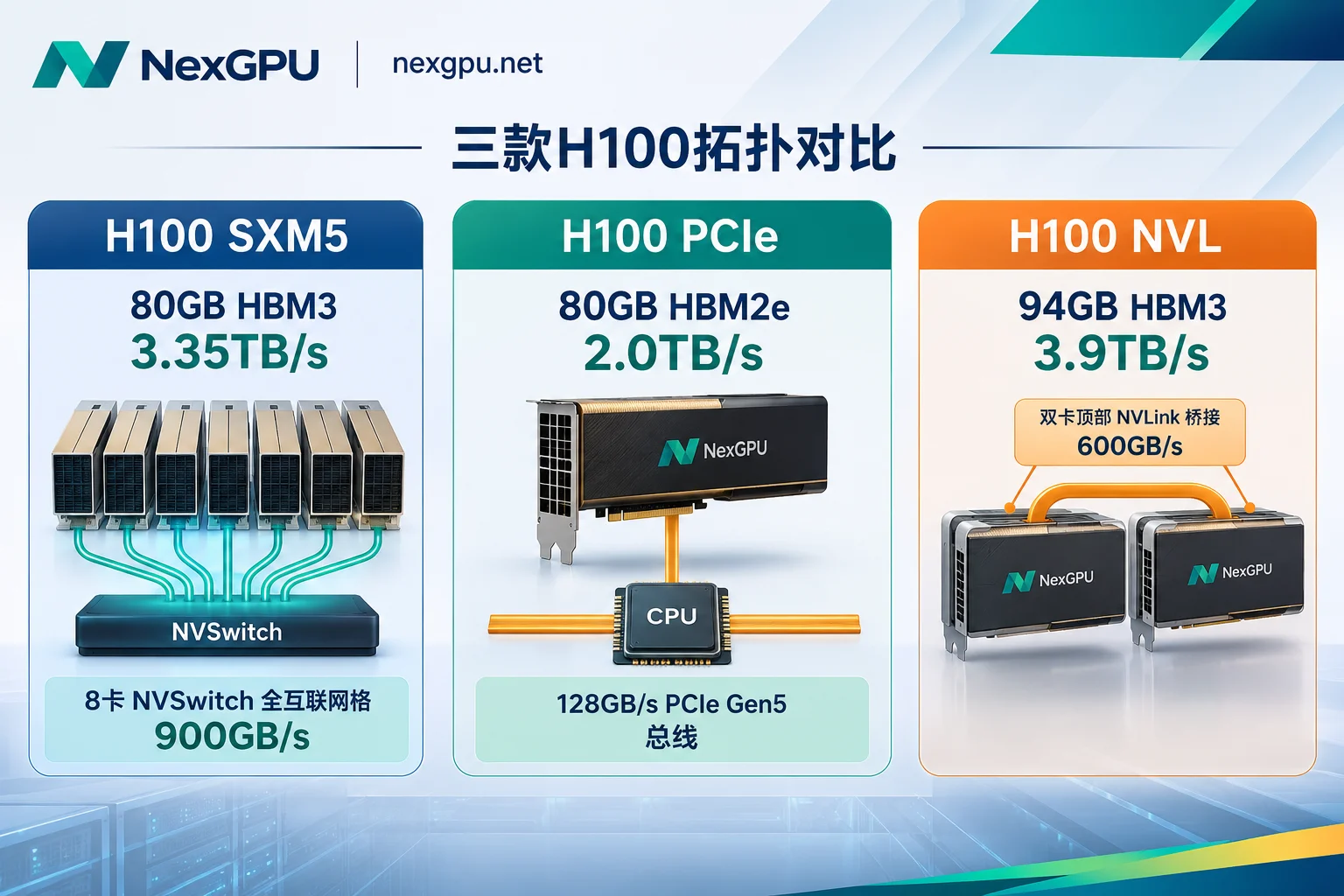
Looking at the overall rental market in 2026, on-demand H100 pricing on specialized compute clouds roughly ranges from $1.73–$3.50/GPU-hour (industry median about $3.38/hour), while traditional hyperscale clouds often charge **$6.88–$12+/GPU-hour**. On platforms of the same tier, H100 PCIe hourly rent is typically 10%–35% lower than H100 SXM, with H100 NVL in between.
2. Translating Spec Gaps to Real Business: Three Most Common Pitfalls
1. Both 80GB, but HBM2e vs HBM3 Memory Bandwidth Differs by 40%
Many assume that "80GB VRAM" means similar inference speed, but once a large language model enters the generation (decode) phase, the performance bottleneck is rarely the compute cores — it's memory bandwidth. For every token generated, the GPU must read model weights from VRAM into compute units again.
- H100 PCIe uses HBM2e with only about 2.0 TB/s bandwidth, roughly 60% of H100 SXM (3.35 TB/s HBM3). This means that for the exact same model and quantization precision, tokens per second on a single PCIe card will be noticeably lower than on SXM.
- H100 NVL pushes bandwidth to about 3.9 TB/s and provides 94GB HBM3 per GPU. The extra 14GB may seem small, but it is critical for FP8 inference of 70B-class models: after subtracting about 70GB of weights from 80GB VRAM, only about 10GB remains for KV cache and system overhead, and longer contexts or higher concurrency can easily trigger preemption; with 94GB NVL, available KV cache space more than doubles.
2. Biggest Cause of Multi-GPU Training Slowdown: PCIe Bus vs NVSwitch
If you rent 4 or 8 GPUs for distributed training (FSDP, DeepSpeed, Megatron) or cross-GPU tensor parallelism (TP), what really determines scaling efficiency is inter-GPU interconnect, not single-GPU TFLOPS.
- H100 SXM nodes (e.g., 8-GPU HGX H100) have 4 NVSwitch chips internally, so any GPU can communicate directly with the other 7 GPUs in the same node at 900 GB/s bidirectional bandwidth, non-blocking and without going through the CPU.
- H100 PCIe nodes on most cloud platforms do not have physical NVLink bridges installed; inter-GPU communication must go through the PCIe Gen5 bus (128 GB/s bidirectional) and motherboard root complex, with bandwidth several times lower than SXM. In practice, at 8-GPU scale, SXM clusters maintain high scaling efficiency, while PCIe nodes without NVLink bridges see communication wait times explode, and total throughput often falls far short of expectations — the money saved on hourly rent is lost to longer training hours.
- H100 NVL's interconnect is positioned in the middle: it supports bridging two adjacent GPUs via a physical NVLink bridge into a 188GB memory pool (600 GB/s bidirectional), which is very suitable for two-GPU TP inference or light 2/4-GPU tasks, but it is not designed for 8-GPU full interconnect with high-frequency gradient synchronization.
3. 700W vs 350W Power Gap Determines Sustained Compute Under High Load
Besides inter-GPU communication and memory, H100 PCIe must fit into standard 350W air-cooled server slots, so not only are stream processors cut from 132 to 114, but the power wall is locked at 350W; H100 SXM has up to 700W TDP headroom. For compute-bound tasks such as high-batch full-parameter training and dense matrix multiplication, SXM can sustain higher clocks over long periods without quickly hitting the power wall and throttling like the low-power version.
3. How to Choose GPUs for Four Real Scenarios Without Wasting Budget or Hitting Bottlenecks
- Single-GPU LoRA / QLoRA fine-tuning, full testing of small models (7B–32B) → First choice: H100 PCIe
As long as the model and activations fit into a single 80GB GPU, the task does not trigger inter-GPU communication at all. In this case, LoRA/QLoRA is less sensitive to memory bandwidth and 700W peak compute, so renting the cheaper H100 PCIe offers the best value. If you're not even sure whether you need H100, you can first self-check against this article: How much does H100 rental cost per hour? 5 self-check conditions for whether to rent. - 4–8 GPU full-parameter fine-tuning, reinforcement learning post-training (e.g., GRPO), and heavy multi-GPU inference → Must choose H100 SXM
Whether using DeepSpeed, FSDP, or Megatron, or enabling TP=4/TP=8 on the inference side to reduce time-to-first-token and time-per-output-token, as long as there is high-frequency All-Reduce / All-Gather communication within the node, you must choose SXM nodes with NVLink + NVSwitch. For how to split multi-GPU parallelism, see: How to choose between tensor parallelism and pipeline parallelism: three-step judgment based on VRAM, inter-GPU connectivity, and concurrency. - 70B+ model inference, ultra-long context, dual-GPU high-throughput deployment → Consider H100 NVL or step up to H200
When 80GB VRAM is just barely overwhelmed by weights and KV cache and you don't plan to go to 4 GPUs, a single 94GB NVL or a dual-GPU bridged 188GB NVL is very handy. However, by late 2026, if H100 NVL carries a high premium or limited availability, it's worth comparing with H200 (141GB HBM3e, 4.8 TB/s bandwidth); for the cost break-even point, see: H100 vs H200: which is more cost-effective? Look at memory bandwidth and hourly premium. - Code not yet running, data pipeline still being tuned, or regular text-to-image workflows → Don't rush to rent H100
If training scripts still frequently throw errors on startup, or data loading (CPU/disk IO) can't keep up with GPU feeding speed, firing up an expensive H100 will only make "every minute of debugging" very costly. The right approach is to first use a low-cost GPU to get code and images running, confirm that the bottleneck is indeed GPU compute or 80GB VRAM, and then switch to H100.
4. Five Practical Steps to Avoid Pitfalls Before Renting H100 (with NexGPU Process)
To avoid "the page says H100 but after boot you find the topology is wrong or costs spiral", check these five steps before starting:
- Check machine details, don't just look at the GPU family name
When selecting nodes in the H100 rental market, each row in NexGPU's list corresponds to a real rentable machine, with compute and disk unit prices listed separately, and filters by VRAM, price, region, reliability, bandwidth, and minimum GPU count (current sub-models and live prices are subject to the official list). Multi-GPU nodes are rented as whole machines; order amount equals per-GPU price times GPU count. A100, H100, and H200 multi-GPU nodes can be used directly for DeepSpeed, FSDP, and Megatron training. - Check VRAM requirements first, then choose the corresponding prebuilt image template
If unsure about the VRAM threshold after model quantization, you can first check the model-to-GPU guide on NexGPU for VRAM requirements and deployment workflows of common open-source models. When starting, directly select the corresponding environment from image templates — for inference, choose vLLM, SGLang, TGI, Ollama (launch to get an OpenAI-compatible API); for training/fine-tuning, choose PyTorch, LLaMA Factory, Axolotl, Unsloth; templates are free and not tiered. If your training framework is locked to a specific CUDA version, the official site recommends directly filling in your own public or private Docker image, saving time on reinstalling drivers and compiling dependencies. - Debug on a small GPU first, then switch to H100 on-demand for full runs
NexGPU allows you to see live prices upon registration, no real-name verification or quota application required, no minimum spend or minimum rental duration; compute is billed by the second and priced by the hour, and the unit price at order time is locked until the instance is destroyed. You can first start a low-cost consumer GPU (e.g., RTX 4090 / 5090) to validate the container environment, data download, and launch commands, then start an H100 node for production tasks. - Distinguish "stop" from "destroy", manage compute, storage, and traffic costs
Many users think stopping the machine costs nothing, only to have their balance drained by storage fees. On NexGPU, bills include only compute, storage, and traffic, itemized on the instance details page: after stopping, compute fees stop immediately and disk data is retained, but storage fees (per GB/month) continue during stoppage; only after entering the instance ID to confirm destruction do storage fees stop (and the disk is released immediately; the platform does not back up data, so be sure to export checkpoints and model weights before destruction) see billing explanation. To calculate the entire cost in detail, see: 2026 GPU cloud server bill breakdown: how to avoid hidden charges and calculate storage, bandwidth, and idle compute costs?. - For cross-node RDMA, monthly billing, or corporate procurement, contact enterprise solutions in advance
If your task cannot be solved by a single 8-GPU machine but requires cross-machine RDMA high-speed interconnect, private network, data isolation, monthly reserved compute pool, contracts, and corporate payment/invoicing, contact NexGPU Enterprise Solutions directly before submitting requirements.
5. Quick Answers to Common Questions (FAQ)
1. Can I run tensor parallelism by renting two or four H100 PCIe?
You can run the code, but inter-GPU communication will be limited. Unless the host explicitly has NVLink bridges (and even then usually only bridges two adjacent GPUs), multi-GPU communication goes over the PCIe bus and CPU root complex. For communication-intensive training or high-concurrency TP inference, actual throughput is often significantly lower than on SXM nodes.
2. Why is my training speed only slightly faster after renting H100?
Usually check three things first: (1) whether multi-GPU training is running on PCIe interconnect without NVLink; (2) whether CPU cores, memory, or disk IO are slowing data preprocessing and loading, leaving GPUs idle waiting for data; (3) whether code precision is still FP32/FP16 and not truly enabling BF16 or Transformer Engine FP8 acceleration.
3. How to quickly decide between 80GB H100 SXM and 94GB H100 NVL?
If it's multi-GPU training (≥4 GPUs), without a doubt choose H100 SXM; 900 GB/s NVSwitch is irreplaceable. If it's single or dual-GPU 70B+ inference, H100 NVL with 94GB + 3.9 TB/s bandwidth can hold more KV cache, offering higher single/dual-GPU service capacity.



