 NexGPU-算力租赁,GPU服务器,GPU云算力,AI服务器租用-新闻博客
The right way to optimize multi-GPU inference is to first account separately for Prefill and Decode workloads, then decide on splitting and when to add GPUs. Many teams simply double the number of GPUs, only to find that 8 GPUs are slower than a single GPU. The root cause is that as you add more GPUs, the communication tax grows heavier.
This isn't just theoretical. In August 2026, vLLM released v0.27.0, which deeply integrates FlashAttention 4, providing native support for FP8 KV Cache and 256 headdim on Blackwell SM100, eliminates empty c128 startup, and optimizes Top-K routing to reduce time-to-first-token (TTFT) for DeepSeek models. Meanwhile, SGLang is advancing NVFP4 prefill/decode disaggregation (PD Disaggregation) on Blackwell and following FlashInfer's NSA and DSA sparse attention operators. Both official updates point in the same direction: shifting multi-GPU inference optimization from "blindly adding GPUs" to "segmented governance."
Understand the Two Workload Segments: Prefill Is Compute-Bound, Decode Is Bandwidth- and Communication-Bound
The first step in multi-GPU inference optimization is to split inference into two phases: the Prefill phase processes the input prompt and generates the first token, heavily relying on GPU compute and parallel processing capability; the Decode phase generates tokens sequentially, primarily limited by memory bandwidth and inter-GPU communication speed.
If you mix the two phases indiscriminately, you'll fall into the trap of "adding GPUs but latency increases": for example, in the Decode phase, inter-GPU communication overhead is huge, and adding more GPUs actually slows down per-token generation.
The latest industry practices follow the "segmented governance" path. vLLM v0.27.0 strengthens sequence parallel optimization for DeepSeek architectures, while SGLang implements NVFP4 PD disaggregation on Blackwell, allowing Prefill and Decode to run on different instances, each choosing optimal hardware and splitting based on workload characteristics.
Criterion 1: Can a Single GPU Hold the Model? Are You Adding GPUs for Capacity or Speed?
Before adding GPUs, ask yourself: are you adding GPUs for capacity or for speed?
- Capacity-driven addition: When model weights plus KV Cache exceed a single GPU's memory, you need multiple GPUs to share memory. In this case, throughput typically doesn't grow linearly with GPU count because inter-GPU communication eats into parallel gains—this is expected, so don't worry.
- Speed-driven addition: When the goal is higher throughput and lower latency, splitting and communication overhead become key.
One easily overlooked fact: A 671B parameter model, even with 4-bit quantization, still requires over 300GB of memory, which a single consumer GPU cannot hold, leaving only 32B or 70B distilled versions. So for very large models, capacity-driven addition is almost unavoidable. Refer to existing deployment experience: How to choose GPU memory can help you quickly determine a memory baseline.
Criterion 2: Wrong Splitting Dimension Means Throughput Won't Scale Linearly (Applicability Boundaries of TP / PP / Sequence-Dimension Splitting)
The parallel splitting method directly determines inter-GPU communication patterns and throughput. The table below compares three common splitting dimensions:
| Splitting Dimension | Applicable Workload | Communication Pattern | Typical Bottleneck |
|---|---|---|---|
| Tensor Parallelism (TP) | Suitable for both Prefill and Decode, but bandwidth-sensitive | All-Reduce per layer forward/backward | Inter-GPU interconnect bandwidth, worsens sharply across nodes |
| Pipeline Parallelism (PP) | Suitable for deep models with high memory pressure | Only activations passed between layers, low communication | Pipeline bubbles reduce utilization |
| Sequence-Dimension Splitting | Long context, shared prefix scenarios | Splits by sequence blocks, reduced communication under sparse attention | Scheduling overhead of sequence splitting and attention computation |
How to choose between tensor parallelism and pipeline parallelism? Simply put: TP splits weights and activations, suitable for high-speed interconnect within a single machine; PP splits by layers, with low communication but pipeline bubbles. For 8-GPU inference throughput not scaling, often the issue isn't the number of GPUs but excessive TP causing high communication overhead.
Engine versions affect the optimal splitting strategy. vLLM v0.27.0 has specific optimizations for sequence parallelism and TTFT, so with the same GPU count, a newer engine version might expand the usable range of TP. Therefore, the choice of splitting must be tested with your specific engine version rather than blindly following old conclusions.
Criterion 3: Inter-GPU Interconnect Determines TP Limits: When to Split Within a Node vs. Across Nodes
Tensor parallelism is extremely sensitive to inter-GPU bandwidth: high-speed interconnect within a node (e.g., NVLink) can support larger tensor parallel sizes, while across nodes via Ethernet or InfiniBand, communication latency and bandwidth degrade significantly.
Thus, the appropriate tensor parallel size depends on interconnect quality. Within a single 8-GPU node, TP=8 is usually feasible; once across nodes, TP's communication tax rises sharply, so you should prefer PP or sequence-dimension splitting to reduce cross-node communication. For cluster planning, refer to GPU cluster planning for more ideas.
One often-ignored cost is the "communication tax" from KV Cache overflow causing cross-machine communication, which directly offsets the gains from adding GPUs.
Criterion 4: KV Cache Precision Rewrites the Memory Account: How to Use the Headroom from FP8 KV Cache
vLLM v0.27.0 natively supports FP8 KV Cache and 256 headdim on SM100. Switching KV Cache from FP16 to FP8 theoretically halves the cache bytes per token, but the actual headroom depends on implementation and alignment overhead, so you should measure with your workload.
The freed memory should first be used to increase batch size or context length to boost single-GPU throughput, or to reduce GPU count to lower communication overhead. This depends on your workload: if concurrency is high and contexts are long, increasing batch and context is usually more cost-effective; if many GPUs but communication is tight, reducing GPU count might improve overall efficiency. However, accuracy optimization may introduce precision loss, so weigh against model sensitivity to errors.
Additionally, after upgrading vLLM, specific FP8 KV Cache configurations can be found in vLLM deployment for practical steps.
Criterion 5: What Request Distributions Suit Prefill/Decode Disaggregation? Which Don't?
What does prefill decode separation mean? Simply put, it runs Prefill and Decode on separate GPU instances, each scaling independently. This way, Prefill instances focus on compute, and Decode instances focus on bandwidth, avoiding interference between the two workload types.
The benefit of PD disaggregation depends on request distribution: when requests have long contexts, many shared prefixes, or imbalanced Prefill/Decode loads, separation can significantly reduce latency and communication overhead. SGLang implemented NVFP4 PD disaggregation on Blackwell in 2026, and supports FlashInfer's NSA and DSA sparse attention operators to boost long-context performance.
But PD disaggregation isn't suitable for all scenarios: with short requests, low concurrency, or few GPUs, separation adds extra scheduling overhead. Whether to enable it depends on measured request distribution.
Criterion 6: Convert Throughput to Cost per Million Tokens to Decide If Adding GPUs Is Worth It
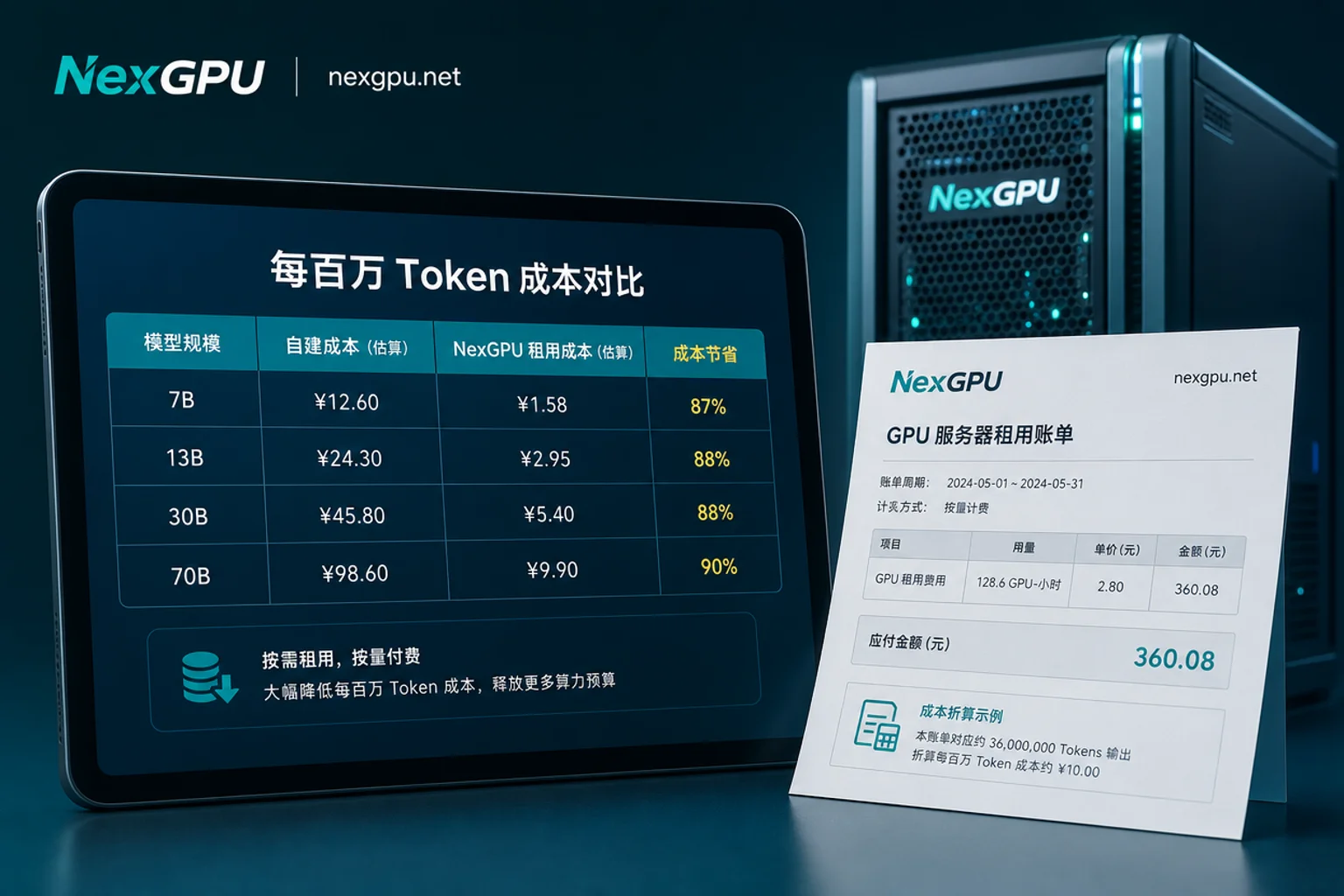
The ultimate goal of adding GPUs is to lower unit production cost, not just increase throughput. When deciding, compare the "cost per million tokens":
- Obtain throughput (tokens/s) and total rental cost under the same workload;
- Calculate cost per million tokens = (unit time cost ÷ unit time throughput) × 1,000,000.
Note: When comparing different GPU generations, ensure you compare under the same precision. Some marketing data conflates throughput multipliers between FP4 and FP8: under FP8, B200 is about 1.5–1.8× faster than H200; only with Blackwell-native FP4 quantization does throughput approach 3×. So don't mix FP4 and FP8 data. When calculating per-million-token cost at the same precision, H200 rental from the Hopper generation often remains a baseline for comparison.
A Troubleshooting Order: From Utilization, Communication Ratio to Adjusting Batch and Context Parameters
When 8-GPU inference throughput isn't scaling, follow this order to troubleshoot—more effective than random parameter tweaks:
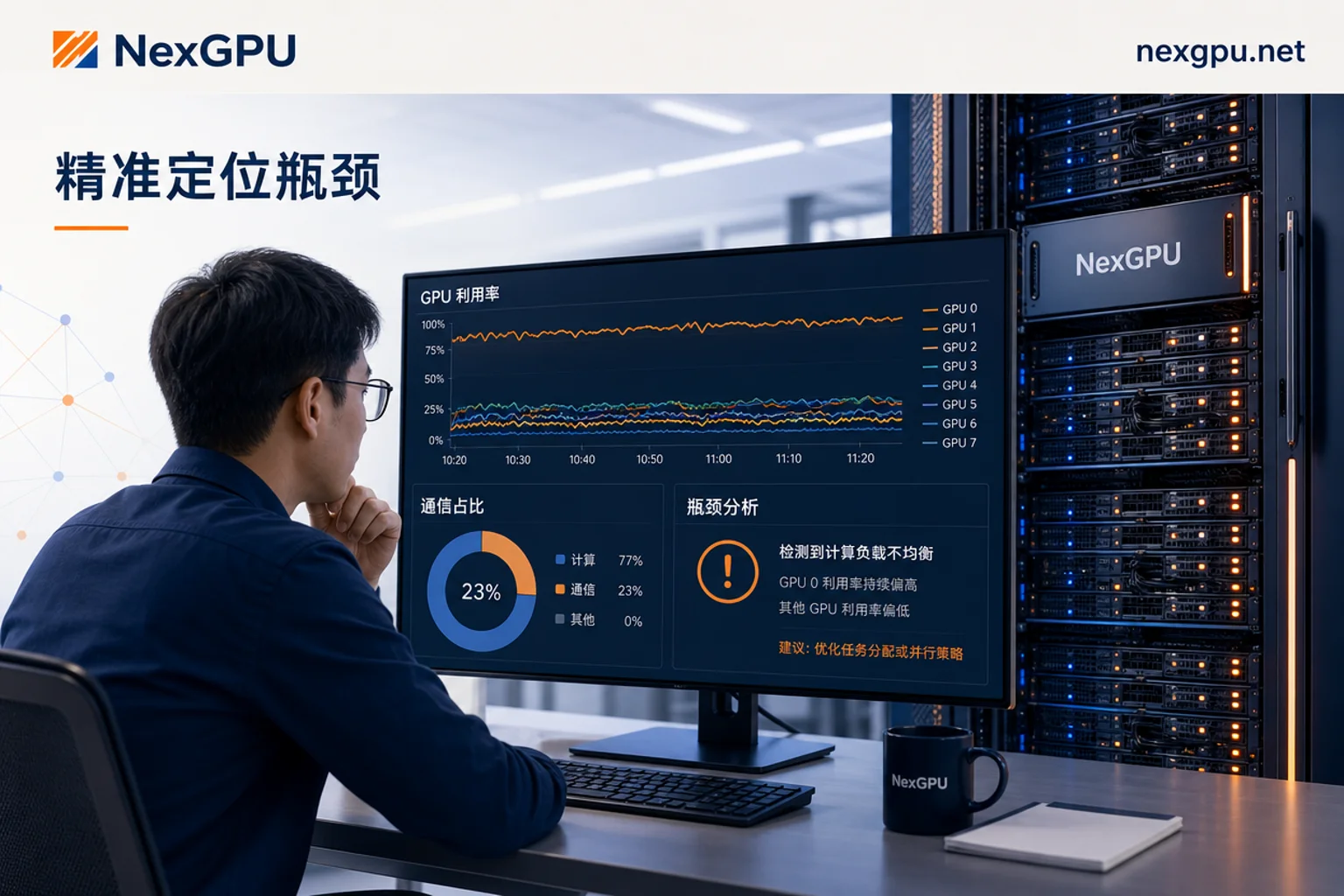
- First check if GPU utilization is balanced: is one GPU maxed out while others idle? This often indicates load imbalance or synchronization waits.
- Next, check communication ratio and sync points: use a profiler to measure NCCL communication time. If communication ratio is too high, consider reducing TP or switching to PP/sequence-dimension splitting.
- Adjust batch, concurrency, and context limits: increase batch or context within memory limits to boost compute density.
- Only last, change parallel splitting and engine version. Change one variable at a time to avoid interference.
How to locate inter-GPU communication bottlenecks? The most direct way is to run a fixed workload and compare throughput and communication time under different TP configurations. If TP=4 and TP=8 produce similar throughput, communication is saturated, and further increasing TP is pointless.
Run a Same-Workload Comparison Test on Pay-as-You-Go Multi-GPU Resources: Which Metrics Matter
Theoretical analysis must eventually be validated. Before adding GPUs, run a same-workload comparison test on pay-as-you-go multi-GPU resources: fix the model, request distribution, and concurrency, then run different TP/PP combinations, with and without PD disaggregation, and record:
- TTFT (time to first token)
- Per-GPU utilization and balance
- Communication time ratio
- Cost per million tokens
Such comparison tests are ideal for pay-as-you-go cloud GPUs: run the same model and requests, then release immediately, which is much cheaper than long-term 8-GPU nodes and trial-and-error. Platforms like NexGPU offer multiple GPU models, pay-as-you-go usage, and prebuilt model templates, perfect for quick start-and-stop experiments.
Four Common Misconceptions: More GPUs Means Faster, High Utilization Means Full Utilization, Only Look at Single-GPU Memory, and Mixing FP4 and FP8 Data
- More GPUs means faster: Communication overhead grows with GPU count, and there's a tipping point.
- High utilization means full utilization: Compute might be waiting on communication, inflating utilization.
- Only look at single-GPU memory: Ignoring KV Cache and communication needs leads to cross-node communication tax outweighing gains.
- Mixing FP4 and FP8 data: Generation multipliers must be compared at the same precision.
Before adding GPUs, run a same-workload comparison following the troubleshooting order, then calculate per-million-token cost, so you don't decide based on feelings. NexGPU's pay-as-you-go usage and prebuilt model templates are ideal for these quick start-and-stop experiments—run and release, keeping costs controlled.
FAQ
Why is multi-GPU inference slower than single-GPU?
Because inter-GPU communication overhead offsets parallel gains. Especially in the Decode phase, which is bandwidth-sensitive, if TP is too large or across nodes, each generated token waits for All-Reduce to complete, increasing latency. Check communication ratio, reduce TP moderately, or switch to pipeline parallelism.
What tensor parallel size should I use?
There's no fixed value; it depends on interconnect and workload. Within a node with high-speed interconnect, try TP=8; across nodes, don't exceed TP=4 and supplement with PP or sequence-dimension splitting. Test different TP configurations and choose the one with low communication ratio and highest throughput.
What does prefill decode separation mean?
It runs Prefill and Decode on separate GPU instances, each scaling independently. It's suitable for long contexts and many shared prefixes, reducing latency and communication overhead. Not recommended for short requests, low concurrency, as it adds scheduling overhead.
What should I check first if 8-GPU inference throughput isn't scaling?
First check if GPU utilization is balanced, then look at communication time ratio. If one GPU has low utilization but high communication, it's likely excessive TP or cross-node communication. Then adjust batch and context parameters, and finally change parallel splitting and engine version, changing one variable at a time.
How to locate inter-GPU communication bottlenecks?
Use a profiler to measure NCCL communication time and compare throughput and communication ratio under different TP settings. If TP increases but throughput plateaus, communication is saturated. Also watch for KV Cache overflow causing cross-machine data fetching, which is an invisible communication tax.




Comments(0)