 NexGPU-算力租赁,GPU服务器,GPU云算力,AI服务器租用-新闻博客
The conclusion is that it's enough, and for most image generation tasks there's VRAM to spare. The L40S has 48GB of GDDR6 ECC memory, and SD 1.5 and SDXL single-image generation only use a fraction of that. So the better question is: can your task use 48GB? If so, the L40S is very suitable; if not, a consumer-grade 24GB card can usually handle it, and the speed won't be much different.
Below, we'll first look at VRAM by model, then assess whether to rent an L40S by task, and finally explain the order to get up and running on NexGPU, as well as the cost impact of stopping and destroying.
First, Compare VRAM Requirements by Model
| Model | Typical Inference VRAM Requirement | Situation on L40S |
|---|---|---|
| SD 1.5 | ~4–8GB | Plenty of headroom |
| SDXL (base inference) | ~8–12GB | Ample, can use larger batch sizes |
| Flux.1 Dev / Schnell (~12B parameters, native BF16/FP16 precision) | ~24–32GB | Fits entirely in VRAM without quantization or offloading to system memory |
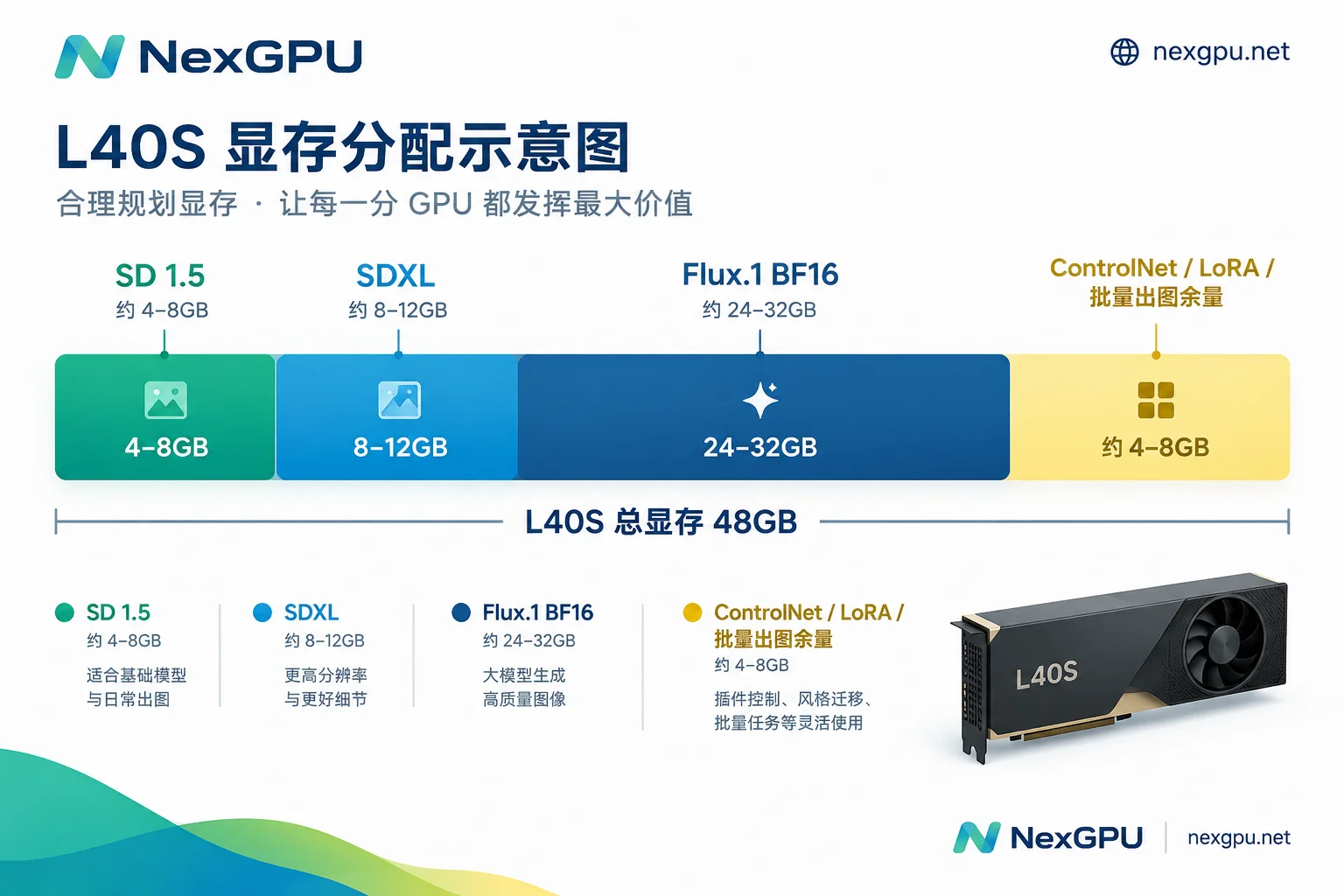
For single-image generation, these models generally won't cause out-of-memory (OOM) errors on the L40S. When there are many frontend plugins and very high resolution, usage will rise, but there's usually still plenty of space below the 48GB limit.
In These Cases, the L40S Is Worth Renting
1. Want to run Flux.1 at native precision
Flux.1 requires about 24–32GB in BF16/FP16. A 24GB consumer card (like the RTX 4090) often needs to use quantized versions like FP8 or GGUF, or enable CPU offload to put some weights in system memory. Quantization can cause subtle differences in image quality, and offloading significantly slows down speed. The L40S's 48GB allows Flux.1 to reside entirely in BF16. This is useful if you're comparing output quality across different precisions or require stable, consistent output.
2. A long chain of models in ComfyUI
Production workflows often use an SDXL base model, Refiner, several ControlNets, and several LoRAs simultaneously. When VRAM is insufficient, these weights need to be swapped back and forth between CPU and GPU, causing waits at each switch. 48GB allows them to reside in VRAM at the same time; the more complex the workflow, the more noticeable the benefit.
3. Batch generation or providing an image generation API
For SDXL at 1024×1024 resolution, the L40S can typically handle batch sizes of 8–16 per run, depending on the workflow and plugin usage. The larger the batch, the higher the throughput per unit time. If you need to process large volumes of assets or provide an image generation API, you can use it this way.
4. Training LoRA / Dreambooth for SDXL or Flux
Training is more VRAM-intensive than inference. 48GB allows training LoRA or Dreambooth for SDXL and Flux at higher resolutions and larger batch sizes without relying on aggressive memory optimization or setting high gradient accumulation to make up batch size. Parameters are easier to tune, and the training process is more stable.
In These Cases, the L40S May Not Be the Optimal Choice
Running only SD 1.5 or SDXL for single images. The L40S is based on the Ada Lovelace architecture with 18,176 CUDA cores. A single SDXL 1024×1024 image at default steps takes about a few seconds, similar to top consumer cards, and faster in some scenarios, but the extra VRAM won't make a single image faster. Its memory bandwidth is 864 GB/s, slightly lower than the RTX 4090's 1008 GB/s. If you only generate images occasionally or try out LoRA effects, you can first check whether a consumer card is sufficient; for how to judge, see When Consumer GPUs Are Not Enough.
Planning large-scale multi-GPU training. The L40S does not support NVLink; multi-GPU communication is via PCIe 4.0, making it unsuitable for large-scale distributed pre-training. Stable Diffusion-related inference and LoRA fine-tuning usually only need a single card and rarely hit this limitation. If you really need to train larger models, then evaluate cards like the A100 or H100; you can refer to the selection method in Which Is Better for Inference: L40S or A100.
Note the caveats when seeing others' it/s data. Actual image generation speed depends heavily on the frontend: ComfyUI, WebUI, native Diffusers code, and TensorRT-based inference services all have different speeds. Whether xFormers, torch.compile, or FP8 acceleration is enabled also makes a noticeable difference. Others' it/s can only serve as a reference; it's best to run your own workflow for a test.
To learn about the limits of 48GB for other tasks like large language models, see How Large a Model Can 48GB VRAM Run.
Order to Get Up and Running on NexGPU
Step 1: Choose an image. If you use a node-based workflow, choose the ComfyUI template for one-click deployment and direct model loading. If you prefer coding with Diffusers, choose the PyTorch template and install dependencies yourself. Select images on the templates page.
Step 2: Choose a card and confirm the unit price. Check the pricing page for currently rentable L40S nodes and unit prices. The unit price is locked when you place an order and remains unchanged until the instance is destroyed. The platform bills by the hour and measures by the second, with no minimum spend and no contracts. If you just want to try Flux or test a workflow, you can stop after running. For how to estimate the cost of an entire task, see How Much Does It Cost to Rent an L40S for an Hour.
Step 3: Reserve enough storage. The full-precision Flux.1 weights plus text encoders take up considerable space, and SDXL, ControlNet, and multiple LoRAs also add up. When creating an instance, allocate enough disk space to avoid running out during downloads.
Step 4: After running, save data first, then decide whether to stop or destroy. The bill has only three items: compute, storage, and traffic:
- Stop: compute billing stops, but models and outputs on disk remain, and storage fees continue. Suitable if you need to continue the next day and don't want to re-download models.
- Destroy: all billing stops, and disk data is also deleted. Before destroying, download generated images, trained LoRA weights, and workflow JSON files to your local machine.
For specific billing details after stopping, see Does a GPU Instance Still Charge After Shutdown.
Simple Judgment
- Occasional image generation, only SD 1.5 or SDXL: L40S can run it, but most VRAM is unused; you can first compare consumer cards.
- Want to run Flux.1 without quantization, many models in ComfyUI, batch generation: L40S is very suitable.
- Train LoRA for SDXL or Flux: 48GB makes training more relaxed; prioritize it.
- Need multi-GPU large-scale training: L40S lacks NVLink; look at other card types.
After deciding, go to the templates page, choose a ComfyUI or PyTorch image, and start generating your first image.




Comments(0)