 NexGPU-算力租赁,GPU服务器,GPU云算力,AI服务器租用-新闻博客
When your team is ready to deploy a 32B model as an online service, but the budget falls short of an A100 or H100, is renting an L40S a worthwhile path? The answer: it depends on three variables—model size, context length, and concurrency. As long as these three fall within the range that 48GB of VRAM and PCIe interconnect can handle, the L40S is a highly cost-effective inference choice; conversely, if any variable goes beyond bounds, the saved hourly rental will be paid back in queuing and failed requests.
Market signals from August 2026 also remind us: inference engine versions and cloud GPU pricing tiers are changing rapidly, so selection must be tied to current engine capabilities and quotes. vLLM v0.27.0, released on August 11, strengthens FP8 KV Cache and FlashAttention 4 support for the Blackwell (SM100) architecture; during the same period, on-demand prices for H100/H200 bottomed out, and price differentiation became evident after B200 scaled up. These changes directly impact the effective capacity and cost comparisons for mid-range cards, so all criteria in this article will clearly distinguish between "architecture-agnostic general mechanisms" and "Blackwell-specific capabilities."
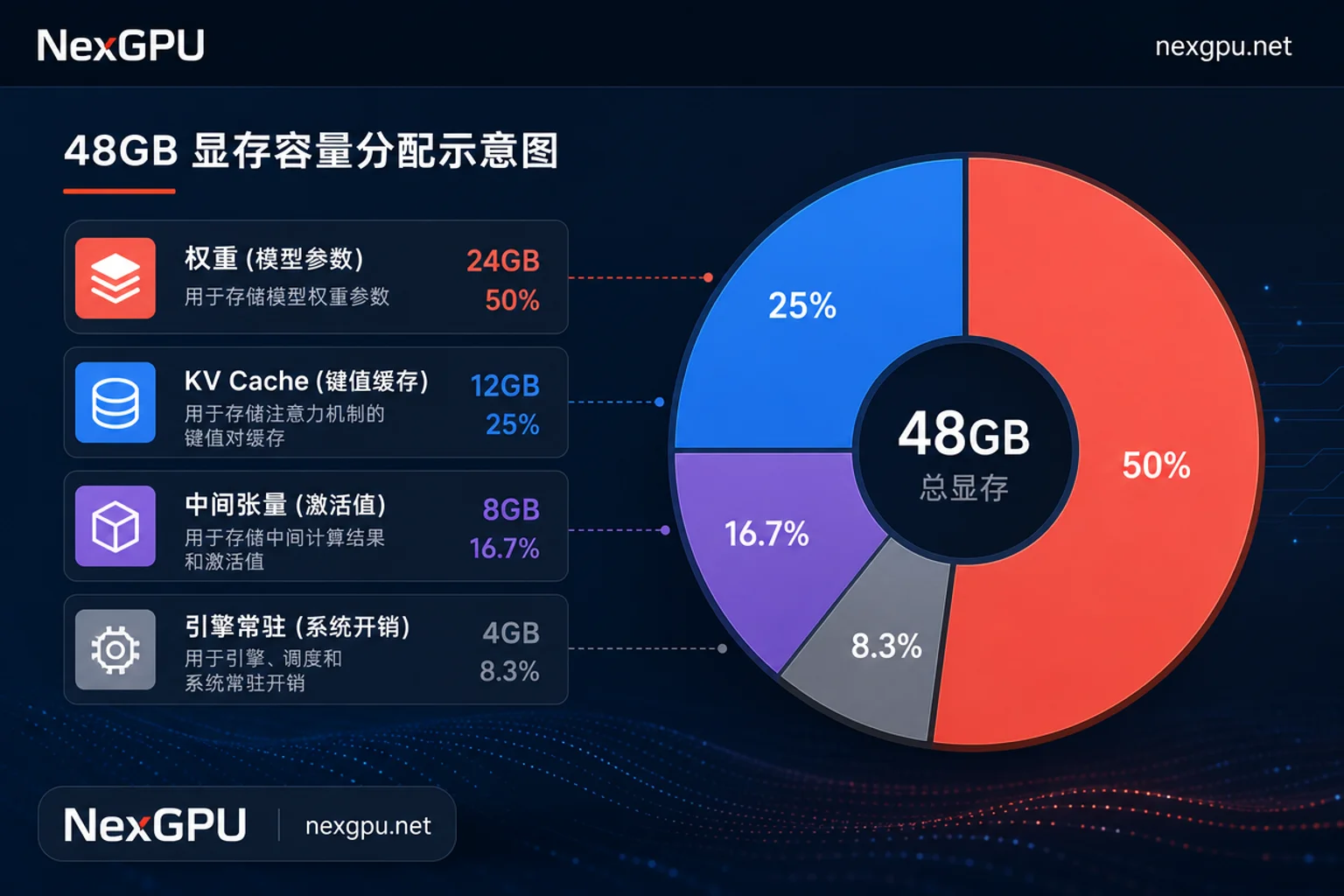
How 48GB VRAM Is Allocated: Weights, KV Cache, Intermediate Tensors, and Engine Overhead
The most attractive feature of the L40S is its 48GB VRAM, but it's not a monolithic block for your model weights. To determine "how large a model can run on 48GB VRAM," you need to break down VRAM into four parts:
| Allocation Item | What It Occupies | Influencing Factors |
|---|---|---|
| Weights | Model parameters | Parameter count, quantization precision (FP16/INT8/FP8) |
| KV Cache | Key-value pairs of generated tokens | Context length, concurrency, bytes per token |
| Intermediate Tensors | Activations, temporary computation results | Batch size, sequence length, model architecture |
| Engine Overhead | Inference framework, CUDA context, fragmentation | Engine version, parallelism strategy, memory management |
When estimating VRAM, calculate the weight portion as parameter count × precision bytes (e.g., 32B FP16 ≈ 64GB, INT8 ≈ 32GB); for the KV Cache portion, use per-token occupancy × context length × concurrency. The per-token occupancy formula here is: 2 (for K and V) × number of layers × number of KV heads × head dimension × bytes per element (FP16=2, FP8/INT8=1). In practice, bytes per element is often 0.5~2 bytes, referring to the precision bytes of each cache element, not total per token. For intermediate tensors and engine overhead, reserve 20%~30% based on experience. Sum these four parts; if they exceed 48GB, you need to reduce model precision, shorten context, or lower concurrency. For a comparison of VRAM headroom under different parameter counts and precisions, refer to the calculation method in GPU VRAM Selection.
Criterion 1: Fitting Isn't Enough—How Much VRAM Headroom Should You Keep?
Many assume that once weights fit into VRAM, the service runs smoothly, but peak activations, bursty long requests, and memory fragmentation consume extra space at runtime. For example, a 32B INT8 model with 32GB of weights seems to have headroom against 48GB, but if context lengths fluctuate widely across concurrent requests, the KV Cache can suddenly expand, and combined with temporary engine allocations, this could trigger OOM.
Self-check method: Use the maximum context length in your business × target concurrency to calculate the upper bound of KV Cache, then reserve at least 20% VRAM headroom; then use a load testing tool to simulate real request distribution and observe VRAM peaks. If the peak stays below 40GB, the L40S can handle the load; if it frequently approaches 48GB, you should reduce concurrency or switch to a card with more VRAM.
Criterion 2: Without High-Speed Interconnect, Where Is the Limit of Multi-Card Scaling on L40S?
"Does the L40S's lack of NVLink affect multi-card inference?" This question needs to be answered by scenario. If you split a large model across multiple cards for tensor parallelism, then inter-card communication bandwidth is the key bottleneck. The L40S uses PCIe interconnect, with bandwidth far lower than NVLink, so communication overhead significantly reduces speedup in multi-card scaling. A more sensible strategy is to prioritize choosing a model size that fits on a single card, then scale horizontally with multiple replicas—each card runs a full model replica, sharing requests through load balancing. This deployment doesn't rely on high-speed inter-card interconnect and scales better. Recent optimizations in mainstream inference engines for sequence parallelism and parallel buffer reuse can mitigate communication costs to some extent, but these optimizations are documented for specific models (like DeepSeek-V4) and cannot be assumed to transfer proportionally to arbitrary models on the L40S. For multi-card scenarios, refer to the general principles in Multi-Card Inference Optimization and prioritize replica-based scaling.
Criterion 3: Engine Version Rewrites Effective Capacity—Headroom Changes from Prefix Reuse and KV Cache Strategies
The inference engine version directly rewrites the L40S's effective capacity, a factor often overlooked. On August 5, 2026, DeepInfra published a comparison showing that SGLang's RadixAttention prefix tree mechanism can achieve zero-overhead KV Cache reuse in long-context and shared-prefix scenarios, outperforming traditional hash-sharded caching in throughput. This means that if your business has high-frequency repeated prefixes—such as multi-turn agent conversations or fixed system prompts—SGLang can enable the same 48GB VRAM to support higher concurrency, because repeated KV Cache doesn't need to be recomputed.
Conversely, hardware-level optimizations in vLLM v0.27.0 for Blackwell (SM100)—such as FP8 KV Cache and FlashAttention 4—cannot be directly applied to the L40S. Prefix reuse is an architecture-agnostic general mechanism and can be used with confidence; but don't count on Blackwell-specific features. For deployment details of SGLang, refer to the SGLang Deployment practical guide.
Converting Hourly Rental to Per-Million-Token Cost: A Comparison Algorithm for L40S vs. A100
To judge whether renting an L40S is cost-effective, you can't just look at the hourly rental rate; you must convert to per-million-token cost. Formula:
Per-Million-Token Cost = Hourly Rental Price ÷ Measured Stable Throughput (tokens/sec) × 1,000,000
Here, "measured stable throughput" must be obtained under the same model, context length, concurrency, and engine version; otherwise, it's not comparable. For example, the A100 may have a higher hourly rental, but its throughput might be higher; the L40S may be cheaper per hour, but if throughput drops sharply under high concurrency, the unit cost may not be advantageous.
Regarding pricing, it's important to note: public reports only cover on-demand ranges for H100 (approximately $2.00/hour), H200 ($2.50-$3.99/hour), and B200; specific hourly rates for L40S and A100 vary greatly by platform and configuration, so this article doesn't provide figures. You can plug in quotes from your own platform using the formula above.
Is L40S Suitable for Inference or Fine-Tuning? Three Exit Signals to Move Up
Is the L40S suitable for inference or fine-tuning? The answer: the L40S is suitable for inference, especially for models that fit on a single card; however, in the following three cases, you should directly consider A100/H100-level cards:
- Long context + high concurrency: If context length exceeds 32K and concurrency exceeds 8, the KV Cache quickly consumes VRAM, and the L40S will frequently OOM.
- Large model training or full fine-tuning: Training requires frequent gradient synchronization, and PCIe interconnect cannot meet multi-card communication needs; the L40S is unsuitable.
- Multi-card tensor parallelism: If a model must be split across multiple cards to run, and the split granularity is fine, communication bottlenecks will drag down performance.
When these signals appear, it's recommended to move up in selection; you can compare H100 Rental costs and compute power to redo cost calculations.
Running a Real Cross-Card Comparison with On-Demand Resources: What Metrics to Record for Comparability
Instead of trusting spec sheets, it's better to conduct your own controlled tests. For example, on a cloud compute platform like NexGPU that supports multiple GPU server models and on-demand billing, you can rent a mid-range card and a higher-tier card you actually have access to, run the exact same workload, and record the metrics in the table below:
| Metric | Recording Standard |
|---|---|
| Time to First Token | Time from request to first token |
| Stable Output Throughput | Tokens per second in steady state |
| Concurrency Limit | Maximum concurrency without violating latency targets |
| VRAM Peak | Highest VRAM usage during runtime |
| Cache Hit Rate | Proportion of requests hitting prefix cache |
| Unit Token Cost | Hourly rental ÷ Measured throughput |
NexGPU offers a variety of GPU server models, pay-as-you-go, and ready-to-use model templates. You can run the same model, context, and concurrency on different tiers of cards on-demand, then decide which tier to reserve long-term, rather than deciding based on spec sheets.
Selection Checklist and Four Common Misjudgments
Finally, let's consolidate the L40S rental criteria into a checklist to help you decide quickly:
- [ ] Model weights + KV Cache + intermediate tensors + engine overhead ≤ 48GB × 0.8
- [ ] If the model fits on a single card, prioritize horizontal scaling with multiple replicas over tensor parallelism
- [ ] Clarify the inference engine version, and confirm which optimizations are Blackwell-specific and which are general
- [ ] Run load tests with the same workload and record time to first token, stable throughput, and VRAM peak
- [ ] Calculate per-million-token cost using "hourly rental ÷ measured throughput" before comparing
Common misjudgments:
- Only looking at VRAM capacity, not bandwidth: Bandwidth and interconnect are equally critical.
- Ignoring engine version differences: Different versions' prefix caching and KV Cache strategies affect effective capacity.
- Estimating throughput from spec sheets: Actual throughput must be measured.
- Overlooking multi-card communication costs: Under PCIe interconnect, tensor parallelism scaling gains are limited.
FAQ
How much does it cost to rent an L40S per hour?
There is no standardized hourly rental price for the L40S; it varies widely by platform, configuration, data center, and billing method. Public reports only cover on-demand ranges for H100/H200/B200; for the L40S, you need to ask the platform for a quote. It's advisable to also ask whether outbound traffic fees are included, and compare quotes from similar cards. You can use "hourly rental ÷ measured throughput" to calculate unit cost and then decide if it's worth it.
What concurrency can the L40S achieve for a 32B model?
There's no fixed answer; it depends on context length, quantization precision, and engine optimizations. You can plug the parameters from your model's config.json into the formulas above to calculate. For example, assuming a 32B model with 64 layers, 8 KV heads, head_dim 128, and FP16 with 2 bytes per element, then per-token KV occupancy = 2 × 64 × 8 × 128 × 2 = 256KB. If context is 4K and concurrency is 4, total KV Cache = 256KB × 4096 × 4 = 4GB, leaving enough VRAM for weights and intermediate tensors; actual concurrency should be confirmed via load testing.
Is the L40S suitable for inference or fine-tuning?
The L40S is more suitable for inference, especially for short-context, low-concurrency online services. Fine-tuning requires frequent weight updates, demanding communication bandwidth and VRAM; 48GB may not fit gradients, and multi-card PCIe interconnect will slow down training. If your fine-tuning task is lightweight (like LoRA), the L40S might work, but for full fine-tuning, it's recommended to go with A100/H100.
Does the L40S's lack of NVLink affect multi-card inference?
Yes, but it depends on the parallelism approach. Tensor parallelism is sensitive to inter-card bandwidth, and PCIe interconnect severely limits scaling gains; model parallelism (splitting by layers) or data parallelism (multiple replicas) is less affected. If your model doesn't fit on a single card, prioritize quantization or switching to a card with more VRAM rather than splitting across multiple L40S cards.




Comments(0)