 NexGPU-算力租赁,GPU服务器,GPU云算力,AI服务器租用-新闻博客
On July 28, 2026, the vLLM official blog announced the integration of parallel draft speculative decoding algorithms such as P-EAGLE, DFlash, and DSpark. After the engine update, how should you configure GPU memory, concurrency, and prefill parameters for vLLM deployment?
1. Introduction: What This vLLM Update Changes and Why It Directly Impacts Your GPU Memory Bill
This update changes the scheduling during the generation phase: multiple candidate tokens can be generated and verified in parallel, no longer constrained by sequential single-token generation, opening new possibilities for optimizing TTFT and TPOT under high concurrency.
For teams working on vLLM deployment, this means the relationship between memory and concurrency has shifted: on the same GPU, if the extra compute for draft verification doesn't eat into the gains, you can use the remaining compute to serve more concurrent requests; for the same concurrency target, you might not need to add more GPUs. Below, we'll explore memory composition, parameter configuration, and practical testing paths.
2. P-EAGLE / DFlash / DSpark: Do Parallel Draft Speculative Decoding Algorithms Affect TTFT or TPOT?
The general principle of speculative decoding is draft-verify: first, a draft model generates candidate tokens, then the target model verifies and accepts them. The vLLM official blog concludes that these parallel draft algorithms are no longer limited by sequential single-token generation, helping reduce TTFT and TPOT under high concurrency. For the draft structure and dependencies of each algorithm, refer to the vLLM official documentation. From a deployment perspective, understand them as "trading compute for lower latency": draft models or draft heads consume extra GPU memory, and the verification phase transforms the original serial generation into parallel batch computation, so the more idle compute and larger batch sizes, the easier it is to see benefits.
How to Enable Speculative Decoding in vLLM: Understand the Costs Before Acting
Many developers are most concerned about how to enable speculative decoding in vLLM. Typically, you specify the speculative decoding configuration and a draft model when starting the service; different algorithms have different draft head structures and dependency parameters. It's not recommended to copy others' parameters because the combination of draft and target models changes the benefits dramatically. For precise switches, parameter names, and defaults, please refer to the vLLM official documentation. First get it running, then tune.
For vLLM high-concurrency TTFT optimization, parallel draft algorithms are worth trying first, but also account for their memory cost.
3. Zero-Overhead Prefix Caching and Chunk Prefill: How to Lower Multi-GPU Deployment Barriers
Another key update comes from an engineering article by Red Hat Developer published in March 2025. Red Hat's optimizations were validated on DeepSeek-R1's 256-expert MoE architecture (Red Hat Developer, 2025-03-19) and cannot be directly applied to other models; below we only discuss the general mechanisms of Prefix Caching and Chunk Prefill, and specific gains still need to be measured on your own model.
First, consider vLLM Prefix Caching memory usage. In conventional approaches, the same system prompt or historical context recalculates KV Cache for each request; prefix caching stores and reuses the KV Cache for the shared prefix, so repeated requests no longer occupy extra memory and compute. It's suitable for long system prompts, multi-turn dialogues, and RAG with fixed knowledge prefixes. However, the cache itself requires memory to store, so before enabling it, estimate the business prefix reuse rate: if all request prefixes are different, caching might become an extra burden.
Next, consider Chunk Prefill. If a long prompt request completes prefill in one shot, it monopolizes compute resources for a long time, making subsequent decode requests queue up; splitting it into chunks and interleaving with decode can prevent long-context requests from slowing down online response times. This is why when optimizing vLLM high-concurrency TTFT, you can't just focus on speculative decoding; you also need to check whether the prefill phase is blocking decode.
The core of vLLM chunk prefill parameter settings isn't to find a one-size-fits-all number but to balance chunk size, memory budget, and latency targets. Smaller chunks allow finer decode interleaving but increase scheduling overhead and potential recomputation. For specific parameter names and defaults, consult the official documentation, keep defaults first, then adjust based on your online request lengths.
4. From Features to Hardware: Memory Estimation and Multi-GPU Selection for vLLM Deployment
Back to the most practical question: How much GPU memory does vLLM deployment need? You don't need to memorize a recommended configuration for a specific model; instead, use a general formula: Memory requirement ≈ Model weights + KV Cache + Speculative decoding draft model/head + Runtime buffers. Model weights are determined by parameter count and quantization precision; KV Cache is determined by concurrency, context length, number of layers, and attention head dimension; whether to enable a draft model is a trade-off between memory cost and generation speedup. For MoE, weight memory depends on total parameters (all expert weights must reside in memory), activation parameters only affect single forward compute cost, so at equal activation scale, MoE typically requires more weight memory than dense models; KV Cache still depends on layers, head dimension, concurrency, and sequence length.
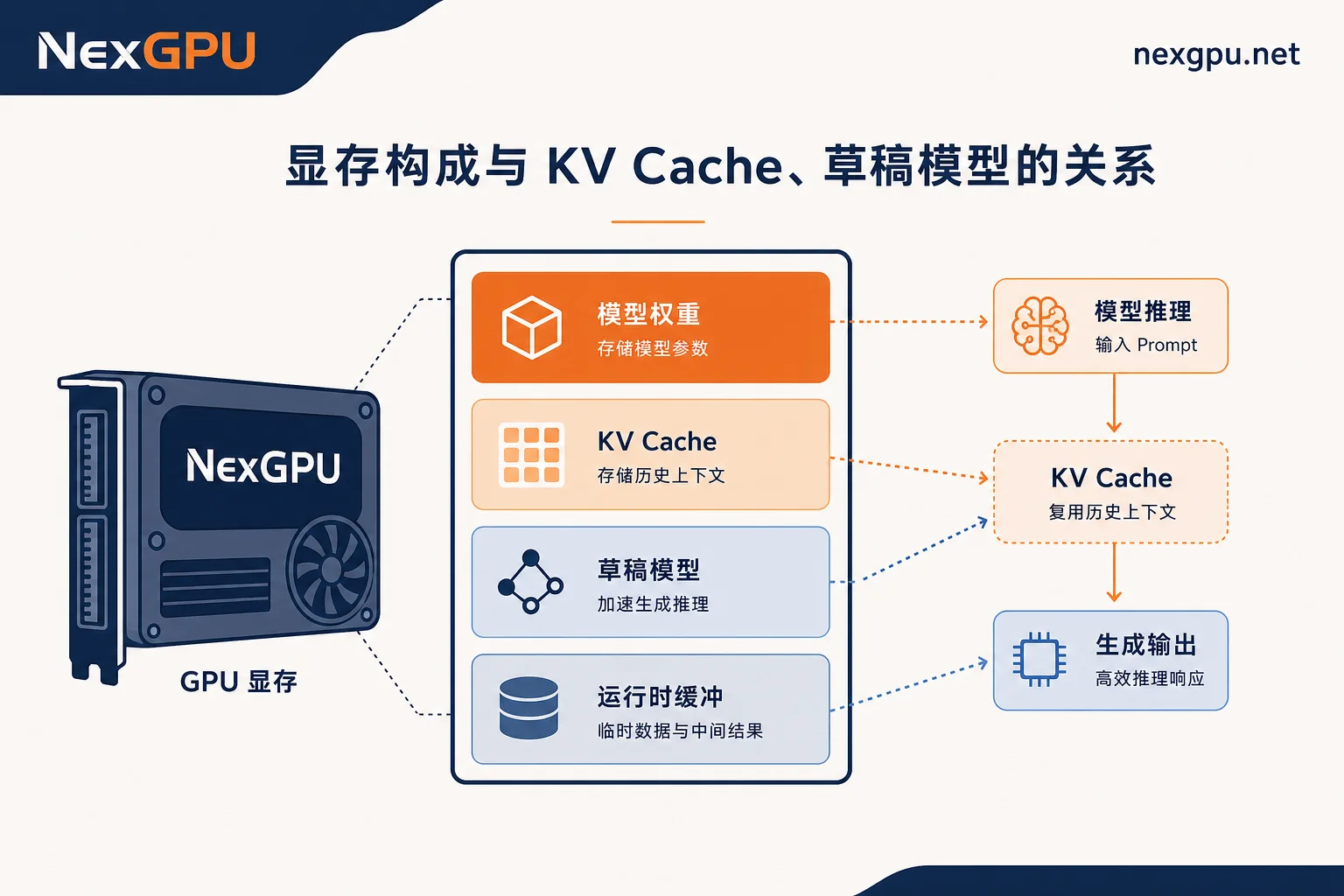
The next question is vLLM multi-GPU deployment GPU selection. Multi-GPU approaches usually follow two strategies: tensor parallelism splits a single model across multiple GPUs, reducing per-GPU pressure; multi-replica serves concurrent requests across multiple GPUs when the model fits on a single GPU. Zero-overhead Prefix Caching and Chunk Prefill change the actual usage and peak of KV Cache: the former avoids storing shared prefixes repeatedly, the latter flattens prefill peaks. Therefore, after estimating memory requirements, don't simply multiply by concurrency; first incorporate the "reusable prefix ratio" and "chunking strategy" into the calculation. No specific numbers are given here for a simple reason: each model's layers, head dimensions, quantization precision, and actual concurrency curves differ; only by plugging in your own parameters will you get usable answers.
5. Concurrency Parameter Configuration: Practical Testing and Switch Order for vLLM Deployment
Before configuring concurrency parameters, fix the test set and concurrency gradient, and record baselines for TTFT, TPOT, throughput, and peak memory. Based on the peak baseline memory, you can infer the remaining memory available for KV Cache, then estimate the concurrency upper limit using per-request KV Cache usage; subsequently, gradually increase concurrency along the gradient, and set the online maximum concurrency as the step before TTFT first exceeds the business-acceptable threshold. After enabling each feature, rerun the same concurrency gradient, comparing peak memory and latency changes. Specific steps are as follows:
- Fix the test set and concurrency gradient, record baselines for TTFT/TPOT/throughput/peak memory.
- Use peak baseline memory to infer the remaining memory for KV Cache, estimate the concurrency upper limit.
- Increase concurrency along the gradient, take the step before TTFT first exceeds the threshold as the online maximum concurrency.
- Enable features in sequence: Prefix Caching → Chunk Prefill → Speculative decoding, rerun the same gradient each step and compare peak memory and latency.
- Separately verify whether draft verification compute eats into gains under high concurrency; disable if not significant.
For memory-ratio configuration item names, refer to the vLLM official documentation. Speculative decoding's actual gains can only be confirmed via testing: for the same model under different concurrency levels, draft acceptance rates and compute headroom vary greatly; official numbers are upper bounds, not guarantees.
6. Verifying and Adjusting vLLM Deployment Specifications on NexGPU
This testing workflow requires a compute environment where you can quickly switch specifications. NexGPU offers a variety of GPU server models, pay-as-you-go usage, and pre-built model/application templates, suitable for getting vLLM deployment running first and then adjusting: start with a small specification to verify actual gains from speculative decoding and Prefix Caching, record peak memory, then switch to a more matching model based on measured concurrency and memory requirements. This way, you allocate memory budget to scenarios that truly need concurrency and context length, rather than locking in hardware for the worst case upfront.
7. Deployment Checklist and Common Pitfalls
Finally, here's a deployment checklist.
- Does the memory budget include KV Cache peak and draft model? If not, redo the four-item sum (weights + KV Cache + draft + buffers) and fill the gap.
- Does Prefix Caching match the prefix reuse rate? If not, measure the online shared prefix ratio; disable caching if below the business threshold and return memory to KV Cache.
- Does Chunk Prefill chunk granularity match the long-context ratio? If not, adjust chunk granularity based on online request length distribution; keep defaults when long-context ratio is low.
- Are you only watching throughput and ignoring TTFT? If so, add tail latency monitoring and use business-acceptable first-token latency as the concurrency upper limit criterion.
- Did you enable everything without baseline comparison? If so, enable features one by one in order, compare peak memory and latency each step, and roll back if gains are not apparent.
Run this workflow on your model to decide the long-term GPU specification; if you need to quickly switch specifications for comparison, you can spin up a verification environment on NexGPU on-demand.




Comments(0)