 NexGPU-算力租赁,GPU服务器,GPU云算力,AI服务器租用-新闻博客
By the end of 2026, when doing Qwen deployment, remember this simplest decision conclusion first: For personal single-GPU testing or local trial, directly use Ollama to run Qwen3.8-27B (Q4 quantization is about 16GB–18GB, and a single 24GB GPU can run it stably); if you want to integrate into team applications, AI Agents, or provide high-concurrency OpenAI-compatible interfaces externally, directly use vLLM or SGLang to deploy Qwen3.8-27B (strong coding, multimodal, and precise tool calling) or Qwen3.6-35B-A3B (MoE architecture, high throughput, and low per-token cost). For non-hyperscale clusters, do not blindly deploy 125B+ Qwen3.8-Flash-Next or trillion-level flagships—not only does the VRAM threshold double, but the commercial license is also different from 27B/35B-A3B.
Many people, when typing "Qwen deployment" into the search box, are often stuck not on a specific command line, but on three things not aligned: too many version numbers to know which to choose, choosing the wrong Ollama/vLLM/SGLang leading to later rework, and tool calls or long contexts directly erroring after starting the service. Below, we break it down one by one according to the actual implementation order.
1. How to Choose the Version? First Look at the 2026 Mainstream Qwen Model VRAM and License Comparison
Entering the second half of 2026, the open-source Qwen family has formed a clear pattern of "Dense models for precision + MoE sparse models for throughput". In particular, the Qwen3.6 and Qwen3.8 series introduced a hybrid architecture of Gated DeltaNet linear attention and full attention, and built-in vision encoder (native support for image-text and video input), making VRAM usage and capability boundaries different from early Qwen2.5.
| Model Version | Architecture & Modality | Weight Size (Common Tiers) | Recommended VRAM Threshold | Open Source License | Best For |
|---|---|---|---|---|---|
| Qwen3-8B | Dense / Text-only | Q4 about 5.5GB | 8GB–12GB | Apache 2.0 | Low VRAM entry, lightweight routing, local quick experiments |
| Qwen3.8-27B | Dense (27.78B) / Native Multimodal | Q4 about 16GB–17GB FP8 about 31GB BF16 about 52GB–56GB | 24GB (Q4 short context) 48GB–80GB (FP8/long text) | Apache 2.0 | Single-GPU flagship: complex coding, AI Agent tool calling, image-text/document understanding |
| Qwen3.6-35B-A3B | MoE (35B total / 3B active) / Native Multimodal | Q4 about 20GB–22GB FP8 about 36GB+ | 24GB–32GB (Q4) 48GB–80GB (FP8) | Apache 2.0 | High-concurrency cost-effective mainstay: low activation per token, fast decoding, high QPS chat service |
| Qwen3.8-Flash-Next | MoE (125B main + 51B N-gram / 6B active) / Multimodal | Minimum quantization about 135GB+ | 96GB–192GB+ (multi-GPU/large VRAM) | Qwen Community License 1.0 | Enterprise intranet high throughput; if providing MaaS or AI assistant products externally, separate authorization is required |
Two Most Easily Overlooked Decision Points in Selection
- For complex Agents, prefer 27B Dense; for high-concurrency chat, prefer 35B-A3B MoE: In Agent scenarios that require strict adherence to system prompts, calling external tools, and faithfully returning parameters, the fully activated
Qwen3.8-27Bis often more stable than the sparsely activated MoE, and tool outputs are less likely to be ignored; while if the business is a large number of customer service Q&A, document summarization, or requires maximizing concurrent throughput,Qwen3.6-35B-A3B, which activates only about 3B parameters per step, has significantly lower computational overhead. - For commercial projects, be sure to check the license:
Qwen3,Qwen3.5,Qwen3.6open-source mainstays andQwen3.8-27Ball use the permissive Apache 2.0 license, allowing commercial use and fine-tuning; butQwen3.8-Flash-NextusesQwen Community License 1.0. If you use it to provide model-as-a-service (MaaS) or "AI work assistant" commercial products externally, according to the terms, you need to contact the official for separate authorization, and it cannot be directly equated with Apache 2.0.
2. How to Choose the Framework? Ollama, vLLM, or SGLang
After the model is chosen, the second fork is the inference engine. The dividing line is not how big the company is, but "how many people or concurrent requests are hitting this machine at the same time".
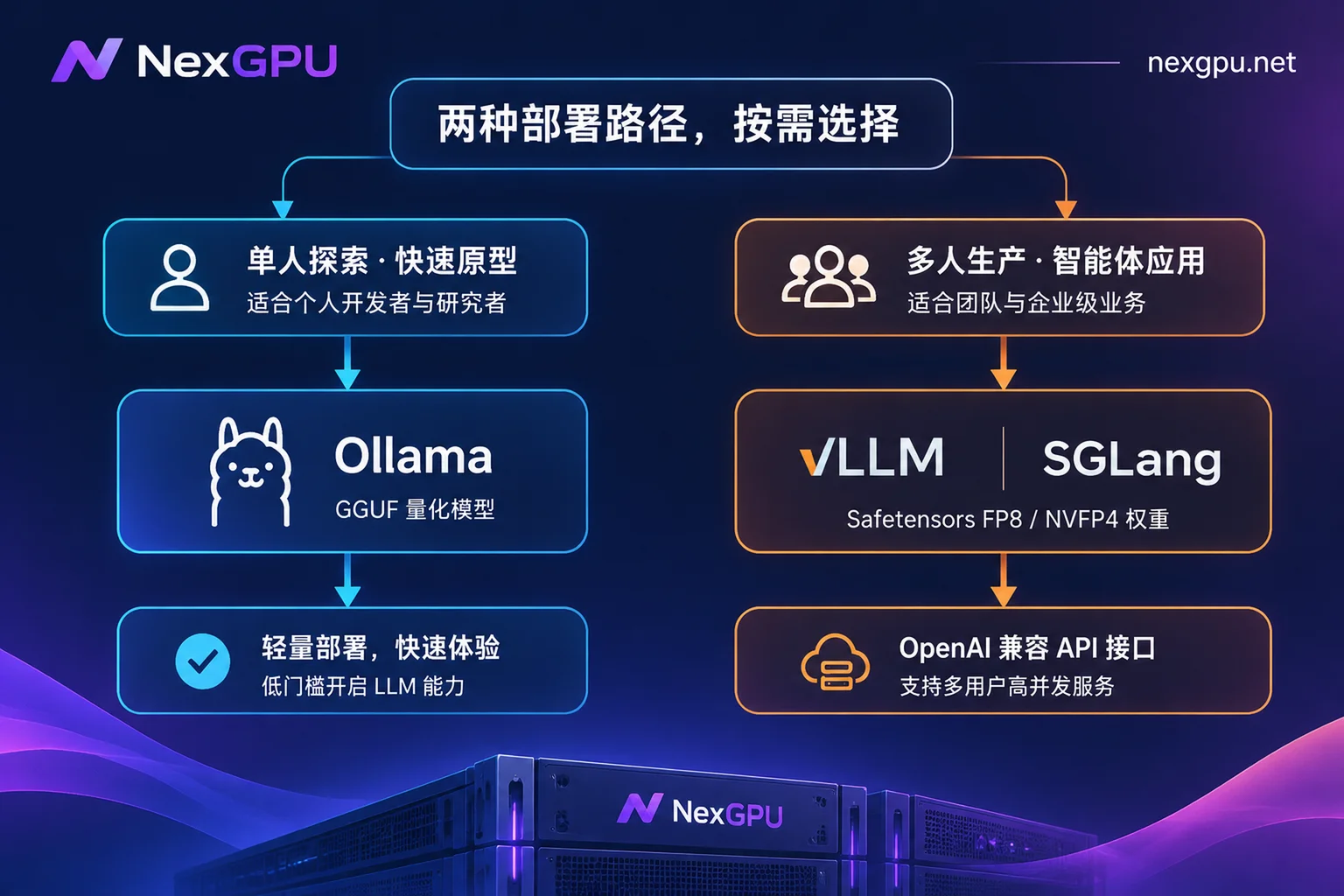
- Ollama (personal development / 1–2 person debugging / POC validation): Essentially an engineering wrapper around
llama.cpp, it can pull quantized models and start an HTTP interface with a single command, convenient on both Mac and Linux. However, its default scheduling favors single-user interaction, and once more than 3–10 users or Agent concurrent requests flood in, queuing latency quickly amplifies. - vLLM (production environment / preferred for high-concurrency OpenAI interfaces): Relying on PagedAttention and continuous batching, it can merge multiple concurrent requests into GPU computation, and throughput is usually several times that of single-machine solutions. At the same time, it has official Recipe support for
Qwen3.8-27Bhybrid attention, FP8/NVFP4 quantization, and tool call parsing. - SGLang (multi-turn Agents / long System Prompt reuse / structured output): If your business has each request carrying tens of thousands of tokens of fixed system prompts, historical codebase context, or requires strongly constrained JSON output, SGLang's RadixAttention prefix cache reuse and lower scheduling overhead often bring higher effective throughput.
Format pitfall tip: Ollama / llama.cpp use GGUF format weights; while vLLM / SGLang natively read Hugging Face Safetensors format weights (BF16, FP8, NVFP4, AWQ, etc.). Do not download tens of GB of GGUF files during local testing and then try to feed them directly to vLLM; the two weight files are not interchangeable. For a complete approach to smoothly migrating from Ollama to production, you can also refer to our site's vLLM deployment practical guide.
3. From Starting the GPU to Exposing the Interface: Three Reproducible Qwen Deployment Walkthroughs
If you don't have a local discrete GPU with more than 24GB, or don't want to deal with CUDA version conflicts, GPU drivers, and slow overseas weight downloads on your own machine, you can directly rent ready-made GPU instances on NexGPU by the hour to run through the entire process:
- Choose environment and GPU: When creating an instance on NexGPU, you can either directly select Ollama / vLLM / SGLang images with pre-installed drivers, CUDA, and inference frameworks from the image templates (which directly provide OpenAI-compatible interfaces after startup), or fill in your own public or private Docker image address and customize the startup command. When you first select the environment and template and then filter machines in the GPU market, the platform will automatically mark nodes with insufficient VRAM and explain why; for example, to run Q4
Qwen3.8-27B, you can choose a single RTX 4090 (24GB) or RTX 5090 (32GB); for FP8 or large-context concurrency, you can directly filter 48GB/80GB data center GPUs or multi-GPU nodes. - Direct connection and open ports: After the instance starts, it supports browser web terminal and SSH direct connection (public IP plus port, no jump host). NexGPU assigns a public IP and port mapping to each instance, and additionally reserves a set of备用 ports for custom services—note that port mappings cannot be added or removed after instance creation, so confirm the template's built-in service ports before starting (e.g., vLLM default
8000, SGLang default30000, Ollama default11434).
If you want to first compare the precise VRAM thresholds and recommended GPU types for different quantized Qwen models, you can directly check NexGPU's Qwen deployment model guide page.
Option A: Fastest Test Run (Ollama Single-GPU Solution)
Suitable for personal development to verify results. Execute in the instance terminal with 24GB or more VRAM (ensure Ollama in the image is updated to a version supporting Qwen3.8 architecture):
# 拉取并运行 Qwen3.8-27B 默认 Q4 量化版(约 16.5GB,含视觉组件)
ollama run qwen3.8:27b

# 如果只做低显存轻量测试,可改用 8B 版本
ollama run qwen3:8b
Option B: Production-Grade High-Concurrency API (vLLM Standard Solution)
Suitable for external services and team integration. Qwen3.8-27B relies on a relatively new inference stack (requires transformers >= 5.8.0 and a vLLM version supporting Qwen3_5Config hybrid architecture; if the pre-installed image version is too old, it is recommended to directly fill in the latest upstream vllm/vllm-openai image when creating an instance on NexGPU).
Taking a single large-VRAM GPU or dual-GPU deployment of Qwen/Qwen3.8-27B-FP8 as an example:
# 若从国内网络环境加速拉取权重,可先配置镜像源
export HF_ENDPOINT=https://hf-mirror.com

# 启动 vLLM OpenAI 兼容服务(以单卡 80GB 或双卡 TP=2 为例,按实际卡数调整 --tensor-parallel-size)
vllm serve Qwen/Qwen3.8-27B-FP8 \
  --host 0.0.0.0 \
  --port 8000 \
  --tensor-parallel-size 1 \
  --max-model-len 131072 \
  --kv-cache-dtype fp8 \
  --reasoning-parser qwen3 \
  --enable-auto-tool-choice \
  --tool-call-parser qwen3_coder
If you rent an RTX 5090 (Blackwell architecture), you can also directly pull community or official NVFP4 quantized weights (e.g., unsloth/Qwen3.8-27B-NVFP4) with FP8 KV Cache to further reduce VRAM usage and increase generation speed.
Option C: Agent and Long-Prefix Reuse Scenarios (SGLang Solution)
If you mainly integrate Coding Agents, automated workflows, or make high-frequency calls under the same long prompt template, you can start the service with SGLang:
python3 -m sglang.launch_server \
  --model-path Qwen/Qwen3.8-27B-FP8 \
  --trust-remote-code \
  --kv-cache-dtype fp8_e4m3 \
  --mem-fraction-static 0.85 \
  --reasoning-parser qwen3 \
  --tool-call-parser qwen3_coder \
  --host 0.0.0.0 \
  --port 30000
After the service starts, verify whether the interface is accessible using the mapped public address on your local machine (if it is a dual-GPU MoE like Qwen3.6-35B-A3B, just replace --model-path with the corresponding repository and adjust the number of GPUs according to VRAM; for more measured differences between vLLM and SGLang in prefix caching and throughput, refer to our site's SGLang vs vLLM selection comparison):
curl http://<你的公网IP>:<映射端口>/v1/chat/completions \
  -H "Content-Type: application/json" \
  -d '{
    "model": "Qwen/Qwen3.8-27B-FP8",
    "messages": [{"role": "user", "content": "用三句话说明为什么需要KV Cache量化"}],
    "temperature": 0.7
  }'
4. The 5 Most Common Qwen Deployment Pitfalls and Troubleshooting Methods
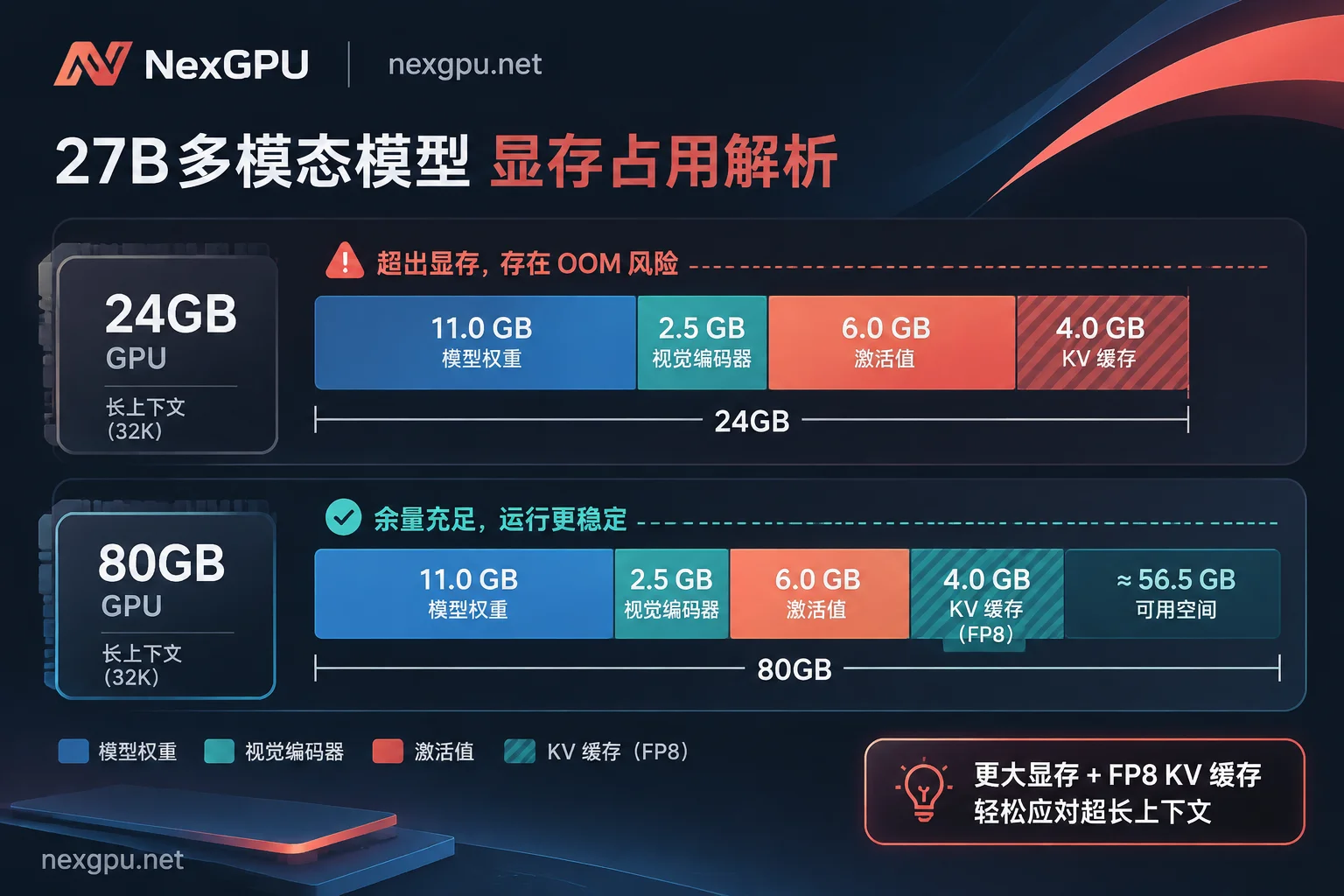
Pitfall 1: 24GB VRAM Can Hold 27B Q4 Weights but OOMs as Soon as You Chat
Cause: The model parameters nominally support 262K native context, but that doesn't mean 24GB VRAM can open 262K. Q4 quantized weights alone take 16GB–17GB, plus the vision encoder, inference activation space, and KV Cache growing with sequence length, the safe practical context on a single 24GB GPU is usually around 8K–32K; forcing --max-model-len to above 128K will inevitably cause VRAM overflow.
Solution: On a 24GB GPU, first limit --max-model-len to 16384 or 32768, and enable --kv-cache-dtype fp8; if you really need to run 128K–256K long document or codebase analysis, directly switch to a 48GB–80GB+ single or dual-GPU node. For specific multi-GPU VRAM accounting methods, see How Much VRAM Does Qwen Deployment Need? Dual-GPU Accounting Guide.
Pitfall 2: After Integrating Agent, Tool Calls Fail or Thinking Process Is Mixed in the Main Text
Cause: Qwen3.6 / Qwen3.8 have a default thinking mode and dedicated tool call format. If you omit --reasoning-parser qwen3 and --enable-auto-tool-choice --tool-call-parser qwen3_coder when starting vLLM/SGLang, the server will not separate the thinking process into the reasoning_content field, nor parse function calls into the standard tool_calls JSON structure; the client receives a bunch of plain text tags.
Solution: Be sure to include both the reasoning parser and the tool parser in the startup command; in addition, some clients automatically recognize the Qwen template based on the model ID prefix. If you customize --served-model-name (e.g., changing it to my-chat), you need to explicitly declare the reasoning template and context length in the client configuration.
Pitfall 3: Service Startup Reports KeyError or Cannot Find Qwen3_5Config / Architecture Not Supported
Cause: Qwen3.5, 3.6, and 3.8 use a hybrid layer structure of Gated DeltaNet and regular attention (Qwen3_5ForConditionalGeneration), and older transformers, vLLM, SGLang, or old Ollama versions cannot recognize the fields in the configuration file at all.
Solution: Upgrade the inference engine and transformers (vLLM recipe requires transformers >= 5.8.0). On NexGPU, if you find that the framework version in the general image you selected is too old, directly use the custom Docker image feature to pull the latest official inference image, which saves more time than manually compiling dependencies inside the container.
Pitfall 4: Disk Full, Weight Pull Stuck, or "Why Am I Still Being Charged After Shutdown?"
Cause: On the one hand, FP8 27B weights are about 31GB, BF16 about 52GB, plus cache directories and system images. If the system/data disk is too small when starting (e.g., only 40GB left), pulling the model will fail halfway with No space left on device; on the other hand, many people mistakenly think shutdown is completely free.
Solution:
- When selecting a machine, reserve disk space based on "weight size × 2 + image redundancy" (recommend at least 100GB), because NexGPU instances do not support disk expansion after creation.
- Understand the cloud billing boundaries: On NexGPU, compute fees are measured per second and billed per hour; stopping the instance immediately stops compute billing; but disk storage fees are calculated per GB/month and continue to be charged during stop-and-retain-disk, and only completely destroying the instance stops storage fees (and after destruction, the disk is immediately released and data cannot be recovered; see How Cloud GPU Storage Fees Are Calculated for details). After testing, if you determine you will no longer reuse the environment, remember to directly destroy the instance; if you need to continue tuning parameters in the short term, then choose stop-and-retain-disk.
Pitfall 5: Wrong Version Selection Strategy, Small GPUs Struggling with Multi-GPU Communication Tax
Cause: Some teams, to save money, use two low-VRAM GPUs to run a model that could fit on one GPU, or directly go for 235B / 125B+ MoE, resulting in cross-GPU communication overhead plus insufficient VRAM headroom, actually slower output speed and higher bills.
Solution: If it can fit on a single GPU (e.g., a single 24GB/32GB for Q4, a single 48GB/80GB for FP8/BF16), prioritize single GPU; when you need to run larger-scale multi-GPU splitting, first refer to Qwen Deployment Practical Guide: From 7B/32B to 235B MoE to calculate the cost-effectiveness of each GPU type.
5. 30-Second Self-Check List Before Running
- Determine model by use case: For personal/single-GPU multimodal and Agent, choose
Qwen3.8-27B; for high-concurrency text/low per-token cost, chooseQwen3.6-35B-A3B; for commercial external products, avoid preview large weights not under Apache 2.0 license. - Determine engine by concurrency: 1–2 people trial with Ollama (GGUF); production multi-user API with vLLM (Safetensors); Agent with high-frequency reuse of fixed prompts with SGLang.
- Leave VRAM and disk headroom: Weight size + KV Cache + vision projection should leave at least 20%–30% VRAM buffer, and reserve 100GB+ disk before starting.
- Include all parameters at once: For vLLM/SGLang, remember to add
--reasoning-parser qwen3and--enable-auto-tool-choice --tool-call-parser qwen3_coder, and enable--kv-cache-dtype fp8. - Handle instances promptly after use: For short breaks, stop and retain disk; after project completion, export configuration and directly destroy to release storage, spending every hour of compute and every GB of storage where it matters most.



