 NexGPU-算力租赁,GPU服务器,GPU云算力,AI服务器租用-新闻博客
Let's give the direct conclusion first: Entering late 2026, unless your team runs at full load for more than 12 consecutive hours every day and the model size is locked within 32B QLoRA for the long term, when doing large model fine-tuning, renting cloud GPU for LLM fine-tuning by the hour far outperforms buying a graphics card in terms of break-even cycle, VRAM ceiling, and engineering trial-and-error efficiency.
The reason for this judgment lies in three realistic variables that have become particularly acute in the second half of 2026:
- High premium on consumer cards purchased outright: Due to the shortage of GDDR7 memory and chip allocation tilting toward workstation cards, in November 2026, the spot price of RTX 5090 in mainstream retail channels in the US, Japan, and Europe still generally falls between $6,300 and $6,999 (approximately 42,000 to 49,000 RMB), more than 3 times the official suggested retail price.
- Fine-tuning is inherently a "pulsed load": In actual business fine-tuning, about 70% to 80% of the time is spent on data cleaning, format validation, prompt restructuring, and evaluation scripts. The periods that truly require GPU full load for backpropagation are often just concentrated sprints of a few hours to a few days.
- The 24GB/32GB single-card VRAM wall arrives early: After switching from early 7B Dense models to today's mainstream 32B models, long-context Agent trajectory fine-tuning, and MoE architectures like Qwen3-30B-A3B, a single consumer-grade graphics card can easily hit the VRAM and communication limits at the first step.
Below we will thoroughly explain the accounts for buying vs. renting cards, the latest card boundaries at the end of 2026, and a cloud workflow that can directly reduce the cost of each fine-tuning run.
I. Why is it harder to break even on self-purchased graphics cards for fine-tuning at the end of 2026? First, calculate the pulsed utilization account
When many teams estimate "buy or rent", they are used to directly dividing the hardware price of a card by the monthly cloud rental to conclude "it pays for itself in half a year". But this algorithm assumes a premise that almost does not exist in fine-tuning scenarios—GPU running at full load 7×24 hours.
Let's align with the real market conditions in November 2026:
- Self-purchased local fine-tuning workstation: A single RTX 5090 (32GB) full card currently trades at around 42,000 to 49,000 RMB. Adding a high-power PSU, motherboard, large memory, and cooling system, a stable single-card workstation for training usually exceeds 55,000 RMB in total budget. For a dual RTX 4090 (48GB VRAM total) with Threadripper platform and 2000W PSU, the overseas complete system assembly cost is also in the $4,000 to $6,000 range (approximately 28,000 to 43,000 RMB).
- Hourly cloud GPU reference water level: In the public computing market in 2026, RTX 4090 (24GB) on-demand hourly rental is about $0.34 to $0.69 per card-hour (domestic mainstream quotes about 1.98 to 2.89 RMB per card-hour), RTX 5090 (32GB) domestic reference hourly rental about 3.25 RMB per card-hour, A100 80GB about 11.4 RMB per card-hour, H100 about 22.5 RMB per card-hour, H200 about 35 RMB per card-hour (varies greatly among providers and node configurations; specific prices are subject to real-time platform quotes).
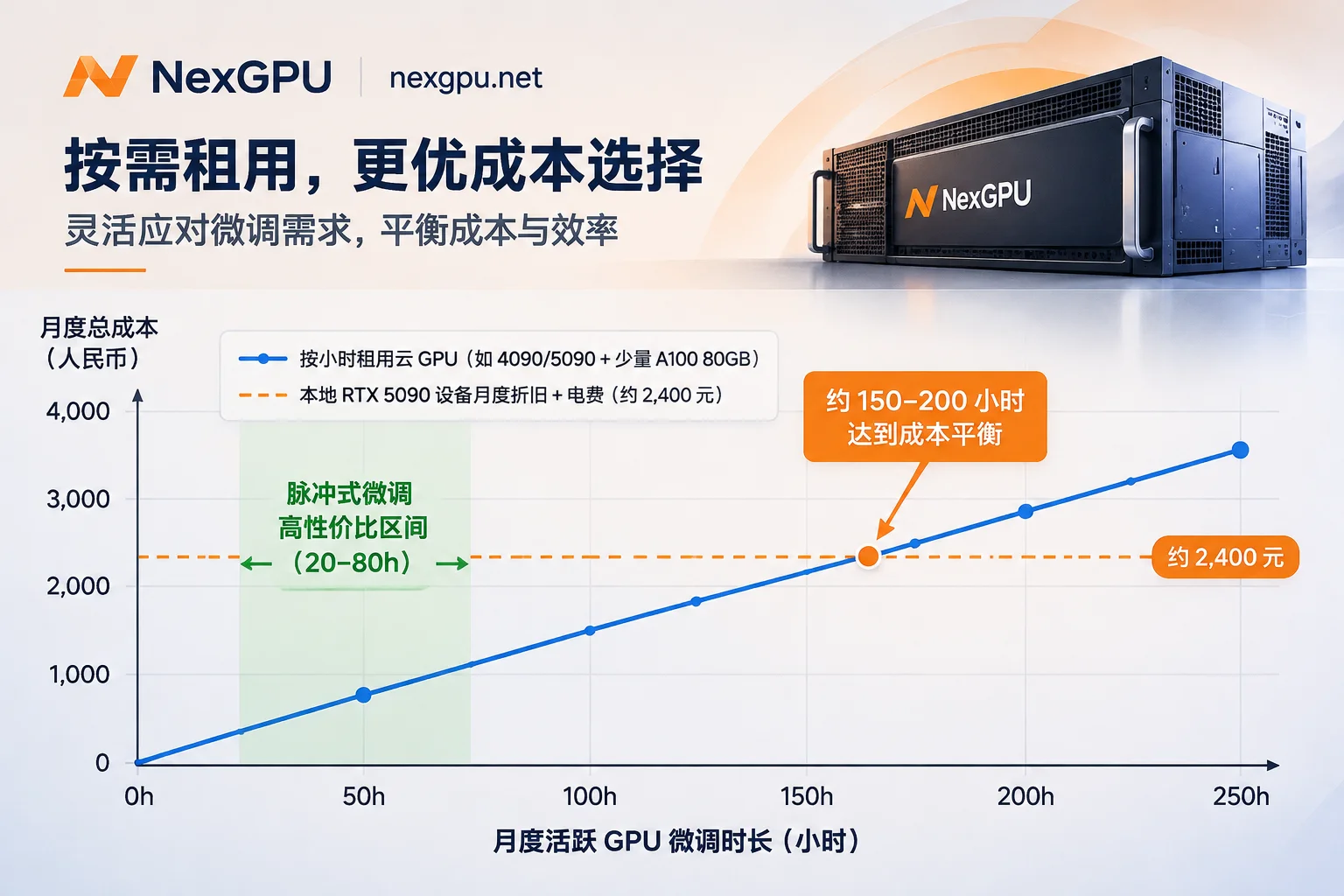
If we depreciate hardware over 24 months (not counting VRAM price drops and fan/PSU maintenance, only hardware amortization and full-load electricity), the fixed sunk cost per month for a 55,000 RMB single-card RTX 5090 workstation exceeds 2,300 to 2,500 RMB. Suppose your business only does concentrated fine-tuning 3 to 4 rounds per month, each round with actual training time of 15 hours (about 50 to 60 effective training hours per month):
- Self-purchased graphics card: Even if the card idles 90% of the nights, the monthly fixed cost remains around 2,400 RMB, equivalent to an implicit cost of over 40 RMB per effective training hour.
- On-demand cloud GPU rental: For the same 50 to 60 effective training hours, switching between single consumer-grade and on-demand A100, the monthly compute expenditure is often only a few hundred RMB; only when the effective training time per month steadily exceeds 150 to 200 hours and there is no need for larger VRAM does local self-purchase start to enter the break-even range.
If you want to learn more about the critical point calculation between self-purchase hosting and long-term rental for general AI servers, you can refer to another cost breakdown on our site: "AI Server Self-Purchase Hosting or Rent GPU? First Measure Utilization, Then Calculate Hidden Costs".
II. Buying a consumer card is not enough: Three hidden thresholds for fine-tuning in 2026
More tricky than "slow break-even due to idleness" is the VRAM ceiling lock. Fine-tuning open-source models in 2026 is no longer just "run QLoRA on a 7B model and done". Once you buy a single card, you will directly stall when encountering the following three types of requirements:
1. The "pseudo-small model" VRAM trap of MoE models (e.g., Qwen3-30B-A3B)
Many developers see that MoE models only activate 3B parameters per token and mistakenly think a 24GB consumer card can easily fine-tune them. But in engineering implementation, fine-tuning requires loading all experts' weights and routing structures into VRAM:
- Taking Qwen3-30B-A3B as an example, the current mainstream community (e.g., BitsandBytes) support for 4-bit QLoRA on MoE architectures is not perfect, and usually requires falling back to BF16 LoRA or full fine-tuning; even with Unsloth's specially optimized MoE Triton fused kernels, 16-bit LoRA fine-tuning still requires about 63GB VRAM.
- In addition, under the traditional Transformers framework, the tens of thousands of expert linear layers in MoE will generate tens of thousands of trainable submodules after attaching LoRA. Once you forcefully run distributed training on multiple consumer-grade GPUs, it is very easy to encounter GPU utilization at 100% but throughput dropping to zero, or even NCCL communication deadlock, due to the overly complex gradient synchronization graph.
2. Activation explosion in long-context Agent and multi-turn trajectory fine-tuning
When doing tool calling, structured long document parsing, or GRPO post-training, the cutoff length is often set to 8K, 16K, or even 32K. The activations retained in the forward pass expand multiplicatively with sequence length and batch size. On 24GB VRAM, you may be forced to reduce micro-batch to 1 and enable heavy gradient checkpointing, stretching training time several times; while on an 80GB A100/H100, large batches with FlashAttention can directly saturate throughput.
3. When multiple consumer cards are combined, PCIe bandwidth eats up more than half of the speedup
Neither RTX 4090 nor RTX 5090 supports NVLink; multi-card communication can only go through the motherboard PCIe bus—PCIe Gen4 x16 one-way bandwidth is only about 31.5 GB/s (Gen5 about 63 GB/s), while Hopper architecture's NVLink 4 single-card bidirectional/direct bandwidth can reach 450 GB/s, and Blackwell NVLink 5 even reaches 900 GB/s. When doing multi-card full-parameter fine-tuning or DeepSpeed ZeRO-3, the cross-card gradient synchronization latency of PCIe interconnection will cause severe compute idling. For specific judgment on multi-card 4090 vs. single-card A100, you can read further: "How to Decide Between RTX 4090 Multi-Card and A100 Single-Card Training? 4-Step Judgment".
III. Late 2026 GPU Quick Reference for LLM Fine-Tuning On-Demand
Rather than locking your budget onto a consumer-grade graphics card all at once, it is better to select cards on demand in the cloud according to your current model size, precision strategy, and fine-tuning method. The following quick reference table can serve as a baseline before renting cards (specific VRAM usage will vary with sequence length, LoRA rank, and optimizer):
| Model Size & Architecture | Common Fine-Tuning Method | Estimated VRAM Requirement | Recommended GPU Configuration | Practical Selection Points |
|---|---|---|---|---|
| 7B~14B Dense | QLoRA (4-bit) | 12GB~24GB | Single RTX 3090 / 4090 (24GB) | Best cost-performance, suitable for quick validation of datasets and SFT pipelines |
| 7B~14B Dense | BF16 LoRA (long sequence) | 28GB~45GB | Single RTX 5090 (32GB) or 48GB professional card / A100 40GB | 32GB GDDR7 can cover most 14B regular sequence LoRA with more headroom |
| 32B Dense | QLoRA (4-bit) | 24GB~32GB | Single RTX 5090 (32GB) or 48GB professional card | 4090 24GB is tight for 32B long context; 5090 32GB is the sweet spot |
| 32B Dense | BF16 LoRA / 14B full parameter | 70GB~140GB | Single A100 80GB / H100 80GB or 2×80GB | For inference/code models sensitive to quantization loss, recommend 80GB level cards |
| 30B~35B MoE | BF16 LoRA (Unsloth) | 60GB~80GB+ | Single A100 80GB / H100 80GB / H200 141GB | Prioritize single-card large VRAM with fused MoE kernels to avoid consumer multi-card PCIe deadlock |
| 70B Dense | QLoRA / BF16 LoRA | 48GB~180GB | Single A100 80GB (QLoRA) or 2~3×80GB (BF16 LoRA) | H200 (141GB) single card can run high-headroom 70B LoRA fine-tuning without splitting |
| 70B Dense | Full parameter fine-tuning / GRPO | 600GB+ | 8×A100 80GB / 8×H100 / 8×H200 (NVLink whole machine) | Must consider high-speed inter-card interconnect and whole-machine memory ratio to avoid communication bottlenecks |
If you want to derive the four VRAM accounts (weights, gradients, optimizer states, activations) from the bottom up, or compare the VRAM compression differences of Unsloth, LLaMA Factory, and Axolotl on the same card, we recommend reading: "How to Choose GPU for LLM Fine-Tuning: Three Steps Based on VRAM, Fine-Tuning Method, and Open-Source Framework" and "2026 LLM Fine-Tuning GPU and Framework Selection in Practice: How to Configure Cards Most Economically with Unsloth, LLaMA Factory, and Axolotl?".
IV. Three-Stage Cloud Fine-Tuning Workflow: Minimize Each Fine-Tuning Bill on NexGPU
The biggest fear when renting cloud GPUs is not the high unit price, but "using an expensive H100 to fix a Python path error, or forgetting to shut down after training and being charged continuously". By leveraging the elastic computing market's per-second billing and seamless card switching, splitting fine-tuning into three stages can usually save more than half of the compute bill:
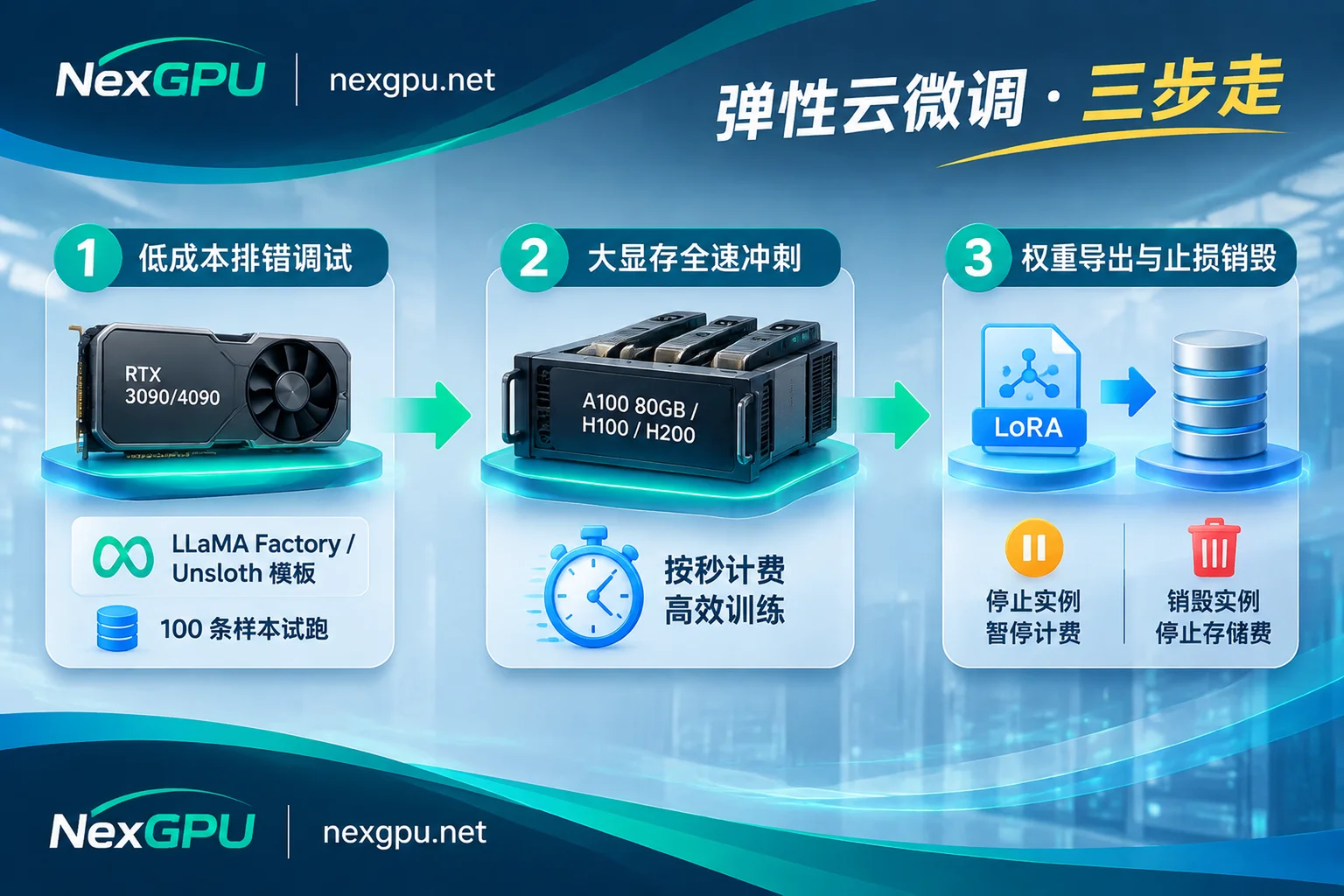
Stage 1: Code and data debugging, rent the cheapest consumer-grade single card (e.g., RTX 3090 / 4090)
Before formally scaling up the data volume, first extract only 100 samples to verify data format, tokenizer template, loss convergence curve, and checkpoint save path.
- When selecting machines on NexGPU, you can go directly to the image template page to choose a pre-installed fine-tuning environment (currently covering LLaMA Factory, Axolotl, Unsloth, as well as standard PyTorch, TensorFlow, JAX; if your training code is locked to a specific CUDA version, you can also directly fill in your own public or private Docker image, and the template itself is free of charge).
- When selecting environment first and then filtering machines, NexGPU will automatically mark machines with insufficient VRAM and indicate the reason, saving the trouble of manually guessing VRAM from spec sheets. Meanwhile, you can check the quantization thresholds and steps for specific open-source models in the AI fine-tuning scenario solutions and model card selection guide.
- After booting, there is no cumbersome jump server configuration: the platform provides a browser-based web root terminal, SSH direct connection with public IP and port mapping (supporting default public key configuration), templates with Jupyter can be opened with a token in one click; when you need graphical management of training logs and files, you can also install the aaPanel dashboard with one click.
Stage 2: Formal training sprint, switch on-demand to RTX 5090 or A100 / H100 / H200 whole machine
After confirming zero errors in the code, pull the data and scripts directly to the high-compute, large-VRAM formal machine and run at full speed:
- If the model is suitable for single-card sprint (e.g., 32B QLoRA on RTX 5090, or 30B MoE / 70B QLoRA on single A100 80GB / H100 / H200), order by machine; if full parameter fine-tuning or large-batch reinforcement learning post-training is needed, directly filter multi-card node whole machines by "minimum number of cards" in the market ( order amount = single card price × number of cards, underlying support for DeepSpeed, FSDP, Megatron).
- No hidden thresholds: NexGPU only requires email registration, no real-name authentication or quota application. After registration, without binding a payment method, you can view real-time prices, reliability, and bandwidth metrics of nodes in various countries; recharge supports Alipay and USDT (TRC20), no minimum spend, activation fee, port fee, image license fee, and no minimum rental duration. The unit price at the time of order will be locked until the instance is destroyed.
Stage 3: Distinguish "Stop" and "Destroy" to hold the last line of defense for your bill
Cloud fine-tuning bill overruns are mostly due to cleanup actions after training. On NexGPU, the bill consists only of compute, storage, and traffic (listed separately in real-time on the details page), among which the billing boundaries of stop and destroy are completely different:
- Stop: Compute fees are measured per second and billed per hour. Once the instance is stopped, the compute fee immediately drops to zero, while the disk and environment are fully retained for later recovery; but storage fees are charged per GB/month and continue to be charged during the stop period (starting from when the instance is created and the image is pulled). For the specific billing logic during stop, see "Does GPU Instance Shutdown Still Charge? Compute Stops, Storage Continues".
- Destroy: Only after entering the instance ID to confirm destruction will the storage fee stop. Special note: NexGPU is an exclusive container architecture; the platform does not read or back up user disk contents, and after creation, disk expansion or adding/removing port mappings is not supported—this means destruction will immediately release the disk and data cannot be recovered.
Therefore, the safest habit is: for long training tasks, always save checkpoints (refer to "Cloud GPU Long Task Interruption Recovery and Checkpoint Settings: 4-Step Configuration"); as soon as training ends, first pull the LoRA Adapter or merged weights back to local or upload to a private repository/object storage, and after confirming the checksum, immediately destroy the instance to minimize storage costs.
V. When should you choose enterprise solutions or local procurement?
On-demand card rental can meet more than 85% of the needs of individual developers, algorithm outsourcing, university research groups, and startup teams. But if you encounter the following two situations, you need a different configuration approach:
- Long-term high utilization and fixed model: If your team has been running for more than half a year with effective fine-tuning time steadily exceeding 150 to 200 hours per month, or is building a long-term online fine-tuning + inference integrated private pipeline, on-demand hourly rental is not as cost-effective as locking in long-term resources. In this case, besides buying machines, a more operationally efficient approach is to switch to monthly/yearly subscription or reserved instances.
- Cross-machine multi-card and enterprise compliance requirements: When training enters the stage of 70B full parameter fine-tuning and multi-machine cluster parallelism, consumer-grade networks and single-machine containers are no longer suitable. You need RDMA high-speed interconnection, data isolation, private network, and dedicated compute pools. Such R&D teams or compute procurement needs can directly contact NexGPU Enterprise and Exclusive Solutions, go through contracts, corporate payment, invoicing, and PO procurement processes, while saving the risk of building your own data center and hardware depreciation.
4 Self-Check List Before Starting a Card
Before opening the compute market and placing an order, spend 1 minute going through the following four items, and you can basically avoid 90% of VRAM errors and cost waste:
- Determine the fine-tuning method first, then look at the card: For vertical format and knowledge injection tasks that can be solved with QLoRA / BF16 LoRA, don't easily go for full parameter fine-tuning; for MoE models, first confirm whether the framework supports fused kernels and BF16 VRAM budget.
- Distinguish between debugging card and sprint card: First use a low-cost single card to run 50 steps to verify the dataset and scripts, then put the large dataset on RTX 5090 or A100/H100/H200 to run at full speed.
- Set disk capacity before starting the card: Because the disk cannot be expanded after creation, leave enough capacity margin for "base weight size + dataset + 2 to 3 checkpoints" at once before ordering.
- Calculate the export path before destroying: Test the weight download or upload script in the terminal or Jupyter in advance, copy away immediately after training, and destroy immediately after copying, so that every penny is spent only on the seconds that actually run gradients.



