 NexGPU-算力租赁,GPU服务器,GPU云算力,AI服务器租用-新闻博客
The multi-provider cloud GPU price index updated on July 18 shows H100 hourly prices ranging from $0.34 to $14.90, a spread of nearly 40x; B200 starts at $2.69 and jumps to over $16, with only a few channels having stock. In the same period, the industry has clearly divided compute access into a four-tier pyramid: top-tier self-built, multi-year locked, queued procurement, and remaining spot supply. This window makes GPU rental no longer a matter of "finding the lowest price" but requires systematic comparison across dimensions.
How Market Tiers Change the Logic of GPU Rental
Discussions in mid-July stated the reality bluntly. The top tier consists of hyperscalers and frontier labs that control their own supply; the next tier sees large enterprises locking in volume with multi-year contracts; further down, enterprises queue with lead times of 36 to 52 weeks; and at the bottom, startups and researchers scramble for spot instances and short-term rentals. New-generation cards (including subsequent architectures expected to ship in larger volumes in the second half of the year) continue to flow preferentially to the top tiers.
The price spread itself is a result of this tiering. The same H100 can be offered at spot prices by some channels and at enterprise reserved prices by others, with variations in network bandwidth, storage, and billing methods in between. Simply comparing "price per hour" can be misleading. Flexible platforms like NexGpu are well-suited for small-scale testing first, before deciding whether to extend the rental period or switch card types.
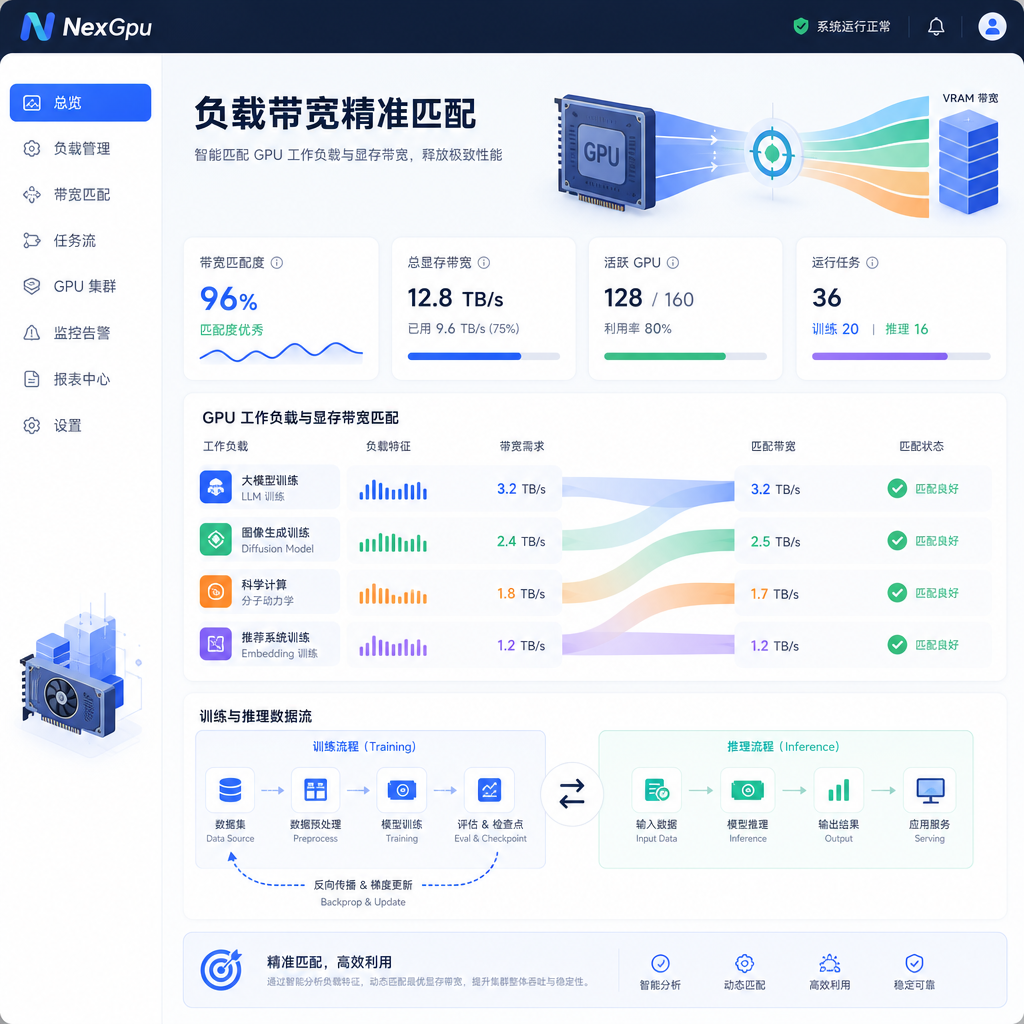
Dimension One: Matching Workloads with VRAM and Bandwidth
First, ask yourself what you're running. Training large models, long-context inference, multimodal, or lightweight fine-tuning plus online serving?
- 80GB-class Hopper cards remain the mainstream choice for training, with high bandwidth and mature ecosystem.
- Cards with 141GB or more VRAM are better suited for inference with memory walls and ultra-long sequences, but come with a significant premium.
- Consumer or workstation-grade cards are suitable for prototyping and small-to-medium models, but multi-card scaling and stability need extra validation.
- AMD large-memory solutions have advantages in certain sharding scenarios, but software stack compatibility requires pre-testing.
- Next-generation cards are currently in extremely tight supply with inflated prices; most teams should still rely on current mainstream cards.
July data shows spot premiums for B200 can be 1.4x or even higher than H100, with few available nodes. If your business hasn't reached the point where you must use the latest architecture, using mature cards to stabilize throughput is often more cost-effective than waiting for new cards. If you mismatch, even a cheap hourly price turns into wasted compute.
Dimension Two: Billing Models and Real Availability
The large price spread is driven by a mix of on-demand, reserved, spot, and custom contracts. July index shows H100 on-demand averages around $3 per hour, spot can drop to just over $1, and reserved is even lower. But spot instances can be reclaimed at any time, and reserved instances require committing to volume and duration.
Availability is the hidden cost. After the top tiers take most new cards, small and mid-sized teams often face "quoted but queued" situations or low-cost nodes with poor network and slow storage. When selecting, you must check:
- Instant launch success rate
- Whether there is throttling during peak hours
- Support for per-second or per-minute billing
- Whether data persists after interruption
Many teams do this: use stable on-demand for development and low traffic, and layer short-term reserved or multi-channel scheduling for burst training. NexGpu supports quick configuration switching, which is ideal for verifying real throughput and interruption frequency under different modes, rather than relying on advertised prices.
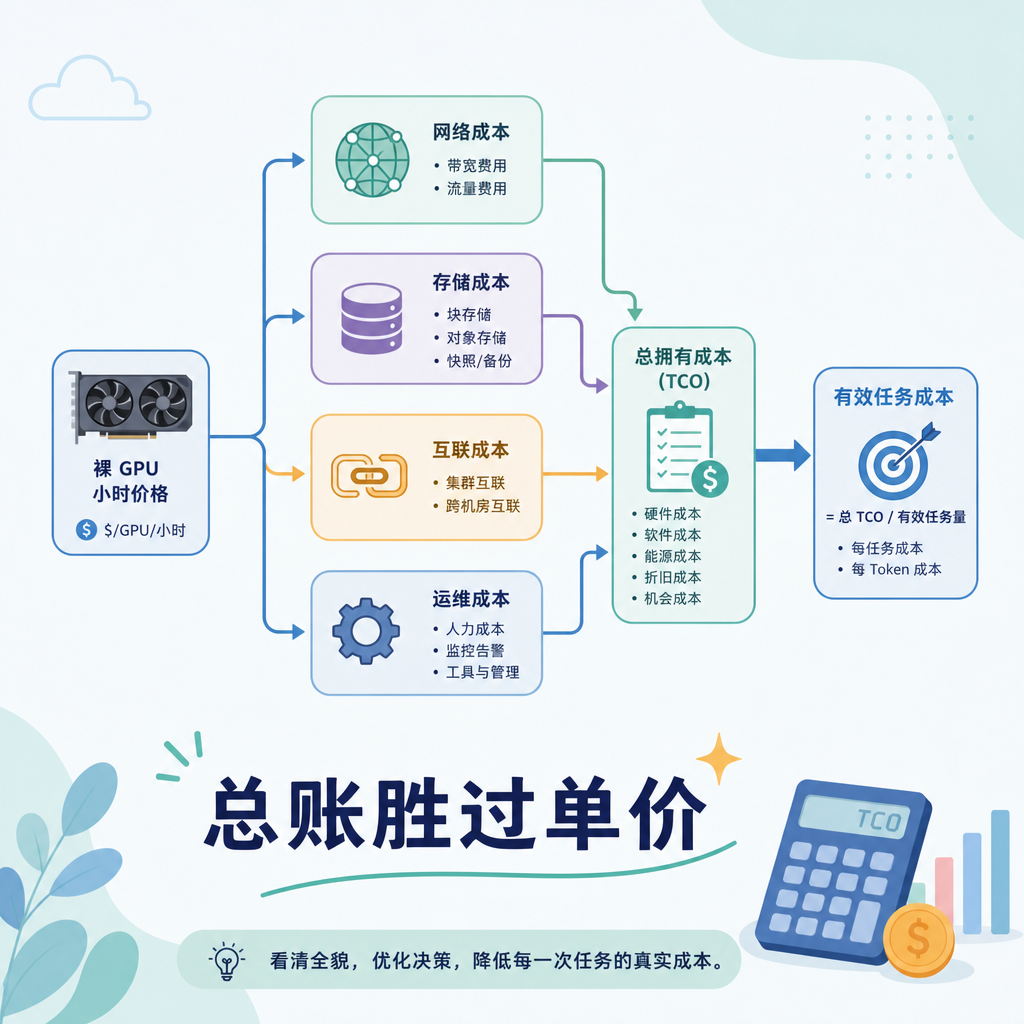
Dimension Three: Total Cost of Ownership, Not Just Bare GPU Hourly Price
Hourly price is just the starting point. Network egress, storage IOPS, multi-card interconnect bandwidth, image pull time, and operational overhead all inflate the bill. Some channels have cheaper GPUs but suffer from slow cross-region transfers or cold starts; others are pricier but come with high-speed storage and one-click environments, yielding results faster overall.
July market analysis also notes that memory (HBM) supply chains remain tight, and the cost structure of systems is changing, making it riskier to gamble on low-priced spot instances alone. When calculating costs, use "effective token cost" or "total cost to complete a training/inference task" rather than staring at unit prices. Fix a test script, run the same workload on different channels, record end-to-end time, and derive the effective unit price—numbers become much more honest.
Dimension Four: Scalability and Software Ecosystem Lock-in
Running on a single card doesn't guarantee smooth cluster operation. NVLink/high-speed networking, container image compatibility, out-of-the-box support for mainstream frameworks (training and inference engines), and elastic scaling are all hard requirements.
The biggest fear for users at the bottom of the pyramid is: after finally getting cards, they hit multi-node communication bottlenecks or outdated driver versions. When selecting, prioritize platforms that offer standardized images, easy mounting of your own storage, and support for smooth scaling from 1 card to 8 cards or multiple nodes. Platforms with good software experience can compress the time from "finding a card" to "getting results" to hours, not days.
Dimension Five: Risk Hedging and Time Windows
Compute is being commoditized. In mid-July, some markets began offering forward reference prices for mainstream card types to help gauge expectations over the coming weeks to months. If the curve indicates short-term tightness but mid-term easing, there's no need to rush into ultra-long contracts; if sustained scarcity is indicated, it's wise to lock in core capacity.
In practice, you can combine strategies: use medium-term reserved for core stable workloads, and elastic rental for experimental and fluctuating parts. Periodically (e.g., every two weeks) revisit the price index and your own utilization rates—switch card types when necessary, and scale down when idle. Don't bet all your budget on a single channel or single generation.
Turn these five dimensions into a checklist and fill it out each time you select: load type, estimated VRAM and bandwidth, acceptable interruption rate, total task cost ceiling, expansion plan, and hedging ratio. Only after filling this out should you look at specific quotes—the decision becomes much cleaner. The nearly 40x price spread in July is a reminder: the winning factor in GPU rental has long shifted from "who is cheaper" to "who is better matched and more controllable."




Comments(0)