 NexGPU-算力租赁,GPU服务器,GPU云算力,AI服务器租用-新闻博客
If your team needs to handle training, fine-tuning, or inference tasks and is unsure whether to "buy servers and colocate them in a data center" or "rent GPUs directly," here's the conclusion:
- Workloads still changing, business in exploration phase, fast model turnover: Rent first. Renting has no upfront cost, can be stopped as needed, and allows switching cards per task.
- Long-term stable workloads, cards running at near full capacity almost constantly, architecture unlikely to change significantly for two to three years, and team has someone who can manage the data center and hardware: Buying and colocating may be more economical.
What determines which is more cost-effective is not the purchase price of a specific card or the rental unit price, but how much time your cards spend doing useful computation over their lifespan. Let's break down the math using this approach.
Where the Money Goes in Each Approach
Buying and colocating is capital expenditure. A single 8-GPU data center-grade server (H100/H200 tier) typically costs hundreds of thousands of dollars, requiring a one-time payment or financing. After payment, you still have to go through chip procurement cycles, delivery, and racking/commissioning, during which the business can only wait.
Renting is operational expenditure. Renting requires no upfront hardware payment, is billed by the hour, can be used immediately upon startup, and stops when the task ends.
The nature of these two expenditures differs: the former buys "computing capacity for the next two to three years," and you've paid whether you use it or not; the latter buys "the actual hours used."
The Real Cost of Colocation Is Far More Than the Server
Many teams calculate colocation costs by simply dividing the server price by its useful life, which severely underestimates the true cost. High-density AI servers incur at least these additional expenses:
- Power and rack space: A single rack often draws 30kW–40kW or more; ordinary data centers cannot handle the power distribution, so you need high-density racks.
- Cooling: Often requires liquid cooling (cold plate or immersion) or rear-door heat exchangers, which are more expensive and harder to find.
- Network: Multi-line BGP or dedicated bandwidth billed monthly.
- Contract term: Racks typically require a fixed-term commitment; you pay even if business shrinks.
- Maintenance and spare parts: Dropped cards, thermal throttling, and hardware failures all need handling; you must stock spares or sign maintenance contracts.
- Operations manpower: Drivers, CUDA, container orchestration, monitoring, and alerting all need to be set up and maintained; failures require manual intervention.
- Depreciation and upgrades: Model requirements for VRAM and interconnect bandwidth change rapidly. After two to three years, old cards may lack sufficient VRAM or interconnect speed, and you bear the asset depreciation.
When renting, most of these costs are borne by the platform. Pre-built images eliminate most environment setup work, and you can switch to a different tier of card when tasks change. The trade-off is paying by the hour and managing data and instance on/off yourself (discussed later).
Break-Even Point Depends on Sustained Utilization
Public comprehensive estimates provide a reference range: over a 2–3 year hardware lifecycle, sustained utilization of roughly 55%–65% or higher is needed for the amortized hourly cost of buying and colocating to potentially fall below on-demand or reserved cloud computing. This range is heavily influenced by electricity prices, rack costs, purchase prices, and rental unit prices, so it's only directional; ultimately, you must calculate with your own numbers.
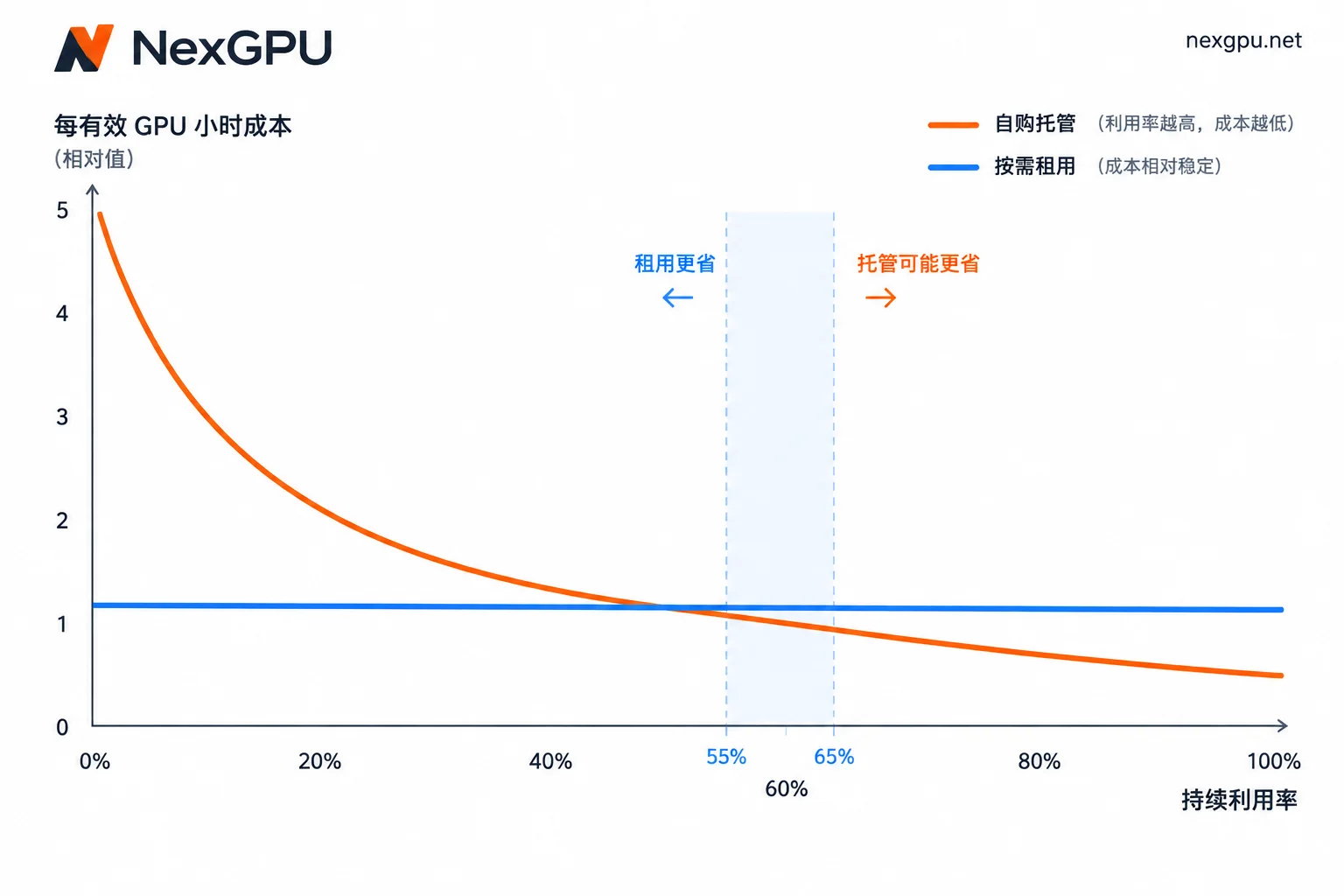
You can calculate it yourself in three steps:
- Calculate the total monthly colocation cost: Depreciate hardware over 2–3 years to a monthly amount, then add rack, power, cooling, bandwidth, maintenance, and allocated operations manpower.
- Calculate effective GPU hours per month: Only count time actually running training or inference. Idle time while powered on, waiting for data, or debugging environments does not count.
- Divide the two to get cost per effective GPU hour, then compare with the rental unit price for the same tier of card.
Step 2 is the most critical. If utilization drops from 80% to 40%, the effective unit cost of colocation doubles, because fixed costs don't decrease at all. Renting only charges for compute when the instance is running. So when business has significant fluctuations or is still in development and testing, colocation often doesn't add up.
If you're already comparing on-demand and reserved rental options, you can read Which Is More Cost-Effective: Spot Instances or Reserved GPU Instances. If you want to include private deployment in the comparison, refer to How to Compare Proprietary Cloud and Public Cloud GPU Costs.
How to Choose by Scenario
Situations more suitable for renting:
- Phased fine-tuning, exploratory training, or experimentation
- Inference traffic has clear peaks and valleys, or the service is newly launched and volume is uncertain
- Haven't decided on the final card and need to try between consumer-grade and data center-grade
- Team lacks dedicated hardware and data center operations staff
Situations worth seriously evaluating for buying and colocating:
- 24/7 stable inference service or long-term uninterrupted training tasks
- Measured sustained utilization remains high over the long term
- Model architecture and VRAM requirements are relatively fixed for two to three years
- Team has the capability to manage data center contracts, hardware failures, and the low-level software stack
Before taking action, confirm two hard conditions:
- Data compliance: If compliance requires data to reside in an environment you control or specify, this will determine the direction before cost.
- Multi-GPU interconnect: Large-scale training has requirements for NVLink, InfiniBand/RoCE, etc. Whether buying or renting, confirm the actual topology of the nodes, not just the number of cards.
The two approaches can also be mixed: Place stable baseline workloads on owned or long-term reserved resources, and rent on-demand for bursty or experimental parts.
When Unsure, Rent for a Period to Measure Utilization
Most teams are unsure because they don't know their real workload. The lowest-cost approach is to rent cards to run real tasks first, get data, and then decide whether to buy.
- Set up the environment directly using images. For example, NexGPU provides image templates for vLLM, TGI, Ollama, PyTorch, ComfyUI, etc., which can be deployed with one click, saving time on driver and CUDA configuration.
- Run real workloads for a few weeks and record three metrics: daily actual GPU usage hours, peak VRAM, and whether the current card type is suitable. Insufficient VRAM or long-term underutilization both indicate the wrong card choice.
- Manage cost boundaries. NexGPU billing only includes compute, storage, and traffic: compute billing stops after shutdown, but storage fees continue until the instance is destroyed. The unit price at order time is locked until destruction, with no minimum spend and no contract. If there are long gaps between tasks, you can move data out and destroy the instance first; see How to Save Data on Rented GPU Instances.
- Plug the measured utilization into the three-step calculation above. The rental unit price for the same tier of card can be found on the NexGPU pricing page.
After calculating, if utilization remains low or highly volatile, continuing to rent on-demand is more cost-effective. If the workload is stable and you need multi-GPU or long-term resources, you can first organize card type, number of cards, usage period, and interconnect requirements according to the Enterprise GPU Cluster and Reserved Instance Consultation Checklist, then contact NexGPU sales to discuss multi-GPU solutions, and compare the quote with the total cost of buying and colocating.




Comments(0)