 NexGPU-算力租赁,GPU服务器,GPU云算力,AI服务器租用-新闻博客
Bottom line: As of November 2026, on-demand rental for a single NVIDIA A100 80GB typically ranges from $0.80–$2.10 per hour in overseas specialized compute markets (Ornn Data's late-October index was $1.09/hour**, with mainstream overseas aggregator/proprietary platforms around a median of $1.09–$2.09/hour); domestic specialized compute platforms commonly quote **¥4.86–¥11.40 per hour**; while major public clouds like AWS, Google Cloud, or large domestic providers charge as much as **$3.43–$5.03 per card-hour or ¥12,000–¥15,000 per month for on-demand pricing.
Why does the same “A100” cost as little as five or six yuan (or even a few dozen cents in USD) at the low end, yet reach thirty yuan per hour or over ten thousand per month at the high end? Because low prices often mix in the 40GB memory version, preemptible (Spot) instances that can be reclaimed at any time, or even hide storage and outbound traffic markups, while major public clouds often lock users into 8-card whole-machine minimum rentals and high service premiums. If you're comparing A100 rental quotes or wondering whether to switch to two RTX 5090s (64GB) or one H100, this article clarifies real market rates, total-cost calculations, and card selection boundaries in one go.
1. Quick Overview of Real A100 Rental Rates in Late 2026
First, let's align public market prices across different channels and specifications in one table (all based on single-card on-demand reference; actual orders are subject to each platform's real-time inventory page):
| Channel / Specification Type | Typical Reference Price Range | Billing and Minimum Rental Characteristics | Suitable For |
|---|---|---|---|
| Overseas specialized/aggregator markets (A100 80GB) | $0.80–$2.10/hour | Supports 1-card minimum, billed per second or per minute; some community nodes lack high SLA | Individual developers, algorithm validation, elastic fine-tuning |
| Overseas markets (A100 40GB) | $0.58–$0.90/hour (median ~$0.68) | Half the memory, some are PCIe versions, suitable for smaller models | 14B-level fine-tuning, lightweight inference testing |
| Domestic specialized compute platforms (A100 80GB) | ¥4.86–¥11.40/hour | Noticeable price gap between community nodes and high-stability secure nodes; some promotional/low-spec nodes are cheaper | Domestic teams needing low latency or local network environments |
| Overseas public cloud giants (AWS / GCP, etc.) | $3.43–$5.03/card-hour | Often require 8-card whole-machine minimum, quotas need prior approval | Teams with existing cloud-native architecture and compliance priorities |
| Domestic public cloud on-demand (single-card whole-machine ratio) | ¥12,000–¥15,000/month (or ¥15–¥28/hour) | Bundled with high-spec CPU/memory, requires enterprise real-name verification and quotas, annual/monthly discounts available | 7×24 full-load production or government/enterprise compliance projects |
Notably, a late-October 2026 monitoring report by a16z based on Ornn Data indicated that due to the surge in inference token consumption since April 2026, rents for all GPU generations are generally higher than at the start of the year, but H200 (about $6.30/hour) and B200 (about $9.70/hour) carry a 111%–143% scarcity premium, while the A100 (about $1.09/hour), released six years ago, is only about 9% above the six-year straight-line depreciation baseline. This means renting an A100 in late 2026 comes with almost no “queue premium for scarce new cards”—what you pay for is genuine 80GB HBM2e memory and a mature ecosystem.
2. Why Can Quotes for the Same “A100” Differ by 3 to 5 Times?
Many users only look at the big headline “A100 price per hour” when comparing, only to find their bill far exceeds expectations after ordering, or discover issues once running. In the 2026 compute market, 58% of users have spent 15%–30% more due to price opacity or hidden costs. The core price differences hide in the following five areas:
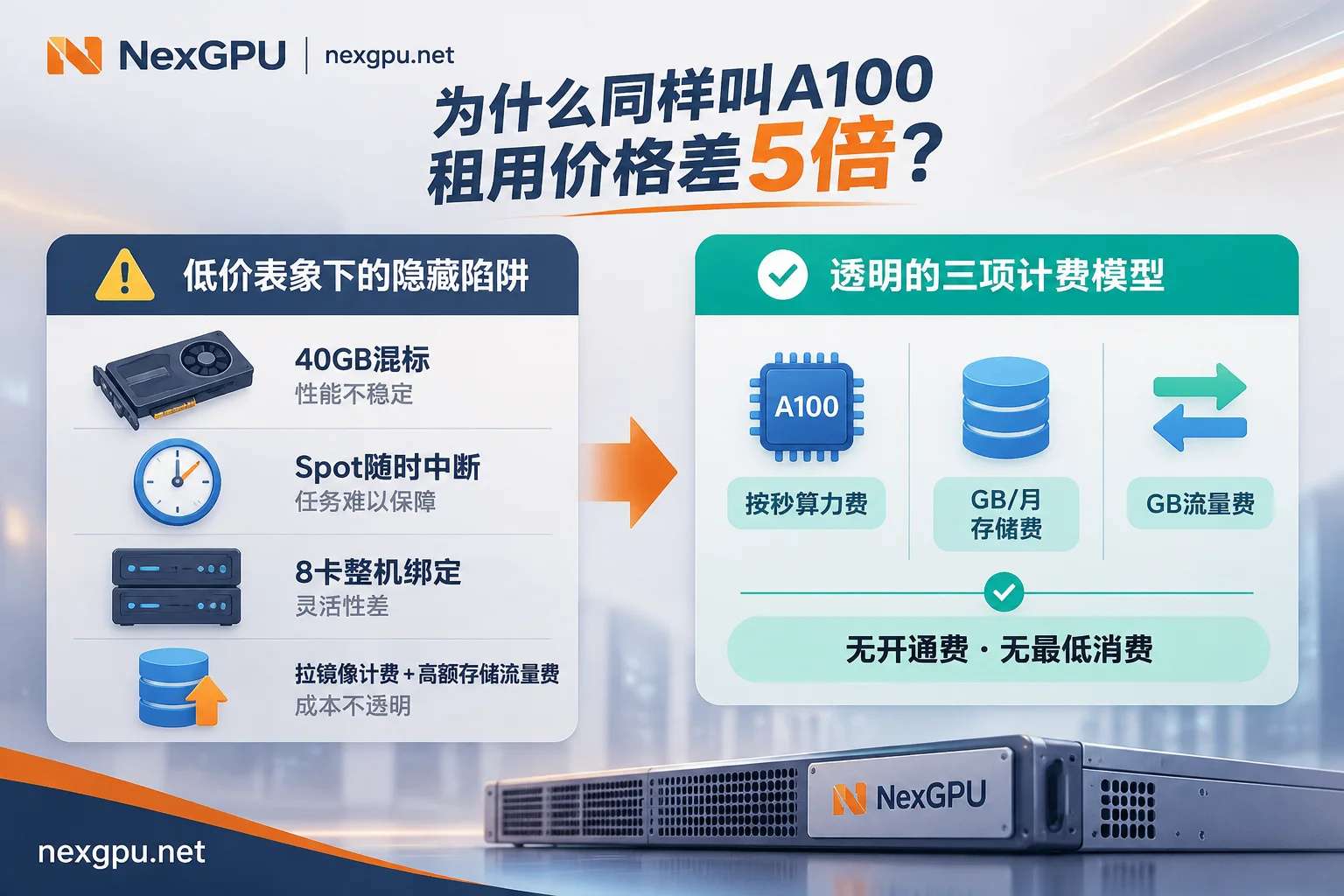
1. 40GB vs. 80GB, PCIe vs. SXM Mixed Labeling
Listings just say “A100”, but upon clicking you discover it's the 40GB version, or a single card plugged into a PCIe slot without NVLink. A100 40GB daily and hourly rents are usually nearly half of 80GB, and memory bandwidth drops from 2,039 GB/s on 80GB SXM to around 1,555 GB/s; if you've calculated to fit 32B/70B weights, renting the 40GB by mistake means starting over. For detailed hardware differences between these specs and interfaces, refer to our article “2026 A100 Rental Guide: How to Choose Between 40GB and 80GB, PCIe and SXM?”.
2. Hidden Amplification from Public Cloud “8-Card Bundling”
On traditional giants like AWS and Azure, A100s are often not sold per card but provided as 8×A100 whole machines by default. Even if you just want to run a 70B quantized inference evaluation or a single-card LoRA fine-tune, you must pay for the other 7 idle cards, instantly multiplying the actual task cost by 8.
3. Preemptible (Spot) Low Prices vs. Dedicated Stable Nodes
Many extremely low quotes of $0.31–$0.65/hour are Spot preemptible instances or shared host environments that can be evicted by higher-priced tasks at any time. For inference scripts that finish in 20 minutes, it's not a big deal; but if you're running a 10-hour fine-tune and get reclaimed before writing a checkpoint, the lost time and re-run electricity costs far exceed the few dimes saved.
4. The “Low Bare-Metal Price + High Surcharges” Billing Trap
Some platforms keep the bare-metal hourly rate very low but recoup the money in four areas:
- Minimum billing granularity: Less than 1 hour counts as 1 hour, or even daily minimums; debugging for 10 minutes still charges the full segment.
- Compute billing starts during image pull: When just booting and pulling a 30GB–50GB image or downloading hundreds of GB of weights, GPU utilization is 0% but compute billing is already ticking per second.
- Hidden add-ons: High monthly system/data disk fees, independent public IP fees, port mapping fees, or expensive outbound internet traffic fees (pulling model weights is a major cost).
- Supporting bottlenecks: Old hosts with low-frequency CPUs, small memory, or slow mechanical disks cause I/O stalls; the A100 spends half its time “waiting for data” while compute idles.
5. The Time Cost of Real-Name Approval and Quota Queuing
Traditional cloud providers often require enterprise real-name verification first, then submitting a ticket to apply for GPU quotas, with approval cycles of several days; if you're just validating a model or meeting an experiment deadline, this “time cost” is more fatal than the hourly price difference.
3. Don't Just Look at the Hourly Card Price: Calculate This Total Cost Before Renting an A100
Before ordering any A100 instance, it's advisable to use the following real-task total cost formula for an estimate:
Total cost per task = (effective running hours × locked compute hourly rate) + (occupied disk GB × monthly storage unit price × days alive ÷ 30) + (outbound traffic GB × traffic unit price) + additional fees (setup fee/port fee/minimum spend)
There's also a key utilization threshold. Industry estimates show that, compared to purchasing and depreciating an A100 node, when a team's average monthly effective card usage is below about 250 hours, on-demand rental is clearly more cost-effective than buying or fixed monthly packages.
The logic is simple: most R&D and fine-tuning tasks are “wavy”—run a training round for 4 hours, then stop to examine loss curves, clean datasets, and tweak hyperparameters for another 6 hours, plus unattended nights. If you choose a fixed monthly plan that can't “stop and stop compute billing”, the GPU idles for a large portion of time; the monthly unit price may look cheap, but the actual effective cost per hour doubles. For a breakdown of cloud instance storage and idle fees, see our article “2026 GPU Cloud Server Bill Breakdown: How to Avoid Hidden Costs”.
4. Late 2026: Should You Rent an A100 or Pay for RTX 5090 / H100?
This is the most common dilemma for users searching “A100 rental” in late 2026: the consumer-grade RTX 5090 (32GB GDDR7, 1,792 GB/s memory bandwidth) rents for as low as $0.497/hour** overseas (around **¥3.32–¥4.50/hour** domestically), and two 5090s combined offer 64GB memory at a rent similar to one A100 80GB; while the newer **H100 80GB** has also fallen to **$1.73–$3.03/hour overseas (around ¥9.41–¥18.80/hour domestically). How to choose?
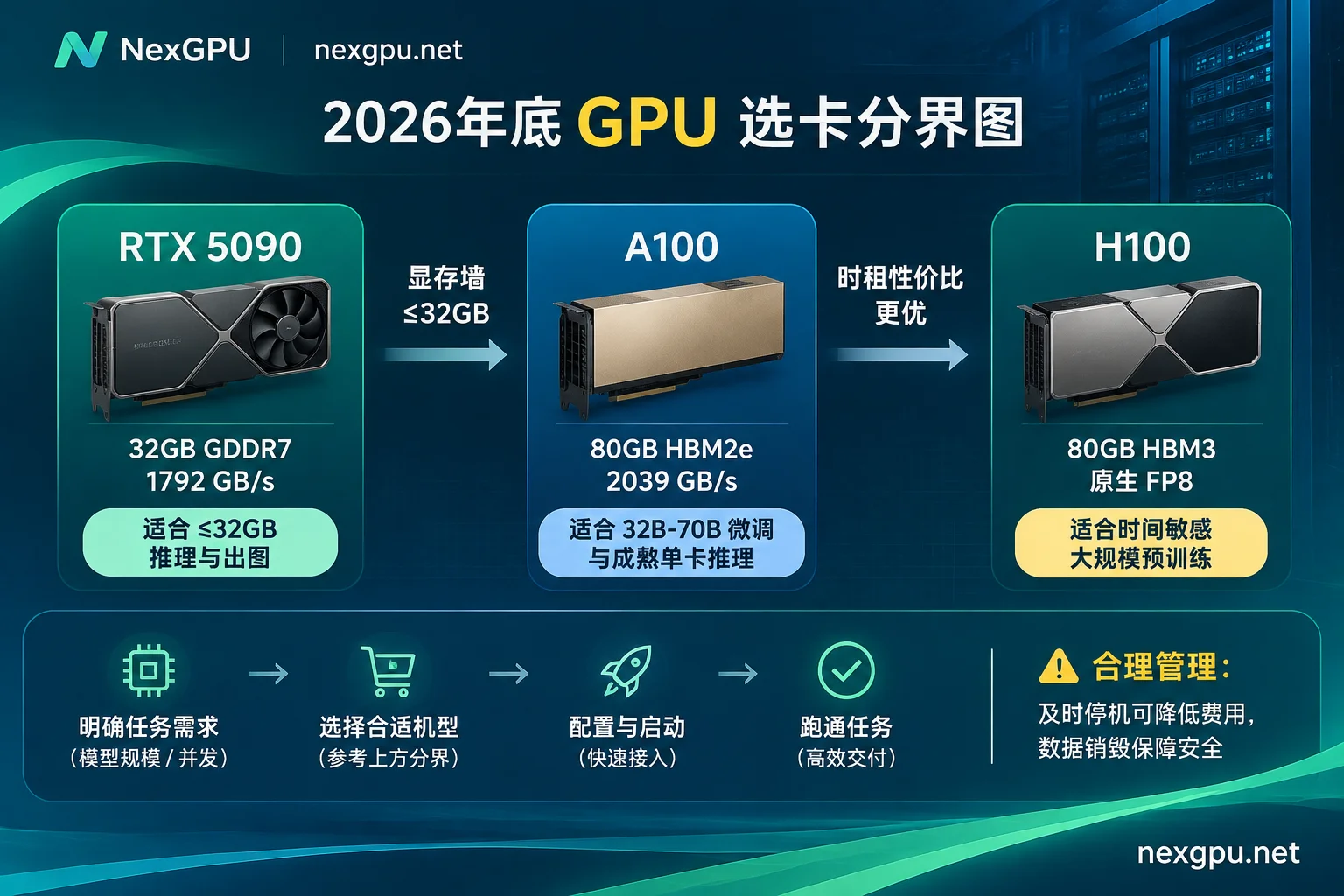
You can match directly by three hard boundaries:
- For tasks that fit within 32GB on a single card, prefer renting an RTX 5090; no need to force an A100:
For example, ComfyUI / FLUX image and video generation, 7B–14B fine-tuning, quantized 32B inference. The 5090 has high memory bandwidth of 1,792 GB/s and Blackwell compute advantages; single-card inference decoding and image generation are often faster than A100, and the hourly rate is lower. - For tasks between 32GB and 80GB, renting one A100 80GB beats combining two RTX 5090s:
Two 5090s only have 64GB total memory and communicate over PCIe; running 70B quantized inference or 32B full-precision/LoRA long-context fine-tuning involves cross-card tensor parallelism communication overhead and potential compatibility issues with older codebases or specific CUDA operators under the new Blackwell architecture. One A100 80GB (2,039 GB/s HBM2e bandwidth) can handle it on a single card, eliminating the communication tax of splitting, and offers near-zero compatibility issues from PyTorch, DeepSpeed to vLLM, LLaMA Factory; moreover, for FP64 double-precision scientific computing, A100 is also irreplaceable by consumer cards. - When is it worth paying more to upgrade to H100?
Only when your training or high-concurrency inference pipeline clearly benefits from Hopper's native FP8 acceleration, or you're doing large-scale pre-training or multi-day long training and are extremely sensitive to “delivery days”, does spending 2–3x the hourly rate on H100 pay off; for daily fine-tuning and regular BF16/INT4 inference, A100 remains the more stable cost-effective baseline.
5. How to Transparently Rent an A100 on NexGPU: Reduce Hidden Costs to Zero
If you don't want to deal with “minimum spend, bundled disks, quota queues, hidden markups” when comparing prices, you can directly check prices and launch instances in the A100 rental marketplace as follows:
- No real-name verification or quotas; no card binding needed to see real machine unit prices
On NexGPU, simply register with an email to access the console and view real-time available nodes and prices; no real-name authentication, no quota application, no need to bind a payment method first; actual top-ups support USDT (TRC20) and Alipay. - Public per-machine price comparison + memory guard to prevent “buying wrong specs”
In the GPU marketplace, consumer-grade cards (RTX 3090/4090/5090) and data-center-grade cards (A100, H100, H200, B200) are listed separately; each row is a real rentable physical machine. You can filter by memory size, price, region, reliability, bandwidth, minimum card count, and each machine separately lists compute unit price and disk unit price (actual real-time unit prices, storage, and traffic prices are subject to the official website).
More practically, when you first select an environment and then filter machines, nodes with insufficient memory are directly flagged by the system with reasons, preventing OOM from renting too small from the start. For multi-card DeepSpeed, FSDP, or Megatron distributed training, multi-card nodes can be filtered by minimum card count and self-ordered as whole machines (下单金额 = 单卡价 × 卡数). Three transparent billing items + price lock at order + stop-instance-keep-disk
NexGPU's billing structure has only compute, storage, and traffic three items, listed in real-time on the instance details page; no minimum spend, no setup fee, no port fee, no image licensing fee, and no minimum rental duration:- Compute fee: Metered per second, priced per hour, billing starts only when the instance enters “running” state, stops immediately on shutdown or destruction; the unit price at order is locked until the instance is destroyed.
- Storage fee: Billed per GB/month, starting from instance creation (including image pull phase), continues after shutdown, stops only on destruction. So when you finish a training round and need to modify code or analyze data, simply click stop-instance-keep-disk to keep only a small monthly fee for tens of GB of disk, bringing expensive A100 compute costs to zero (see more billing boundaries in the billing documentation).
- Prepaid risk control: Warning emails are sent when balance is low; when balance is exhausted, the instance is automatically stopped (not destroyed) first, and only auto-destroyed after negative balance exceeds a set duration; top up in between to recover.
- Pre-built images without compilation & dedicated container direct connection
In the image template page, vLLM, SGLang, Ollama (launches OpenAI-compatible API), LLaMA Factory, Axolotl, Unsloth, PyTorch, WhisperX, RAPIDS, etc. are all pre-installed for free without tiering; you can also fill in your own public or private Docker image and customize startup commands (if your code is locked to a specific CUDA version, use your own image). Instances are dedicated containers, providing browser root terminal, SSH direct connection (public IP + port, no jump host), and one-click Jupyter, plus a separate set of backup ports for business services. - Enterprise clusters and long-term custom rentals
If your team needs A100 reserved instances, monthly/annual packages, RDMA high-speed interconnect, private networks, dedicated compute pools, or requires contracts, corporate payment with invoices, and PO procurement, contact us directly via the enterprise contact page for customization.
6. 5 Quick Self-Check Items Before Ordering an A100
Before clicking “Create Instance”, use these 5 items for a final check:
- Confirm memory and version: First check the memory threshold of your target model after quantization in the model-to-card selection guide, then confirm whether the page lists 80GB or 40GB, and view compute price and disk price separately.
- If a single card fits, don't force multi-card splitting: For 32B–70B tasks that can run on one A100 80GB, prefer single-card execution to save cross-card communication and multi-card debugging overhead.
- Set disk capacity and ports in one go: Note that NexGPU instances do not support online disk expansion or adding/removing port mappings after creation; when choosing disk, leave enough room for model weights, datasets, and checkpoints.
- Distinguish the data boundary between “stop” and “destroy”: The platform does not read or provide disk backups; destruction requires entering the instance ID for confirmation, and the disk is immediately and permanently released, unrecoverable. For long-term code and data retention, use “stop”; before permanent abandonment, be sure to pull model weights and logs back to local or object storage.
- Watch for warning emails before balance is exhausted: Ensure sufficient account balance before long-running tasks, enable automatic checkpoint saving in scripts to avoid losing training progress due to unexpected shutdowns.



