 NexGPU-算力租赁,GPU服务器,GPU云算力,AI服务器租用-新闻博客
When evaluating GPU cloud servers, many developers and procurement managers have encountered the same confusion: despite carefully comparing the hourly GPU price before ordering, why does the actual expense at month-end or project completion end up 20% or even 40% higher than the initial budget calculated as "GPU-hour price × estimated running hours"?
Entering 2026, this phenomenon of "seemingly cheap GPU unit price but frequently exceeding budget on the overall bill" has become increasingly prominent in the industry. On one hand, as large model fine-tuning, high-concurrency inference, AI video generation, and 3D rendering become commonplace, project throughput requirements for disk capacity and data transfer have multiplied. On the other hand, due to the global shift of storage chip production capacity toward high-bandwidth memory (HBM), procurement costs for conventional server memory (DRAM) and flash storage (NAND) have risen sharply since late 2025. To maintain the attractive low GPU prices on the surface, many cloud platforms have shifted costs into various additional billing items.
To truly spend your budget wisely, you cannot just look at the starting GPU price on promotional pages; you must break down the real cost of the entire workflow. This article will dissect the four most common hidden billing traps when renting GPU cloud servers in 2026, and combine them with NexGPU's transparent billing and instance management mechanisms to provide a practical cost-calculation solution.
Why Does Looking Only at "Hourly GPU Price" Lead to Miscalculating the Total Bill? Breaking Down Four Hidden Billing Traps
On traditional public clouds or some compute rental platforms, GPU instance pricing is often split into a dozen billing dimensions. If you only focus on the GPU compute price itself, the following aspects can easily eat into your budget without you realizing it:
1. "High-cost Idling" During Environment Setup and Weight Download
Getting a large model or complex generative workflow running often requires downloading tens or even hundreds of GB of model weights and dependencies. If you rent a high-end GPU billed by the hour but spend an hour and a half after boot compiling drivers, configuring CUDA, and slowly pulling images and weights, the GPU is idling at 0% utilization while the meter runs at full price. Worse, if you fail to accurately estimate the VRAM threshold after quantization when selecting a GPU, you may only discover out-of-memory (OOM) errors after spending money downloading weights, completely wasting the time and compute costs.
2. Compute and Storage Bundling, or Ambiguous "Stopping Fees"
During daily development, code debugging, or waiting for the next batch of business data, machines do not need to run at full capacity 24/7. Many people shut down their machines at the end of the day, thinking the meter stops, only to find a huge bill at month-end. The reason is that some platforms still charge a proportional GPU occupancy fee even when powered off; while others release the GPU but charge high snapshot fees or tiered excess storage fees for retained hundreds of GB model disks, without clearly indicating the unit price before boot.
3. Network Port Fees and Traffic Assassins Hidden in the Fine Print
In scenarios such as AI video generation, multimodal data processing, or cross-node model distribution, data ingress and egress are frequent. Many cloud providers waive data upload (Ingress) fees but set high tiered unit prices for data export and public network downstream traffic (Egress), and even charge extra for opening public IPs, adding port mappings, or using specific base images. For teams that frequently download rendered outputs or fine-tuned LoRA weights locally, traffic and network surcharges can sometimes account for a quarter of the total bill.
4. Price Fluctuations During Instance Operation and Hard Thresholds
Some platforms use opaque dynamic bidding or complex package mechanisms, with minimum consumption, activation fees, or minimum rental duration restrictions. Sometimes they adjust the pay-as-you-go unit price mid-operation due to tight data center resources, or directly destroy instances when the balance is slightly insufficient, causing training results that have not been exported in time to be lost forever.
Leave Complexity to the Underlying Layer, Return Simplicity to the Bill: NexGPU's Transparent Billing Logic
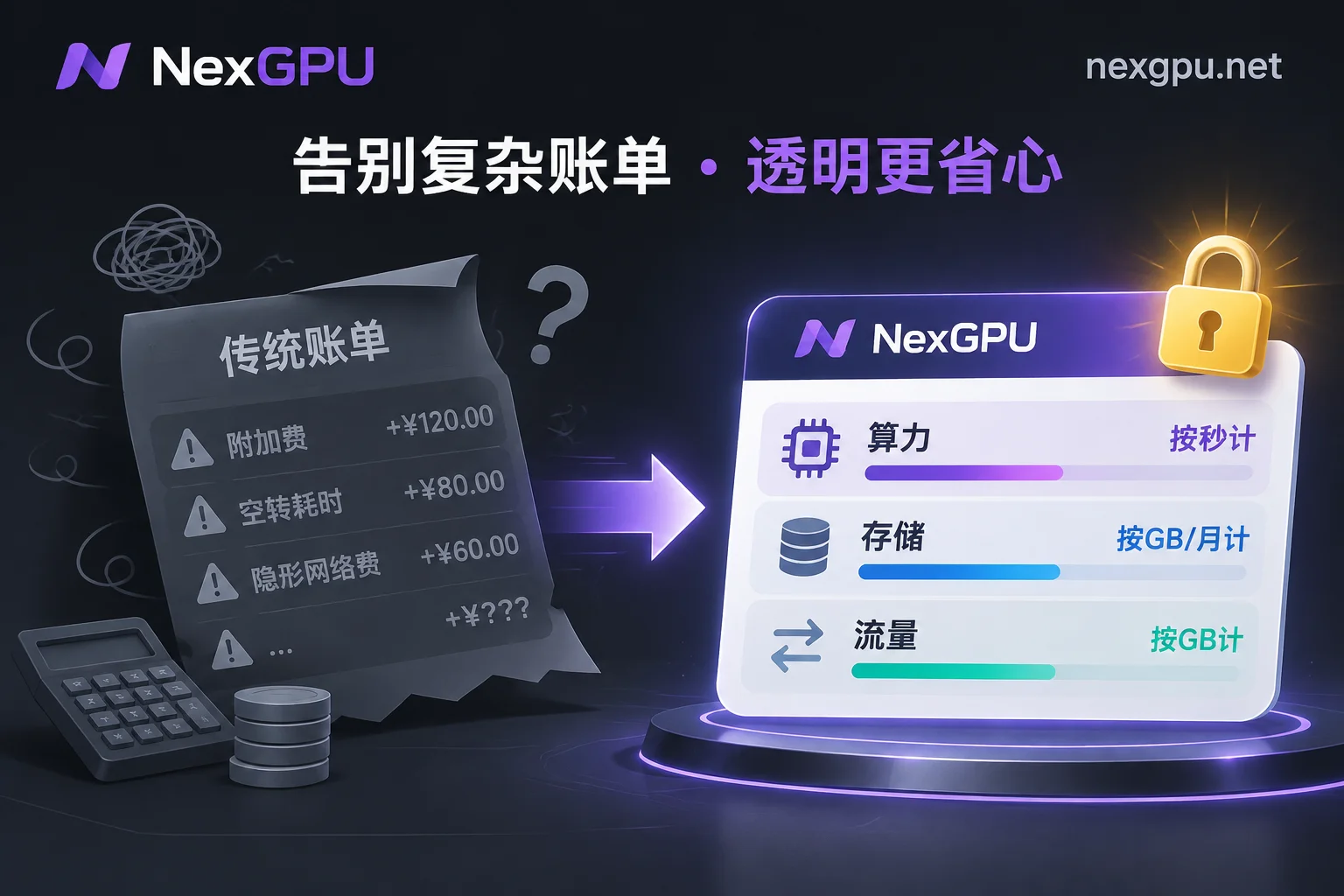
In response to the widespread billing fog in the industry, NexGPU established minimalist and transparent billing rules from the outset: no minimum consumption, no activation fee, no port fee, no image licensing fee, and no minimum rental duration restriction.
In the GPU marketplace list on the NexGPU pricing page, each row represents a real physical machine available for rent. Before ordering, you can clearly see the machine's hardware specifications, location, network bandwidth, and separately marked compute unit price and disk unit price. Throughout the entire lifecycle, your bill consists of only three clear items, all listed in real-time on the instance details page:
| Billing Item | Measurement and Pricing Unit | Billing Start and End Points | Key Pitfall Avoidance Rules and Cost-Saving Tips |
|---|---|---|---|
| Compute Fee | Measured per second, priced per hour | Starts when the instance enters "Running"; stops immediately upon shutdown or destruction | The unit price at order time is locked until the instance is destroyed; for multi-GPU nodes rented as a whole, the order amount strictly equals 单卡价 × 卡数, with no additional cluster surcharge. |
| Storage Fee | Priced per GB/month | Starts from instance creation (including image pulling); continues after shutdown, stops only upon destruction | Each machine's disk unit price is separately indicated in the marketplace list; during shutdown while retaining data, you only pay the very low pure storage cost, with no compute fee at all. |
| Traffic Fee | Priced per GB | Calculated based on actual traffic generated | Each instance comes with a public IP, port mapping, and backup ports, with no port occupancy fee or fixed bandwidth monthly fee. |
For more details on the settlement of each fee, you can refer to the official billing documentation at any time. Even better, developers can register with just an email, without cumbersome real-name verification and quota applications, and without binding a payment method in advance. After registration, you can directly enter the marketplace to view real-time prices of all nodes.
Four Practical Cost-Reduction Habits for Renting GPU Cloud Servers in 2026
Now that the billing rules are clear, the next step is how to use platform features to maximize every bit of compute budget in specific development, fine-tuning, inference, and rendering tasks. If you are new to cloud compute, we recommend first reading the 2026 GPU Rental Full Process Guide: From RTX 5090 to H200/B200 - GPU Selection, Boot, and Cost Control to build an overall concept, and then streamline daily expenses through the following four habits:
1. Check the "VRAM Account" Before Ordering, Avoid Blind Trial and Hardware Mismatch
Buying too high wastes compute; buying too low fails to run and wastes boot fees. Before renting a GPU, it is advisable to check the Model and GPU Selection Guide on NexGPU. Whether for large language models, image and video generation, speech recognition and synthesis, or OCR and AI agents, the guide clearly lists the current versions of mainstream open-source models, VRAM thresholds after quantization, and recommended GPU models (for example, the single-model page Qwen GPU Selection and Deployment Steps fully lists the entire process from opening a GPU to starting the service).
In addition, you can refer to the Scenario Practices Page, which directly provides required VRAM, recommended GPU types, suitable images, and approximate cost references for 11 typical scenarios such as private deployment of large models, AI fine-tuning, and Blender/V-Ray graphics rendering.
When operating in the console, if you adopt the "select environment first, then filter machines" process, the system will automatically check for you: any machine with insufficient VRAM for the current environment requirements will be clearly marked with the reason, fundamentally eliminating the trial-and-error cost of "opening the wrong GPU." Consumer-grade GPUs (such as RTX 3090, 4090, 5090, etc.) and data center GPUs (such as A100, H100, H200, B200, etc.) are priced separately, making it easy to precisely match according to actual load (for detailed filtering tips, see the How to Choose a GPU document).
2. Leverage Pre-built Images and Direct SSH to Shorten "Boot to Work" to Minutes
Since storage fees start when pulling images, and compute fees start as soon as the instance enters running state, shortening environment preparation time directly saves money.
Do not manually install drivers in a blank system every time. In the Image Template Library, the platform provides a rich set of templates covering large model inference (vLLM, TGI, Ollama, SGLang, which directly provide OpenAI-compatible interfaces after launch), training and fine-tuning (PyTorch, LLaMA Factory, Axolotl, Unsloth), image and video (ComfyUI, AUTOMATIC1111), speech (Whisper series), and data processing (RAPIDS, Jupyter). These templates are free and open to all tiers, pre-installed with drivers, CUDA, and core dependencies, truly ready to use upon boot. If your project code strictly locks a specific CUDA version, the official website also supports and recommends directly entering your own Docker image (public or private repositories), custom startup commands, and environment variables.
After boot, without cumbersome jump servers, you can directly SSH using the public IP and port, or one-click open Jupyter and browser-based web terminal with tokens (see Instance Connection Guide). If you prefer visual operation, you can also one-click install the aaPanel to manage files, processes, and scheduled tasks in the browser (only occupies disk space, no additional software fee).
3. Strictly Distinguish "Shutdown with Disk Retention" and "Destroy/Release" to Manage Intermittent Workflows
This is the most critical operation for controlling medium- to long-term costs (for specific mechanisms, see Instance Management Documentation):
- When to use "Shutdown"?
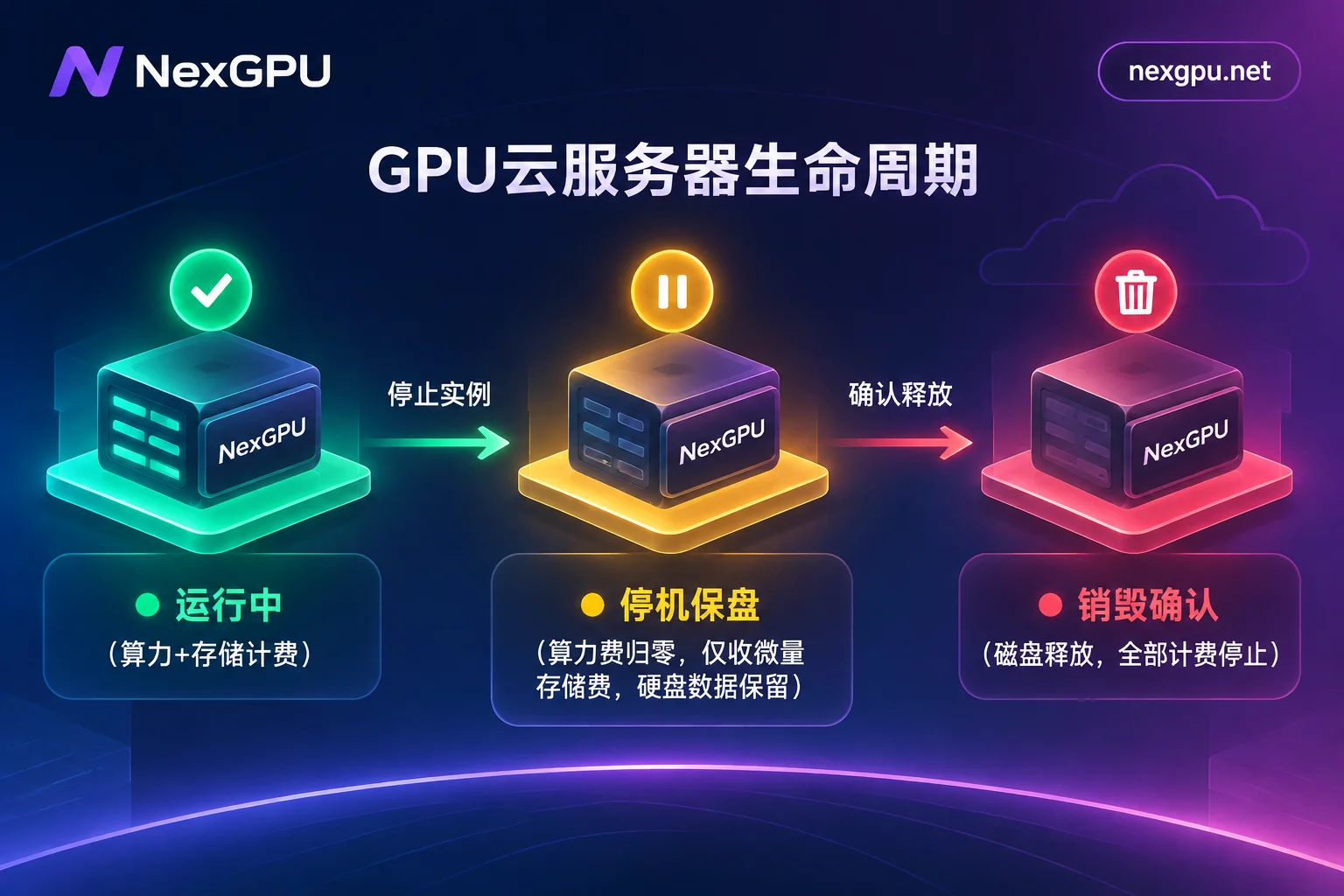
When you have set up a complex development environment (such as ComfyUI fully loaded with custom nodes and hundreds of GB of models, or a daily development machine being debugged in stages), and you are not running tasks after work today but will continue tomorrow, click Shutdown. After shutdown, the expensive GPU compute fee measured per second immediately drops to zero, your disk and data are fully retained, and only a tiny storage fee calculated per GB/month is charged. You can restart whenever needed. For cost-saving practices of this workflow, refer to our previous articles How to Set Up a Daily Development Environment on GPU Cloud Servers: From Image Selection, SSH Direct Connection to Shutdown with Disk Retention and ComfyUI Cloud GPU Environment Setup and Cost Control. - When to use "Destroy"?
Since instances do not support dynamic disk expansion after creation, and for privacy and security reasons (instances are exclusive containers, and the platform never reads or backs up disk contents), no underlying data backup is provided. Therefore, when your fine-tuned weights have been exported, video renderings downloaded locally, and you are sure you no longer need the machine, be sure to copy important data out and then execute Destroy. Destruction requires entering the instance ID for secondary confirmation; once confirmed, the disk is immediately released, and storage fees completely stop.
Pitfall Prevention Tip: NexGPU uses a prepaid model (supports Alipay and USDT-TRC20 deposits). If the account balance is low, the system will first send a warning email; if the balance is exhausted, the platform will automatically shut down first (without destroying data), and only automatically destroy after the negative balance exceeds a set duration. You can seamlessly restore instance operation by recharging in time, preventing unexpected overspending and giving you enough time to rescue data.
4. Utilize Concurrency and Transparent Multi-GPU Pricing to Optimize Team-Level and Batch Tasks
For teams running batch tasks or large model training, extending single-machine runtime is often less cost-effective than launching high concurrency for a short period. On NexGPU, there is no limit to the number of instances a single account can run simultaneously (only constrained by account balance).
For example, when rendering Blender 3D animations, rather than renting a single-GPU machine for three days and nights, it is better to launch multiple instances for segmented parallel rendering, complete the job in a few hours, and immediately destroy to release disks. Not only does delivery speed multiply, but total compute time and storage occupancy fees are actually lower.
In scenarios requiring DeepSpeed, FSDP, or Megatron distributed training and large-parameter inference, R&D teams can directly filter by "minimum GPU count" in the GPU marketplace to self-service order multi-GPU nodes such as A100, H100, H200 (further reading: 2026 A100 Rental Guide: From On-Demand GPU Opening to Shutdown with Disk Retention Cost Practices). For enterprise-level long-term projects requiring RDMA high-speed interconnect, private networks, data isolation, dedicated compute clusters, or financial compliance needs such as monthly/yearly packages, reserved instances, contracts, corporate payments and invoicing, PO procurement, you can directly contact sales to customize an enterprise solution.
Conclusion: Let Compute Return to a Pure Productivity Tool
In 2026, as AI applications are fully deployed, renting a GPU cloud server should not be a game of wits with cloud provider billing rules. Clearly marking the compute and disk unit prices of each machine, eliminating various hidden surcharges, and returning the control of per-second billing elasticity and shutdown with disk retention to users—only then can independent creators, developers, and enterprise R&D teams truly calculate every expense.
If you are about to start a new model experiment or rendering project, why not browse the Quick Start Documentation and FAQ, or go directly to the NexGPU Compute Marketplace to view real-time nodes and prices, and start a cloud compute experience with transparent billing and on-demand stopping.



