 NexGPU-算力租赁,GPU服务器,GPU云算力,AI服务器租用-新闻博客
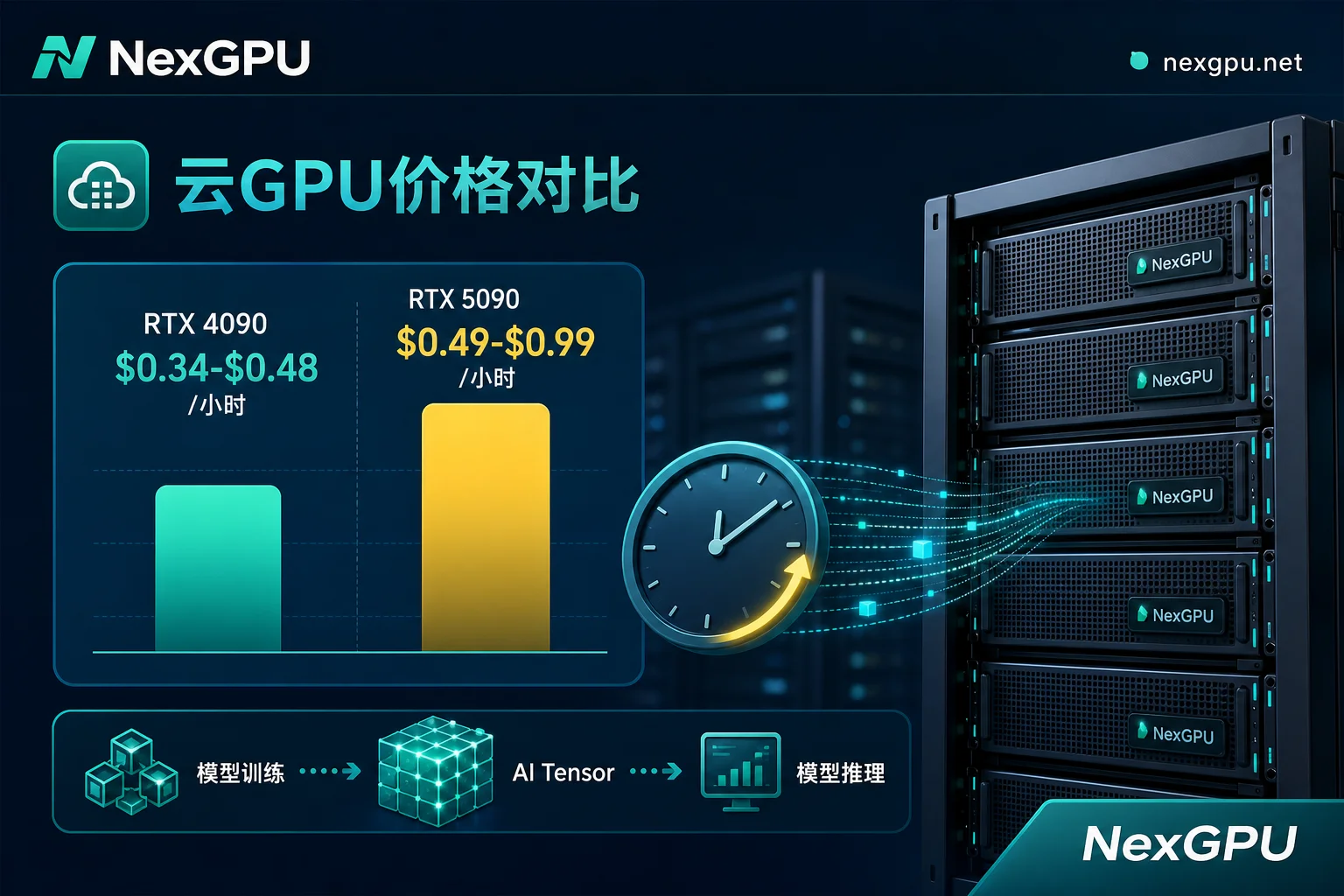
As of August 2026, the on-demand rental price for the RTX 5090 has stabilized at $0.49–$0.99/hour, while the median on-demand price for RTX 4090 cloud servers sits at $0.34–$0.48 (Spot as low as $0.13–$0.22). The price gap is less than double, raising the question: is it still worthwhile to rent a 24GB RTX 4090 cloud server, or should you pay extra for the 32GB RTX 5090? The answer isn't in the single-card specs but in your own model size, context length, and concurrency—specifically whether that 24GB VRAM will be overwhelmed by KV cache.
1. Consumer Cloud GPU Price Landscape in August 2026
First, let's look at the price ranges from market monitoring (August 2026):
- RTX 4090 (24GB GDDR6X): Median on-demand $0.34–$0.48/hour, Spot ~$0.13–$0.22/hour.
- RTX 5090 (32GB GDDR7): Mainstream on-demand hosting $0.49–$0.99/hour, bare-bones P2P platforms starting at $0.21–$0.28/hour.
If you're just asking "how much does an RTX 4090 cloud server cost per hour," the answer is the median on-demand rate of $0.34–$0.48/hour. But focusing solely on unit price is useless—if your workload constantly OOMs on 24GB, the savings on hourly rental will be eaten by retries and interruptions. The VRAM step is the real dividing line.
2. The True Limits of RTX 4090 Cloud Servers: How Weights, KV Cache, and Activations Split the 24GB
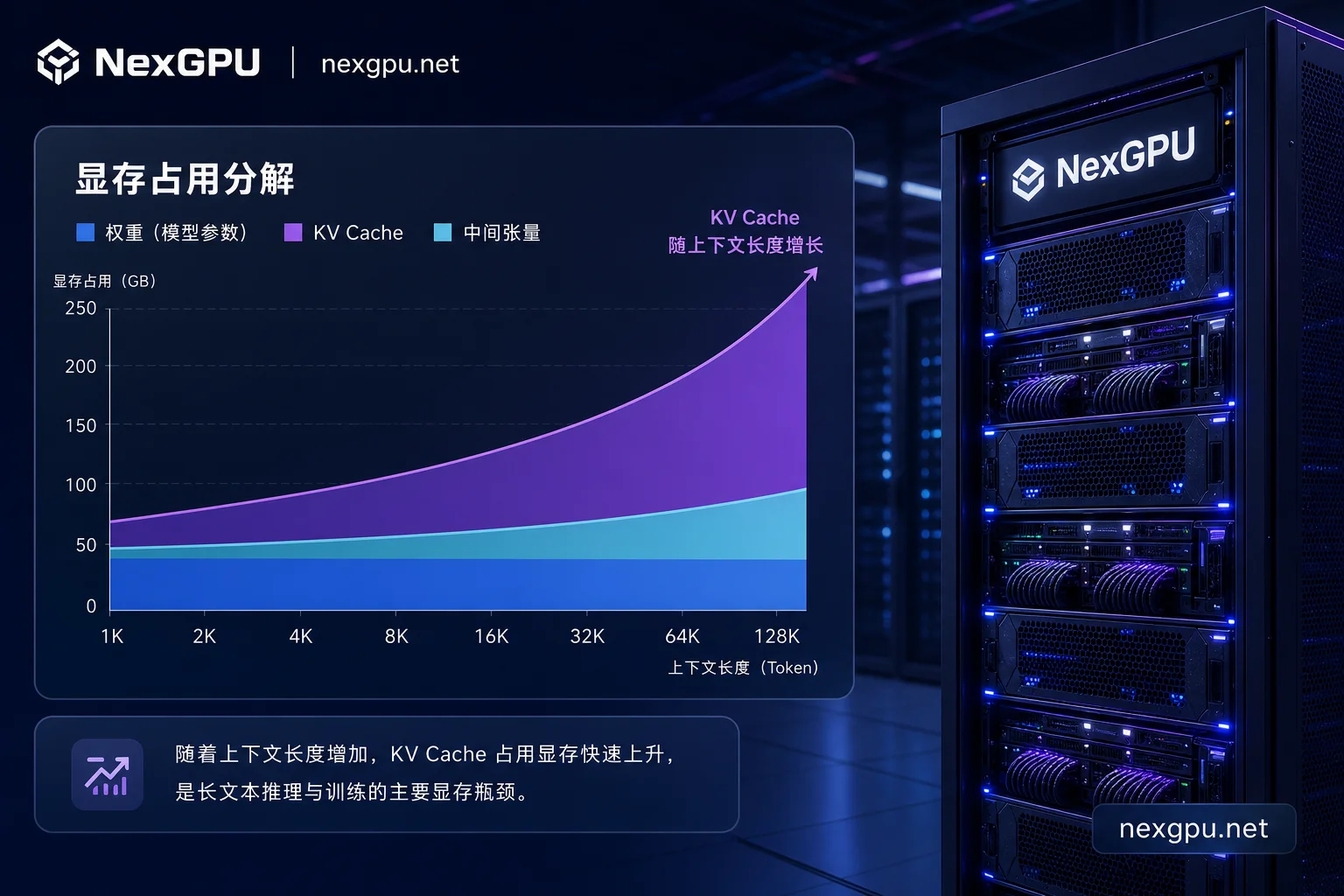
Many assume VRAM only stores model weights. In reality, LLM inference VRAM consumption is a sum of three parts: fixed model weights + dynamic KV cache + runtime activations. The KV cache is the hidden VRAM hog, expanding linearly with context token count and concurrent requests.
For example, from VRAM calculation research: Llama 3 8B at 8K context uses only about 1GB for KV cache; but when context extends to 128K, or concurrency spikes, a single request's KV cache can reach 16GB. What does that mean? FP16 weights for an 8B model are about 16GB, add 16GB KV cache, plus a few GB of activations, and the 24GB RTX 4090 cloud server overflows immediately.
So "what model size can 24GB run" can't be judged by weights alone; you must factor in context and concurrency.
3. Converting Context Length and Concurrency into VRAM: A Reusable Estimation Method
Here's a reusable estimation approach, all numbers are order-of-magnitude extrapolations from formulas, not measured benchmarks, so don't treat them as evaluation conclusions.
Step 1: Calculate weights. Under FP16, every 1B parameters needs about 2GB; 8B ≈ 16GB, 13B ≈ 26GB, 20B ≈ 40GB, 35B ≈ 70GB. With 4-bit quantization, weights roughly divide by 4.
Step 2: Calculate KV cache. Using a public VRAM calculation study as anchor: Llama 3 8B at 8K context has ~1GB KV cache (from VRAM calculation research), and KV cache scales linearly with context length and concurrency—i.e., roughly +1GB per 8K context per concurrent request for an 8B-class model; at 128K that anchor corresponds to ~16GB. For larger sizes like 13B/30B, we only note that it can be roughly extrapolated proportionally by parameter scale, but we won't give precise decimals. All numbers are order-of-magnitude estimates from formulas, not measured data.
Step 3: Reserve headroom for activations. Recommend at least 10%–20%.
The table below shows overflow thresholds for 8B, 13B, and 20B–35B model tiers under different context and concurrency (linear extrapolation based on the anchor, no quantization):
| Model Size | Weights (FP16, GB) | Context | Concurrency | Est. Total VRAM (GB) | Sufficient on 24GB? | Sufficient on 32GB? |
|---|---|---|---|---|---|---|
| 8B | 16 | 8K | 1 | 17–18 | ✅ | ✅ |
| 8B | 16 | 32K | 1 | 21–23 | ⚠️ Borderline | ✅ |
| 8B | 16 | 32K | 4 | 33–36 | ❌ Likely OOM | ❌ Likely OOM |
| 13B | 26 | 8K | 1 | 27–30 | ❌ | ✅ |
| 13B | 26 | 32K | 2 | 39–43 | ❌ | ❌ |
| 20B–35B | 40–70 | 8K | 1 | 42–75 | ❌ | ❌ |
All values in the table are linearly extrapolated from the public VRAM calculation research conclusion that Llama 3 8B has ~1GB KV cache at 8K context; they are order-of-magnitude estimates. Actual usage varies with framework, quantization, and implementations like PagedAttention. In other words, 32GB is better suited for long-context and multi-concurrency workloads of 8B–13B in unquantized scenarios; for 20B–35B, quantization or multi-GPU is still required.
4. What Kind of Overflow Does 32GB GDDR7 and 1.79 TB/s Bandwidth Solve?
Compared to the RTX 4090, the RTX 5090 has 8GB more VRAM (32GB vs 24GB) and about 78% higher bandwidth (1,792 GB/s vs 1,008 GB/s). These two capabilities aren't for running larger models, but for accommodating longer contexts and higher concurrency on the same model.
Simply put: the same 13B model, 24GB might handle only a single request at 8K context, while 32GB can handle 32K or even multiple concurrent requests because there's room for the KV cache. The bandwidth boost speeds up VRAM transfers during batch inference. This is about "accommodating an extra tier of concurrency and context," not a generational leap in compute. For 20B–35B models, with 4-bit quantization, weights can be compressed to ~10–18GB (estimated by dividing FP16 weights by ~4; actual usage varies with quantization scheme and implementation), leaving headroom for KV cache, enabling single-card deployment on 32GB. But unquantized 20B–35B (FP16 weights 40–70GB) still doesn't fit on a single 32GB card.
5. Unit Price ≠ Cost: Compare 4090 vs 5090 Using Unit Output Cost
Price is only the surface; unit output cost determines your wallet. Basic formula: hourly rental ÷ generation speed = cost per million tokens. Note this is a calculation framework, not measured numbers, because generation speed depends on the model, framework, and workload. Based on cross-GPU AI benchmark reviews from May–July 2026 (including cost-per-million-token metrics), on sub-13B models, the RTX 4090 has a lower hourly rate ($0.34–$0.48 vs $0.49–$0.99), and if speed isn't significantly different, unit output cost is usually better.
Conversely, on 20B–35B models, if 24GB OOMs frequently, you're forced to choose between reducing context, cutting concurrency, or switching cards; in that case, the 32GB RTX 5090 might actually save money—not only avoiding retries and interruptions but also allowing larger batch sizes to amortize unit costs.
Additionally, Spot (4090 at ~$0.13–$0.22/hour) suits interruptible batch tasks, not online services—because instances can be reclaimed anytime. This is a key point in on-demand cost accounting.
6. When to Stick with 4090, When to Switch to 5090, and When Consumer Cards Are Out Entirely
Here's a three-tier decision framework to directly answer "how to choose between RTX 4090 and RTX 5090 cloud servers":
| Scenario | Recommended Card | Rationale |
|---|---|---|
| Short context (≤8K), low concurrency, 8B–13B models | RTX 4090 (24GB) | Lower hourly rate, better unit output cost |
| Long context (32K+) or high concurrency, 20B–35B quantized models | RTX 5090 (32GB) | 32GB VRAM accommodates KV cache, avoids OOM |
| 70B FP16 or larger | Consumer cards out entirely | Weights alone ~140GB, require multi-GPU or data center cards |
Let's debunk a persistent myth: running 70B FP16 on a single 32GB card is impossible. 70B FP16 static weights alone are ~140GB; even with 4-bit quantization, it's ~35GB, still exceeding single-card 32GB. So "32GB losslessly hosts 70B" is a pure arithmetic error.
7. Conduct a Cross-Card Comparison with On-Demand Resources
Paper calculations only go so far. Such comparative tests are best done with on-demand cloud compute. Take NexGPU as an example: it's a GPU cloud computing and AI server rental platform offering multiple GPU server models, pay-as-you-go, ready-to-use, with pre-built model and application templates, allowing you to deploy the same model on both card types without repetitive environment setup. I recommend running the same model, same context length, and same concurrency gradient on both 24GB and 32GB cards. Record fields as follows:
| Card | Model | Context Length | Concurrency | Peak VRAM (GB) | First Token Latency | Stable Throughput (Tokens/s) | OOM? | Actual Bill (USD) |
|---|---|---|---|---|---|---|---|---|
| RTX 4090 | Your model | e.g., 8K / 32K | 1 / 4 / 8 | ? | ? | ? | ? | ? |
| RTX 5090 | Same | Same | Same | ? | ? | ? | ? | ? |
Plug the two throughputs and two bills into the unit output cost formula (hourly rate ÷ generation speed) to replace paper estimates with real data.
8. Selection Checklist and Four Common Misjudgments
Finally, here's a self-check list to avoid four high-frequency pitfalls:
- Only counting weights, ignoring KV cache → Fix: Use the three-step method above to add KV cache.
- Planning VRAM based on average concurrency → Fix: VRAM must be reserved for peak (or P95/P99 percentile) concurrency; average concurrency is only for cost estimation because a single concurrency spike can trigger OOM and interrupt the entire service.
- Treating Spot low prices as the cost baseline for online services → Fix: Spot is only for interruptible tasks.
- Believing a single 32GB card can run 70B FP16 losslessly → Fix: 70B FP16 is ~140GB; even quantized it's ~35GB, still over single-card capacity.
The VRAM step is right there—calculate your context and concurrency, and you'll know whether to stay on RTX 4090 cloud servers or upgrade to the 32GB RTX 5090.




Comments(0)