 NexGPU-算力租赁,GPU服务器,GPU云算力,AI服务器租用-新闻博客
Many people focus on the difficulty of buying GPUs and the lengthening delivery times, but overlook an even more painful reality: the cards they already have sit idle much of the time. Industry data shows that in typical ML workloads, GPUs are idle 60-80% of the time, and some Kubernetes clusters average only about 5% utilization. That means the actual compute you're using is just a fraction of what you bought. Training clusters may run at 95% saturation, but inference side can be idle 30-60% of the day. Shortage and waste coexist, and money quietly leaks away.
First, look at the shortage side. Cards like H100 and H200 have delivery lead times of 36-52 weeks, not because of the chip die itself, but because HBM memory and TSMC's CoWoS packaging capacity are locked in by big players. The Blackwell B200 is even scheduled into 2027. Small and medium teams trying to scale up training often have to squeeze into on-demand instances, paying double with no guarantee of availability. Planning cycles shrink from quarters to weeks, and training task queues and rising inference token costs become the norm.
On the other hand, the phenomenon of high purchase costs but relatively low rental prices has also sparked discussion: if you calculate based on five-year depreciation and full load, some small suppliers' rental prices can barely cover initial investment. This is more of an allocation and utilization issue—large clusters have bursty training needs, and inference demand is scattered, so many cards are reserved but idle. You pay full price but get only half or even less of the actual output.
For small and medium teams, trying to build your own or long-term reservations can easily backfire. Buying for peak demand means idle time during normal operation; or treating A100 as a universal card, running preprocessing, small model fine-tuning, and other tasks on high-end cards, which is even more wasteful. Leaving Jupyter notebooks running over a weekend can rack up hundreds of dollars in extra bills. In multi-node tasks, communication bottlenecks or slow data loading can drop SM utilization below 40%, and actual FLOPS may be only a fraction of theoretical peak.
The key to solving this is to "match demand, use elastically, and continuously optimize." The first step is to change how you choose hardware. Data preprocessing and tokenization can use CPUs or low-end cards; fine-tuning 7B-13B models can often be done on a mid-range card with gradient checkpointing; only truly large model pretraining requires H100 clusters. Inference is often memory-bound, so L4 or similar cards offer better cost-performance. Don't go all-in on flagship cards.

Second, make good use of interruptible instances. Spot or preemptible instances can cut costs by 40-70%. During training, checkpoint every 15-30 minutes, saving model state, optimizer, and data location to persistent network storage, not local disks. If the instance is reclaimed, you lose at most half an hour of progress, but save a big chunk of money. Some teams have used this method to bring down the cost of training 70B models to an acceptable range. For inference, use on-demand as baseline, Spot for spikes, with load balancers automatically switching and a 20% buffer capacity.
On the code side, it's not complex. Write a simple save/load function in PyTorch, call it periodically in the training loop, and automatically resume on startup. The key is to save to S3 or similar persistent storage so data survives instance termination. Then add mixed precision (BF16/FP16), Flash Attention, 8-bit optimizers, and gradient accumulation, which can reduce memory requirements severalfold, allowing the same task to run on fewer or cheaper cards.
Third, quantization and architecture slimming. FP8 is natively supported on H100/H200, nearly halving the memory requirement for 70B models and cutting the number of cards in half. INT4 (GPTQ/AWQ) is more aggressive, fitting 13B models into 24GB consumer cards. MoE models only activate a few parameters, reducing compute, but still need to load all weights, so they suit cards with large memory. Distilling into a smaller student model can reduce inference costs by an order of magnitude with manageable quality loss. Routing strategies also work: simple queries go to small models, complex ones to large models, with overall cost reductions of 40-70% common.
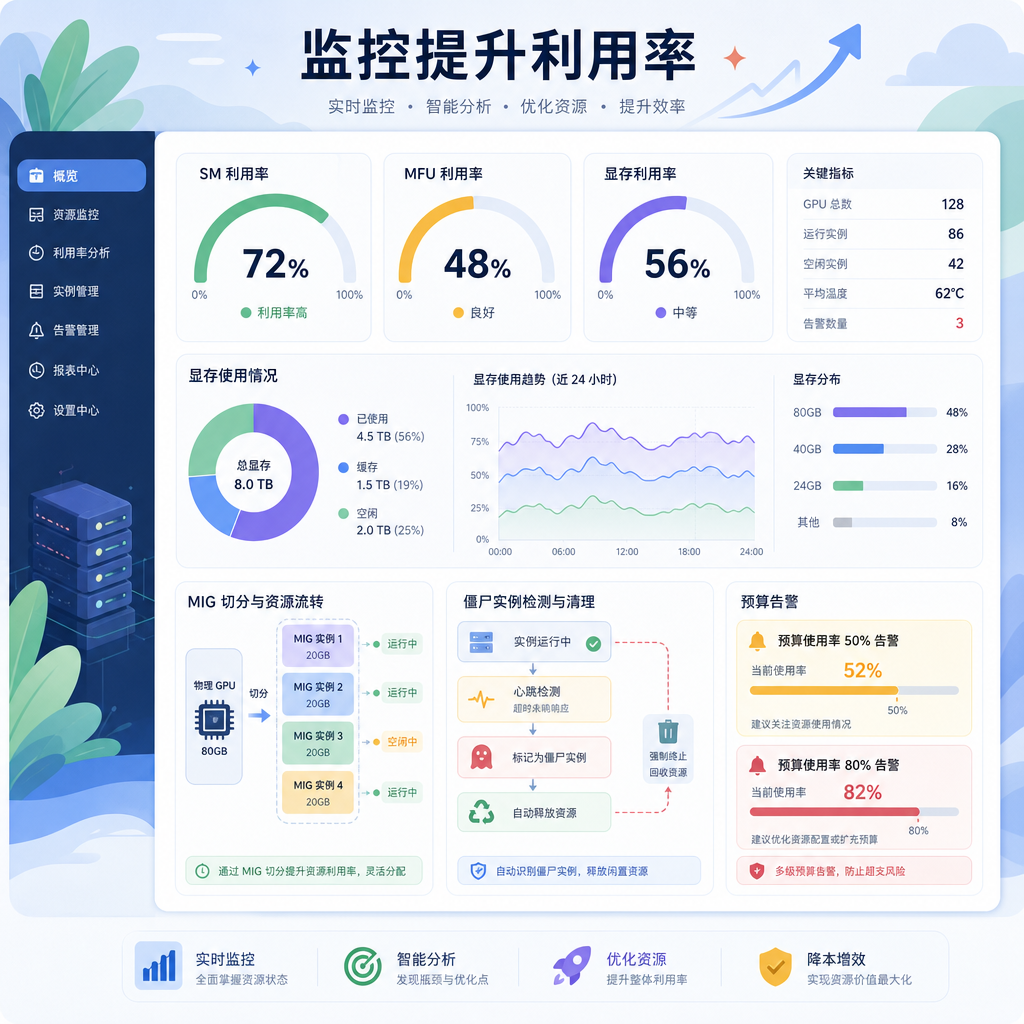
Don't forget scheduling and sharing. MIG partitions a card into multiple independent instances, allowing small inference tasks to share and double utilization. Time-slicing is suitable for experiment notebooks. Monitoring is essential: target SM utilization above 70%, if memory isn't fully used switch to a smaller card, world-class MFU (model FLOPs utilization) is 40-60%, below 20% means you need to investigate bottlenecks. Tag by project and team, auto-kill zombie instances, set budget alerts at 50% and 80%. Once visibility improves, teams naturally curb waste.
Let's look at practical examples. Small teams doing RAG or private knowledge base fine-tuning: use local or low-spec cards for day-to-day prototyping, and elastically spin up cloud cards during peak times for full training or large batch inference. Don't hold high-end resources long-term; release them immediately after tasks. For video generation or agent pipelines with bursty demand, elastic scaling is more cost-effective than building your own. Separate training and inference: training uses Spot for spikes, inference uses a stable pool with auto-scaling.
There are common pitfalls. First, over-reserving for "safety" and eating profits with idle resources. Second, ignoring checkpoint frequency, so Spot interruptions lose everything. Third, hardware mismatch, using big cards for small tasks. Fourth, only looking at per-card-hour price, not actual throughput and utilization. Fifth, relying on a single vendor with no fallback when supply is tight. Multi-source orchestration or quick switching can mitigate risks.
This is where cloud elasticity shines. When demand fluctuates, minute-level scaling is faster than buying hardware; pay only for actual usage, and idle time disappears. Platforms like NexGpu focus on GPU computing rental, quickly matching different card types and durations, helping teams turn "have cards but not using them" into "have cards when needed." When training tasks come, spin up; when done, release. Combined with the optimizations above, overall bills can often be cut by more than half. For data-sensitive workloads, a hybrid approach: sensitive parts locally, large batches in the cloud.
From shortage to efficiency, it's not about buying more cards, but about using every hour of compute wisely. Monitor utilization, match workloads, use Spot with checkpoints, quantize and slim down architectures—combine these tactics, and small and medium teams can run smoothly even in tight supply. Next time you plan to expand, ask yourself first: how much time are your existing cards actually working? The answer is often lower than you think. Raising that number is more practical than chasing new cards.




Comments(0)