 NexGPU-算力租赁,GPU服务器,GPU云算力,AI服务器租用-新闻博客
Let's start with the conclusion. The capability boundaries of a single 48GB GPU (the RTX 6000 Ada, L40/L40S, A6000, A40 tier) are as follows.
- Inference: The largest you can run is the 4-bit quantized version of a 70B-class model, provided it's single-user or low-concurrency with a context of around 4K–8K. If you want more headroom, you can choose the 8-bit version of a 32B/34B model, or the FP16/BF16 full-precision version of a 14B model.
- Fine-tuning: The limit is 4-bit QLoRA on a 70B model, which requires limiting the sequence length to 2048–4096 and enabling gradient checkpointing and FlashAttention. The safer approach is 16-bit LoRA on a 14B model. Full-parameter fine-tuning can only handle about 2B–3B.
Below I'll explain where these numbers come from, so you can estimate for yourself when switching to a different model.
First, understand where VRAM goes
VRAM usage consists of three parts:
- Model weights ≈ number of parameters × bytes per parameter. FP16/BF16 uses 2 bytes per parameter, INT8/FP8 uses 1 byte. 4-bit quantization (AWQ, GPTQ, NF4, etc.), including scaling coefficients and other metadata, takes roughly 0.55–0.6 bytes.
- Framework runtime overhead: generally reserve 1–2GB.
- KV Cache: grows linearly with context length and concurrency, and is the most easily overlooked item.
For example: loading a 70B model in FP16 takes about 140GB of weights. After quantizing to 4-bit it's about 35–42GB, which fits on a 48GB card, but only 6–13GB remains for the KV Cache. Fitting the weights in is only the first step; you also need to check whether the remaining VRAM is enough for your desired context length and concurrency.
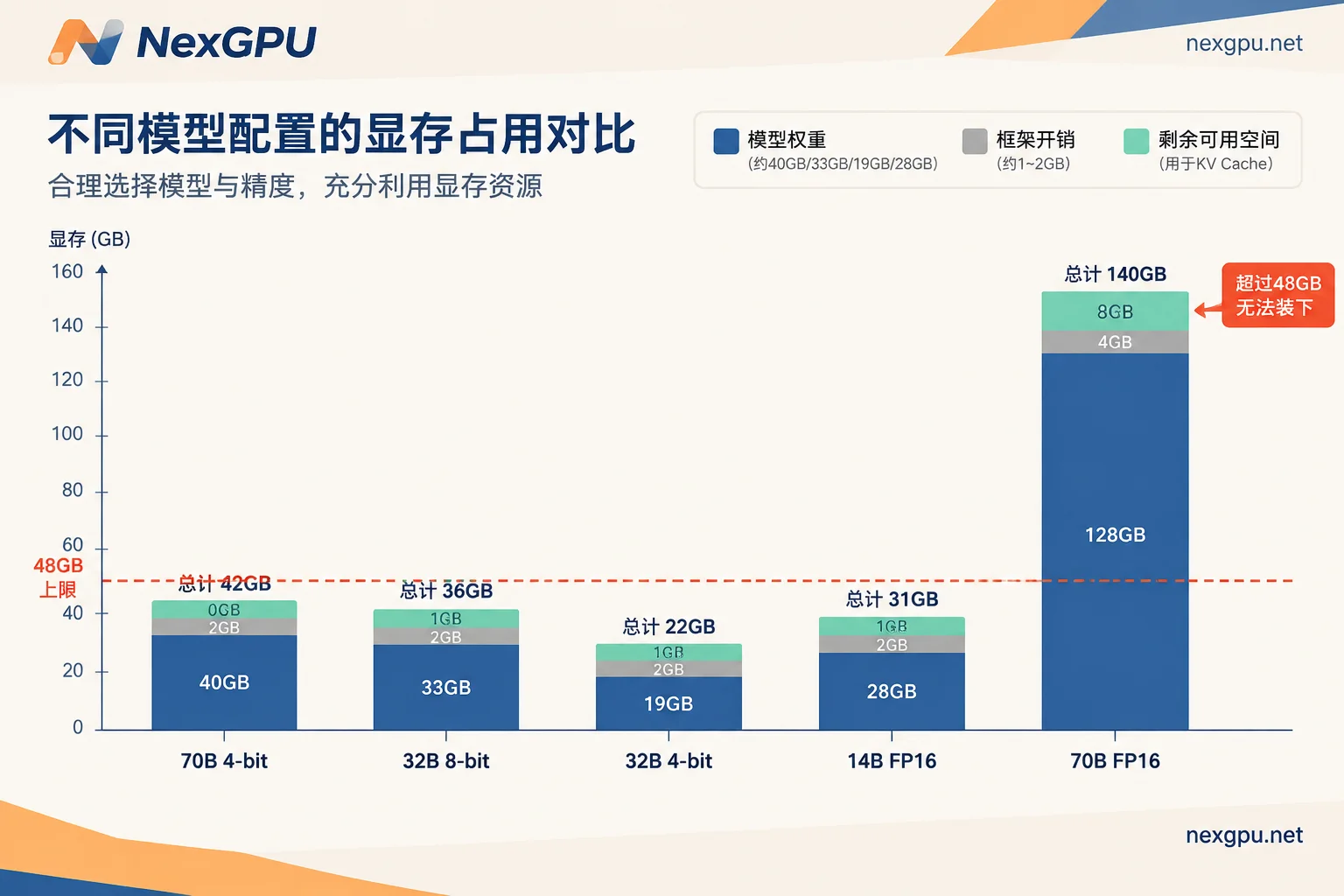
Inference: Comparison by model size
| Model size | Precision | Approx. weight usage | 48GB remaining (before framework overhead) | Suitable use case |
|---|---|---|---|---|
| 70B–72B (Llama-3-70B, Qwen-2.5-72B) | FP16 | ~140GB | Doesn't fit | — |
| INT8 | ~70GB | Doesn't fit | — | |
| 4-bit | 35–42GB | 6–13GB | Single-user or low concurrency, 4K–8K context | |
| 32B–34B (Qwen-2.5-32B, Yi-34B) | FP16 | 64–68GB | Doesn't fit | — |
| INT8/FP8 | 32–34GB | ~14GB | Standard-context inference | |
| 4-bit | 18–20GB | ~28GB | 32K–64K long context, or concurrency | |
| 14B (Qwen-2.5-14B) | FP16 | ~28GB | ~20GB | Long text or moderate concurrency |
| 7B/8B (Llama-3-8B) | FP16 | ~16GB | ~30GB | Ultra-long context (e.g. 128K), high-concurrency production deployment |
You can choose based on your use case:
- Personal use, wanting 70B-level performance: Choose the 4-bit version of 70B. It can chat smoothly, but don't expect it to handle long documents or serve multiple users at once.
- Handling long documents, or serving a small team: The 4-bit version of 32B has the most headroom. If you care more about accuracy, you can step down to 8-bit, at the cost of less context and concurrency space.
- Accuracy-sensitive, unwilling to accept quantization loss: 14B FP16 is the largest full-precision tier that fits in 48GB.
The quantization format must match your inference framework. vLLM and TGI commonly use AWQ/GPTQ formats, while Ollama uses GGUF (e.g. Q4). Before downloading weights, first confirm the format matches your framework.
Fine-tuning: The method determines how large a model you can tune
Fine-tuning requires storing gradients, optimizer states, and activations in addition to weights, so the model you can fine-tune on the same card is much smaller than what you can run for inference.
- Full-parameter fine-tuning: With AdamW, roughly 16 bytes per parameter are needed. 48GB divided by 16 is about 3B, so in practice you can generally only handle 2B–3B models.
- LoRA (base frozen in 16-bit): You can reliably fine-tune 13B–14B models. This tier is sufficient for most customization tasks.
- QLoRA (base frozen in 4-bit NF4): With FlashAttention and activation checkpointing enabled, a single 48GB card can just barely fine-tune 70B within a sequence length of 2048–4096. This is a barely-runnable state, with little room to adjust batch size and sequence length.
If your training data is mostly long samples and you need longer sequences, single-card 70B QLoRA won't be enough.
Cases where a single 48GB card isn't enough
- A 70B model needing context above 32K, or needing high concurrency with continuous batching: requires multi-GPU tensor parallelism.
- A 32B-class model wanting FP16 full-precision inference: the weights alone exceed 48GB.
- 70B QLoRA requiring a sequence length above 4096.
- Full-parameter fine-tuning of models above 3B.
In these cases, you can switch to a card with more VRAM or go multi-GPU. For how to weigh VRAM against bandwidth, see L40S vs A100: Which Is Better for Inference.
Also, 2×24GB adds up to 48GB total, but the model needs to be split across two cards via tensor parallelism, with only 24GB per card individually. Frameworks like vLLM and TGI support this kind of splitting. However, if the model fits on a single 48GB card, single-card deployment is simpler for both deployment and troubleshooting.
Get started: Pick a card, pick an image, and watch out for storage fees
- Pick a card: First determine the model size and precision, then choose a single 48GB or 2×24GB spec. For which card is recommended for each model and what the VRAM threshold is, you can check the NexGPU model-to-GPU guide.
- Pick an image: Use the vLLM or TGI template for inference serving. If you want to quickly try the GGUF quantized version first, use Ollama. For fine-tuning, you can start with a PyTorch image and then install the training framework. These templates are all on the image templates page, with one-click deployment, so you don't need to configure the CUDA environment yourself.
- Watch out for storage: A 70B 4-bit weight set is about 40GB, and downloading it once takes considerable time. After an instance is stopped, compute billing stops, but storage continues to be billed; after it is destroyed, all billing stops and the data is wiped as well. If you plan to continue using it a few days later, you can stop it and keep the disk. When you're done, transfer out the weights and training artifacts you need before destroying it. For the specific billing boundaries, see Are You Still Charged After Shutting Down a GPU Instance.




Comments(0)