 NexGPU-算力租赁,GPU服务器,GPU云算力,AI服务器租用-新闻博客
Previously, once training was finished, the bill was cleared. Now, as soon as the model goes live, inference becomes a bottomless pit—every user click and every agent step continuously burns tokens. Industry estimates suggest inference accounts for 55% to 80% of GPU spending on enterprise AI. Training is a one-time project; inference is perpetual operations. A 70B model, assuming 1,000 daily active users, each making 1,000 requests per day, with 500 tokens per request, can reach 500 million tokens daily. At a typical H100 node token price, compute alone could cost over a thousand dollars a day, easily reaching hundreds of thousands annually. Small and medium teams often find that once they push a model into production, the bill can exceed the total training cost.
The GPU rental market is also expanding rapidly. By 2026, it's expected to reach around $7.4 billion, with continued double-digit growth. Hardware generations update quickly, and building in-house clusters requires long procurement cycles with high depreciation risk. More teams are turning to on-demand cloud rentals, especially for inference scenarios with fluctuating traffic and need for elastic scaling. The issue isn't 'whether you have the cards', but 'how to extract more useful tokens and lower cost per million tokens (CPM)' from the same cards.
CPM is the key metric: GPU hourly cost divided by (tokens per second throughput × 3600 / 1 million). Simply comparing peak FLOPS is useless; actual throughput and utilization determine whether the money is well spent. Currently, GPU utilization for many inference workloads is only 20%-40%, and pushing it above 50%-60% makes the capital expenditure worthwhile. Inference places more stringent demands on synchronization, sequencing, and memory management than training.
Optimization isn't a single trick but a four-layer stack, each with independent benefit potential.
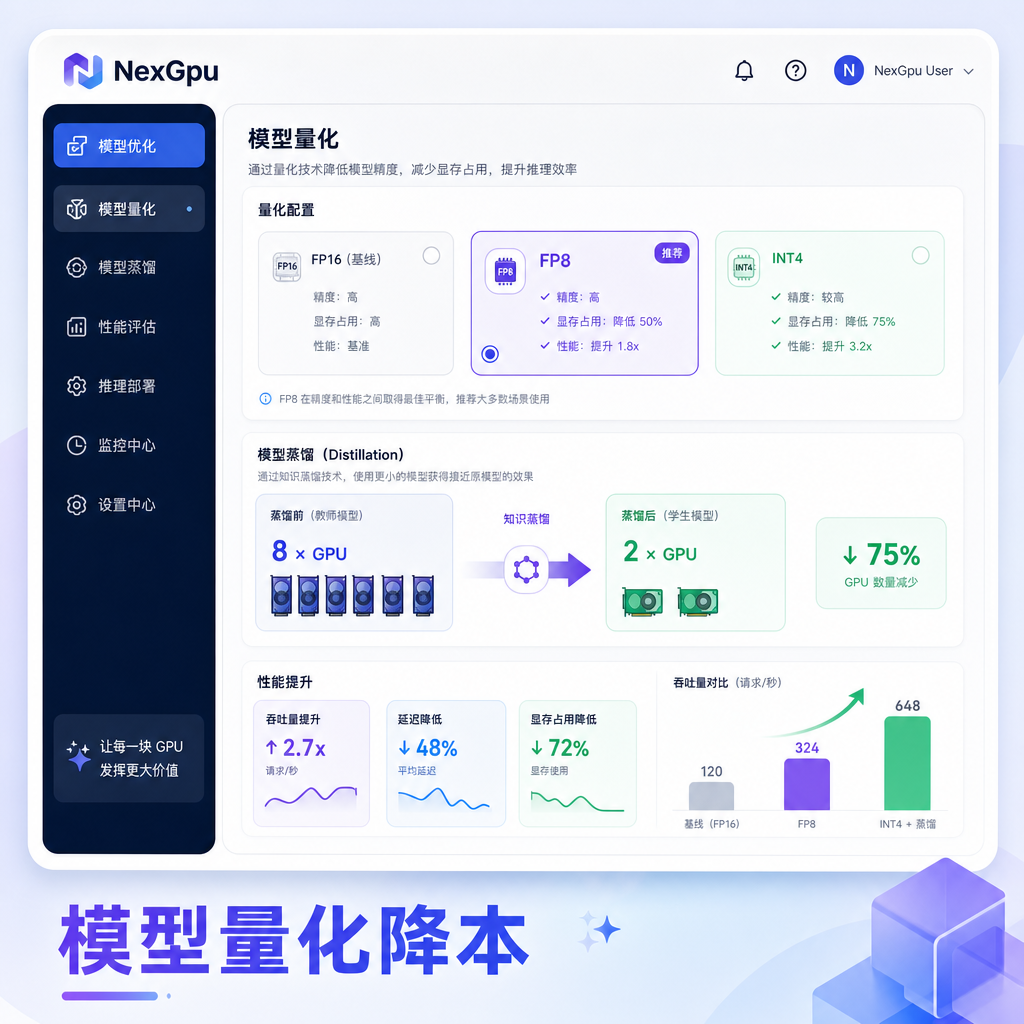
The first layer is the model itself. Quantization is the most direct lever. Enabling FP8 on H100 can typically increase throughput by 1.3-2x, with quality loss kept within 2%, almost imperceptible for tasks like dialogue, summarization, and code generation. Blackwell natively supports more aggressive NVFP4, adding another 1.5-2x gain. INT4 (GPTQ/AWQ) can fit a 70B model on a single card, reducing node requirements from 8 cards to 2-3 in high-batch scenarios. Distillation is even more aggressive: if the task allows, distilling a 70B model to 14B or 8B can reduce GPU demand by 4-8x. Don't default to the largest model; first run your own evaluation sets—in many cases, a medium-sized model with quantization is sufficient.
The second layer is the runtime. Continuous batching is the killer technique for utilization. Static batching lets the GPU idle between requests; continuous batching with PagedAttention can lift utilization from 15%-30% to 60%-80%, improving effective throughput by 3-4x. Speculative decoding uses a small draft model to generate candidates, with the large model validating in parallel, boosting output-dense tasks by another 2-4x. For long-context scenarios, focus on KV cache management: paged attention eliminates fragmentation, and INT8/FP8 quantization can save another 30%-50% of VRAM, freeing space for more concurrency. Engines like vLLM, TensorRT-LLM, and SGLang each excel in these areas; after selection, be sure to stress-test with real traffic profiles.
The third layer is infrastructure. Workload determines choice. For synchronous APIs with strict P99 latency SLAs, use on-demand H100/H200/B200—spot interruption risk is too high. Batch tasks (embeddings, async summaries, nightly evaluations) are better suited for spot instances, which can be significantly cheaper; just set up queues and retries. For auto-scaling, don't watch CPU or memory—focus on request queue depth: if the backlog per card exceeds dozens of requests, add nodes. For small models (below 14B with FP8), a single-card PCIe setup may be more cost-effective than multi-card SXM, simplifying networking and operations. Blackwell series has a clear advantage in token output: compared to Hopper, some configurations deliver up to 50x token throughput per megawatt, with cost per million tokens potentially as low as 1/35. On the software side, distributed inference frameworks like Dynamo further decouple prefill and decode, intelligently route, and implement multi-level KV caching, boosting throughput by up to 2.7x on the same hardware and cutting token costs by over 60%. Many inference providers are already using Blackwell + open-source models + optimized stacks to reduce token costs to 1/4 to 1/10 of previous levels, with implementations in healthcare, gaming, and customer service.
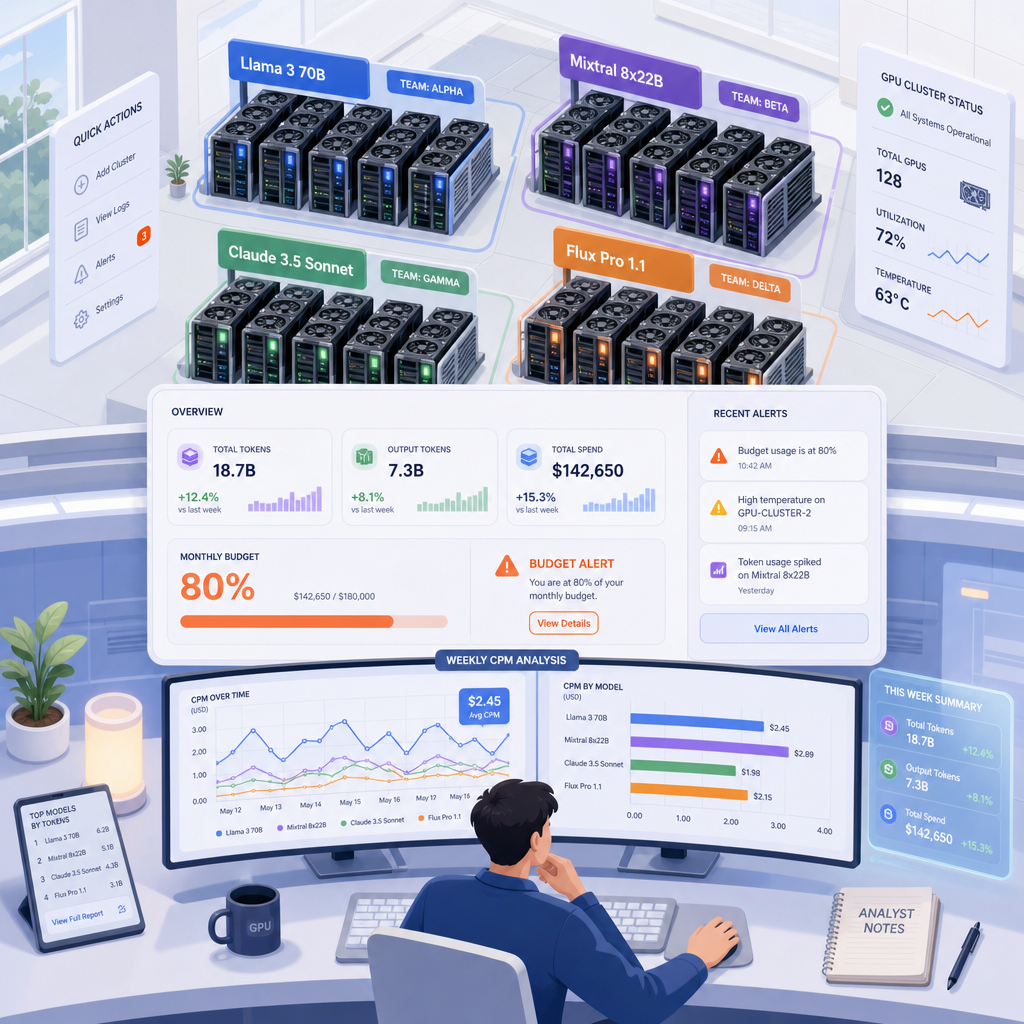
The fourth layer is FinOps. Without attribution, GPU bills are a black box. Tag tasks with model name, use-case ID, and team label; report token count as a key metric rather than just GPU hours. Review CPM weekly and set alerts at 80% budget, not after overspending. Inference costs change rapidly, so weekly reviews are more appropriate than monthly.
Common pitfalls in practice: using training cards directly for inference (low utilization, cold start latency); ignoring quantization and running full precision; lacking continuous batching, wasting money when traffic is sparse; scaling on the wrong metrics leading to either idle or queuing; and only counting GPU costs without egress and storage. When traffic has peaks and troughs, the elasticity of cloud rental shines—start and stop on demand, scale up in seconds, without maintaining redundancy for peak loads.
Platforms like NexGpu, a cloud compute provider, fit this rhythm: offering flexible GPU rental capabilities, covering major card types, enabling teams to quickly switch to newer architectures, run quantization experiments, implement continuous batching and auto-scaling, while integrating FinOps tags and metering. You don't need to invest in heavy assets upfront; start with small-scale validation of CPM, and scale once it works. For inference deployment, small and medium teams often start with a single node, confirm latency and throughput, then scale horizontally; batch tasks mix spot instances to further reduce costs.
There have been impressive recent industry advances: engineers at major companies have halved inference costs for specific traffic through software optimization, significantly reducing GPU requirements; multiple providers are deploying Blackwell clusters in new data centers specifically for production inference; and software stacks (CUDA kernels, TensorRT-LLM, Dynamo, etc.) continue to improve, allowing further throughput gains and cost reductions after deployment. Hardware is fixed once purchased, but software and scheduling offer continuous compounding benefits.
Practical recommendations are straightforward: first, calculate your daily token volume and target CPM; stress-test different precision levels and engines with real requests; make continuous batching, KV optimization, and queue-based scaling part of your default configuration; and review attributed reports weekly. Cloud rental lowers the barrier to experimentation, and gives you faster access to the latest card models and software stacks. Inference is already the main battlefield—whoever drives token costs lower and utilization higher can serve more users and run more complex agent workflows with the same budget. Action beats observation: start with model quantization and runtime batching, and you can see changes in your bill within weeks.




Comments(0)