 NexGPU-算力租赁,GPU服务器,GPU云算力,AI服务器租用-新闻博客
In the field of speech recognition (ASR), OpenAI's open-source Whisper remains the go-to foundation in 2026 for multilingual transcription, meeting minutes generation, podcast subtitle alignment, and customer service quality inspection. However, many developers and teams encounter the same gap when actually moving their business onto GPU servers: running a transcribe.py script locally or in a test environment takes only ten minutes, but once faced with a backlog of hundreds of hours of historical recordings or the need to provide a high-concurrency API service externally, they immediately fall into the quagmire of "GPU utilization only 15%, long audio frequently hallucinating repetitions, and cloud provider monthly GPUs idling and burning money most of the time."
If you are still struggling with the basic VRAM calculations and GPU thresholds of native Whisper, faster-whisper, and WhisperX, you can first read our previous article "Whisper Deployment: How to Choose Solutions and GPUs: A VRAM and GPU Selection Guide from Native Whisper to faster-whisper to WhisperX".
This article will take a step forward and focus on the engineering practice of "from script running to production delivery": under the 2026 tech stack, how to match large-v3 and large-v3-turbo according to business scenarios? How to squeeze the throughput out of a single GPU? And how to use hourly-billed elastic GPU computing power to reduce the transcription cost per hundred hours of audio to less than one-tenth of commercial APIs?
1. Why Can't You Just Run a "Bare Script" for Whisper Deployment in 2026?
Many teams new to Whisper deployment first think of spinning up a cloud VM with a GPU, pulling the official weights, and writing a loop to read audio files one by one. In a production environment, this approach quickly hits three walls:
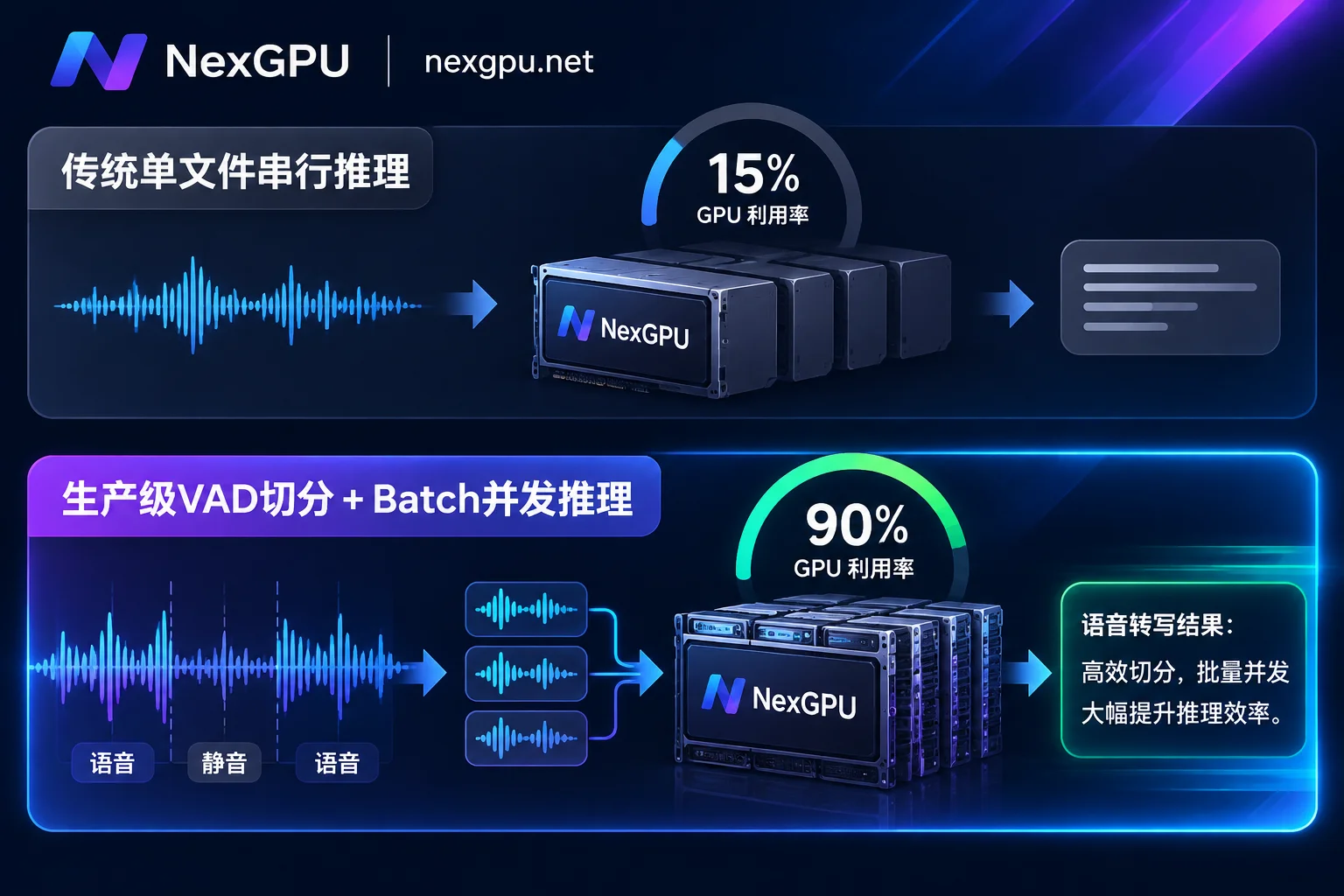
- Idle compute due to decoder autoregression: Whisper is a standard Encoder-Decoder architecture. If you perform sequential inference on a single audio file (Batch Size = 1), even if you rent an RTX 4090 or A100, the GPU's stream processors spend most of their time waiting for memory bandwidth to read weights, and GPU core utilization often hovers around 10%~20%. You pay for compute, but transcription speed does not improve.
- "Death loop" hallucinations on silent segments of long audio: Native Whisper uses a 30-second sliding window. When there are long background noises or pauses in meeting recordings or phone calls, without prior VAD (Voice Activity Detection) segmentation, the decoder can easily fall into infinite loops of repeated lines, and even misalign the entire timestamp.
- High idle costs under tidal traffic: Speech transcription business naturally has strong "peak and valley" characteristics—for example, processing thousands of customer service recordings accumulated from the previous day in the early morning, or a self-media team compressing multilingual video subtitles for two or three days a week. If you rent a fixed-configuration cloud server monthly for this, over 70% of the budget is actually paying for idle time.
To solve these problems, you need to work on three dimensions simultaneously: model weight iteration, inference runtime concurrency architecture, and compute scheduling.
2. The Golden Combination of Models and Inference Engines: Match According to Business Form
By 2026, deploying whisper-large-v3 across the board is no longer the optimal solution. Combined with mature engineering solutions in the open-source community, we usually determine the tech stack in production based on the following three business flows:
1. Weight Selection: large-v3 or large-v3-turbo?
OpenAI's whisper-large-v3-turbo significantly cuts the decoder from the original 32 layers to 4 layers, reducing parameters from 1.55 billion to about 809 million, while the encoder remains unchanged.
- When to use
large-v3-turbowithout hesitation: Most pure speech-to-text (same-language transcription) scenarios. Because the autoregressive decoding layers are reduced by 87.5%, its inference speed on GPU is several times faster than the fulllarge-v3, VRAM usage drops by about 40% (about 6GB VRAM under FP16 is enough), and the word error rate (WER) is almost on par withlarge-v3. - When you must keep
large-v3: Cross-lingual direct speech translation (e.g., directly outputting English subtitles from Japanese audio end-to-end). Since theturboversion removed translation task data during pruning and fine-tuning, scenarios involving cross-lingual direct translation or extremely heavy dialect accents still require the full 32-layer decoderlarge-v3, or a two-stage pipeline of "turbofast transcription + lightweight local LLM translation".
2. How to Choose Among the Three Main Production-Grade Inference Stacks?
| Business Scenario | Recommended Engine Stack | Core Engineering Advantages | Typical GPU and Selection Direction |
|---|---|---|---|
| Massive offline audio batch transcription (podcast archiving, online course subtitles, historical recording cleanup) | faster-whisper (CTranslate2 backend + BatchedInferencePipeline) | Supports INT8/FP16 mixed precision quantization and context-aware batching, saves VRAM, throughput over 4 times faster than native. | Consumer-grade high cost-performance cards (e.g., RTX 3090 / 4090) single or multiple instances in parallel |
| Multi-person meeting minutes and interview refinement (need to distinguish "who said what at what time") | WhisperX (faster-whisper + wav2vec2 + pyannote) | Integrates forced phoneme alignment and speaker diarization, solves word-level timestamp drift, comes with silent VAD filtering to prevent hallucinations. | VRAM needs to accommodate alignment and speaker models; recommend 24GB VRAM or above consumer or data center cards |
| High-concurrency real-time API gateway (multiple clients initiating short speech requests simultaneously, agent voice entry) | vLLM (Whisper support) (Continuous Batching + FP8 KV Cache) | Leverages continuous batching, CUDA Graphs, and torch.compile from large model inference, supports OpenAI-compatible /v1/audio/transcriptions interface, extremely strong high-concurrency throughput. | GPUs supporting FP8 and high compute density (e.g., RTX 4090, RTX 5090, or data center-grade large cards) |
💡 GPU and Model Reference: If you are unsure about the exact VRAM usage of each model weight under specific quantization precision, you can directly refer to NexGPU's Model and GPU Selection Guide, which organizes detailed VRAM thresholds and deployment steps for speech recognition, speech synthesis, and text large models; you can also go directly to the Audio-to-Text Scenario Practices page to view complete solution configurations and cost estimates.
3. Zero-Friction Implementation of Whisper Production Environment on NexGPU (Four-Step Practice)
Configuring a Whisper production environment from scratch is often not about Python code, but the underlying dependency hell—especially CTranslate2, cuDNN version conflicts, and errors caused by missing ffmpeg codec libraries. On NexGPU, you can spin up a production-grade transcription service in minutes with pre-built images and flexible network configuration.
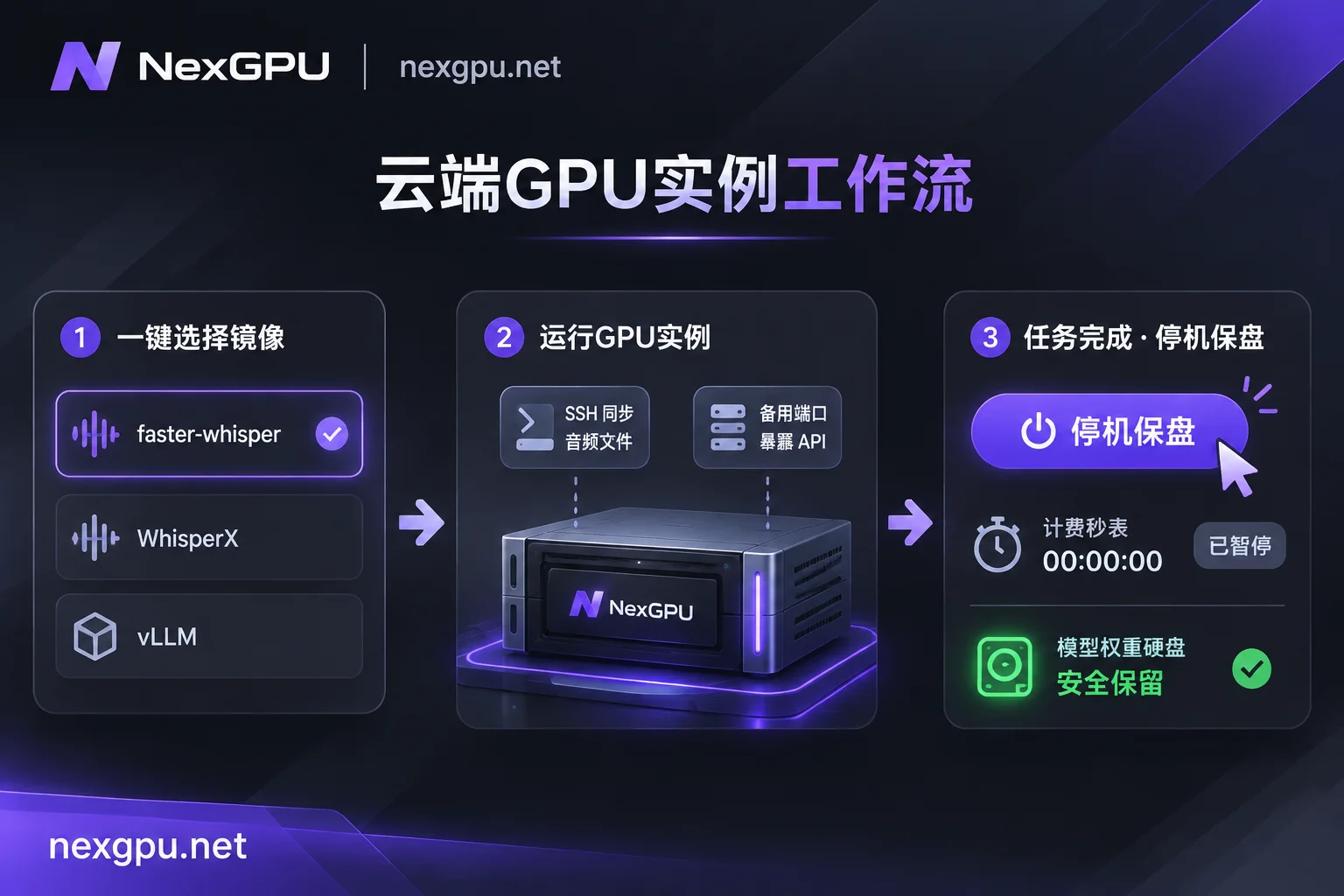
Step 1: Choose a Pre-built Image (Skip CUDA and Environment Pitfalls)
Go to NexGPU's Image Template Library; you don't need to start from a blank system and struggle with drivers:
- For batch tasks or speaker diarization: Directly select the pre-built Whisper / faster-whisper / WhisperX template under the "Speech" category. The image already includes matching NVIDIA drivers, CUDA environment, and core speech dependencies, ready to use upon boot.
- For building a high-concurrency online API gateway: If you plan to use vLLM to uniformly host speech and text interfaces, you can choose the vLLM template under the "Large Model Inference" category (provides OpenAI-compatible interface natively after launch).
- Enterprise custom environment: If your team has already packaged business code, specific CUDA dependencies, and FastAPI into a standard production container, you can also fill in your own Docker image (public or private repository) when creating an instance, and customize the startup command and environment variables.
Step 2: Precisely Filter GPUs on the GPU Market
After selecting the image environment, go to the GPU Market; the system will automatically filter risks for you—machines with insufficient VRAM to run the environment will be automatically flagged with reasons, completely avoiding the embarrassment of "discovering OOM (out of memory) after booting".
When filtering machines, each row represents a real rentable physical node, and you can flexibly allocate according to business characteristics (for detailed GPU selection logic, refer to the How to Choose GPU documentation):
- Compute and disk unit prices listed separately transparently: When batch processing hundreds of GB of
.wavraw recording files, focus on bandwidth and disk unit price; choosing high-bandwidth nodes can greatly shorten the time for audio upload and pulling HuggingFace model weights. - Consumer and data center grades priced separately: For daily running of
faster-whisperorWhisperX, renting consumer-grade RTX 3090, RTX 4090, or RTX 5090 is extremely cost-effective; for enterprise-level massive backlog queues or when needing to connect with large-parameter LLMs on the same machine, you can switch to data center-grade GPUs such as A100, H100, H200 (if you want to learn about the cost details of multi-GPU and large-VRAM cards, you can read "How to Rent RTX 4090 Cloud Servers" and "2026 A100 Rental Guide").
Step 3: Connect to Instance, Manage Large Audio Files, and Expose API Ports
After the instance boots, NexGPU provides multiple developer-friendly connection and management methods:
- SSH direct connection and web terminal: Each instance is equipped with an independent public IP and port, supports SSH direct connection without a jump server (default public key can be preset), making it easy to use
rsyncorscpto quickly sync local audio directories; when working remotely, you can also directly open the root web terminal in the browser or open Jupyter with one click with a token to debug code. - Visual management panel (aaPanel): If you are not used to pure command-line management of thousands of audio slices and scheduled tasks, you can install the aaPanel visual panel with one click in the instance (only uses a small amount of disk space), directly drag and drop to manage audio files, monitor background transcription daemon processes, and configure Cron scheduled tasks in the browser.
- Expose services via alternate port mapping: After you encapsulate Whisper into an HTTP microservice with FastAPI or vLLM, you can bind it to the instance's reserved alternate port. Through the public IP plus mapped port, your business backend or workflow (such as Dify, n8n) can directly initiate remote transcription calls (note: port mapping cannot be added or removed after instance creation, so plan the required ports at boot time).
Step 4: Two Key Engineering Parameters for Performance Tuning
After the instance is running, check the real-time load monitoring on the details page (refer to the Instance Management documentation). If you find that more than half of the VRAM is still free, adjusting the following two parameters can double throughput:
- Enable Batched inference and VAD filtering: In
faster-whisper, useBatchedInferencePipeline, setbatch_sizeto 16 or 32 (depending on 24GB VRAM availability), and be sure to enablevad_filter=True. This not only cuts out meaningless silent segments to prevent loop hallucinations, but also packs valid speech segments into compact batches sent to the GPU, instantly pushing GPU utilization above 85%. - Multi-worker concurrent data feeding: Audio decoding (FFmpeg converting MP3/AAC to PCM features) is a typical CPU-intensive operation. If a single process reads audio, it's often "GPU waiting for CPU". Properly configure
num_workerswhen starting the service or use an asynchronous queue to preprocess audio to truly eliminate the I/O bottleneck.
4. From an Actuary's Perspective: How to Cut Speech Transcription Costs by 90%?
At OpenAI's official Whisper API standard pricing (about $0.006/minute), transcribing 100 hours of audio costs **$36.00; for a 10,000-hour enterprise recording library, API call fees alone reach $3,600**. On a self-built GPU instance, with faster-whisper combined with large-v3-turbo batch processing capabilities, a mainstream GPU can easily throughput tens or even hundreds of hours of audio in 1 hour, and the hardware compute cost is often less than one-tenth of commercial APIs.
To fully capture this cost advantage, you need to make good use of NexGPU's elastic billing mechanism:
Per-second billing + stop and retain disk (a magic tool for tidal tasks)
NexGPU's bill is extremely clean, with only three items: compute, storage, and traffic. There is no minimum consumption, setup fee, or minimum rental duration, and the unit price at the time of order is locked until the instance is destroyed.- After you finish running 2 hours of batch recording transcription each day, simply click "Stop" in the console.
- At the moment of stopping, compute fees stop immediately; your downloaded tens of GB of model weights (such as Whisper weights, pyannote speaker models) and configured Python environment are preserved intact on the disk (during shutdown, only a very low storage fee per GB/month is charged).
- When new audio arrives the next day, restart the instance with one click, saving the time of pulling images and downloading weights again, truly achieving "pay per second for compute when running tasks, and only spend a few cents to maintain the disk normally".
Horizontally split "historical backlog" with multiple concurrent instances
Since on NexGPU the number of simultaneously running instances is not subject to quota limits (only limited by account balance, no lengthy real-name verification and ticket quota application required), when you suddenly receive an urgent task to "transcribe 2000 hours of interview recordings before tomorrow morning", you don't need to scramble for expensive top-tier cards. You can directly use the same pre-built image to start 10 cost-effective consumer-grade single-GPU instances simultaneously, divide the audio list into 10 parts and run them in parallel, and after the task is completed, destroy all instances (after entering the instance number for confirmation, the disk is immediately released, and all billing stops).⚠️ Data Security and Loss Prevention Reminder: NexGPU instances are exclusive containers; the platform never reads or backs up user disk contents. Since the platform does not provide automatic data backup, and once an instance is destroyed, disk data is immediately unrecoverable, before performing the destroy operation, please make sure that the transcription-generated
.srt/.jsontext results have all been synced back to your local or object storage. Also, since online disk expansion is not supported after instance creation, it is recommended to reserve sufficient disk space for raw audio at the initial boot.- Enterprise-grade and large-scale pipeline expansion
If you are doing a full-chain private deployment of "ASR speech transcription + local large language model meeting summary + TTS speech synthesis" (for example, with Qwen or DeepSeek models, refer to our "Qwen Deployment Practice Guide" and "vLLM Deployment Practice Guide"), requiring multi-GPU nodes for whole-machine rental, private network data isolation, dedicated compute pools, or needing contracts, corporate payments, and invoices, you can directly go to the Contact Sales page to customize an enterprise solution.
5. Conclusion: Start Your Low-Cost, High-Throughput Deployment Now
From testing a single audio file in the lab to a production speech pipeline that stably throughputs tens of millions of minutes, the core of Whisper deployment is never "can it run", but "how to use less VRAM, higher batch concurrency, and more elastic compute scheduling to minimize the transcription cost per unit time".
If you are preparing to build your own speech-to-text service, or want to replace expensive external ASR APIs with a self-controlled open-source solution, you can now quickly register with your email (no payment method required to view all real-time prices; top-up supports Alipay and USDT), follow the Quick Start Guide, choose your favorite GPU on the NexGPU Compute Market, and run your first high-concurrency Whisper production pipeline within 5 minutes.



