NexGPU-算力租赁,GPU服务器,GPU云算力,AI服务器租用-新闻博客
Bottom line first: In 2026, when running open-source AI video generation models, what determines whether you can run it is not a single number circulating online, but two completely different VRAM thresholds—"can start without errors (relies on offloading to barely run)" and "all weights resident in VRAM (full-speed generation)".
- 16GB–24GB GPUs (e.g., RTX 4090): Suitable for running LTX-2.3 (FP8), HunyuanVideo 1.5 (8.3B distilled/offloaded), or Wan 2.2 TI2V-5B. Generating a 5-second 480p/720p video typically takes between tens of seconds to 9 minutes.
- 32GB GPUs (e.g., RTX 5090): The sweet spot for individual and studio creators with high cost-effectiveness. Running LTX-2.3 takes only about 4 seconds (near real-time), and it can also stably run LTX-2.5 distilled/FP8 version, with much more headroom for audio-visual sync and 720p/1080p iterations than 24GB.
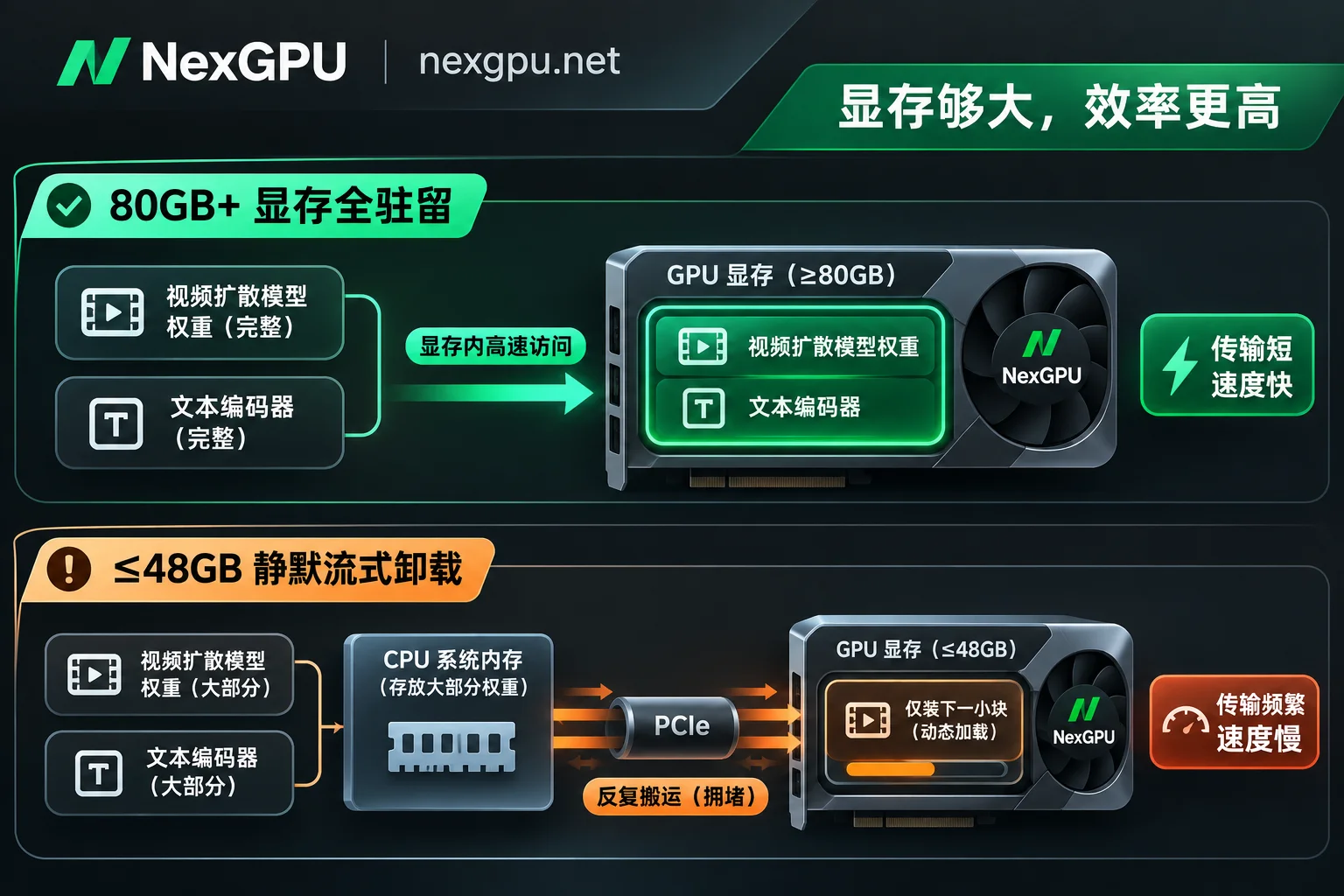
- 80GB–96GB+ GPUs (e.g., A100 80GB, H100, H200, RTX PRO 6000): If you want to run full Wan 2.2 A14B or full-precision LTX-2.5, this is the unavoidable threshold. Once you force-load a Wan 2.2 14B-class template on a 48GB or smaller card, ComfyUI will not report an out-of-memory (OOM) error, but will silently stream weights from system memory via PCIe, directly slowing down a 5-second video by 3–4 times (from around ten minutes to thirty or forty minutes, even an hour). Ultimately, the cost per video is actually higher than renting a large-VRAM card.
If you don't need to generate videos 24/7 at full load, buying 80GB-class hardware is not cost-effective. Dynamically switching card types by second/hour through the AI video generation GPU market—using consumer cards for lightweight sampling and large-VRAM cards for heavy production—is currently a more reliable solution.
1. Why do 24GB or even 48GB GPUs run videos "without OOM but 3–4 times slower"?
Many users new to video generation have the same confusion: they rent a GPU with 24GB or even 48GB VRAM, load the official ComfyUI video workflow, and there is no error or crash, but the progress bar seems stuck, taking half an hour for a 5-second clip, while the peak VRAM usage shown in monitoring is only 10GB–15GB.
The reason is that the VRAM accounting for video diffusion models is completely different from static image generation, and modern frameworks, in order to "let you run it", enable silent streaming/CPU offloading by default:
- Pixel scale increases geometrically: Generating a 1024×1024 image processes about 1 million pixels; generating a 5-second 24fps video is 120 consecutive frames, and considering the spatiotemporal compression of 3D VAE and inter-frame consistency calculations, the VRAM and compute throughput pressure is 5–10 times higher than image generation.
- Text encoders are huge: For example, Wan 2.2 relies on T5-XXL, HunyuanVideo 1.5 relies on Qwen2.5-VL + Byt5; the text encoder alone takes 10GB–20GB.
- The hidden bandwidth tax after crossing the "residency line": According to a ComfyUI Wan 2.2 benchmark covering 23 GPU configurations in October 2026, Wan 2.2 requires about 64GB VRAM in FP16, and about 36GB for FP8 weights (plus runtime activations still exceed the safe line for 48GB cards). When the GPU VRAM is below 80GB, ComfyUI does not report OOM, but only keeps a small part of the layers in VRAM (monitoring shows peak only 10.5GB–15.5GB), and the remaining weights are repeatedly transferred between system RAM and VRAM via PCIe in each sampling round.
The measured data most intuitively illustrates the power of this divide (same 5-second Wan 2.2 FP16 clip):
- Cards that can fully fit the model: 96GB RTX PRO 6000 peaks at 60.7GB VRAM and takes 734 seconds (about 12.2 minutes); 80GB H100 PCIe peaks at 47.8GB and takes 1,059 seconds (about 17.6 minutes); H100 SXM takes only 652 seconds (about 10.9 minutes).
- 32GB/48GB cards that trigger streaming offloading: RTX 5090 (32GB) peaks at only 14.1GB and takes 1,297 seconds (about 21.6 minutes); 48GB L40S peaks at 10.5GB and takes 1,464 seconds (about 24.4 minutes); RTX 6000 Ada (48GB) takes 1,984 seconds (about 33 minutes); A40 (48GB) even takes 2,810 seconds (nearly 47 minutes).
More counterintuitive: hoping to quantize Wan 2.2 to FP8 to save small-VRAM cards often doesn't work. In tests, switching to FP8 on 80GB+ cards indeed saves about 11% time (e.g., RTX PRO 6000 from 734s to 656s, H100 SXM from 652s to 616s); but on 48GB cards that also can't fit, A40 goes from 2,810s to 2,749s (only 2% faster), and RTX A6000 even slightly slows down from 2,616s to 2,654s—because the bottleneck is PCIe transfer, not compute precision.
2. Mainstream open-source video models by end of 2026: real VRAM thresholds and generation time comparison
Official repositories or communities often advertise "minimum startup VRAM with offloading enabled" as "recommended configuration", leading many creators to choose the wrong GPU. The table below compares the four most mainstream downloadable open-source video models as of November 2026:
| Model (2026 mainstream version) | Key features and audio-visual capabilities | Official minimum VRAM (and prerequisites) | Comfortable VRAM without triggering streaming slowdown | Reference time for 5-second clip | Key commercial licensing boundaries |
|---|---|---|---|---|---|
| LTX-2.3 | Extremely fast, supports native audio-visual sync, up to 4K 50fps | 16GB–32GB (FP8/distilled) | 24GB–32GB (RTX 5090 excellent) | RTX 5090 about 4 seconds; RTX 5060 Ti 16GB about 15–20 seconds | LTX-2 community license (free commercial use if annual revenue < $10M) |
| LTX-2.5 (22B) | 2026 new generation audio-visual sync model, up to two-stage upscale to 4K | 32GB (distilled+quantized) | 80GB+ (official recommendation A100 80GB / H100) | Distilled version on consumer cards in minutes; full precision on clusters in seconds to tens of seconds | Same as LTX-2 community license (free commercial use if annual revenue < $10M) |
| HunyuanVideo 1.5 (8.3B) | Strong physical motion, realistic portraits, native 480p/720p can be upscaled to 1080p, no native audio | 14GB (must enable model offloading) | 24GB–48GB | Step-distilled I2V on RTX 4090 about 75 seconds; regular FP8 about minutes to ten-plus minutes | Tencent Hunyuan community license (commercial use and some regions restricted, check terms) |
| Wan 2.2 TI2V-5B | Lightweight dense model, 720p@24fps, no native audio | 24GB (requires offload and --t5_cpu) | 24GB–48GB | RTX 4090 without deep optimization about within 9 minutes | Apache 2.0 (most permissive for commercial use, no revenue or region restrictions) |
| Wan 2.2 A14B (27B MoE) | 14B activated parameters, top image quality and instruction following, no native audio | 80GB (official single-card command) | 80GB–96GB+ | 96GB card about 11–12 minutes; H100 SXM about 10–11 minutes | Apache 2.0 (most permissive for commercial use) |
A golden rule for selection: If you pursue fast sampling within 10 seconds, native sound, and your company revenue is within the licensing threshold, prioritize LTX-2.3 / LTX-2.5; if you value clean and worry-free commercial compliance, choose Wan 2.2; if you only have 16GB–24GB VRAM and mainly run image-to-video (I2V), HunyuanVideo 1.5 distilled or Wan 2.2 5B is a reasonable starting point for smooth iteration.
For specific model combinations at different business stages (quantized sampling, full-precision output, LoRA training), you can also refer to the site's "How to Choose GPU for AI Video Generation: From ComfyUI Quantized Sampling, Full-Precision Output to LoRA Training" and "How to Choose Cloud GPU for ComfyUI: Under FLUX.2 and Video Generation, VRAM, Bandwidth and Cost per Image of RTX 5090 vs H100" for comparison.
3. Crunching the cost: Why "cheap hourly rate cards" cost more per video?
Many creators only look at "how much per hour" when renting GPUs, thinking they can save half the unit price by choosing 24GB or mid-low-end 48GB cards, but they ignore a basic formula:
Actual compute cost per video = GPU hourly rate × actual time (hours)
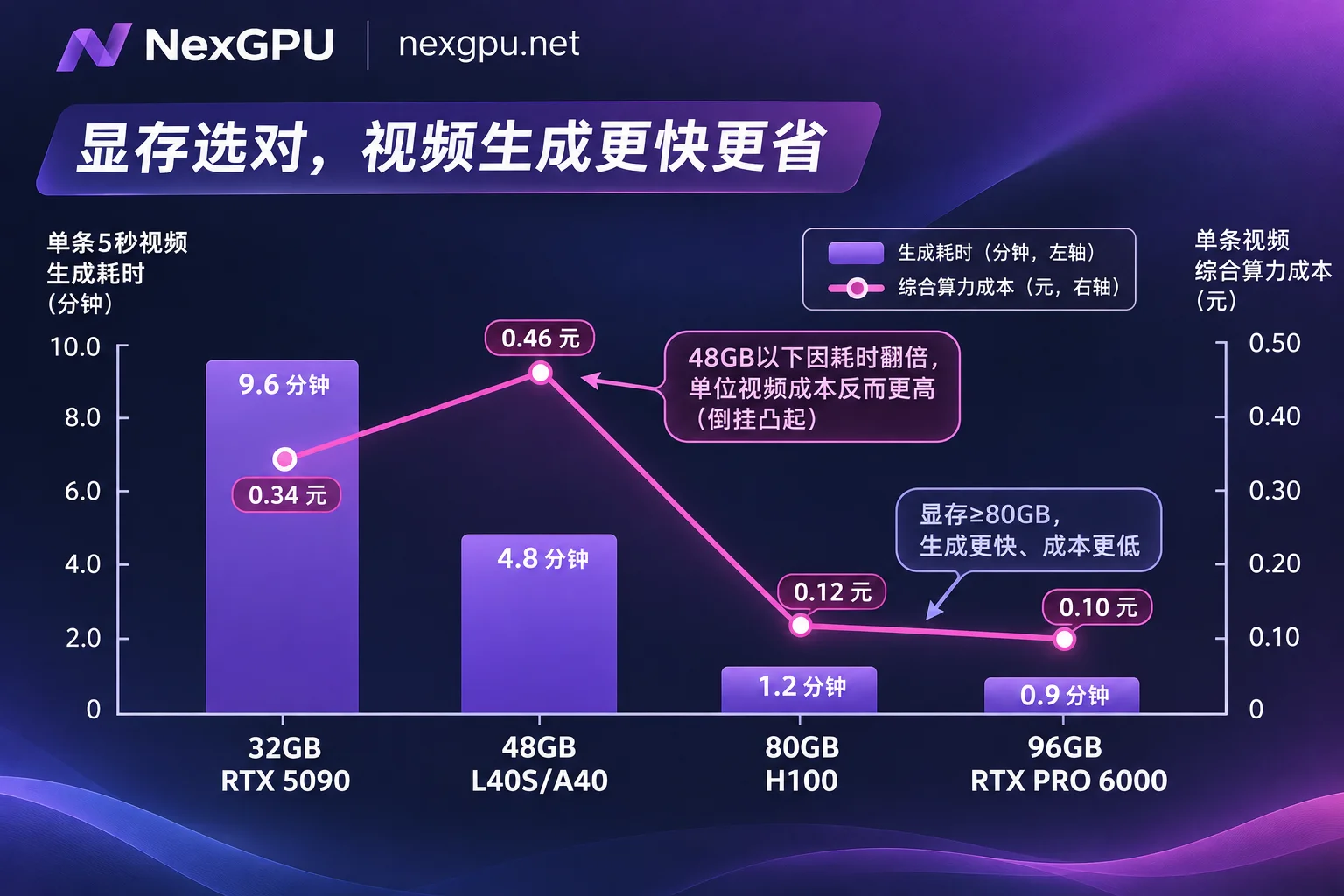
Once entering the "streaming offloading" zone mentioned earlier, the time directly triples or quadruples, and the account instantly inverses. In RunPod's public 23-card same-template test, 96GB RTX PRO 6000, although higher hourly rate, takes only about 11 minutes for a Wan 2.2 FP8 clip, translating to a compute cost of about $0.38 per video; while the L4 card, which looks much cheaper per hour, ran for 69 minutes, making the cost per video higher than RTX PRO 6000, and you also waited nearly an extra hour. Even the 48GB RTX A5000 barely lowers the per-video cost, but at the cost of waiting 57 minutes for a 5-second clip—if you deviate slightly in the prompt, a whole hour is sunk.
Besides GPU compute itself, two invisible consumptions often drag down "seemingly cheap" tasks:
- Insufficient CPU memory causes hangs: Video models generally need to offload 10GB–20GB of text encoders or partial weights to system RAM. For video generation workflows, 64GB system memory is just the comfort line; if the machine itself only has 32GB RAM, the system will frequently read/write disk swap, potentially doubling the time again.
- Weight size and disk storage accounting: Don't follow the habit of running SDXL and only leave twenty or thirty GB of disk. According to public model file lists, HunyuanVideo 1.5 FP8 full set is about 21GB, Wan 2.2 A14B FP8 (including encoder and VAE) about 37GB, LTX-2.5 low-VRAM suite about 40GB (official recommendation to reserve 100GB free space). When renting cloud GPUs on-demand, if the disk is too small, the model will fill up and report errors halfway; if too large, it will incur ongoing monthly storage fees.
4. Four steps to avoid pitfalls when running video workflows on-demand on NexGPU
If you don't want to be limited by local VRAM and want to keep the time and cost per video within a controllable range, you can follow these steps to launch an instance on NexGPU:
1. Check model thresholds first, then decide the GPU tier
Before ordering, review NexGPU's Model Selection Guide and Scenario Practices (including the "AI Image and Video" topic) to confirm the VRAM and framework requirements for the current model version:
- For LTX-2.3 / HunyuanVideo 1.5 / Wan 2.2 5B: filter in the GPU market for 24GB (RTX 4090) or 32GB (RTX 5090) nodes, which offer the best single-card cost-effectiveness.
- For Wan 2.2 A14B or full-precision LTX-2.5: don't gamble on 48GB cards to save hourly fees; directly filter for 80GB+ (A100 80GB / H100 / H200 / B200) nodes.
2. Choose an image template first, let the system filter out machines with insufficient VRAM
In NexGPU Image Templates, directly select the pre-installed ComfyUI image and video templates with drivers, CUDA, and dependencies (templates are tier-agnostic, ready on boot); if your workflow is locked to a specific CUDA version (e.g., LTX-2.5 requires CUDA 12.7+ or some new repositories recommend CUDA 13+), you can also directly fill in a custom Docker image from a public or private repository with startup commands.
When using "select environment first, then filter machines" in the GPU market, the platform will automatically mark machines with insufficient VRAM and indicate the reason, helping you avoid time-consuming trial and error after launching. NexGPU requires no real-name verification or quota application; you can register with an email to see real-time compute and disk unit prices, and recharge supports Alipay and USDT (TRC20).
3. Allocate enough disk at creation, and use "stop and keep disk" to control costs
Before ordering, pay attention to NexGPU's three resource boundaries: no disk expansion after creation, no adding/removing port mappings, and the platform does not provide automatic data backup.
- Disk capacity: If you plan to test both Wan 2.2 and LTX-2.5, it is recommended to allocate 100GB–150GB or more disk space at creation to avoid running out of disk halfway through downloading weights.
Billing and stop strategy: NexGPU bills only for compute, storage, and traffic; there is no minimum spend, setup fee, port fee, or template licensing fee. Compute fees are metered per second and billed per hour, and stop immediately when the instance is stopped or destroyed; storage fees are charged per GB/month from creation, and continue during stoppage (for specific boundaries, see "How Cloud GPU Storage Fees Are Calculated: Charged by Capacity Times Duration, Stop Keeps Charging, Destroy Stops").
- Best practice: If you finish sampling today and will continue tuning parameters tomorrow, choose stop and keep disk; tens of GB of model weights and ComfyUI nodes are all retained, and you don't spend an extra penny on compute; after the project is delivered and the final video is transferred back locally via SSH or web terminal, enter the instance ID to destroy the instance, and storage fees immediately drop to zero.
4. Smoothly upgrade from single-card sampling to LoRA fine-tuning or multi-card batch production
When personal testing turns into commercial delivery—for example, you need to fine-tune video LoRA for a specific character/product (LTX-2.5 officially recommends LoRA fine-tuning starting at 80GB or 32GB INT8 low-VRAM configuration, full-parameter fine-tuning requires 4–8 80GB cards), or batch-generate storyboard materials—there is no need to switch platforms: in the NexGPU GPU market, directly filter multi-card nodes by "minimum number of cards" and place an order self-service (order amount = single-card price × number of cards); if you need multi-machine RDMA high-speed interconnect, dedicated compute pools, or corporate contracts and invoicing, you can directly contact the sales team via the Enterprise Solutions page.
5. 30-second pre-order checklist
Next time you open the compute market to rent a GPU for AI video, check these 5 items before clicking create:
- Are the model and GPU tier aligned? Wan 2.2 A14B / full-precision LTX-2.5 directly use 80GB+; consumer 24GB/32GB prioritize LTX-2.3, HunyuanVideo 1.5 distilled, or Wan 2.2 5B.
- Are you looking at real VRAM, not "minimum startup VRAM"? Confirm you are not forcing heavy weights on cards below 48GB, avoiding paying 3–4 times the "streaming offloading time tax".
- Is the disk allocated sufficiently at once? Reserve 25–45GB per model plus system and cache overhead to prevent inability to expand midway.
- Have you checked commercial licensing? For commercial projects, prioritize confirming Apache 2.0 (Wan 2.2) or whether your revenue meets the community license threshold (LTX-2.5 / HunyuanVideo 1.5).
- Remember to destroy the instance after downloading the final video? Stopping only stops compute fees, not storage fees; if not used for a long time, export results and destroy to release disk.