 NexGPU-算力租赁,GPU服务器,GPU云算力,AI服务器租用-新闻博客
With the iteration of new open-source model weights such as Qwen3, DeepSeek-R1, and Llama 4, and the advancement of enterprise local AI agents in tool calling, structured output, and vertical domain dialogue, more and more R&D teams and independent developers are finding that prompt engineering or general RAG alone can hardly make models strictly adhere to complex business formats. Instruction supervised fine-tuning (SFT) or preference alignment (DPO, GRPO) for specific scenarios remains essential.
But before actually starting training, the first hurdle is often hardware: How should you choose a GPU for LLM fine-tuning? Choose a GPU that's too small, and you'll instantly trigger CUDA Out of Memory (OOM) when running; blindly going for high-end multi-GPU setups may leave a large amount of VRAM and compute budget idle.
Looking at recently popular articles on our site, we've discussed quite a bit about inference-stage parallelism and GPU selection (e.g., "How Large a Model Can Run on 48GB VRAM? Precision and Context Boundaries for Inference and Fine-Tuning"). Today we focus specifically on training and fine-tuning. We'll help you find the most cost-effective GPU solution in three steps: calculate the VRAM budget → choose the fine-tuning method → match open-source frameworks and hardware.
Step 1: Why Does Fine-Tuning Consume More VRAM Than Inference? Calculate the Four VRAM Budgets First
Many developers trying fine-tuning for the first time tend to estimate hardware based on inference experience: they think a 7B/8B model loaded in FP16 only needs 14GB–16GB of VRAM, so a 16GB or 24GB card can train it easily. But as soon as the training script runs, it runs out of VRAM before the first step completes.
The reason is that inference only needs to put model weights and KV Cache into VRAM; fine-tuning is a closed loop of "forward pass to compute loss + backward pass to compute gradients + optimizer updates weights," requiring four things to be stored simultaneously in VRAM:
- Model Weights: When loaded in FP16/BF16 precision, each parameter takes 2 bytes; when loaded in 4-bit quantization, each parameter takes about 0.5–0.7 bytes.
- Gradients: Tied to the number of trainable parameters. For full fine-tuning, the gradient size equals the FP16 model weights (2 bytes/parameter); for LoRA, only the gradients of the low-rank adapter matrices need to be stored.
- Optimizer States: This is the biggest VRAM killer in full-parameter fine-tuning. The mainstream AdamW optimizer needs to store first-order momentum, second-order momentum, and a master weight copy for each trainable parameter. Under mixed precision training, this typically consumes about 12 bytes/parameter.
- Activations and Temporary Buffers: Intermediate results that must be stored during the forward pass for backward differentiation. It depends not only on the number of model layers but also positively correlates with Batch Size and Cutoff Length / Max Seq Length—when fine-tuning long documents or complex multi-turn agent trajectories, activations often expand exponentially.
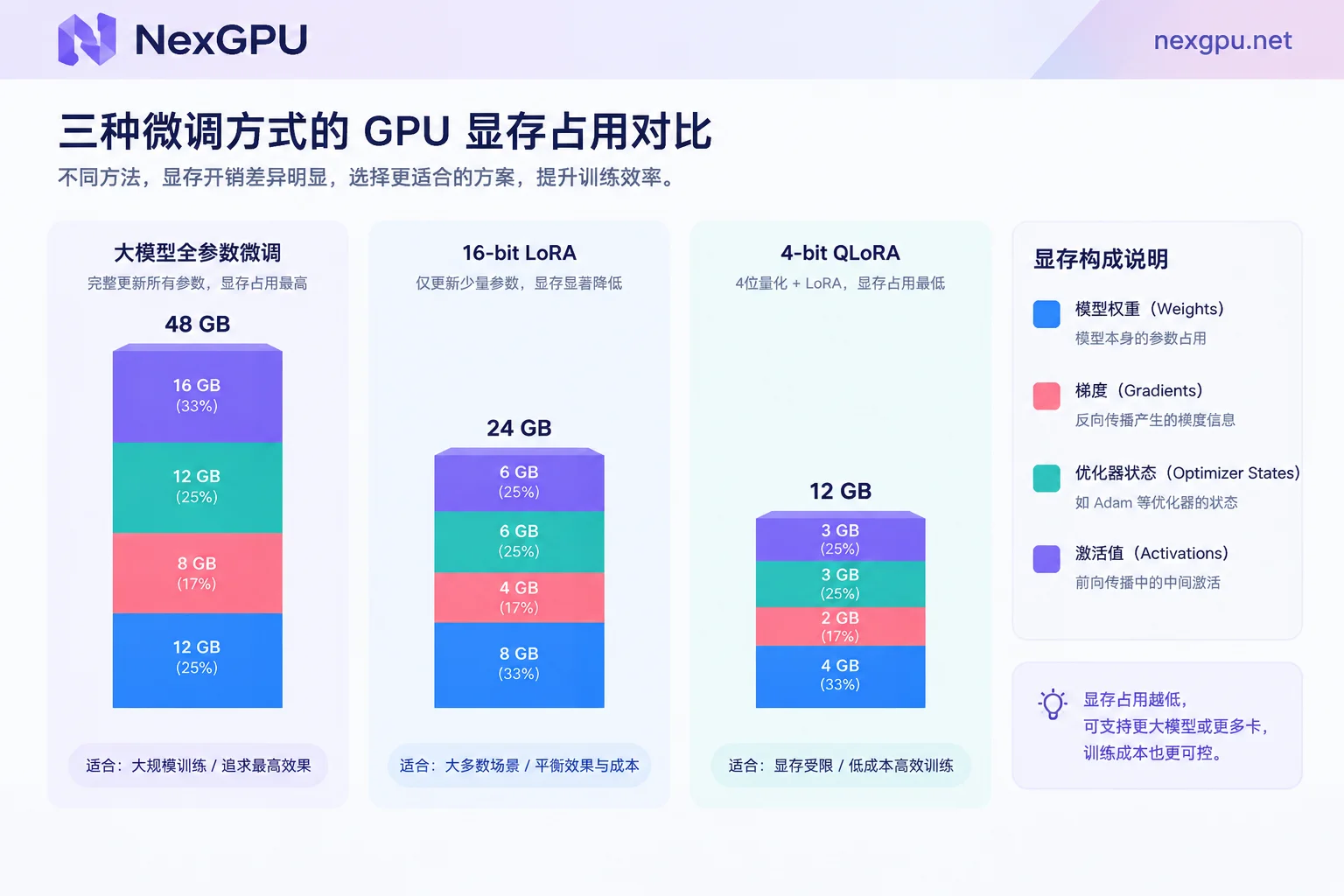
In other words, full-parameter fine-tuning of a model requires about 16GB–18GB of base VRAM per 1B parameters (2 bytes weights + 2 bytes gradients + 12 bytes optimizer + activation margin). Even full fine-tuning an 8B model requires over 130GB, which a single consumer-grade GPU cannot handle. This is why you must first decide the "fine-tuning method" before deciding "what GPU to rent."
Step 2: QLoRA, LoRA, or Full Fine-Tuning? Choose GPUs Based on VRAM Thresholds
In the Hugging Face open-source fine-tuning ecosystem, over 80% of fine-tuning tasks use parameter-efficient fine-tuning (PEFT) techniques like LoRA or QLoRA. Different fine-tuning approaches have vastly different GPU requirements. We can draw a clear GPU selection boundary based on model size and fine-tuning method:
| Fine-Tuning Method | Core Mechanism | VRAM Threshold for 7B/8B Models | VRAM Threshold for 14B/32B Models | VRAM Threshold for 70B+ Models | Typical Use Cases and Recommended GPU Level |
|---|---|---|---|---|---|
| QLoRA (4-bit) | Freeze base model and quantize to 4-bit, train only a tiny fraction of adapter parameters | 6GB–10GB | 14B about 14GB; 32B about 22GB–24GB | About 40GB–48GB | Quick PoC, fixed output format, budget-limited single-GPU experiments; suitable for RTX 3090 / 4090 / 5090 |
| LoRA (16-bit) | Keep base model in FP16/BF16 without quantization, train low-rank adapter matrices | 16GB–22GB | 14B about 32GB; 32B about 65GB–75GB | About 150GB–160GB | Vertical industry dialogue adaptation, multimodal fine-tuning, pursuing higher convergence accuracy; 8B fits 24GB consumer cards, 32B+ fits A100 / H100 |
| Full Fine-Tuning | Update all model weights, VRAM cost about 16–18 times parameter count | 130GB–160GB | 32B about 500GB+ | 1,200GB+ | Injecting large amounts of new domain knowledge, continued pre-training (CPT); must use A100 / H100 / H200 / B200 multi-GPU nodes |
Note: The above VRAM estimates are based on common context lengths (2K–4K) and small batch sizes (with gradient accumulation). For fine-tuning long sequences over 32K or large batches, additional activation VRAM must be reserved. For specific model versions and quantized VRAM thresholds, refer directly to the NexGPU Model Selection Guide (e.g., Qwen Model Selection and Deployment Page).
Based on this table, there are two very practical engineering lessons for GPU selection:
- First, 16GB/24GB VRAM is the sweet spot for single-GPU fine-tuning, but don't force in overly large base models. With a 24GB consumer-grade GPU (like RTX 3090 or RTX 4090), running 16-bit LoRA on an 8B model is very comfortable, and QLoRA on 14B–27B models also fits. But if you find yourself having to reduce
per_device_train_batch_sizeto 1, cut the cutoff length to 512, or even try to rescue with DeepSpeed ZeRO-3 CPU Offload on a single GPU to fit a larger model, you'll often encounter communication slowdowns or operator crashes. For when to decisively upgrade hardware, see "When Consumer GPUs Are No Longer Enough: Four Boundary Signals and Criteria for Upgrading". - Second, when moving from SFT to RLHF (DPO / GRPO), remember to leave headroom for the reference model. When doing DPO preference alignment or GRPO reinforcement learning fine-tuning, besides the policy model being trained, the VRAM or computation pipeline often needs to handle the Reference Model logic or multiple sampling generations, so VRAM usage will be higher than pure SFT. In this case, directly renting a single 80GB datacenter GPU (like A100, H100) or a multi-GPU node saves far more time than squeezing every byte on a single small-VRAM card.
Step 3: How to Set Up the Three Main Fine-Tuning Frameworks? Choose the Right Image to Avoid Environment Hassles
With VRAM calculated, the next step is choosing tools. In the current open-source community, LLaMA Factory, Unsloth, and Axolotl have formed a mature tripartite ecosystem. They not only determine your workflow but also directly affect your machine selection strategy when renting GPUs:
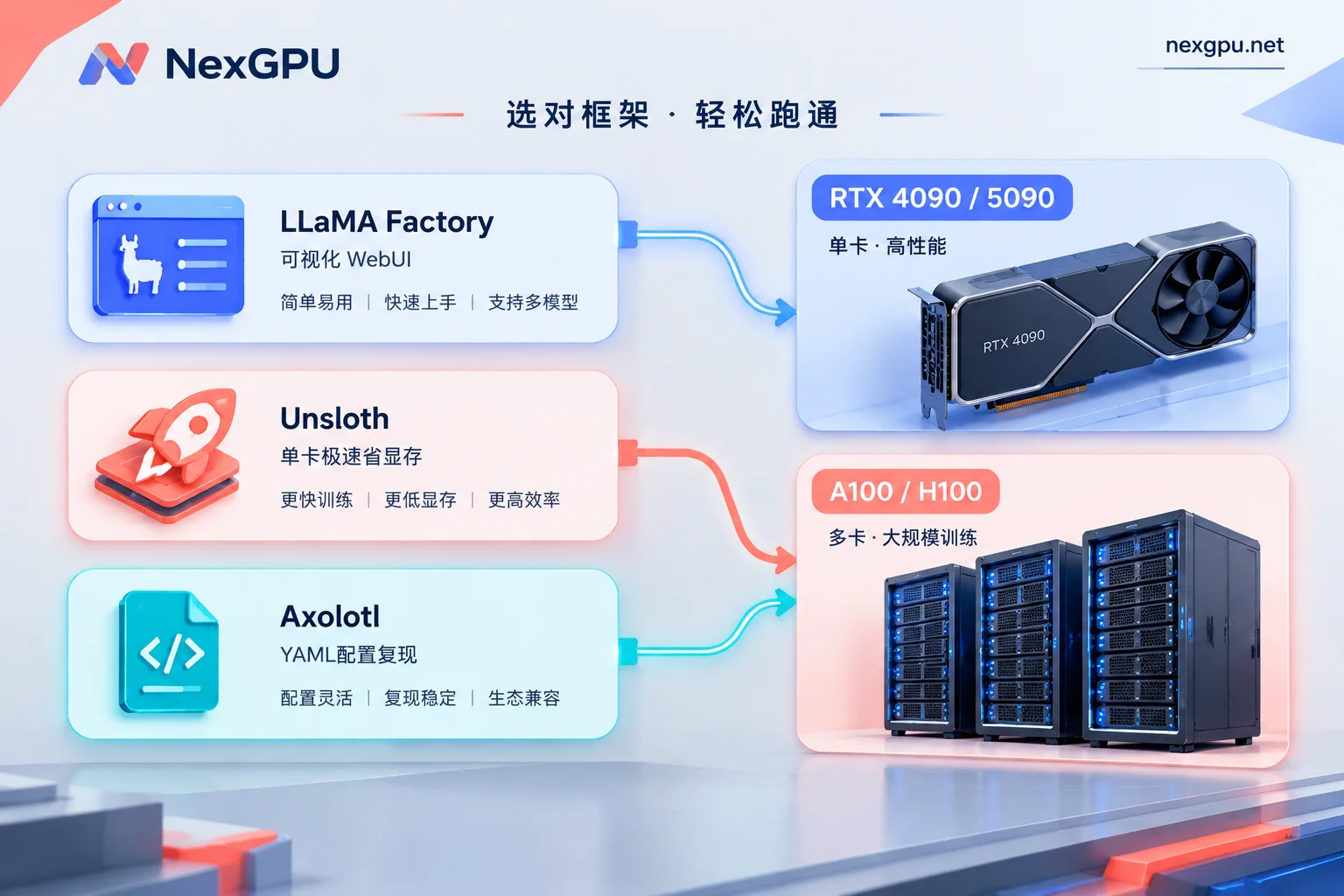
1. LLaMA Factory: Zero-Code WebUI and Full Model Coverage, Suitable for Beginners and Enterprises
- Framework Features: Supports 100+ mainstream text and multimodal large models, built-in LlamaBoard visual web interface. With just a few clicks, you can complete dataset loading, LoRA/QLoRA parameter configuration, SFT/DPO/KTO training monitoring, and export evaluation.
- How to Configure GPU: If it's your first time fine-tuning, strongly recommend using LLaMA Factory + 8B model + single RTX 4090/5090 to first run through data format and loss curve with 10% of samples in the WebUI; if your team is doing multi-model matrix comparisons or 32B/70B distributed fine-tuning, LLaMA Factory seamlessly integrates with DeepSpeed, and you can directly rent multi-GPU A100/H100 nodes.
2. Unsloth: The "VRAM-Saving and Speed-Boosting Beast" with Handwritten Triton Kernels
- Framework Features: By rewriting CUDA/Triton operators at a low level and manually deriving backpropagation, Unsloth can increase fine-tuning speed by about 2x while reducing VRAM usage by 70%–80% with zero accuracy loss. Additionally, LLaMA Factory now supports enabling Unsloth as a built-in acceleration backend with one click.
- How to Configure GPU: When you have limited budget or want to challenge longer contexts and larger parameter counts (e.g., 14B/27B QLoRA) on a single 24GB GPU (RTX 3090/4090), Unsloth is the ultimate tool to squeeze every bit of performance from single-GPU hardware.
3. Axolotl: YAML Configuration-Driven, Suitable for Serious Experiments and Distributed Reproducibility
- Framework Features: Manages data preprocessing, packing (Multipack), fine-tuning hyperparameters, and FSDP/DeepSpeed strategies entirely through a YAML configuration file. Highly auditable and favored by algorithm engineers who need strict reproducibility.
- How to Configure GPU: Very suitable for running on multi-GPU RTX 4090 nodes or A100 / H100 / H200 datacenter multi-GPU nodes for long-cycle domain knowledge injection or continued pre-training.
In practice, many people get stuck for half a day dealing with CUDA 版本不匹配, FlashAttention-2 编译失败, bitsandbytes 报错 locally or on bare metal before even starting to train a model. On NexGPU, you can skip this step:
Open Templates, and under the "Training & Fine-Tuning" category, the platform has pre-configured ready-to-use environment images for LLaMA Factory, Unsloth, Axolotl, as well as native PyTorch, TensorFlow, JAX, with drivers, CUDA, and core dependencies all pre-installed. If your project code strictly locks specific CUDA or internal dependency versions, you can also fill in your own public or private Docker image repository address, and customize startup commands and environment variables. Not sure how to set up for your specific scenario? Check out the AI Fine-Tuning and Other Scenario Practices Page for recommended VRAM, GPU types, images, and approximate budgets.
Step 4: How to Minimize Compute Costs When Fine-Tuning on NexGPU?
Fine-tuning is different from 7×24 online inference services; it's a typical bursty, phased workload: cleaning data, tuning parameters, running a few epochs, testing results, then revising data. For this rhythm, making good use of the platform's GPU selection and billing mechanisms can save teams a significant amount of budget:
1. Select the Fine-Tuning Environment First, Then Let the System Help You Filter GPUs
Go to the NexGPU Compute Marketplace (see the "How to Choose a GPU" documentation for GPU selection). Each row is a real rentable physical machine, with consumer-grade (RTX 3090, 4090, 5090, etc.) and datacenter-grade (A100, H100, H200, B200, etc.) priced separately. Compute unit price and disk unit price are clear at a glance.
Even more convenient: when you first select a fine-tuning image or model environment and then filter machines, machines with insufficient VRAM will be automatically flagged with reasons, preventing you from renting the wrong GPU and causing OOM from the start. You can freely filter by VRAM size, price, region, reliability, and network bandwidth.
2. Use Jupyter, Direct SSH, and Additional Ports to Monitor Dashboards
After the instance is up (supports direct email registration, no cumbersome real-name verification or quota approval, see Quick Start Guide), you can choose your preferred connection method (see "Connecting to Instances" documentation):
- If you like interactive dataset debugging and Notebooks, directly open Jupyter with token already set, or use the web root terminal in the browser;
- If you prefer writing code with local VS Code Remote, use the public IP and port for direct SSH (no jump host, supports configuring default public keys);
- When running LLaMA Factory WebUI, TensorBoard, or SwanLab to monitor loss curves, each instance has a set of additional ports reserved in addition to the default mapping for exposing your own web services; if you want to visually manage fine-tuning dataset files and processes in the browser, you can also install a visual management panel (aaPanel) with one click.
3. Master the Billing Rules of "Stop and Keep Disk" and "Destroy and Stop Charges"
During fine-tuning, you often need to pause training to clean the next batch of data or have a meeting to discuss evaluation results. In NexGPU's billing system, the bill only has three items: compute, storage, and traffic. There is no minimum spend, setup fee, or minimum rental period, and the unit price at order time is locked until the instance is destroyed:
- Compute fees are billed per second and priced per hour: billing starts only when the instance is "running". As soon as you click "Stop," compute billing stops immediately, while model weights and datasets on disk are preserved intact. You can power on and continue training anytime;
- Storage fees are billed per GB/month: starting from instance creation. During shutdown, storage fees still apply because the disk is occupied. Only destroying the instance completely releases the disk and stops all billing (for detailed billing logic on stop vs. destroy, we strongly recommend reading "Are GPU Instances Charged When Shut Down? Compute Stops, Storage Continues" and "How to Save Data on Rented GPU Instances: Stop and Keep Disk, Destroy and Clear, and Three Data Migration Routes").
Therefore, the most cost-effective fine-tuning approach is: when creating an instance, allocate enough disk space based on the total size of your dataset and checkpoints (note: disk cannot be expanded after instance creation). Stop the instance during small-batch debugging to save compute fees; after final LoRA weights are trained, merged, exported, and backed up to external object storage or Hugging Face, enter the instance ID to confirm destruction (the platform uses exclusive containers and does not read or back up disks; destruction permanently clears data), ensuring you don't pay a penny extra for storage.
Conclusion: From Single-GPU Validation to Multi-GPU Clusters, Evolve Smoothly by Stage
In summary, choosing a GPU for LLM fine-tuning doesn't require blindly stacking hardware:
- Get the pipeline working and style fine-tuning (7B–14B): Choose LLaMA Factory or Unsloth pre-configured images, rent an RTX 3090 / 4090 / 5090 to run LoRA/QLoRA. The compute cost of a few fast-food meals can get you a custom model;
- Validate results immediately after fine-tuning: Seamlessly switch to the platform's vLLM, SGLang, TGI, or Ollama inference images, and spin up OpenAI-compatible APIs for AB testing;
- Full-parameter fine-tuning and multi-GPU training for medium-to-large models (32B–70B+): In the GPU marketplace, filter by "minimum GPU count" for A100, H100, H200, B200 multi-GPU full nodes (rented as whole machines; order amount = per-GPU price × GPU count), and directly run DeepSpeed, FSDP, or Megatron distributed training.
If your enterprise or lab needs a long-term stable fine-tuning compute pool, RDMA high-speed interconnected multi-node clusters, private network data isolation, or reserved instances, monthly/yearly subscriptions, contract-based corporate payment and invoicing, PO procurement, please prepare your requirements (refer to "How to Consult About Enterprise GPU Clusters and Reserved Instances: Prepare This Requirements Checklist Before Contacting") and directly contact our team via the Contact Sales page.
Now go to the NexGPU Image Templates page and pick a fine-tuning framework that suits you to start your first low-cost model customization!



