 NexGPU-算力租赁,GPU服务器,GPU云算力,AI服务器租用-新闻博客
Before renting a GPU for LLM fine-tuning, many developers instinctively plug "model parameter count × bytes per parameter" into a VRAM formula. But in 2026 engineering practice, what determines whether you should rent a 24GB consumer-grade GPU or an 8×80GB data center node is often not just the model itself, but the fine-tuning framework and low-level kernel implementations you choose.
If in "How to Choose a GPU for LLM Fine-Tuning: A Three-Step Guide Based on VRAM Accounting, Fine-Tuning Methods, and Open-Source Frameworks" we covered the basics of VRAM accounting, and in "2026 GPU Selection for LLM Training: VRAM Accounting and Multi-GPU Cost Practices from SFT to GRPO Reinforcement Learning Post-Training" we broke down differences across post-training stages, then when it comes to actual hands-on tuning, the most common real-world questions developers face are:
- Why is it that when fine-tuning the same 8B dense model or 20B/30B MoE (Mixture of Experts) model, some people finish in a few hours on a single RTX 4090, while others rent an A100 and frequently hit OOM (out-of-memory)?
- Unsloth, LLaMA Factory, and Axolotl—these three mainstream open-source fine-tuning frameworks—what kind of GPU does each work best with?
- On hourly-billed compute platforms, how can you use prebuilt images, spare ports, and the "stop and keep disk" mechanism to minimize the total bill from data cleaning and hyperparameter tuning to merging and exporting weights?
This article provides an actionable GPU configuration and cost-control guide for LLM fine-tuning from the cross-perspective of "framework characteristics × hardware boundaries."
1. Why Does the Fine-Tuning Framework Directly Determine Your GPU Bill?
In the 2026 open-source post-training ecosystem, although Unsloth, LLaMA Factory, and Axolotl all build on PyTorch and the Hugging Face ecosystem, their engineering optimization priorities are entirely different, directly rewriting the hardware thresholds for GPU memory and inter-GPU interconnect for different tasks:
- Unsloth (single-GPU extreme squeezing and hand-written kernels): It does not use the standard PyTorch autograd black box but instead hand-writes forward and backward propagation kernels using OpenAI Triton, eliminating a large amount of redundant gradient buffers with zero accuracy loss. In single-GPU scenarios, it delivers 2–5× training speedup and reduces peak VRAM by 40%–70% or more. Especially for the MoE models and long-context (8K–16K) fine-tuning that are hot in 2026, Unsloth's improved Split-LoRA mechanism avoids materializing LoRA increments across all expert layers before matrix multiplication, making tasks that would inevitably OOM under native frameworks fit easily on a single GPU.
- LLaMA Factory (zero-code visualization and full model coverage): Supports 100+ mainstream text LLMs and multimodal vision models (VLMs), comes with an intuitive WebUI (LlamaBoard), and allows switching among SFT, DPO, GRPO, KTO, ORPO, and other alignment algorithms via menu selections. More practically, it supports checking an option to enable Unsloth as a single-GPU acceleration backend, and can also invoke DeepSpeed or Megatron via command line for multi-GPU distributed training.
- Axolotl (multi-GPU distributed orchestration and enterprise-grade scaling): Manages everything through a declarative YAML configuration file, natively deeply integrates FSDP2, DeepSpeed ZeRO-3, tensor parallelism (TP), sequence parallelism, and expert parallelism (EP), and introduces operator optimizations such as SonicMoE LoRA for MoE fine-tuning and FlashAttention 3/4. When your task goes beyond a single GPU and requires 4-GPU or 8-GPU nodes for 30B–70B+ full fine-tuning or ultra-long sequence training, Axolotl's multi-GPU scaling efficiency far exceeds that of single-GPU tools.
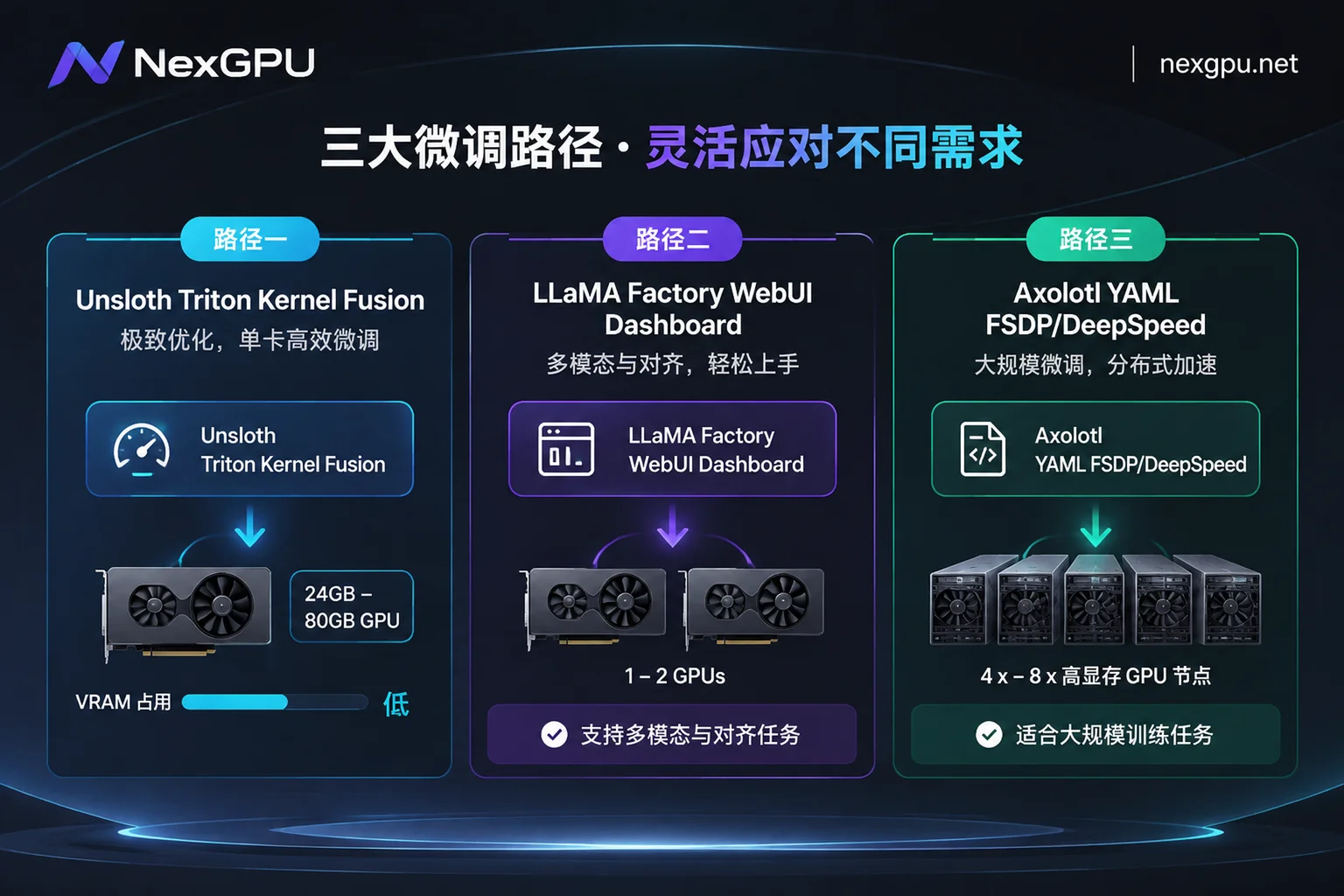
Quick Reference Table: Matching the Three Fine-Tuning Frameworks with GPU Hardware
| Fine-Tuning Framework | Core Engineering Advantages | Typical VRAM and Speed Performance | Optimal GPU Configuration Direction | Suitable Fine-Tuning Scenarios |
|---|---|---|---|---|
| Unsloth | Hand-written Triton kernels, manually derived backpropagation, MoE Split-LoRA optimization, one-click GGUF export | 8B QLoRA needs only 6–8GB; 70B QLoRA about 41–48GB; long-context MoE up to 7× speedup | Single GPU preferred: RTX 3090 / 4090 / 5090, or single A100 / H100 80GB | Individual developers and small teams doing single-GPU ultra-fast QLoRA/LoRA, long-text instruction fine-tuning, directly converting to Ollama for local inference after fine-tuning |
| LLaMA Factory | LlamaBoard visual interface, coverage of 100+ LLMs and multimodal VLMs, most comprehensive alignment algorithms | Native 8B QLoRA about 16GB; enabling Unsloth backend greatly reduces VRAM and speeds up 2× or more | Single GPU to small-scale multi-GPU: RTX 4090 / 5090 (1–2 cards), or A100 80GB | Zero-code rapid experimentation, multimodal image-text fine-tuning, frequent comparison of different datasets and hyperparameters, exporting HF weights for vLLM deployment |
| Axolotl | YAML configuration-driven, highest combination flexibility of FSDP2 / DeepSpeed ZeRO-3 / sequence parallelism | Single-GPU overhead slightly higher than Unsloth, but good linear scaling on 4–8 GPUs; SonicMoE saves about 30% VRAM | Multi-GPU full-node preferred: 4×/8× A100, H100, H200, or B200 nodes | 13B–70B+ full fine-tuning, enterprise-scale continued pre-training on large corpora, cross-GPU long-sequence training |
💡 No environment setup needed: In the NexGPU Image Template Library, under the "Training & Fine-Tuning" category, Unsloth, LLaMA Factory, Axolotl, and PyTorch are all available as prebuilt templates, with drivers, CUDA, and core dependencies ready out of the box. Templates are not tiered and incur no additional licensing fees.
2. Choosing GPUs by Fine-Tuning Task: GPU Selection Plans for Three High-Frequency Scenarios
Having clarified the framework differences, we can now precisely select GPUs in the NexGPU Compute Marketplace across two major series: "consumer-grade GPUs" and "data center GPUs." The platform lists every real rentable machine line by line, with compute unit price and disk unit price stated separately. You can filter directly by VRAM, price, region, reliability, bandwidth, and minimum GPU count.
Scenario 1: Single-GPU Fast Fine-Tuning of 7B–14B Dense Models / Small-to-Medium MoE Models
If your goal is to perform QLoRA/LoRA fine-tuning on 7B–14B models such as Qwen, Llama 3.3, or DeepSeek distilled versions for vertical industry Q&A, JSON structured output, or coding assistance:
- Top choice combination: Unsloth prebuilt image + single RTX 3090 / RTX 4090 (24GB) or RTX 5090
- Why this configuration is most cost-effective: Within the 24GB VRAM boundary, when running 8B–14B models with native frameworks, once you extend context to 4K–8K, activations easily blow up VRAM. With Unsloth's kernel fusion and memory optimization, not only can 8B QLoRA usage be pressed below 8GB, but the extra VRAM also allows you to increase batch size or enable longer sequence lengths, shortening training that would otherwise take three or four hours to tens of minutes to one or two hours.
- Advanced tip: For specific capability boundaries of 24GB single-GPU cards in training and inference, refer to our previous article "How to Rent an RTX 4090 Cloud Server: Capability Boundaries of 24GB VRAM, GPU Selection Pitfalls, and a Guide to Smooth Scaling from Single to Multi-GPU". If you are still unsure about the specific versions and quantized VRAM thresholds of open-source models at hand, we recommend first checking the NexGPU Model GPU Selection Guide (for example, the Qwen GPU Selection and Deployment Page).
Scenario 2: Zero-Code Visual Tuning, Multimodal (VLM) Fine-Tuning, and Multi-Round Alignment Experiments
When a business team needs to feed image-text table data to a multimodal vision LLM, or when an algorithm engineer needs to compare preference alignment effects such as DPO, KTO, and ORPO immediately after SFT, hand-writing scripts for debugging is often time-consuming and laborious.
- Top choice combination: LLaMA Factory prebuilt image + single RTX 5090 / A100 80GB (or 2×RTX 4090 node)
Why this configuration is most cost-effective:
- WebUI interaction boosts efficiency: Each NexGPU instance not only provides a web-based root terminal, direct SSH without a jump host, and one-click Jupyter with token, but also comes with a public IP and port mapping, plus an additional set of spare ports reserved for the user's own services. You can bind LLaMA Factory's LlamaBoard WebUI directly to a spare port, select datasets in your local browser, and monitor loss curves and evaluation metrics in real time, with no extra cost for port mapping (see the Instance Connection Documentation for details).
- VRAM headroom for multimodal: Multimodal fine-tuning generates large transient activations when processing high-resolution image tokens. If budget allows, renting a single A100 80GB can completely eliminate the hassle of frequently reducing
per_device_train_batch_size(for trade-offs among A100 specifications, see "2026 A100 Rental Guide: How to Choose Between 40GB and 80GB, PCIe and SXM?").
Scenario 3: 30B–70B+ Full Fine-Tuning, Medium-to-Large MoE, and Long-Context Distributed Training
When fine-tuning enters deep waters—for example, performing 16-bit LoRA/full-parameter fine-tuning on a 70B model, or injecting domain knowledge into a 30B+ MoE model under 8K–16K long contexts:
- Top choice combination: Axolotl (or LLaMA Factory CLI + DeepSpeed) + 4-GPU/8-GPU A100 / H100 / H200 / B200 full-node
Why this configuration is most cost-effective:
- The inflection point between single-GPU high VRAM and multi-GPU parallelism: If you are only running 4-bit QLoRA on a 70B model, a single 80GB A100 or H100 with Unsloth (peak VRAM about 41–48GB) can finish in a few hours, and single-GPU rental has the lowest overall cost. But once 13B–70B full fine-tuning or large-scale datasets are involved, a single GPU not only cannot hold optimizer states but also stretches training time to tens of hours.
- Direct full-node multi-GPU rental: In the NexGPU Pricing and Marketplace Page, you can directly filter for 4-GPU or 8-GPU high-VRAM multi-GPU nodes by "minimum GPU count" (multi-GPU nodes are rented as full machines; order amount = per-GPU price × number of GPUs), and use Axolotl's FSDP2 or DeepSpeed ZeRO-3 for cross-GPU gradient and optimizer sharding. If your enterprise team needs higher-spec RDMA high-speed interconnect, data isolation, private networking, or dedicated compute clusters, you can also directly contact sales to customize enterprise solutions and corporate contracts with invoicing.
3. NexGPU Full-Cycle Cost-Saving Practices for Fine-Tuning: Spend Every Cent Where It Counts
Many developers find when reviewing their fine-tuning bills that the time actually spent running trainer.train() accounts for only 40% of total rental time, while the remaining 60% of compute fees are wasted on pulling hundreds of GB of weights, cleaning and converting JSONL datasets, troubleshooting CUDA dependency conflicts, and idle periods watching logs.
Combining the NexGPU Billing Rules and Instance Management Features, following these five steps can reduce overall fine-tuning costs by 30%–50%:
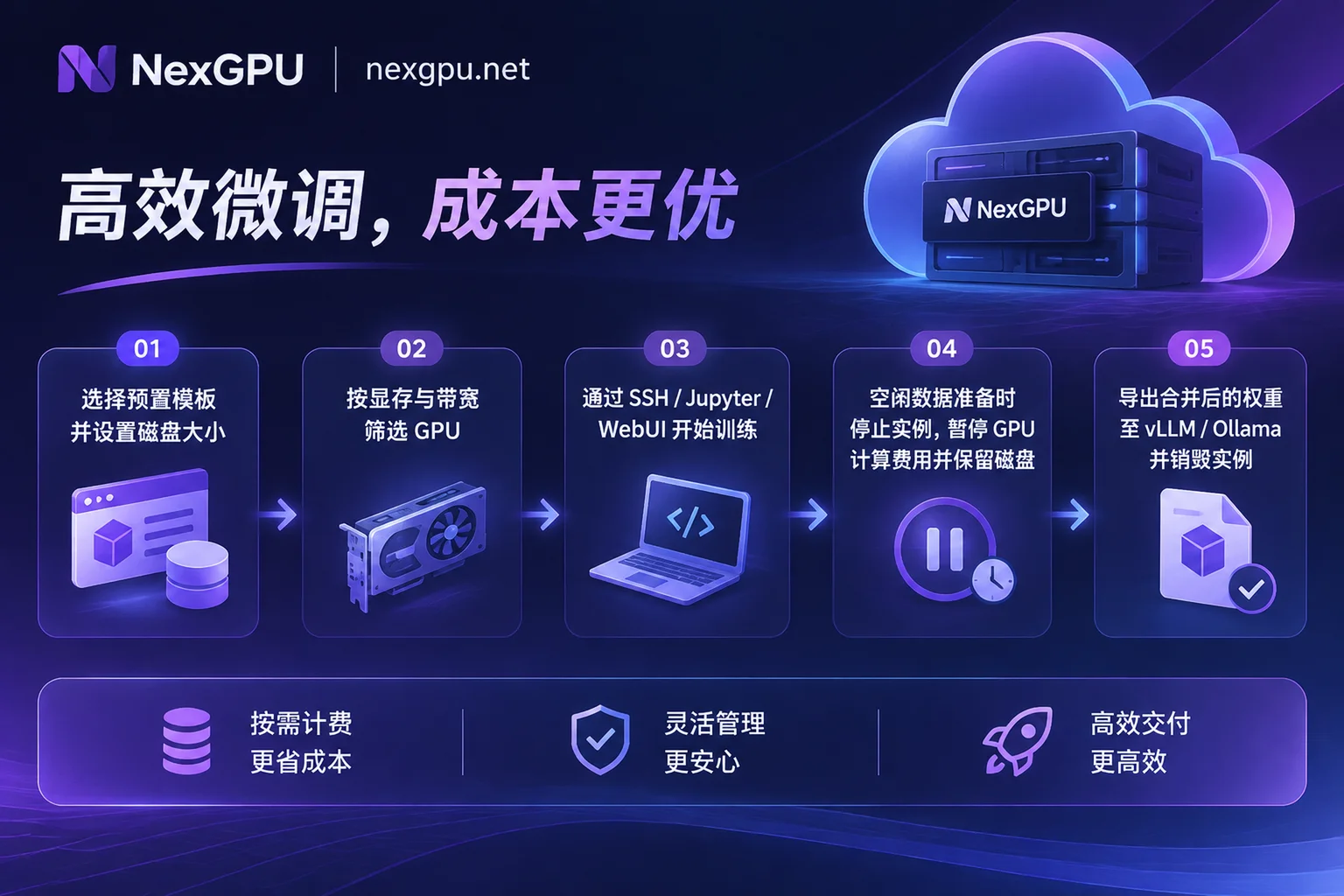
1. Select the Image Environment First, Then Filter Machines to Avoid "OOM on Startup" and Lengthy Environment Setup
When creating an instance, it is recommended to follow the order of "select environment first, then filter machines." After you select the target environment, machines with insufficient VRAM will be automatically marked in the list with reasons, preventing wrong GPU rentals from the source (see How to Choose a GPU documentation).
In addition, if your training code or specific operators (such as custom FlashAttention or special MoE kernels) are strictly locked to a particular minor CUDA version, the official website recommends directly using the custom Docker image feature (supporting public or private repositories, with customizable startup commands and environment variables). This lets you boot directly into a preconfigured deterministic environment, saving the high compute cost of recompiling operators on every startup.
2. Accurately Calculate Disk Capacity and Machine Bandwidth at Instance Creation
Fine-tuning large models typically involves four space hogs: original base weights + training dataset + Checkpoint archives from multiple steps + final merged full model weights.
When using NexGPU, there are two hardware boundaries you must plan for in advance:
- Disks cannot be expanded after creation: Be sure to allocate sufficient disk capacity at the time of ordering based on "base model size × 3 + reserved space for datasets and checkpoints." If you want to manage files, processes, and scheduled tasks visually in a browser, you can install the aaPanel visual management panel with one click, but remember to include the disk space used by aaPanel in your calculation.
- Bandwidth is determined by the selected machine and cannot be set separately: Before fine-tuning, you usually need to pull tens to hundreds of GB of base weights from Hugging Face or ModelScope. When filtering machines in the GPU marketplace, prioritize nodes with ample bandwidth to significantly shorten image pulling and weight downloading time.
3. Leverage "Per-Second Billing" and "Stop and Keep Disk" to Cut Compute Charges During Non-Training Periods
NexGPU's billing is very transparent, with only three items: compute, storage, and traffic. There is no minimum spend, no activation fee, no minimum rental duration, and the unit price at order time remains locked until the instance is destroyed:
- Compute fee: Billed per second, priced per hour; billing starts only when the instance enters "Running" state, and compute fees stop immediately upon shutdown or destruction.
- Storage fee: Billed per GB/month, starting from instance creation (including image pulling time); charged as usual after shutdown, and stops only when the instance is destroyed.
This means that when you finish an epoch and need to spend a few hours manually spot-checking generation quality, cleaning a second batch of bad cases, or pausing experiments for the night, you only need to click "Shutdown" in the console. The environment, datasets, and checkpoints on disk remain intact, while the bulk of the cost—GPU compute—drops to zero. When you have revised your data recipe, simply start it again with one click to continue training.
4. Seamless Post-Training Validation: Switch from Fine-Tuning Environment to vLLM / Ollama Inference Validation
After fine-tuning is complete and you have exported LoRA adapters or merged them into full weights, do not leave them running long-term on an expensive multi-GPU training instance for low-concurrency manual testing:
- If you exported GGUF quantized weights with Unsloth, you can switch to a lightweight instance with the Ollama template to quickly validate the conversational feel.
- If you are preparing to launch a high-concurrency business API, you can choose LLM inference templates such as vLLM, SGLang, or TGI from the NexGPU Image Template Library (which provide a standard OpenAI-compatible API upon launch). For detailed production migration steps, refer to "vLLM Deployment Practical Guide: Migrating from Ollama to a High-Concurrency Production Environment—How to Choose GPUs, Configure Images, and Expose OpenAI-Compatible APIs".
5. Destroy the Instance Promptly After Exporting Weights; Note That the Platform Does Not Provide Automatic Backups
Since storage fees continue to accrue pro rata per month even when stopped, once your fine-tuning task is completely finished, be sure to transfer and back up the LoRA weights, merged models, and training logs produced by fine-tuning to your own external storage via SSH/SFTP or object storage tools as soon as possible.
⚠️ Important Security Reminder: NexGPU instances are dedicated containers, and for privacy protection the platform neither reads nor backs up user disk contents. After you enter the instance ID to confirm "Destroy," the disk will be released immediately and data cannot be recovered. Also pay attention to account balance warning emails to avoid triggering automatic system destruction due to prolonged negative balance after automatic shutdown when the balance is exhausted.
4. Conclusion: How to Start Your First Low-Cost Fine-Tuning?
In 2026, LLM fine-tuning is no longer a heavy-asset engineering project that requires renting expensive clusters by the month. As long as you clarify the framework division of labor—"Unsloth for single-GPU speed, LLaMA Factory for visualization and multimodality, Axolotl for multi-GPU distributed scaling"—and combine it with per-second billed elastic GPU compute, even with a budget of just a few dollars, you can train a dedicated model highly tailored to your business context in a few hours.
If you already have your fine-tuning dataset ready, you can quickly get started by following these steps:
- Zero-barrier price checking and registration: Register with just an email (no real-name verification or cumbersome quota application required; after registration, you can view real-time compute prices without binding a payment method; top-ups support Alipay and USDT-TRC20; see the Quick Start Guide for details).
- Find the right plan for your needs: Go to the NexGPU Scenario Practices Page (AI Fine-Tuning) to view VRAM requirements, recommended GPUs, image combinations, and budget estimates for different model sizes.
- Pick a GPU and start: Open the NexGPU GPU Marketplace and the Image Template Page, select your fine-tuning framework template and a cost-effective GPU, and start your ultra-fast fine-tuning journey now!



