 NexGPU-算力租赁,GPU服务器,GPU云算力,AI服务器租用-新闻博客
In early November 2026, the global AI compute rental market was rocked by two industry-shaking pieces of news: first, Microsoft was reported to be gradually terminating its AI compute rental leases with Oracle and tightening long-term procurement from several emerging cloud providers, primarily because previous-generation NVIDIA GPU hardware signed in early contracts is aging and no longer matches the specifications required by the latest model architectures; then, Anthropic's latest prospectus amendment showed that despite a revenue surge, a sudden spike in user demand exceeded its long-term reserved capacity, forcing it to temporarily purchase $5 billion in high-priced short-term compute, which, combined with a cross-cycle compute commitment of up to $895.4 billion, pushed it back into an operating loss in the third quarter.
These two landmark events have torn open the most real state of the GPU rental market in 2026: the pace of chip iteration and model architecture evolution has far exceeded the cycle of traditional long-term contracts. Whether it's the heavy asset lock-in of multi-year buyouts or the blind hoarding of a single generation of graphics cards, both become heavy financial burdens when the model generation changes.
Meanwhile, the center of gravity of compute consumption is undergoing a dramatic shift. A 2026 industry report from the China Academy of Information and Communications Technology shows that inference compute has exceeded 70% and become the absolute mainstay of the market, yet 45% of teams still have compute utilization below 35% due to unclear demand profiles, and a large number of users have encountered hidden charges and configuration mismatches. Especially in the second half of 2026, new workflows represented by native multimodal vision models (VLM), one-shot long-document OCR parsing (such as Unlimited-OCR), and round-the-clock enterprise AI Agents (such as NVIDIA Nemotron 3.5 Super VL and GLM-5.3-Flash) are exploding across the board. Renting cards based solely on the "parameter count × 2" experience from the pure-text era easily leads to deep pitfalls such as video memory overflow (OOM) or compute idling.
If you are planning to find a cost-effective compute foundation for your team's AI Agent, multimodal visual understanding, or batch document OCR business, this article starts from the latest workload characteristics at the end of 2026 and walks you through calculating VRAM requirements, choosing the right GPU generation, and using on-demand elasticity to spend every bit of budget where it matters most.
I. Three Lessons from the 2026 Compute Market Shakeup for Neutral Developers
Why are even tech giants and top large-model labs re-examining their compute leases? Bringing the perspective back to small and medium R&D teams, AI creators, and enterprise compute procurement, these three industry signals directly determine the selection strategy going forward:
1. The generational hardware dividend is accelerating: "on-demand upgrades" beat "long-term contracts"
Take consumer flagship cards as an example: buying an RTX 5090 plus a matching high-wattage power supply, water cooling, and server chassis typically pushes the total cost above 40,000 RMB, while AI accelerator cards face significant performance depreciation every 18 months on average as architectures iterate. In the cloud rental scenario, using consumer-grade GPUs for initial validation today and switching to an RTX 5090 with 32GB VRAM or data-center-grade A100, H100, H200, or even B200 when the model is upgraded to a native multimodal architecture requiring higher memory bandwidth next month is the healthiest way to manage cash flow.
2. Workflows shift from "single-turn chat" to "multimodal perception + long-chain Agent execution"
In the 2026 production environment, isolated text Q&A can hardly constitute a business moat. Real business is often a composite pipeline: upload scanned PDFs or business charts → vision-language models (VLM/OCR) extract structured Markdown and table data → AI Agents invoke toolchains for multi-step reasoning and code execution. This workload has both high-density visual token prefill computation and idle periods when the Agent suspends multiple rounds waiting for tool returns, requiring the underlying compute to withstand concurrency peaks and quickly shrink costs during business troughs.
3. Bill transparency is more important than "surface low prices"
Many teams only look at the hourly card price when comparing GPU rental platforms, only to find at month-end settlement that they have been charged extra for port mapping fees, image pull authorization fees, minimum spending thresholds, or high bundled bandwidth fees. This is why more and more developers prefer compute marketplaces with minimalist billing structures, locked unit prices, and no hidden surcharges.
II. Calculating the "VRAM Bill" for Multimodal, OCR, and AI Agents: Why They Are More Demanding Than Pure Text?
In previous blog posts, we have already detailed how to choose a GPU for large model fine-tuning and deployment solutions for Qwen pure-text and MoE models. But in multimodal vision (VLM), document OCR, and AI Agent scenarios, the VRAM consumption structure has fundamentally changed.
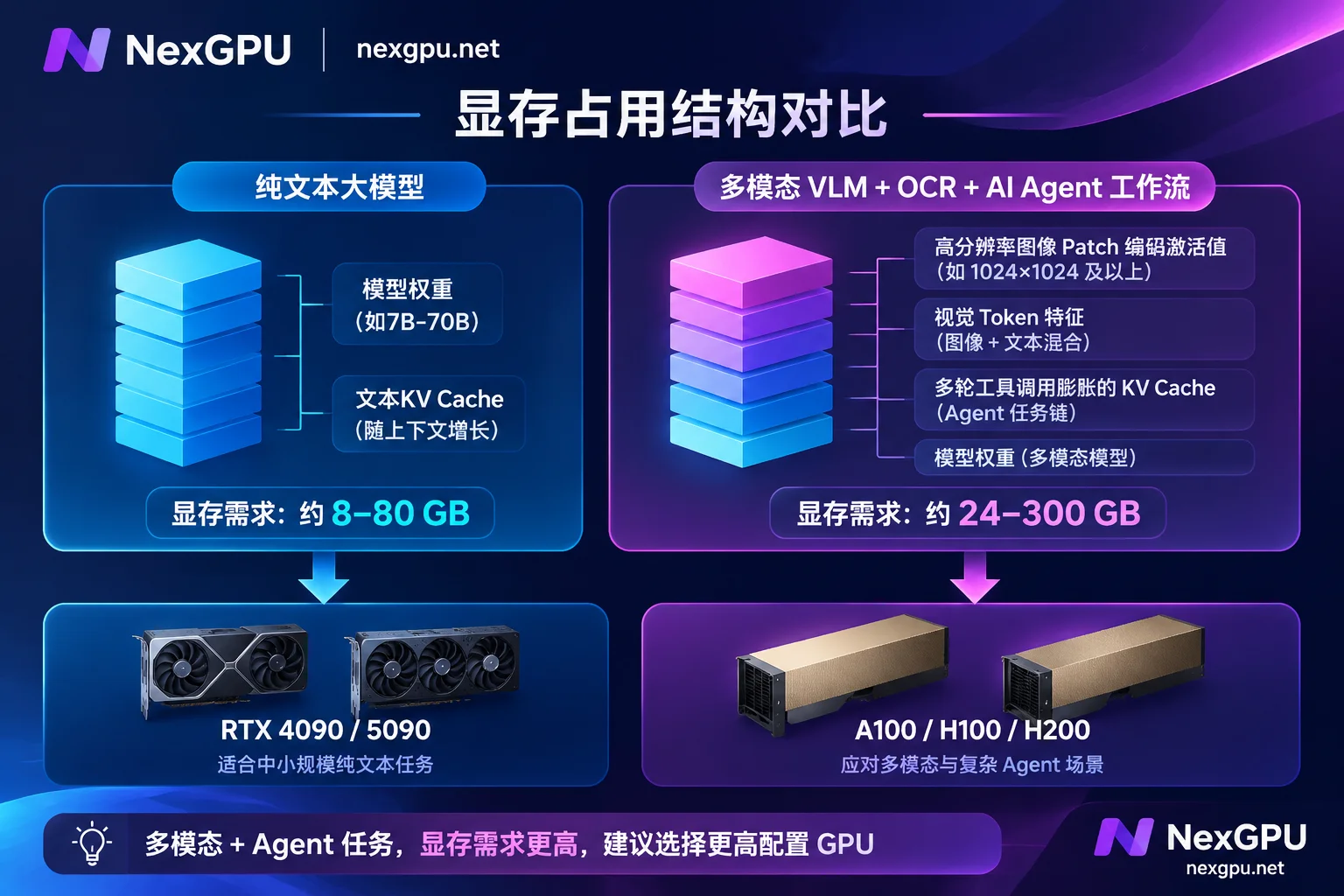
1. Vision Encoder and High-Resolution Image Patch Overhead
Traditional LLMs only process discrete text tokens, whereas multimodal models (such as the Qwen-VL series, MiniCPM-V, GLM-5.3-Flash, etc.) and next-generation VLM-based document parsing models (such as Unlimited-OCR, which supports one-shot multi-page parsing) first need to use a vision encoder to split high-definition images or PDF pages into hundreds or thousands of visual patches.
- When doing dense financial statement OCR, medical document recognition, or UI automation regression Agents, you often cannot enable high-ratio visual downsampling compression (otherwise small text and table lines will be blurred and lost).
- Once a high-resolution scanned image enters the model, the equivalent number of visual tokens often reaches thousands or even tens of thousands, and combined with the activations of the vision encoder itself, its instantaneous VRAM peak is often 25%–40% higher than that of a pure-text model with the same parameter count.
2. KV Cache Expansion from Multi-Turn AI Agent Trajectories
The biggest difference between AI Agents and ordinary chatbots is "long-range state retention." An automated task may include a dozen steps: reading documents, querying databases, executing Python scripts, validating results, and correcting output. The return result of each tool call is appended to the context history, causing the KV Cache to expand rapidly with the number of concurrent sessions and context length.
3. Quick Reference Table for GPU Selection in Mainstream 2026 Multimodal/OCR/Agent Scenarios
To avoid wasting time troubleshooting after renting a machine with insufficient VRAM, you can refer to the following workload tiers to match consumer-grade and data-center-grade GPUs (for the specific current versions of each model and post-quantization VRAM thresholds, it is recommended to check the NexGPU model selection guide directly):
| Typical business scenario | Representative open-source models/tool stacks | VRAM characteristics and workload bottlenecks | Recommended GPU rental tier | Applicable stage and deployment suggestions |
|---|---|---|---|---|
| Lightweight multimodal & batch long-document OCR | 3B–8B VLMs, dedicated visual OCR models, image-text-audio pipelines combined with Whisper | Small weight footprint (about 8GB–16GB in BF16), but batch processing of multi-page PDFs requires higher VRAM headroom to store image features | Consumer-grade single card RTX 3090 / RTX 4090 | Suitable for daily batch document-to-Markdown conversion and knowledge base ETL cleaning; start on demand for batch runs and stop when done |
| Medium-to-large visual understanding & desktop/GUI Agents | 11B–32B multimodal models, 74B MoE quantized versions (such as Agent models optimized for local/single-card use) | 24GB VRAM easily hits the ceiling with high-resolution multi-image input or long context; 32GB VRAM provides a critical KV Cache safety margin | Consumer-grade flagship single/dual card RTX 5090 / dual RTX 4090 | Suitable for quantized inference of 32B-level models, complex chart parsing, and internal Agent services for small and medium teams |
| Enterprise-grade round-the-clock multimodal Agents & high-concurrency APIs | 70B–120B+ native multimodal/MoE models (such as the Nemotron 3.5 Super VL level), multi-model collaborative routing | Both weights and high-concurrency KV Cache require a very large VRAM pool, and are extremely sensitive to inter-card communication and high VRAM bandwidth | Data-center-grade single/multi-card A100 / H100 / H200 / B200 | Suitable for 7×24 online production services and multi-Agent concurrent scheduling; it is recommended to use vLLM or SGLang with prefix caching enabled |
If you are not yet familiar with the underlying differences between single-card consumer-grade and data-center-grade GPUs, you can read further on this site: RTX 4090 cloud server rental and scaling guide, A100 rental hands-on guide, and H100/H200 GPU selection and cost calculation.
III. Four Standard Steps to Deploy Multimodal and AI Agents on NexGPU
Many developers new to GPU rental, or teams migrating from traditional public clouds, are most troubled by "choosing a GPU like opening a blind box" and "spending a whole day configuring the environment." On NexGPU (nexgpu.net), the entire process is simplified into four transparent and predictable steps:
Step 1: Use the "Model Selection Guide" and "Scenario How-To Pages" to Work Backwards to Hardware
You don't need to dig through forums to estimate VRAM yourself. Before starting an instance:
- Open the NexGPU model selection guide, which categorizes mainstream open-source models into multimodal vision, OCR, AI Agent, large text models, image generation, video generation, speech recognition, digital humans, 3D generation, and other categories. Click into the corresponding model page (for example, view the Qwen series single-model page), and the page directly states the current version, post-quantization VRAM threshold, which GPU to rent, and the complete steps from starting an instance, selecting an image, pulling weights, to launching the service.
- If you are starting from a business goal, you can directly visit the NexGPU scenario how-to pages and view topics such as AI Agents, private deployment of large models, and batch data processing. Each page clearly lists the required VRAM, recommended GPU types, applicable images, and approximate costs.
Step 2: Filter GPUs by Real Metrics in the GPU Marketplace to Avoid "Forcing It with Insufficient VRAM"
Go to the NexGPU pricing and compute marketplace (for detailed GPU selection logic, refer to the official documentation How to choose a GPU). You will see that each row represents a real rentable physical machine or exclusive container node:
- Consumer-grade and data-center-grade priced separately: Consumer-grade GPUs such as RTX 3090, 4090, and 5090 are clearly listed separately from data-center-grade GPUs such as A100, H100, H200, and B200. You can freely filter by VRAM size, price, region, reliability, network bandwidth, and minimum number of cards.
- Proactive foolproof prompts: When you first select an environment template and then filter machines, the system automatically marks machines with insufficient VRAM and notes the specific reason, fundamentally eliminating the embarrassment of "starting the machine and pulling up the model only to find OOM."
- Transparent separation of compute and disk unit prices: Each machine separately lists the compute unit price and disk unit price; if you need to rent multi-card nodes to run tens or hundreds of billions of parameters of multimodal models, multi-card nodes are rented as whole machines, and order amount = single-card price × number of cards, making the accounting clear at a glance.
Step 3: Choose a Prebuilt Image and Start Instantly, or Mount a Private Docker Image
Multimodal models and OCR engines are often very picky about PyTorch, CUDA, and vision dependency library versions. In the NexGPU image template library, all templates are open to all users without tiering, with drivers, CUDA, frameworks, and dependencies pre-installed:
- Directly launch an OpenAI-compatible interface: Choose the vLLM, SGLang, TGI, or Ollama template under the large model inference category (for high-throughput production deployment, refer to the vLLM deployment practical guide). Once the service is launched, it is a standard OpenAI-compatible interface (
/v1/chat/completions). Whether you connect it to Agent orchestration frameworks such as LangChain or Dify, or useimage_urlto pass Base64 images for batch OCR parsing, your business code can seamlessly integrate without any modification. - Custom Docker images for version locking: If your multimodal OCR project or Agent toolchain is locked to a specific CUDA version or private operator dependency, the official website recommends using your own Docker image directly—supporting public or private repository addresses, and customizable startup commands and environment variables.
Step 4: Direct Debugging, Open Spare Ports, and Visual Management
After the instance starts, you can choose the most efficient connection method according to your team's habits (see the connecting to instances documentation and instance management documentation for details):
- Three direct channels: Support opening a web terminal with root privileges directly in the browser; support SSH direct connection (connect directly via public IP and port without a jump host, and you can preset a default public key); if the selected environment includes Jupyter, it can be opened with one click and comes with an access token automatically.
- Public IP and spare ports: Each instance comes with a public IP and port mapping, and additionally reserves a set of spare ports specifically for your custom services (for example, simultaneously exposing the vLLM inference port, OCR preprocessing API port, and Agent monitoring dashboard port). Note: The platform does not support adding or removing port mappings or expanding disks after instance creation. It is recommended to plan the required disk capacity and port allocation in one step when creating the instance.
- Optional visual panel: If you are not used to managing massive PDF documents to be parsed and model weights purely from the command line, you can install the aaPanel visual management panel with one click (it will occupy some disk space), and directly manage file uploads and downloads, background daemon processes, and scheduled batch tasks in the browser.
IV. Reject Hidden Charges: How to Cut Compute Costs by 50% with "Three Minimal Bill Items + Stop and Keep Disk"?
Returning to the industry pain points mentioned at the beginning: whether it's a startup or an individual developer, the biggest fear is compute idling and incomprehensible complex bills. NexGPU's billing rules are designed for elastic workflows to help you achieve cost control down to the second.
1. Only Three Bill Items, Unit Price Locked at Order Time
On the instance details page, the cost breakdown is strictly split into and only includes three items: compute fee, storage fee, and traffic fee.
- No additional tricks: No minimum spending, no activation fee, no port occupancy fee, no image authorization fee, and no minimum rental duration.
- Unit price locking mechanism: The unit price when you place an order on the pricing page remains locked until the instance is destroyed, so you don't need to worry about temporary price increases during use.
2. Compute Metered by the Second, Use "Stop and Keep Disk" for Intermittent Workflows
Understanding the start and end boundaries of compute fees and storage fees is the core skill for saving money:
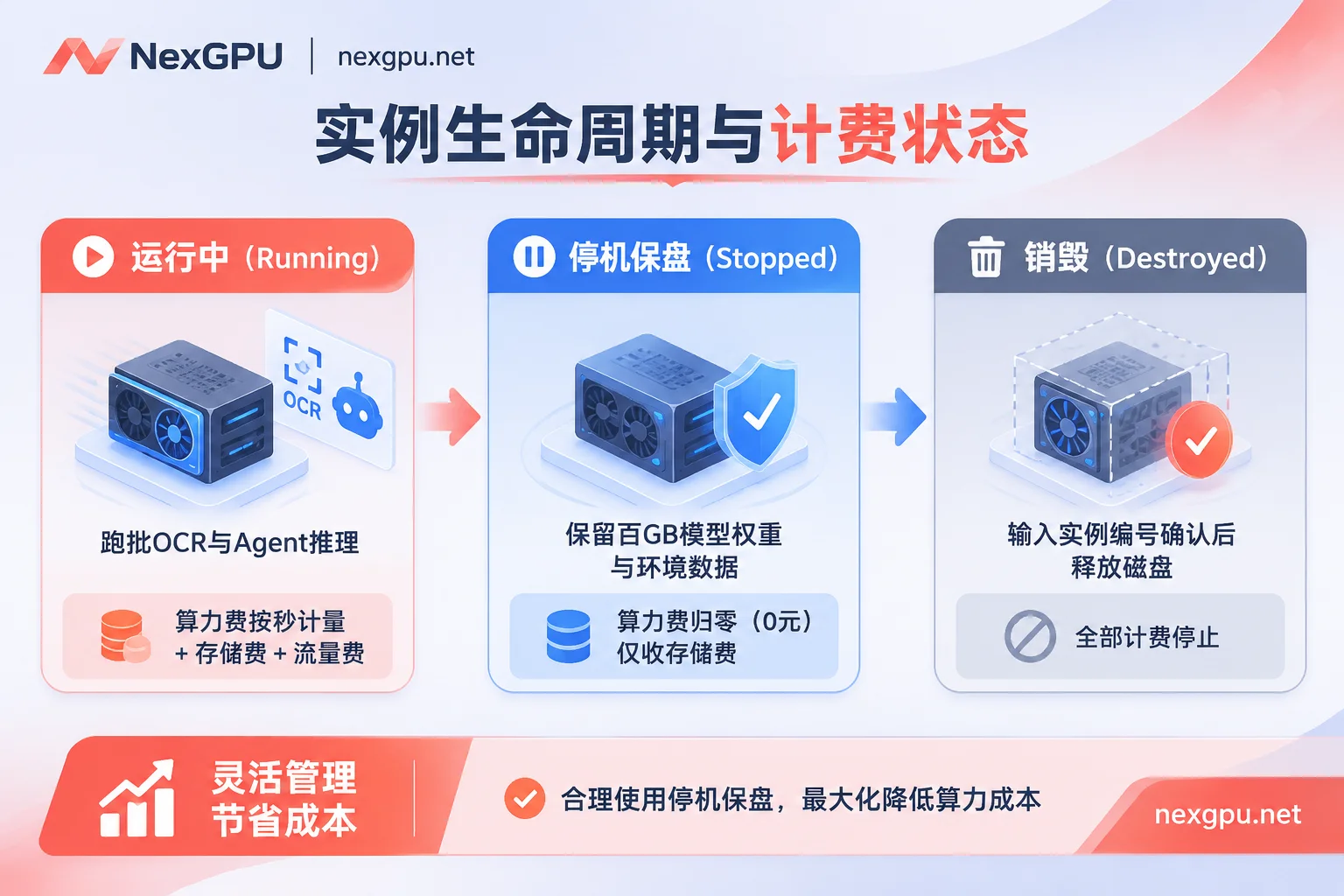
- Compute fee: Metered by the second, billed by the hour. Billing only starts when the instance officially enters the "running" state; once stopped or destroyed, compute billing stops immediately.
- Storage fee: Billed by GB/month, starting from instance creation (including image pulling time). After stopping, the disk and data are retained and storage fees continue to be charged. Only destroying the instance stops billing and immediately releases the disk.
Practical money-saving tactics:
Suppose your team has set up a "hundreds of GB of open-source multimodal weights + proprietary industry OCR cleaning pipeline + Agent test environment":
- Daily debugging and batch running stage: During the day, R&D staff debug Agent trajectories online, or at night, run structured parsing of 100,000 scanned PDF pages in a concentrated 2-hour batch. As soon as the task ends, click Stop directly in the console.
- During stopped periods: The expensive GPU compute fee instantly drops to zero, and you only pay a very low proportion of disk storage fees, while the environment you worked hard to configure, the hundreds of GB of model weights downloaded, and business data remain intact. You can start it with one click the next morning and continue running.
- Final project closure stage: When a short-term evaluation project is completely finished and data has been exported, execute Destroy (to prevent misoperations, the system requires entering the instance number for confirmation; please note that the platform does not read or back up disk contents, and destruction releases the disk and is irreversible. Before destruction, be sure to migrate important results via SSH or the panel).
In addition, the platform adopts a friendly prepaid protection mechanism: when the account balance is low, it sends an early warning email; even if the balance is exhausted, the system will first automatically stop the instance (without immediately destroying data). Only when the negative balance exceeds a set duration will it be automatically destroyed, and you can recharge at any time via USDT (TRC20) or Alipay to resume operation.
V. Smooth Evolution from Personal Quick Validation to Enterprise-Grade Multi-Card Clusters
Teams of different sizes have completely different demands for GPU rental. NexGPU supports a seamless leap from solo operations to enterprise-grade clusters through a unified compute foundation:
- Zero-threshold rapid start (creators and independent developers): Only email registration is required, with no cumbersome real-name verification and long quota applications; after registration, you can view real-time prices without binding a payment method (see the quick start guide and FAQ for details). There is no artificial upper limit on the number of concurrently running instances, only constrained by account balance, making it very suitable for simultaneously launching multiple instances for A/B evaluation of different vision models, or for Blender and 3D rendering segmented parallel acceleration.
- Self-service ordering of multi-card nodes (fine-tuning and high-concurrency inference teams): When a single card's VRAM cannot hold tens or hundreds of billions of parameters of native multimodal models, or when you need to use DeepSpeed, FSDP, or Megatron for post-training and reinforcement learning fine-tuning (refer to GPU selection for large model training and reinforcement learning post-training), you can directly filter by minimum number of cards in the GPU marketplace for high-VRAM multi-card nodes such as A100, H100, and H200 and place orders self-service.
- Customized enterprise solutions (R&D middle platforms and compute procurement): For enterprises that need large-scale long-term deployment of private AI Agent platforms or training of proprietary industry foundation models, NexGPU provides enterprise-grade solutions supporting RDMA high-speed interconnect, data isolation, private networks, and dedicated compute clusters; it also supports reserved instances, monthly/yearly subscriptions, dedicated compute pools, as well as signing formal contracts, corporate payments and invoicing, and PO procurement processes. For customized needs, you can directly contact the bilingual Chinese-English customer service via Telegram, or visit the contact sales page to discuss contracts and invoicing matters via email.
Conclusion
The AI industry at the end of 2026 has proven that compute is no longer a fixed asset where "the more you hoard, the safer you are," but a flowing productivity that needs to precisely match model generations and business peaks and troughs. Facing the new VRAM challenges brought by multimodal vision, long-document OCR, and AI Agents, rather than being held hostage by opaque long-term contracts or high hardware depreciation, it is better to entrust compute to an elastic marketplace with per-second metering and transparent configuration.
Go now to the NexGPU model selection guide or browse the 2026 GPU rental full-process guide, pick the GPU that best fits your current model, and launch your dedicated multimodal and agent service in minutes!



