 NexGPU-算力租赁,GPU服务器,GPU云算力,AI服务器租用-新闻博客
Recent analysis data covering tens of thousands of Kubernetes clusters has laid bare the awkward reality of AI infrastructure: GPU utilization averages only 5%. CPUs are around 8%, memory 20%, and GPUs are at the bottom. This means that the expensive compute that companies buy is idle 95% of the time. The healthy level is around 50%, so there's a huge gap. Some companies hoard entire racks of H100s and H200s, but leave them idle for long periods out of a fear of "not being able to grab them later," resulting in bills that keep coming while output is minimal.
The problem isn't that the cards are underpowered, but that the allocation method is too crude. By default, a Pod requesting nvidia.com/gpu: 1 gets the entire physical GPU exclusively. Lightweight inference, small model fine-tuning, and embedding services often use only 10% to 40% of the compute power, wasting the rest. Training tasks can spike above 80% during peaks, but the average is still low. Developers are used to "requesting the whole card first," and don't release it promptly after experiments, leaving nodes burning money. The cost of an idle H100 per hour is not trivial; for a team of moderate size, this can easily add up to tens of thousands of dollars in hidden expenses per month.
Worse still, software-level time-slicing can virtualize a single card into multiple slices, but without hardware isolation. One task's OOM or bandwidth hogging can affect its neighbors. This is especially dangerous in production environments. This is where hardware-level partitioning comes in.
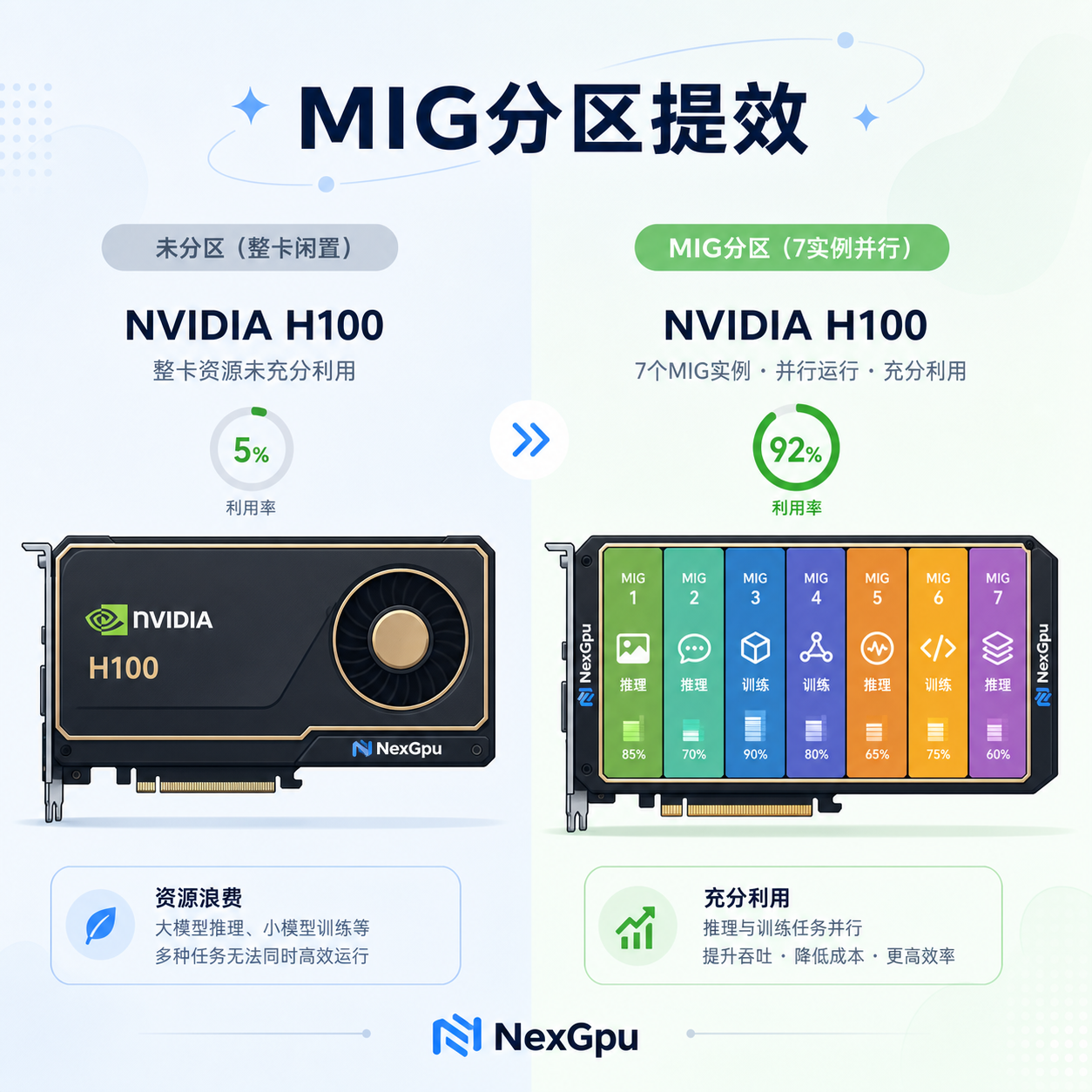
NVIDIA's Multi-Instance GPU (MIG) is designed exactly for this. It divides a supported card (A100, H100, H200, and the newer Blackwell series) into up to 7 independent instances. Each instance has its own compute cores, high-bandwidth memory, cache, and bandwidth quota, with complete fault isolation. A single card can simultaneously run multiple inference services of different sizes, or mix training and inference, without interference. Administrators can also dynamically reconfigure: during the day, split into multiple smaller instances to serve low-throughput inference, and at night, combine into larger instances for training.
In practice, Kubernetes environments are the most common. First, install NVIDIA GPU Operator. Then define partition configurations through a ConfigMap. Here are some common H100 80GB configurations:
- 1g.10gb: 7 instances, suitable for small classifiers or lightweight embedding
- 2g.20gb: 3 instances, good for development and testing of 7B-class models
- 3g.40gb: 2 instances, suitable for medium-scale inference or fine-tuning
- Full card: reserved for large model training
The configuration looks roughly like this (simplified version):
apiVersion: v1
kind: ConfigMap
metadata:
  name: default-mig-parted-config
  namespace: gpu-operator
data:
  config.yaml: |
    version: v1
    mig-configs:
      all-balanced:
        - devices: all
          mig-enabled: true
          mig-devices:
            "1g.10gb": 2
            "2g.20gb": 1
            "3g.40gb": 1
After applying, label the nodes to activate, for example nvidia.com/mig.config=all-balanced. Note: before changing the configuration, you must drain the node; running Pods will be evicted, so choose a maintenance window or configure a PodDisruptionBudget. When requesting resources in a Pod, simply specify nvidia.com/mig-2g.20gb: 1, and the scheduler will match the corresponding instance.
Some teams have tested and found that when a card previously ran only one service with utilization below 20% for long periods, after splitting it into multiple parts, the same hardware could simultaneously serve 3-5 lightweight tasks, and overall utilization easily rose above 60%. Adding elasticity on top makes the effect even more pronounced. Someone calculated that pushing fleet utilization from 60% to 85% effective utilization is equivalent to spreading fixed costs over more useful GPU hours, reducing effective cost per hour by about 30%.
Time-slicing is suitable for development environments or extremely light loads. Configuration is simpler—just enable replicas through GPU Operator, virtualizing a card into 4-8 slices. However, there's no memory isolation, and services like vLLM that default to occupying 90% of VRAM need manual adjustment of --gpu-memory-utilization, otherwise they'll OOM immediately. For production, MIG is preferred.
Dynamic Resource Allocation (DRA) recently became generally available in Kubernetes 1.34, further freeing up scheduling. No longer stuck with node labels and counters, workloads can directly declare the attributes they need: how much memory, what architecture, whether NVLink is supported. Drivers publish ResourceSlices, making scheduling more flexible. Multi-tenant, multi-model mixed deployments especially benefit. Combined with MIG, it can pack fragmented resources more tightly.
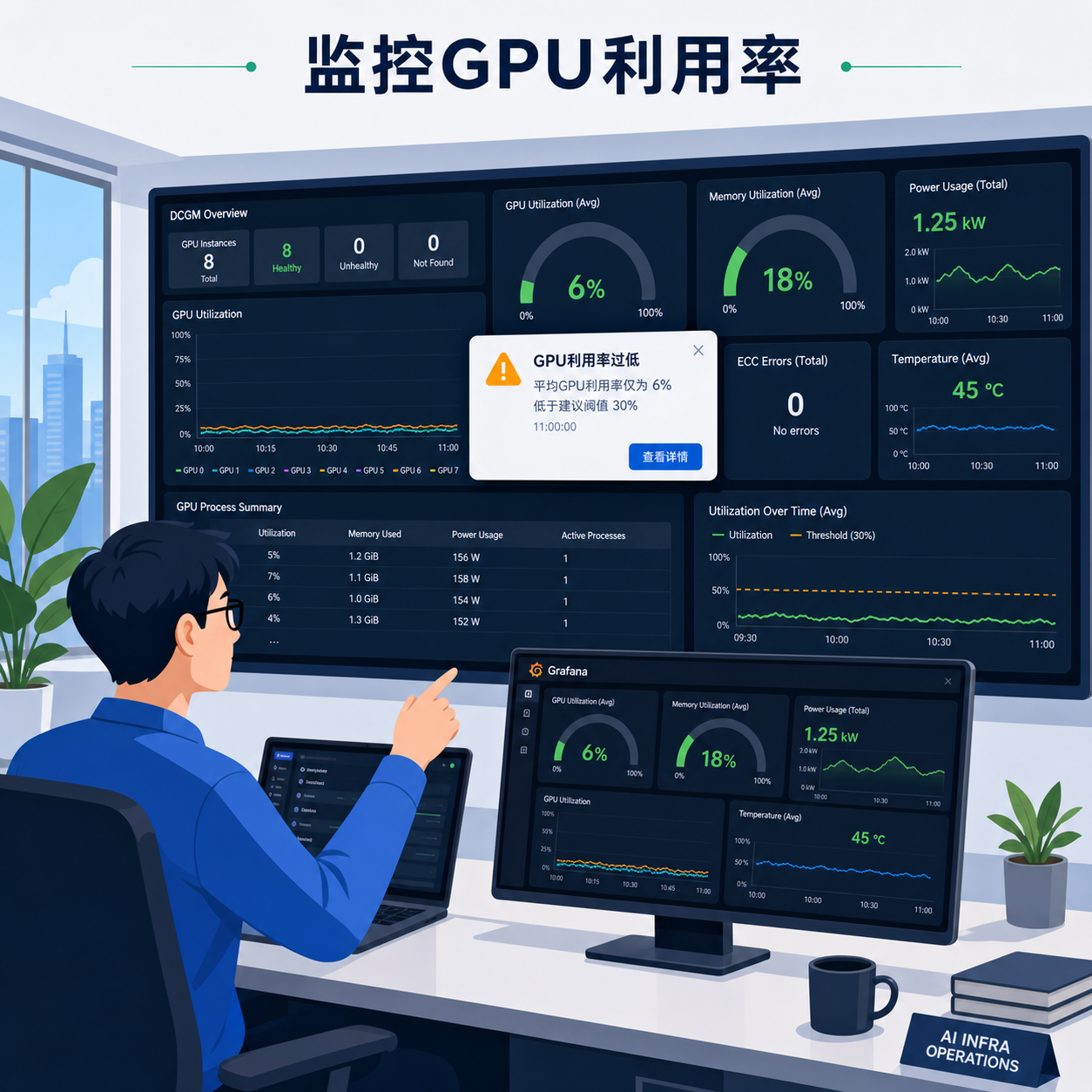
Monitoring is a must. Install DCGM Exporter and track a few key metrics: GPU utilization, VRAM usage/idle, power consumption, and clocks. Set alerts: if utilization stays below 20% for 30 consecutive minutes, it's a signal that you might need to scale down or re-partition; if VRAM exceeds 90% for 5 minutes, consider switching to a larger instance or splitting further. Grafana has ready-made NVIDIA dashboards you can use directly.
Common pitfalls to avoid. First, blindly splitting into the smallest instances: large model KV caches will overflow. Evaluate model size and batch size first. For a 7B FP16 model, weights are roughly 14GB, plus a few GB for context, so 2g.20gb might be tight; prefer 3g.40gb. Second, ignoring node lifecycle: if experiment nodes aren't automatically scaled to zero after finishing, they'll still burn money. Use auto-scaling that supports GPUs, with nodes going offline after 30 minutes of idle time, and reserve 3-8 minutes for warm-up. Third, using only on-demand instances and very few Spot instances: for interruptible training, batch inference, and preprocessing, Spot can save over 60%, especially when combined with checkpointing. Fourth, not isolating general-purpose services: use Taints and Affinity to keep pure CPU microservices off GPU nodes, ensuring dedicated resources for GPU workloads.
Putting these together, small and medium teams can reduce waste. During the day, run online inference with multiple small MIG instances; at night, combine them into a large card for offline training or fine-tuning. When traffic is low, scale down the whole cluster; when peaks hit, scale back up. Cloud elasticity perfectly complements this. Platforms like NexGpu, which offer cloud computing power, provide flexible GPU leasing and scheduling capabilities, allowing you to quickly spin up instances that support MIG, scaling up or down as needed, without having to stockpile hardware yourself. During the experiment phase, rent small slices; for production, expand to full cards. Costs follow actual load instead of FOMO.
For actual implementation, it's recommended to proceed step by step. First, measure the real utilization of your existing cluster to identify nodes that have been under low load for a long time. Then pick one or two cards to try MIG, running mixed workloads to verify isolation and performance. Once confirmed, roll out across the fleet, and integrate auto-scaling and Spot strategies. For inference services, adding continuous batching, PagedAttention, and prefix caching can further boost utilization. For training, ensure the data pipeline can keep up to avoid GPUs waiting.
Some worry that performance degrades linearly after partitioning. Hardware isolation ensures dedicated bandwidth and cache, and in practice, inference latency and throughput on small instances are more predictable, and overall rack output is actually higher. In multi-tenant scenarios, fault isolation is especially valuable—one tenant's OOM won't bring down the whole card.
With compute prices showing signs of recovery, and H200 prices already rising, we can't afford more waste. Rather than continuing to hoard idle cards, it's better to fine-slice existing resources, make scheduling more dynamic, and tighten monitoring. Combined with the cloud and MIG, one card can be used as several, with elastic on-demand scaling, allowing small and medium teams to achieve efficiency close to that of large companies. Tweaking your configuration beats placing another purchase order. Those who've tried it generally don't go back to the old whole-card exclusive approach.




Comments(0)