 NexGPU-算力租赁,GPU服务器,GPU云算力,AI服务器租用-新闻博客
First, the answer: whether you need real-name verification and advance quota application depends on the type of platform you're renting from, not on the act of renting a GPU itself.
Three sentences:
- Traditional domestic public clouds (like Alibaba Cloud, Tencent Cloud): real-name verification is a hard prerequisite, and GPU instance quotas usually require separate application—both gates must be passed.
- Overseas giants (e.g., AWS): no Chinese ID required for real-name, but GPU instance types are limited by vCPU quotas, and new accounts often can't even launch a full GPU machine without first requesting an increase.
- Hourly GPU computing markets (like NexGPU): typically email registration and pay-as-you-go, with no ticket-based pre-approval for quotas—if the target node has available capacity, you can start it directly.
Below, we explain each platform's specific process and what to do if you're stuck in approval.
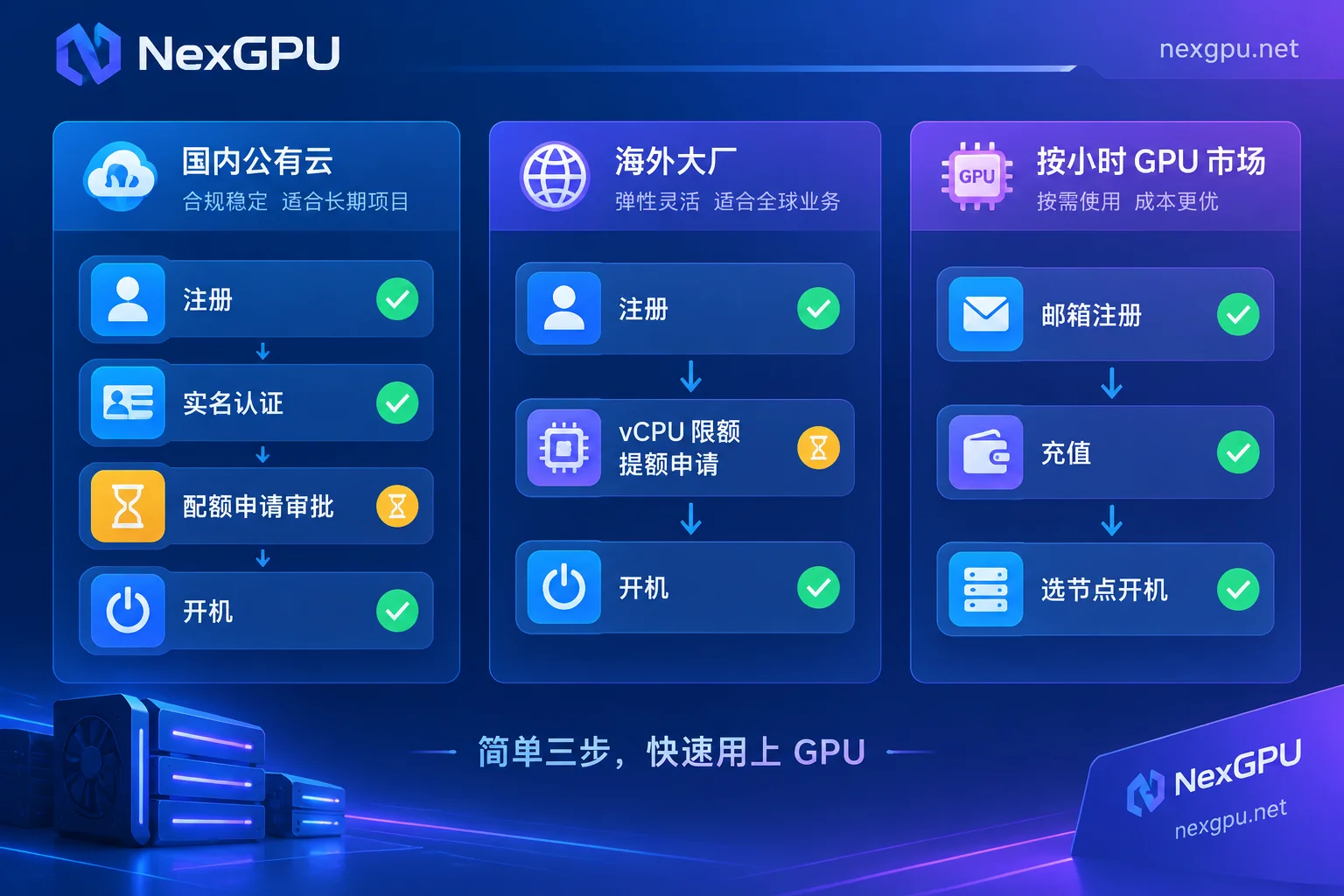
Domestic Public Clouds: Real-Name Is the First Gate, Quota Is the Second
Before buying a GPU cloud server on Alibaba Cloud, individual accounts must pass ID and facial recognition, and enterprise accounts must submit business licenses and other qualifications. Without this, nothing can be launched. This isn't an extra step added by the platform; it's a regulatory and risk-control requirement. Tencent Cloud similarly lists "completing personal or enterprise real-name verification" as a constraint for purchasing cloud servers.
After real-name, there's a second gate: quota. ECS sets limits on the number of GPU cards and vCPUs for a single account in specific regions, and new accounts often have very low or even zero default high-spec GPU quotas. When you select an instance type in the console and click create but get an error about insufficient quota, you've hit this limit. The solution is to request a quota increase in the Quota Center and wait for manual approval before creating instances. Tencent Cloud follows a similar logic—instance purchase quantity is limited by account quota, and exceeding it requires submitting an increase request in the console.
Two tricky details: quotas are region-specific—approval in region A doesn't mean you can launch in region B; quotas are instance-family-specific—approval for one card type doesn't guarantee another. So if you plan to switch cards or regions, you may need to go through the process again.
Overseas Giants: No Real-Name, but vCPU Limits Will Still Stop You
AWS doesn't require Chinese ID verification, but it manages GPU resources via Service Quotas. The unit isn't "number of cards" but the total vCPUs for on-demand G and P series instances. This metric is crucial: a single GPU instance often has dozens of vCPUs, and new or no-history accounts often have default limits that can't even launch one instance.
The process is to submit an increase request in the Service Quotas console, clearly describe your use case, and wait for review. So "AWS doesn't need real-name so it's faster" is a misconception—what you save is identity verification, not approval wait time.
Hourly GPU Computing Markets: No Tickets, but Three Other Boundaries
Lightweight GPU computing markets take a different path. Typically, email registration is enough; no mandatory ID or business license upload, and no pre-approval ticket-based quota. As long as the target node has available capacity in the market, after topping up, you can launch instances hourly, load images, and start running. For creators renting a card for the first time or developers running an open-source model temporarily, the main saving is waiting time.
But "no quota application" doesn't mean no constraints. Three things will actually affect you:
First, inventory, not approval. In public clouds, once you get quota, resources are likely reserved for you; in markets, it's available if in stock—if not, you switch nodes or models. So before running a big task, check the pricing and available nodes page to see if your target card type has online nodes now—more practical than preparing materials a week in advance. NexGPU's unit price is locked at order time until destruction, which matters for long tasks: market price fluctuations won't be added to your instance.
Second, payment and risk control. No real-name doesn't mean no account verification—payment methods and anomaly detection still exist. Also, how many cards a single account can run concurrently, whether platforms have anti-abuse concurrency limits and what they are—if not in public docs, don't guess. For multi-machine, multi-card, or cluster-scale tasks, directly ask support to confirm; NexGPU has bilingual Telegram support, and team and multi-card solutions can go through the contact page.
Third, cost boundaries—the easiest to get burned by. Low barriers mean you might start in minutes but haven't figured out billing. NexGPU bills only for compute, storage, and traffic. Stopping only stops compute; storage continues to bill; only destruction stops everything. First-timers often think "shut down means no cost" and find charges days later. Check Does GPU instance shutdown still charge? and How is cloud GPU storage charged? to understand before launching.
Which Path Should You Take
Decide based on your task, not which platform is "better":
- Need to run a task today (generate images, run an open-source model, validate a fine-tuning): choose a quota-free market; real-name and ticket waits are pure cost in this scenario.
- Company requires invoices, compliance audits, security certifications, or integration with existing domestic cloud VPCs: go with domestic public clouds; handle real-name and quotas, and allow lead time.
- Long-term large-scale cluster, reserved capacity and committed discounts: big cloud quota systems are an advantage; worth going through the process.
- Unsure which card, just validating feasibility: first run small specs on hourly markets to understand VRAM and time, then decide on larger quotas. This way, even if approval is denied or delayed, validation continues.
What to Do When Stuck in Quota Approval
If you've submitted and are waiting, parallel actions:
Try a different region—quotas are region-independent; downgrade a spec—smaller VRAM types often have looser default quotas; write a specific use case—"machine learning" vs. "deploying a 7B model with vLLM for inference, expected concurrency X" helps reviewers judge; meanwhile, run the process on an hourly market to validate environment, code, and data pipeline, then move over once quota is approved, not wasting the wait.
After Waiving Quota Application: Three Things to Prepare Before Launch
Low-barrier platforms shift prerequisites from "approval" to "your own clarity." Without these three, you'll waste money and time:
Choose the right image; don't compile inside the instance. Manually installing CUDA and compiling dependencies takes an hour or two, during which the card is billed. Pick ready templates per task—vLLM or TGI for inference, Ollama for local chat, PyTorch for training/fine-tuning, ComfyUI for image generation, Whisper for speech-to-text—all can be deployed with one click on the image template page. For selection tips, see How to choose a cloud GPU image template.
Decide where data goes first. Stop preserves disk; destroy clears—this boundary determines whether your weights and outputs should stay in the instance. See How to save data on rented GPU instances.
Choose cards by VRAM threshold, not feeling. How much VRAM each model needs and which card to rent—the official model-to-card guide lists details by model, faster than trial and error.
Once these three are set, the speed advantage of "no real-name, no quota wait" truly lands in your hands.




Comments(0)