 NexGPU-算力租赁,GPU服务器,GPU云算力,AI服务器租用-新闻博客
Consumer GPUs (RTX 3090, 4090, etc., with 24GB VRAM) are not "toys." For single-GPU lightweight inference, small-parameter fine-tuning with LoRA/QLoRA, and regular image/video generation, they offer excellent value. The real bottlenecks arise in four scenarios:
- Model weights simply don't fit — Even with 4-bit quantization, 70B-level models cannot fit into 24GB.
- Fine-tuning multiplies VRAM requirements — A model that runs for inference may not run for full-parameter fine-tuning.
- Longer contexts or concurrency blow up the KV Cache — If weights just barely fit, there's no headroom left.
- Two cards don't equal one big card — Consumer cards lack NVLink, and when model partitioning is needed, PCIe bandwidth becomes a bottleneck.
There's also a fifth category: not "can't run," but "shouldn't run this way." Training jobs lasting dozens of hours and inference endpoints serving external requests lack ECC, virtualization isolation, and have mismatched cooling and rack form factors. The risk isn't performance—it's reliability.
Below, we'll go through each scenario to help you determine if you've hit the limit, and what to do first if you have.
A One-Minute Self-Check
Run through this with your current task:
- What's the parameter count of the model I want to run? At what precision/quantization?
- Am I doing inference or fine-tuning? If fine-tuning, is it full-parameter, LoRA, or QLoRA?
- How long is the context window? How many concurrent requests will I serve?
- How long will the task run continuously? Is it for my own use or for others to call?
If any answer clearly exceeds the ranges below, it's time to consider upgrading rather than continuing to tweak parameters on 24GB.
First Boundary: Do the Weights Fit?
This is the hardest line—no tricks can bypass it. A rough estimate: parameter count × bytes per parameter, plus 15–20% headroom. FP16 uses 2 bytes per parameter, 8-bit about 1 byte, and 4-bit about 0.5 bytes.
By this rule, a 7B model in FP16 takes about 14GB, which fits on a 24GB card. A 13B model in FP16 takes about 26GB, already over the limit—you'd need to drop to 8-bit to fit. For 70B-level models (like Llama 3.1 70B, Qwen 2.5 72B), even with Q4 quantization, weights still require about 42–48GB of VRAM. A single 24GB consumer card cannot load them no matter how you adjust.
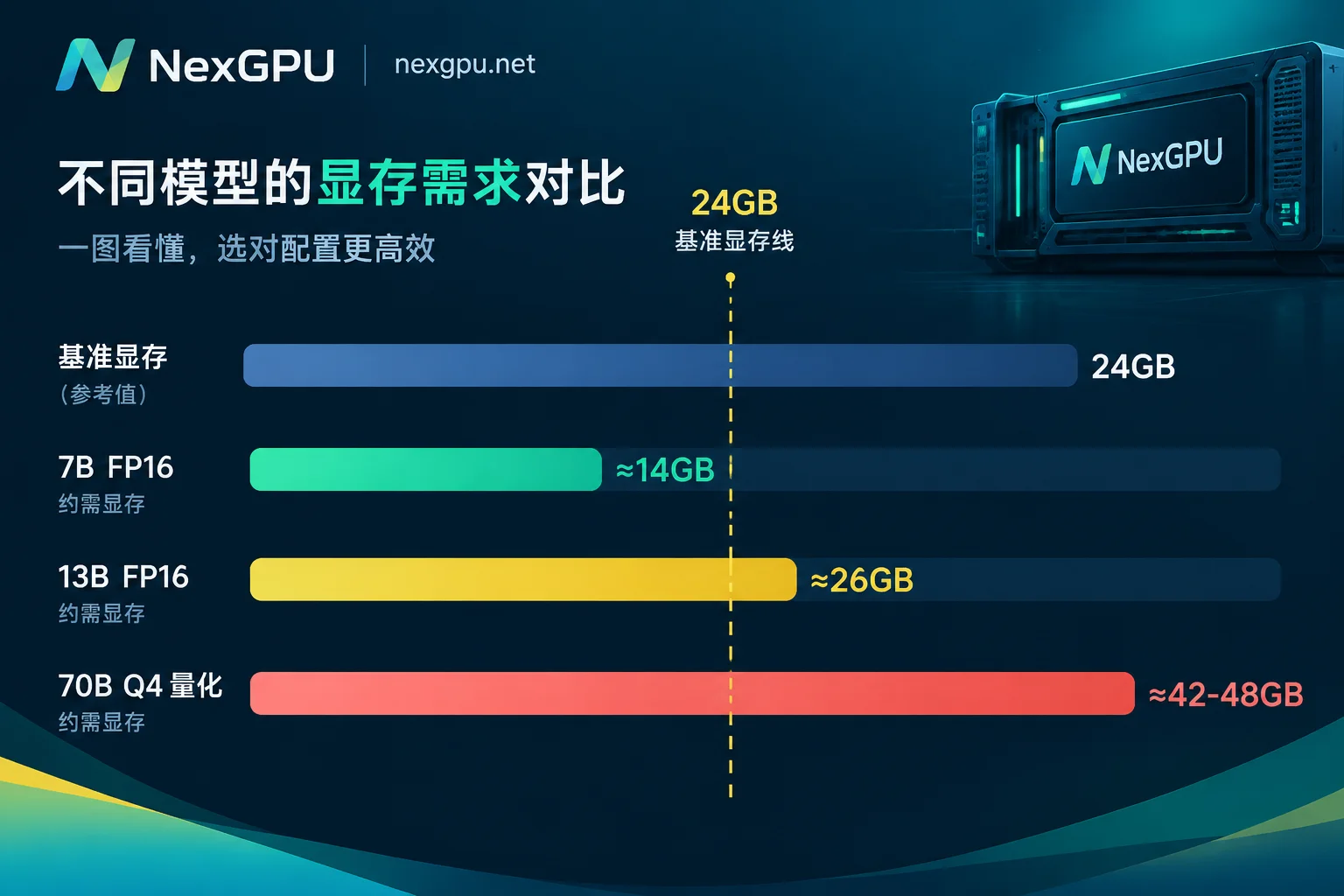
On this front, you have only three options: further reduce quantization precision (at the cost of output quality, and gains diminish quickly below 4-bit), switch to a single card with more VRAM, or partition across multiple cards—which runs into the fourth boundary.
Second Boundary: Fine-Tuning Needs Far More VRAM Than Inference
Many people first hit this wall here: a model runs fine for inference, but as soon as fine-tuning starts, it OOMs. The reason is that during training, VRAM holds not just weights but also optimizer states, gradients, and intermediate activations. As a rule of thumb, full-parameter fine-tuning requires about 16–20GB of VRAM per billion parameters.
For a 24GB single card, the rough ceilings are:
- FP16 full-parameter fine-tuning: up to about 3B models
- LoRA (training only adapter layers): up to about 13B models
- QLoRA (quantized base + LoRA): up to about 20B models
These are ranges, not fixed values. Batch size, sequence length, gradient checkpointing, and 8-bit optimizers can shift these boundaries by several billion parameters. So before upgrading, it's worth trying: reduce batch size to 1, enable gradient checkpointing, and truncate sequence length. If you still OOM after all that, you genuinely need more VRAM—further parameter tricks will only slow convergence.
Third Boundary: Context and Concurrency Overwhelm the KV Cache
During inference, VRAM isn't just occupied by weights. Each extension of the context window and each additional concurrent request increases the KV Cache multiplicatively. For long contexts like 32k or 128k, KV Cache usage can be on the same order as the weights themselves.
The dangerous state is when your model weights just barely fit into 24GB—it seems to run, but headroom is near zero. This configuration works fine with short prompts and single requests, but as soon as long documents or a few concurrent requests come in, it immediately OOMs. The real value of 80GB and 141GB datacenter cards lies largely not in how fast they compute, but in their ability to simultaneously handle deeper contexts and larger concurrency pools.
If you only occasionally need long contexts, you can explicitly limit max_model_len and max concurrency in your inference framework to trade stability for capacity. But if long contexts or concurrent serving are part of your deliverable, then it's a hard requirement—you need a card with more VRAM.
Fourth Boundary: Two Consumer Cards Are Not One Big Card
This is the most easily misjudged boundary. Since the Ada Lovelace architecture (RTX 40 series), NVIDIA has dropped NVLink support on GeForce consumer cards. Cards can only communicate over PCIe, with PCIe 4.0 offering about 32–64 GB/s bidirectional bandwidth, while datacenter SXM/NVLink interconnects are on the order of hundreds of GB/s—an order of magnitude difference.
How much this bandwidth gap matters depends on your parallelism strategy:
- Data parallelism: Each card holds a full model copy and handles separate requests, synchronizing only when necessary. In this mode, PCIe is fully sufficient; running two replicas on two consumer cards and doubling throughput is viable.
- Tensor parallelism: When a model doesn't fit, it's split across dimensions within layers and distributed across multiple cards. Each layer's forward pass requires cross-card synchronization of intermediate activations. Here, PCIe bandwidth becomes the bottleneck; communication overhead severely eats into gains, and both throughput and latency suffer noticeably.
So the criterion is simple: Are you adding cards to "run more" or to "fit a bigger model"? For the former, consumer multi-GPU is fine. For the latter (e.g., trying to split a 70B model across two 4090s), you're forcing PCIe to do NVLink's job. It might run, but latency and throughput typically won't meet usable standards—better to just get a single card with more VRAM.
Fifth Category: Not That It Can't Run, But That It Shouldn't Run This Way Long-Term
This category has nothing to do with VRAM but surfaces when you move from demo to production:
- No full ECC memory protection. Consumer cards use GDDR memory lacking complete error checking and correction. Under prolonged high load, bit flips can crash a training job that's been running for dozens of hours or silently corrupt results.
- Lack of MIG and mature virtualization isolation, making it impossible to reliably partition a single card among multiple tasks or users.
- Air cooling and form factors not suited for high-density standard rack deployments.
- Commercial licensing and SLA boundaries that matter for external services.
These apply differently depending on your scenario: for individuals running local or rented machines for short image generation, script debugging, or a few hours of experiments, none of these upgrades are necessary. But if you're delivering a training job that runs for days, or deploying an API that others will call, these become essential considerations.
Conversely, Don't Rush to Upgrade in These Cases
To avoid waste in the other direction:
- For image generation like SD/Flux at standard resolutions, 24GB is usually enough. When VRAM is tight, first try quantized models and startup parameters—far cheaper than upgrading.
- For quantized inference and LoRA fine-tuning of 7B–13B models, consumer cards offer the best value.
- When still validating whether a pipeline works—checking data formats, script errors, or container environments—use a cheaper card to get things running, then move the same code to a bigger card. This saves money compared to renting expensive cards from the start.
Once You've Confirmed You've Crossed the Line, What Next?
First, pinpoint the actual bottleneck. While running your task, use nvidia-smi to monitor VRAM peaks and note where OOM occurs: during weight loading (first boundary), during backpropagation (second boundary), or only under concurrency (third boundary). The solutions differ for each; mixing them up can lead to buying the wrong card.
If the bottleneck is VRAM capacity, aim for a single card with more VRAM. If it's inter-card communication (low GPU utilization and long waits during multi-GPU tensor parallelism), aim for a datacenter node with high-speed interconnects rather than simply adding cards. For specific models and which card to choose, and where the VRAM threshold falls, you can check NexGPU's model selection guide, and then see which models are available for rent on the pricing and rentable nodes page. Hourly billing, per-second metering, and no minimum commitment mean you can rent for an hour to measure real VRAM peaks, then decide on a long-term tier without a large upfront bet.
There's an easily overlooked cost detail when upgrading: shutting down only stops compute; storage continues to be billed unless the instance is destroyed. So if you're following the path of "try on a consumer card first, upgrade if needed," that intermediate test instance won't zero out your bill if just left powered off. Move data out if needed, and destroy it if no longer required. For specifics, see "Does a Shut-Down GPU Instance Still Cost Money? Compute Stops, Storage Doesn't" and "How to Preserve Data on a Rented GPU Instance".
If you're budgeting for the training side—how many cards, whether you need interconnects, how to allocate VRAM—"How to Choose GPUs for Large Model Training: Calculate VRAM First, Then Decide Interconnects and Card Count" details the methodology. If you're deploying a Llama-family model, "Practical Guide to Deploying Llama Models" covers specific steps for serving with vLLM and multi-GPU partitioning.
Finally, a reminder: all numbers above are estimated for the 24GB tier. Newer consumer cards with more VRAM will push the first and second boundaries a bit further, but the fourth boundary (no NVLink) and the fifth category (ECC, isolation, rack compatibility) won't disappear just because VRAM increases. When making decisions, calculate based on the actual model you plan to rent—don't blindly copy conclusions from others' posts.




Comments(0)