 NexGPU-算力租赁,GPU服务器,GPU云算力,AI服务器租用-新闻博客
When generating podcast subtitles, meeting transcripts, cross-language video dubbing, or batch audio data cleaning, uploading audio to third-party commercial APIs often faces issues such as high cumulative costs per minute, file size limits (requiring manual splitting and merging), and data privacy compliance. Therefore, deploying Whisper on your own GPU has become the first choice for most developers and content teams.
However, when actually deploying, many people get stuck on two issues: first, seeing the official documentation stating that the large model requires 10GB VRAM, but finding it slow and with fluctuating VRAM usage; second, being unable to distinguish which of openai/whisper, faster-whisper, and WhisperX to install, and how to choose between large-v3 and large-v3-turbo in business scenarios.
This article will help you clarify the optimal path for Whisper deployment from four dimensions: model weights, inference runtime, VRAM accounting, and GPU selection.
1. How to Choose Model Weights: large-v3 or large-v3-turbo?
OpenAI's open-source Whisper weights come in multiple sizes, from tiny (39M) to large-v3 (1550M). Given sufficient GPU computing power or extremely low on-demand rental costs, unless for extremely constrained edge devices, production environments typically choose only between large-v3 and large-v3-turbo:
| Model Version | Parameters | Architecture Features | Core Advantages | Selection Pitfall Tips |
|---|---|---|---|---|
| whisper-large-v3 | 1550M | 32-layer decoder, 128 Mel bands | Highest recognition rate for multilingual, dialect, noisy environments, and technical terms (medical, legal, technical symbols) | Many autoregressive decoding layers, long native inference time, recommended to use with acceleration engines |
| whisper-large-v3-turbo | 809M | Decoder reduced from 32 layers to 4 layers | Maintains recognition accuracy close to large-v3 while significantly improving inference speed and reducing VRAM usage by about 40% | Does not support cross-language translation tasks (passing --task translate still returns original language text) |
One-sentence conclusion: For pure same-language transcription (e.g., Chinese recording to Chinese subtitles, English podcast to English transcript), pursuing high throughput and low latency, choose large-v3-turbo first; if the audio has heavy accents, complex background noise, or you need to directly translate foreign audio into English text, you must choose large-v3.
2. Inference Framework Comparison: Native Whisper, faster-whisper, and WhisperX
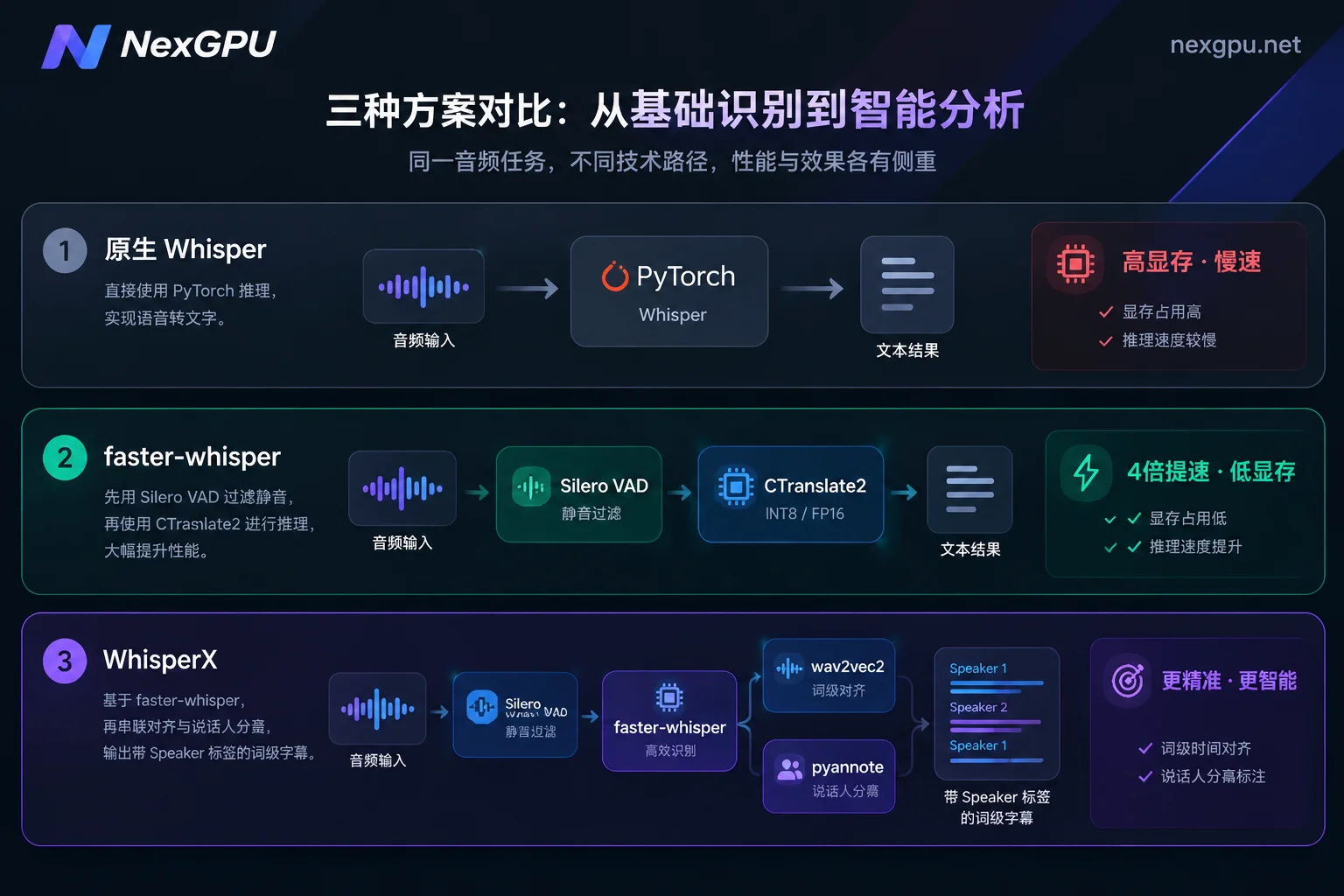
After choosing the weights, the key to VRAM usage and transcription speed lies in the inference runtime. Under the speech category of the NexGPU Image Template Library, three mainstream environments are pre-installed: Whisper, faster-whisper, and WhisperX, which address different stages of needs:
1. Native OpenAI Whisper (Reference Implementation)
Based on standard PyTorch, suitable for validating algorithms or running a minimal demo. However, in production, its shortcomings are obvious: high VRAM usage (the large-v3 default occupies about 10GB VRAM), and long audio transcription is prone to "hallucinations" or infinite repetition loops due to silent segments.
2. faster-whisper (Main Production Transcriber)
An inference implementation rewritten based on the CTranslate2 engine. Through operator fusion, memory reuse, and quantization support, while maintaining the same accuracy, inference speed is more than 4 times faster than the native version, and VRAM usage is reduced by more than half.
Tested on an RTX 3070 Ti level GPU transcribing 13 minutes of audio (using large-v2 model, Beam size=5):
- Native Whisper (FP16): 2 minutes 23 seconds, VRAM usage about 4.7GB.
- faster-whisper (FP16, batch_size=8): only 17 seconds, VRAM usage about 6.1GB.
- faster-whisper (INT8 quantization): single-stream VRAM can be compressed to about 2.9GB; with
batch_size=8batch processing, time is only 16 seconds, VRAM usage only 4.5GB.
In addition, faster-whisper has built-in Silero VAD (Voice Activity Detection). Simply enable vad_filter=True to automatically filter silent segments, effectively curing the repetition hallucination problem in long audio.
3. WhisperX (Word-level Timestamps + Speaker Diarization)
If you not only need to convert speech to text but also require precise word-level subtitle timing, or need to distinguish "who said what" in multi-person interviews or meeting recordings (Speaker Diarization), Whisper alone is not enough.
WhisperX is based on faster-whisper and connects the wav2vec2 speech alignment model and the pyannote-audio speaker diarization pipeline. Because multiple models for transcription, alignment, and voiceprint clustering are loaded simultaneously in one pipeline, its overall VRAM usage is 2GB–4GB higher than running faster-whisper alone, and the total time increases, but it can directly output high-precision structured subtitles with speaker labels.
3. How Much VRAM Does Whisper Deployment Need? Which GPU to Rent?
Many tutorials vaguely say "prepare 8GB or 12GB VRAM for Whisper", but in actual engineering, single-stream serial transcription and multi-channel concurrent/large batch processing have completely different VRAM requirements.
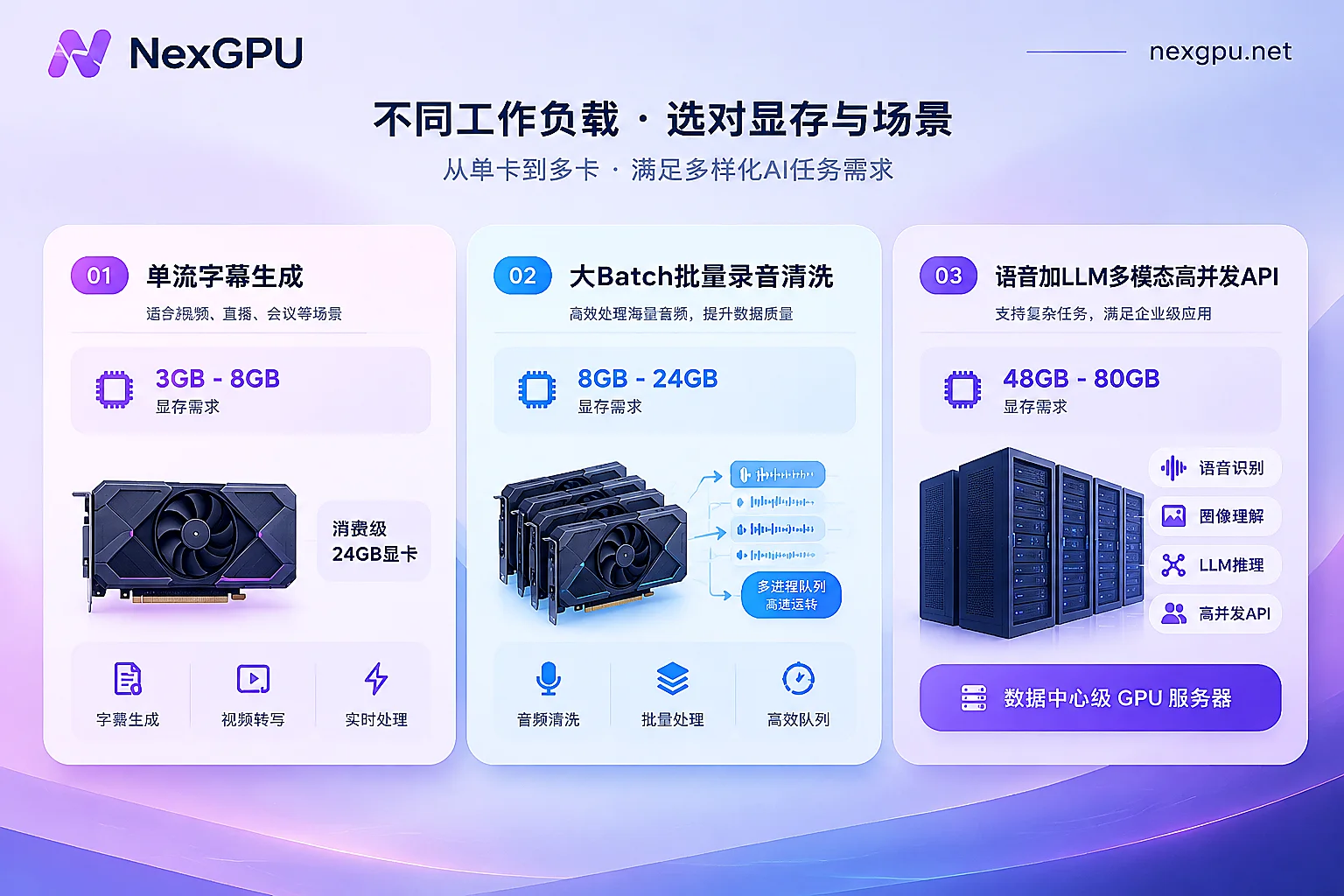
You can directly refer to the NexGPU Model Selection Guide or the Audio-to-Text Scenario Page to see the VRAM thresholds and single-card configuration recommendations for various speech models. Below is a clear breakdown for three typical scenarios:
Scenario 1: Daily audio/video subtitle generation, podcast transcription (single task / offline lightweight processing)
- Software combination:
faster-whisper+large-v3orlarge-v3-turbo(FP16 or INT8) - VRAM accounting: Model weight loading plus inference buffer requires only 3GB–6GB VRAM. But if you want to enable
batch_size=8or16to accelerate long video transcription, or useWhisperXto attach a speaker diarization model, peak VRAM will reach around 8GB–12GB. - GPU recommendation: Choose consumer-grade GPUs from the GPU Compute Market, such as RTX 3090 (24GB) or RTX 4090 (24GB). 24GB VRAM can not only easily accommodate the full
WhisperXpipeline in full precision (FP16) but also increasebatch_size, so 1 hour of audio can typically be processed in 1–2 minutes.
Scenario 2: Hundreds of hours of historical recording cleaning, batch video library indexing (high-throughput batch processing)
- Software combination:
faster-whisper(BatchedInferencePipeline) + multi-process queue - VRAM accounting: The optimization goal for batch tasks is "maximum audio duration transcribed per unit time (high RTF real-time factor)". A card with 24GB or 48GB VRAM can saturate the GPU compute units by increasing
batch_sizeor running multiple worker processes on one card. - GPU recommendation: A single RTX 4090 / RTX 5090, or data center-grade L40S / A100. If you are curious about the cost difference between data center cards and consumer cards for batch tasks, you can refer to our previous analysis: How much does it cost to rent an L40S for an hour? Look at the real-time unit price first, then calculate the entire task based on compute, storage, and traffic. Since hundreds of hours of audio can be destroyed and released after processing, the total cost of compute measured by seconds and priced by hours is often only a fraction of commercial pay-as-you-go APIs.
Scenario 3: Enterprise internal speech API services, large model + speech multimodal agents (online high concurrency)
- Software combination: API services encapsulated based on
faster-whisper, or a service framework deployed together with LLMs. - VRAM accounting: If the team is simultaneously running text large models (such as Qwen, Llama) and Whisper speech recognition to assemble an "AI Agent" that goes from "speech input → Whisper transcription → LLM thinking processing", running both models on the same card or node requires sufficient VRAM headroom and high bandwidth support.
- GPU recommendation: It is recommended to choose A100 (80GB), H100, or multi-card nodes. For specific selection logic, you can also read When consumer-grade GPUs are no longer enough: four out-of-bounds signals and criteria for switching cards.
4. Four-Step Process to Quickly Deploy Whisper on NexGPU
When setting up the environment on a local computer, developers often struggle not with Whisper itself but with a chain of errors from CTranslate2, cuDNN versions, FFmpeg, and PyTorch CUDA versions. With the NexGPU Pre-installed Image Templates, you can skip the tedious low-level driver compilation:
Step 1: Choose an image template, automatically filter incompatible machines
After entering the console, directly select the Whisper / faster-whisper / WhisperX pre-installed image under the speech category (drivers, CUDA, and core dependencies are pre-installed, ready to use upon boot). If you have your own packaged business service, you can also fill in a custom Docker image from a public or private repository and customize the startup command and environment variables. When you first select the environment and then filter machines, machines with insufficient VRAM will be automatically marked with reasons, avoiding configuration errors (see GPU Selection Documentation).
Step 2: Pick a machine based on VRAM, bandwidth, and disk unit price
In the GPU market list, each row represents a real rentable machine. For Whisper batch transcription, besides looking at the compute unit price, it is recommended to focus on two indicators:
- Network bandwidth: Since you need to upload large amounts of raw audio/video files and initially pull about 3GB of model weights, choosing a node with higher bandwidth can significantly reduce transmission waiting time.
- Disk space: Note that disks cannot be dynamically expanded after instance creation. Please reserve sufficient disk capacity in advance based on the total volume of audio/video files to be processed.
Step 3: Connect to the instance and open API ports
After the instance boots (refer to the Instance Connection Guide), you have three ways to enter the environment:
- Jupyter one-click open: Suitable for debugging transcription parameters while writing Python scripts (e.g., testing different
vad_parametersandinitial_prompt), with tokens automatically configured. - SSH direct connection / web terminal: Each instance comes with a public IP and port mapping; SSH direct connection does not go through a jump server. If you are used to graphical management of audio files and transcribed text, you can also install a visual management panel (aaPanel) with one click, directly uploading audio, downloading SRT subtitles, and managing background processes in the browser.
- Expose HTTP interface: In addition to the basic connection port, each instance reserves a set of备用 ports. If you have wrapped
faster-whisperinto a speech transcription microservice using FastAPI, simply bind it to the备用 port for external business systems to call.
Step 4: Stop after running to control storage and compute costs
Speech transcription tasks mostly have obvious peak and valley characteristics. In NexGPU's Billing Rules, the bill only includes compute, storage, and traffic, with no activation fee or minimum rental period:
- If your audio is processed in batches at scheduled times each week, you can stop the instance during off-hours—compute fees stop immediately after stopping, and the model weights and code environment in the disk are fully preserved (during stoppage, only storage fees are charged per GB/month, see Does a GPU instance still incur charges when shut down? Compute stops, storage continues to be billed).
- For one-time cleaning of large audio datasets, after running and pulling the generated text or subtitles back locally, directly enter the instance ID to confirm destroy, and both compute and storage billing are cleared (Note: The platform does not read or back up disk contents, so please ensure transcription results are exported before destruction).
5. Three Practical Parameters to Improve Whisper Production Transcription Quality
After the environment is running, to make faster-whisper output cleaner text in Chinese or multilingual scenarios, it is recommended to add the following three key configurations in your code:
- Must enable VAD filtering and anti-repetition switches:
Long audio with background music or silent segments can easily get stuck in a loop repeating the same sentence. When callingmodel.transcribe(), be sure to setvad_filter=Trueandcondition_on_previous_text=False; this is the most effective combination to solve long audio hallucinations. - Use
initial_promptto guide punctuation and simplified/traditional Chinese:
Whisper sometimes mixes traditional Chinese characters or omits punctuation in Chinese transcription. Passing a simplified Chinese prompt with punctuation (e.g.,initial_prompt="以下是普通话的句子,包含完整标点符号。") can stabilize the output format to simplified Chinese with punctuation. - Use
hotwords+ post-processing word list for proper nouns:
For industry jargon, names, or product names, you can passhotwordsduring inference to increase hit probability, and finally use a simple regex replacement table for post-processing fallback to achieve commercial-grade subtitle quality.
Ready with the audio files to transcribe? Now you can go to the NexGPU Quick Start Guide, register an account without real-name verification, pick a cost-effective GPU instance to launch the pre-installed speech image, and get your专属 high-speed speech transcription pipeline running in minutes.



