 NexGPU-算力租赁,GPU服务器,GPU云算力,AI服务器租用-新闻博客
Multi-GPU inference throughput not doubling is mostly not due to broken hardware; the most common cause is using the wrong parallelism method. Tensor parallelism (TP) and pipeline parallelism (PP) are mainly for fitting models that don't fit on a single GPU or reducing latency for a single request. They let multiple GPUs process the same batch of requests together, and total throughput won't multiply by the number of GPUs. To get throughput close to doubling, if the model fits on a single GPU, a better approach is to run one independent replica per GPU with load balancing in front (data parallelism).
If you do need TP, throughput is also affected by three things: whether there are enough concurrent requests, whether inter-GPU interconnect is PCIe or NVLink, and whether the compute in the Decode phase is too small. Below is a step-by-step explanation in troubleshooting order.
Step 1: Confirm which parallelism you're using
First, check the startup parameters. Taking vLLM as an example:
tensor_parallel_size=2or4: One model is split into several parts and distributed across GPUs. From the perspective of external serving, this is still one replica.pipeline_parallel_size>1: Split by layer, requests pass through different GPUs in sequence.- Each GPU runs an independent instance, or the framework's built-in data parallelism option is used: This is multiple replicas.
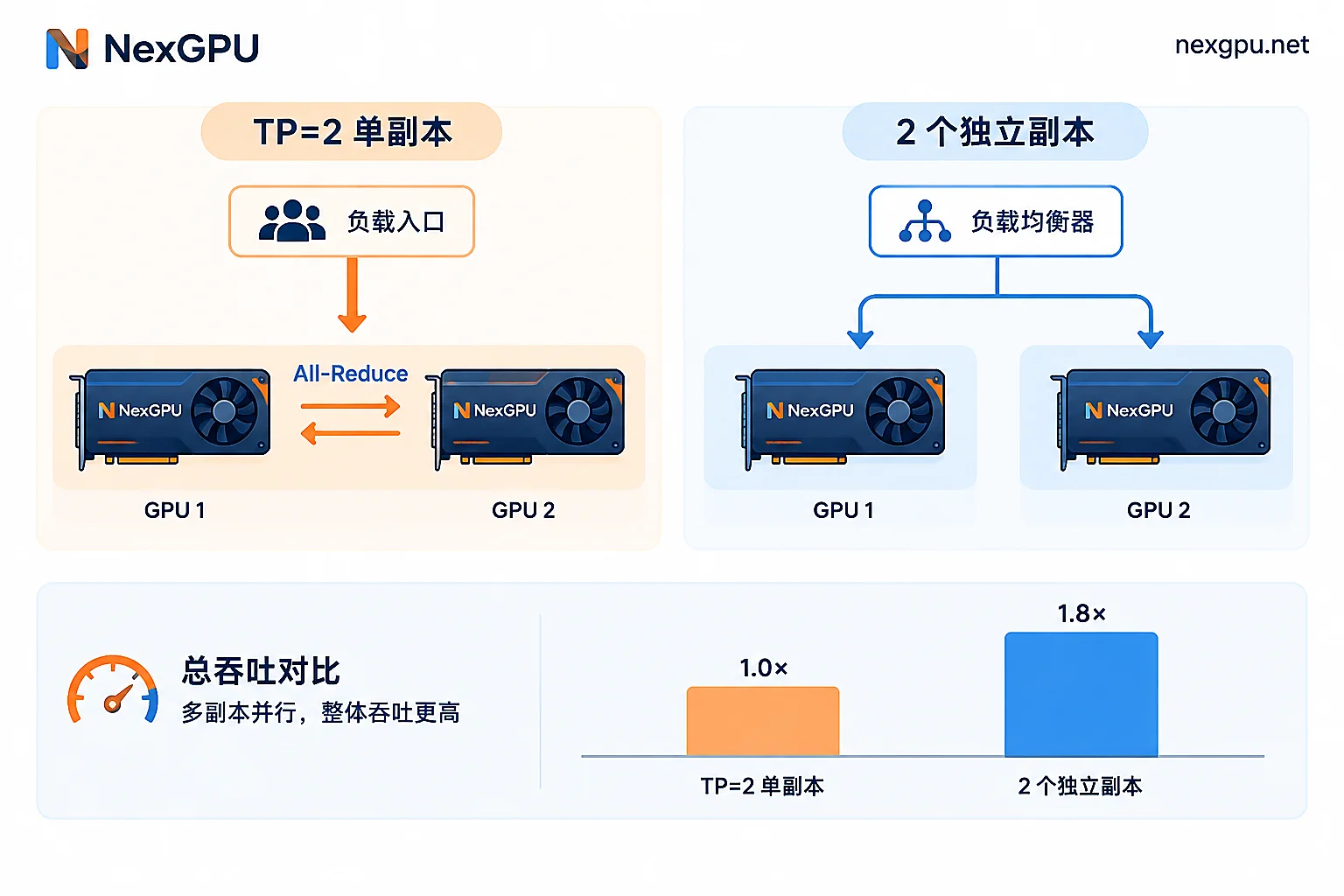
In TP mode, all GPUs jointly complete the same forward computation. It solves the problems of "model doesn't fit" and "single request too slow," and does not multiply processing capacity by the number of GPUs. Assuming the model fits on a single GPU and leaves enough KV Cache space, switching to two independent replicas usually gets closer to double throughput than TP=2. The reason is that replicas don't need to communicate, and each GPU works at full load.
PP is even more problematic. Requests must be passed between GPUs by stage, with pipeline bubbles and point-to-point transfer latency. When concurrency is not high, most GPUs are waiting for the output of the previous stage, and throughput cannot grow exponentially.
Step 2: Check whether concurrency can fill the batch
This is easily overlooked during stress testing. Engines like vLLM rely on continuous batching to combine multiple simultaneously arriving requests into a batch to fill the GPU's compute units. If the stress test has only a few concurrent requests, or actual online traffic is low, after adding GPUs each GPU gets less computation, and total throughput naturally won't double. In this case, what you see reflects insufficient request volume, not the GPU's limit.
Troubleshooting method:
- Use the same prompt length and generation length distribution for stress testing on single and multiple GPUs.
- Gradually increase client concurrency, e.g., start from 1 and double it, recording total Tokens/s.
- Observe at which point the curve starts to flatten. If a single GPU is already near its plateau at low concurrency, while multiple GPUs are still rising, it means the previous test concurrency was too low and the multiple GPUs are not yet saturated.
Also, distinguish two metrics: total throughput (Tokens/s or RPS summed across all requests) and single-request latency (time to first token TTFT, per-token generation speed). TP often significantly improves latency but offers limited total throughput improvement. First confirm which one your business goal is, then judge whether the result counts as "not doubling."
Step 3: Confirm inter-GPU interconnect
As long as TP is used, after the attention computation and MLP of each Transformer layer, a cross-GPU All-Reduce is needed to synchronize intermediate results. Autoregressive decoding generates one token at a time and must go through all layers completely for each token, so this synchronization is very frequent.
- PCIe: Bandwidth is on the order of 32–64 GB/s; frequent synchronization easily causes communication waits. Throughput gains are largely offset, and in some configurations it can even be lower than a single GPU.
- NVLink / NVSwitch: Bandwidth can reach hundreds of GB per second, and TP communication overhead is much smaller.
You can use nvidia-smi topo -m to check the connection method between GPUs. Consumer-grade GPUs and many PCIe versions of data center GPUs do not have NVLink, and enabling large TP on such machines often yields unsatisfactory results.
Why the Decode phase is particularly hard to scale
LLM inference has two phases. Prefill processes the entire input at once, is compute-intensive, and more easily benefits from multi-GPU parallelism. Decode generates tokens one by one, with very little computation per step, and is mainly limited by memory bandwidth. After splitting with TP, each GPU processes smaller matrices each time, and the fixed overhead of kernel launches and inter-GPU synchronization increases as a proportion of total time, reducing scaling efficiency. The longer the generated text and the higher the Decode proportion, the more obvious the "adding GPUs doesn't double" phenomenon.
Adjust based on your situation
Model fits on a single GPU with enough KV Cache space: Prioritize multiple replicas. Run one instance per GPU, and you can use CUDA_VISIBLE_DEVICES to bind instances to different GPUs, then add load balancing in front; you can also use the data parallelism feature provided by your framework, with specific parameters per the corresponding version's documentation. This is the option closest to linear scaling, provided traffic is sufficient to saturate each replica.
Model doesn't fit on a single GPU: TP is unavoidable. In this case, choose the smallest TP that can fit the model based on memory requirements, and use the remaining GPUs for more replicas. For example, with 4 GPUs and a model needing 2 to fit, usually "2 replicas with TP=2" gives higher throughput than "1 replica with TP=4." For how to trade off, refer to What's the right inference parallelism setting and How to choose between tensor parallelism and pipeline parallelism. If long context causes KV Cache to use too much memory and it doesn't fit on a single GPU, first see What to do when long-context inference runs out of memory; sometimes adjusting context length or quantization can return to single-GPU deployment.
Parallelism is fine, but GPU utilization remains low: The problem may be in scheduling, batching parameters, or the data input pipeline. Continue troubleshooting with Five-step troubleshooting for low multi-GPU inference GPU utilization.
Think before renting multiple GPUs
If you're planning to rent multiple GPUs to improve throughput, first use a single GPU to measure "whether the model fits and how high a single GPU can run at high concurrency." Then decide whether to rent multiple GPUs for multiple replicas or a multi-GPU machine with NVLink for TP. The former has no inter-GPU interconnect requirement and offers a wider range of GPU choices; the latter requires confirming the node's interconnect type before ordering. You can check the configurations of rentable nodes on the NexGPU pricing page. If you need multi-GPU or cluster solutions, or are unsure about a node's topology, contact us to confirm.
Also note the costs: multiple replicas mean multiple instances billed simultaneously. After stress testing, merely stopping them still incurs storage fees; when you're sure you no longer need them, destroy the instances to stop all charges.



