 NexGPU-算力租赁,GPU服务器,GPU云算力,AI服务器租用-新闻博客
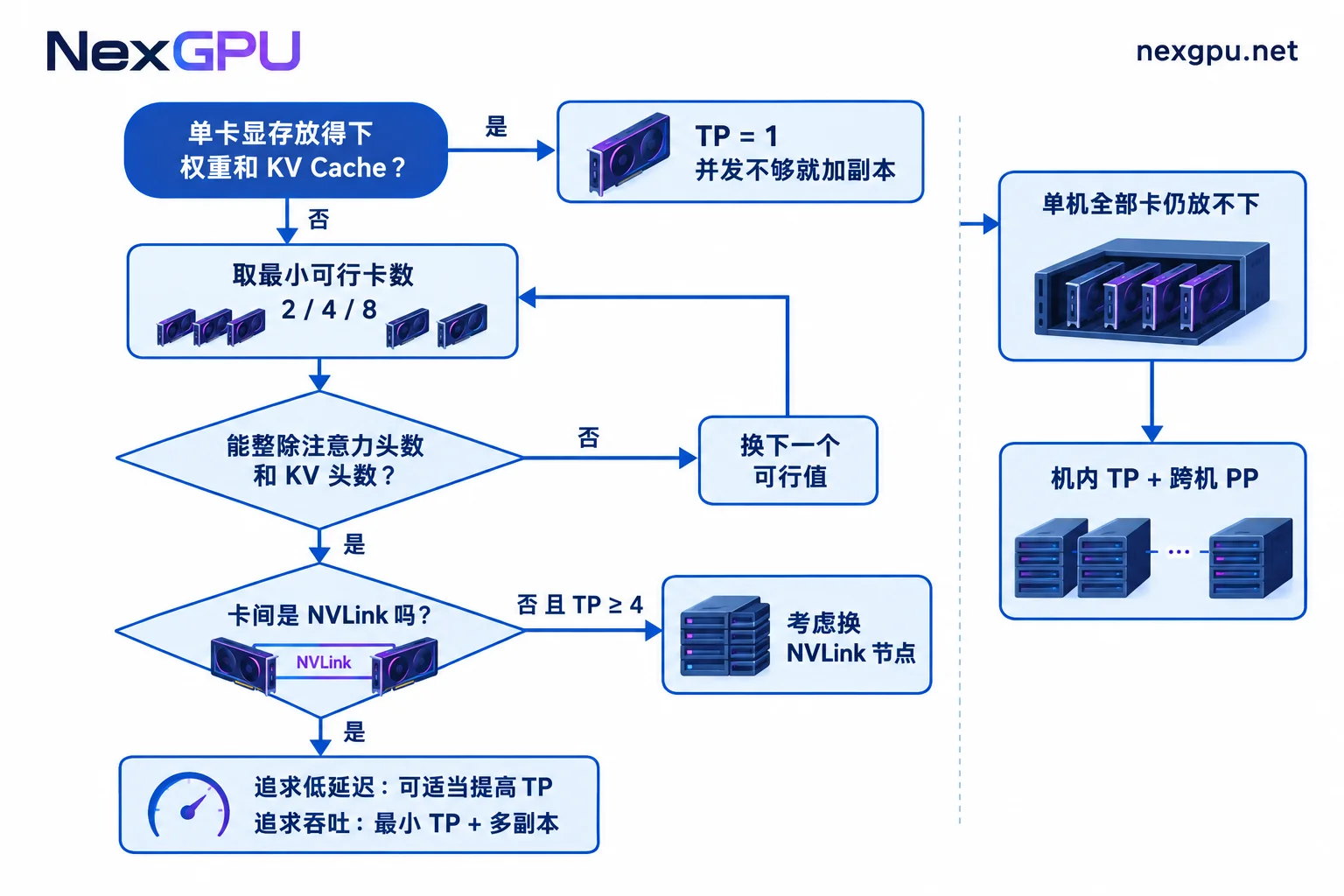
Let's start with the conclusion: there is no universal "best value" for inference parallelism, but there is a reliable method: choose the smallest tensor parallelism (TP) that fits in VRAM.
- If a single GPU can hold the model weights and still leave enough space for KV Cache: set
TP = 1. - If a single GPU cannot hold it: choose the minimum number of GPUs that just fits, usually 2, 4, or 8, and this number must divide the model's number of attention heads evenly.
- If you need to handle more concurrency: prefer running multiple replicas for data parallelism instead of increasing the TP of a single instance.
- If all GPUs in one machine combined still cannot fit the model: only then consider "intra-node TP + cross-node pipeline parallelism (PP)".
The following sections expand step by step in the order of actual parameter tuning.
Why More GPUs Isn't Always Faster
Tensor parallelism splits each layer's matrices across multiple GPUs for computation, at the cost of an All-Reduce communication and synchronization for each forward pass. If the model already fits on one GPU, splitting it across multiple GPUs only adds this communication overhead. Speed won't scale linearly with the number of GPUs; latency may increase, and throughput may even drop.
So the starting point for setting TP is "can the model fit?", not "how many GPUs do I have?".
Step 1: Estimate VRAM and Derive the Minimum Number of GPUs
VRAM mainly holds three things:
- Model weights: roughly equal to the number of parameters multiplied by the bytes per parameter. FP16/BF16 uses 2 bytes per parameter, so a 70B model's weights are about 140GB. FP8 roughly halves that, and INT4 halves it again.
- KV Cache: grows with context length and the number of concurrent requests. In long-context, high-concurrency scenarios, it can be as large as or even larger than the weights.
- Runtime overhead: the framework itself, activations, etc., also consume VRAM.
Add these three together, divide by the VRAM per GPU, and round up to a feasible TP value—that's your starting point. After TP splitting, each GPU only holds a portion of the weights, and the saved VRAM can go to KV Cache. This is why sometimes increasing TP from 2 to 4 allows for longer contexts. However, each increase adds communication, so stop once it's sufficient.
For the specific KV Cache algorithm and what to adjust first when VRAM is insufficient, see What to Do When VRAM Is Insufficient for Long-Context Inference. If you don't want to estimate the VRAM threshold for a model yourself, you can directly check NexGPU's Model GPU Selection Guide, which lists recommended GPU types for rent by model.
Step 2: Ensure TP Divides the Number of Attention Heads Evenly
This is a hard constraint. If not met, the framework will throw an error during initialization and the service won't start. TP must divide both the model's num_attention_heads and num_key_value_heads. For models using grouped-query attention (GQA), the number of KV heads is usually much smaller than the number of attention heads, and it's often this that restricts you. Both values are written in the model directory's config.json.
For example: a model with only 8 KV heads can only use TP values of 1, 2, 4, or 8. Even if you have 6 GPUs, you cannot set TP=6. A feasible approach is to use 4 GPUs with TP=4, or split into 3 replicas with TP=2.
This is why common TP values are almost always powers of 2.
Step 3: Look at How GPUs Are Connected
TP communication occurs at every layer and is very frequent, so it's highly sensitive to inter-GPU bandwidth:
- Machines with NVLink / NVSwitch (common in data-center-grade SXM form-factor GPUs): TP=4 and TP=8 can perform well.
- PCIe-only interconnect (consumer multi-GPU setups without bridges): TP=2 is relatively less affected; at TP≥4, communication latency becomes significantly amplified, and the benefit of additional GPUs may be offset.
- Cross-machine: TP generally should not cross nodes because inter-node networks are much slower than intra-node interconnects.
To find a machine's interconnect topology, run nvidia-smi topo -m on the machine. In the output, NV# indicates NVLink connections, while PIX, PXB, PHB, SYS, etc., indicate PCIe or CPU-forwarded connections. When renting multi-GPU nodes on NexGPU, it's recommended to check the Pricing and Available Nodes page before ordering to confirm the node's GPU type and interconnect specs. If a model requires TP>2 to fit on a PCIe machine, switching to a node with NVLink is usually better than forcing it.
Step 4: Decide Whether to Increase Further Based on Business Goals
After the first three steps are satisfied, the remaining trade-offs depend on which metric you care more about.
If you care more about single-request speed (e.g., interactive chat, sensitive to time-to-first-token (TTFT) and tokens per second): appropriately increasing TP on NVLink nodes can aggregate memory bandwidth across GPUs and shorten per-token computation time. For example, a 70B model on such nodes with TP=4 or TP=8 will have lower single-request latency than a minimal configuration.
If you care more about total throughput (e.g., batch processing, multiple concurrent users): start one instance with the minimal necessary TP, replicate it, and add a load balancer in front. For example, with 8 GPUs running a model that fits with TP=2, starting 4 replicas of TP=2 usually gives better total throughput and cost per unit than a single TP=8 instance, because replicas don't need to communicate with each other.
If you need to balance both metrics, first reduce latency to an acceptable level, then scale concurrency with the number of replicas.
Additionally, MoE models can use expert parallelism, with different trade-offs from dense models; this article discusses the dense model case.
When to Use Pipeline Parallelism
Pipeline parallelism (PP) splits the model by layers across different devices, and requests pass through each segment sequentially. During inference, pipeline bubbles occur (some devices idle), and end-to-end latency for a single request increases. So if a single machine can solve the problem, PP is generally not used.
PP is suitable for: when all GPUs in one machine combined still cannot fit the model (e.g., the 405B scale), or when cross-node deployment is necessary and there's no high-speed interconnect between nodes. A common approach is intra-node TP and inter-node PP, e.g., two 8-GPU machines forming TP=8, PP=2. For a detailed comparison of TP and PP, see How to Choose Between Tensor Parallelism and Pipeline Parallelism.
Translating to Startup Parameters
In vLLM, the corresponding parameters are:
# 单卡放得下
vllm serve <模型路径>

# 单机两卡张量并行
vllm serve <模型路径> --tensor-parallel-size 2

# 两台机器:机内 TP=8,跨机 PP=2(需要先按 vLLM 文档配好多节点集群)
vllm serve <模型路径> --tensor-parallel-size 8 --pipeline-parallel-size 2
In TGI, the parameter controlling the number of sharded GPUs is --num-shard, and its value must also follow the divisibility and interconnect constraints mentioned above.
How to Validate After Setting
Parameters are estimates; ultimately, actual measurements prevail. It's recommended to use request lengths and concurrency close to real scenarios, run the chosen configuration and an adjacent one (e.g., TP=2 vs TP=4, or one TP=4 instance vs two TP=2 replicas) each for a round, and compare three metrics: time-to-first-token, tokens per second, and GPU utilization.
If throughput doesn't increase significantly after adding GPUs, first check the parallelism method and interconnect; refer to Why Doesn't Multi-GPU Inference Throughput Double?. If GPU utilization remains low, follow these five steps to locate the bottleneck.
When conducting such comparative tests, also pay attention to billing: on NexGPU, storage fees are still charged after stopping, and only destroying the instance stops all billing. Remember to destroy nodes promptly after testing if they are no longer needed.



