 NexGPU-算力租赁,GPU服务器,GPU云算力,AI服务器租用-新闻博客
In most cases, follow this rule: For multiple GPUs within a single machine that are connected via high-speed interconnects like NVLink, prioritize Tensor Parallelism (TP). When the model is too large to fit on one machine and requires cross-machine deployment, use TP within each machine and Pipeline Parallelism (PP) between machines. If the model and KV cache can fit on a single GPU, don't split the model. In this case, using a single GPU or running several independent replicas is usually simpler.
Below, we explain the reasoning behind this rule and several situations that require separate consideration.
Answer Three Questions First
Before you start, confirm three things:
- Is there enough VRAM: Can a single GPU hold the model weights plus KV cache at the precision you plan to use (BF16, FP8, INT4, etc.) and context length? The VRAM requirements vary greatly between models. You can first check the GPU selection guide for your model, or refer to How large a model can 48GB VRAM run.
- How are the GPUs connected: NVLink/NVSwitch or regular PCIe? If cross-machine, what network between nodes? Run
nvidia-smi topo -mon the machine to see the interconnect type. - What does the task prioritize: Online serving cares more about time-to-first-token and token generation speed; offline batch inference cares more about total throughput; training and fine-tuning follow a different approach, discussed separately later.
Once you have answers to these three questions, the choice is basically determined.
The Difference Between the Two Parallelisms
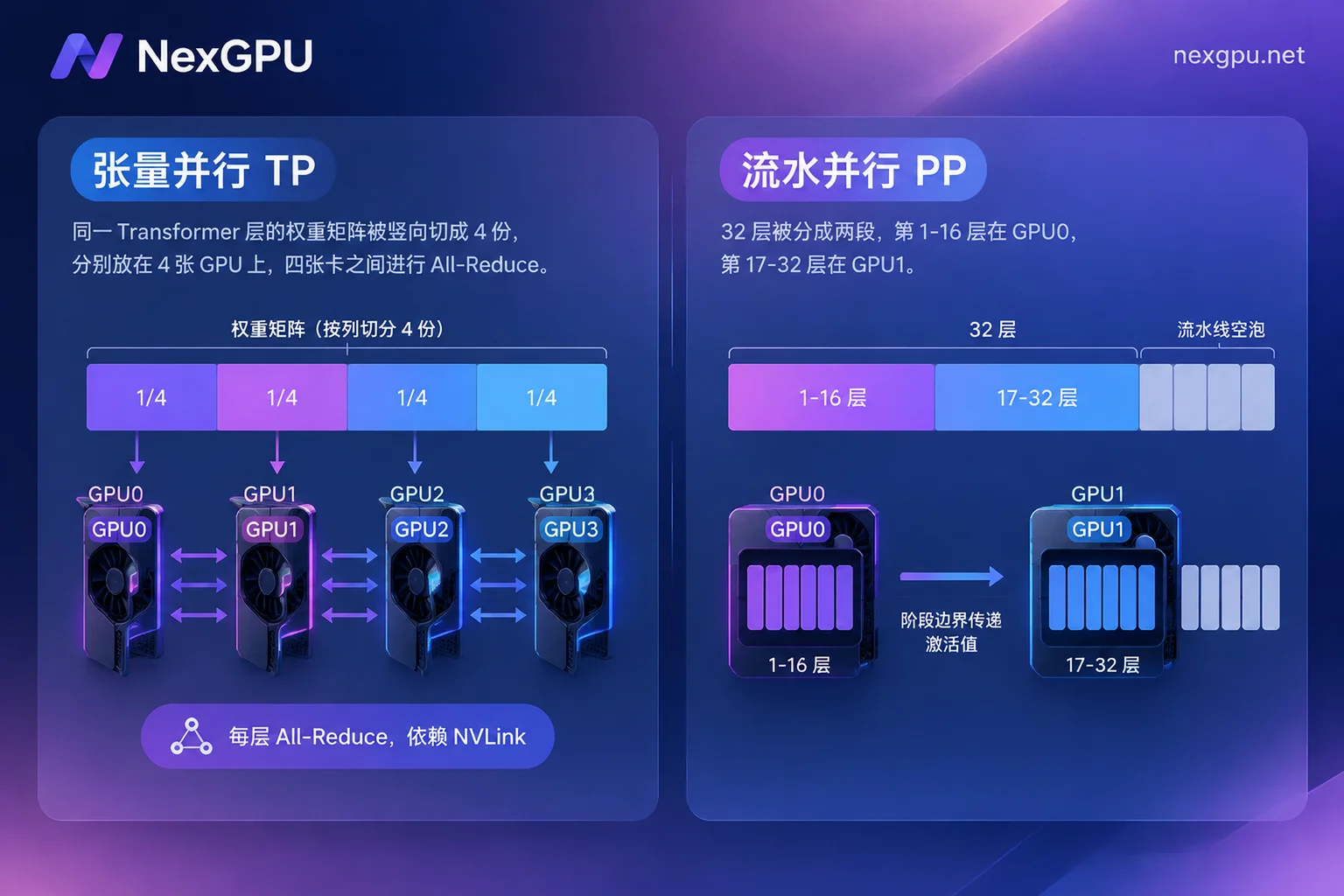
Tensor parallelism splits within layers. In each Transformer layer, the attention QKV matrices and MLP weight matrices are split across multiple GPUs and computed simultaneously. Every GPU participates in every layer's computation, and after each layer, All-Reduce or All-Gather is needed to synchronize results.
Pipeline parallelism splits by layers. Consecutive layers are divided into stages. For example, layers 1–16 on GPU 0, layers 17–32 on GPU 1. GPUs only pass intermediate activations once at stage boundaries, using point-to-point communication.
The trade-offs of both stem from this difference:
| Tensor Parallelism (TP) | Pipeline Parallelism (PP) | |
|---|---|---|
| Communication frequency | Synchronization every layer, many times | Transfer only at stage boundaries |
| Interconnect requirement | High bandwidth, low latency; usually requires NVLink | Lower; can use cross-node network |
| Single-request latency | Can be reduced; multiple GPUs compute one token simultaneously | Increased; requests must go through stages sequentially |
| Main drawback | With slow interconnect, communication overhead can offset compute gains | Pipeline bubbles; GPUs idle when concurrency is low |
Inference: How to Configure for Single and Multi-Machine
Single Machine, Multiple GPUs
When the model doesn't fit on a single GPU, first use TP within one machine. For example, with vLLM:
vllm serve <模型名或路径> --tensor-parallel-size 4tensor_parallel_size is usually set to 2, 4, or 8, and must divide the model's number of attention heads. If it doesn't divide evenly, startup will fail.
The benefit of TP is that the computation for one token is distributed across multiple GPUs simultaneously, reducing both time-to-first-token (TTFT) and time-per-output-token (TPOT). Therefore, latency-sensitive online serving typically prefers TP.
Even 8 GPUs in a Single Machine Can't Fit
For very large models, full precision, or very long contexts, even 8 GPUs may not be enough. In this case, use hybrid parallelism: TP within a machine, with size equal to the number of GPUs per machine; PP between machines, with size equal to the number of nodes. For example, two 8-GPU machines:
vllm serve <模型名或路径> \
  --tensor-parallel-size 8 \
  --pipeline-parallel-size 2
This arrangement keeps the most communication-intensive TP on intra-node high-speed interconnects, while the cross-machine network only handles the lighter PP transfers. If TP were across machines, each layer's synchronization would go over the network, significantly slowing things down.
Only PCIe Between GPUs
Many consumer GPUs and some PCIe versions of data center GPUs lack NVLink. In such environments, using large TP sizes may cause layer synchronization overhead to offset the benefits of multiple GPUs. Here's how to handle it:
- If quantization can fit the model into fewer GPUs, reduce the number of GPUs first.
- When multiple GPUs are truly needed, use combinations like TP=2 and PP=2, run both under real concurrency, and compare latency and throughput empirically rather than relying on theoretical estimates.
- If multi-GPU throughput is far below expectations, refer to Why multi-GPU inference throughput doesn't double for troubleshooting.
Throughput Not High After Using PP
Pipeline parallelism has an inherent issue: if the previous stage hasn't finished, the next stage must wait. This idle time is called a pipeline bubble. With few requests, most GPUs will be waiting. To improve throughput, you need sufficient concurrent requests or techniques like micro-batching or chunked prefill to fill the pipeline. Therefore, PP is better suited for high-concurrency serving and offline batch inference, not for scenarios with only one or two users requiring fast responses. If your main issue is latency, see How to optimize high inference latency for large models to distinguish between slow first token and slow generation.
Training and Fine-Tuning: Don't Rush to Split the Model
For training, the order of choices differs from inference:
- When VRAM is sufficient, start with data parallelism and memory optimization, such as DDP, ZeRO, or FSDP. They don't split the model's computation, are simple to implement, and scale efficiently.
- When a single layer's parameters or activations exceed single-GPU capacity, add TP within the machine.
- When scaling to multiple machines, use the so-called 3D parallelism: limit TP to within 8 GPUs per machine to leverage NVLink; combine PP and DP between nodes to reduce cross-machine communication bottlenecks.
For most LoRA or full-parameter fine-tuning of small to medium models, the first step is sufficient.
Quick Reference
- Fits on a single GPU: don't split the model; run multiple replicas for more throughput.
- Fits on a single machine with NVLink: use TP only.
- Fits on a single machine but only PCIe: minimize GPU count and empirically test both TP and PP combinations.
- Doesn't fit on a single machine: TP within machine + PP across machines.
- Training or fine-tuning: start with DP/ZeRO/FSDP; add TP when a single layer doesn't fit; use 3D parallelism for multiple machines.
Things to Confirm Before Renting GPUs
Once you've decided on the parallelism strategy, the hardware requirements become clear: TP requires enough GPUs in the same node, preferably with high-speed interconnect; PP across machines requires available network between nodes. On NexGPU, you can first filter machines with the right number of GPUs per node on the Pricing and Available Nodes page. After starting up, run nvidia-smi topo -m to confirm the interconnect type before deciding the TP size. If you have questions about node configuration, you can confirm with the bilingual English/Chinese support via Telegram. For deployment, you can directly use vLLM or TGI image templates without setting up the environment yourself.
A note on costs: When testing different parallelism combinations, if you merely stop the machine, storage fees still apply; billing completely stops only after destruction. Destroy configurations promptly after testing, and save any weights or test results you need to keep beforehand.
If after evaluation you determine that a cross-node multi-machine solution is needed, or you need a long-term cluster of fixed size, you can contact sales. Before reaching out, organize your model size, precision, and concurrency targets according to the Enterprise GPU Cluster Consultation Requirements Checklist to speed up the conversation.



