 NexGPU-算力租赁,GPU服务器,GPU云算力,AI服务器租用-新闻博客
Comparing whether dedicated cloud (self-built or long-term exclusive GPU clusters) or on-demand GPU rental is more cost-effective depends mainly on one variable: how much time your GPUs actually spend running tasks in a year.
A common industry TCO calculation looks roughly like this:
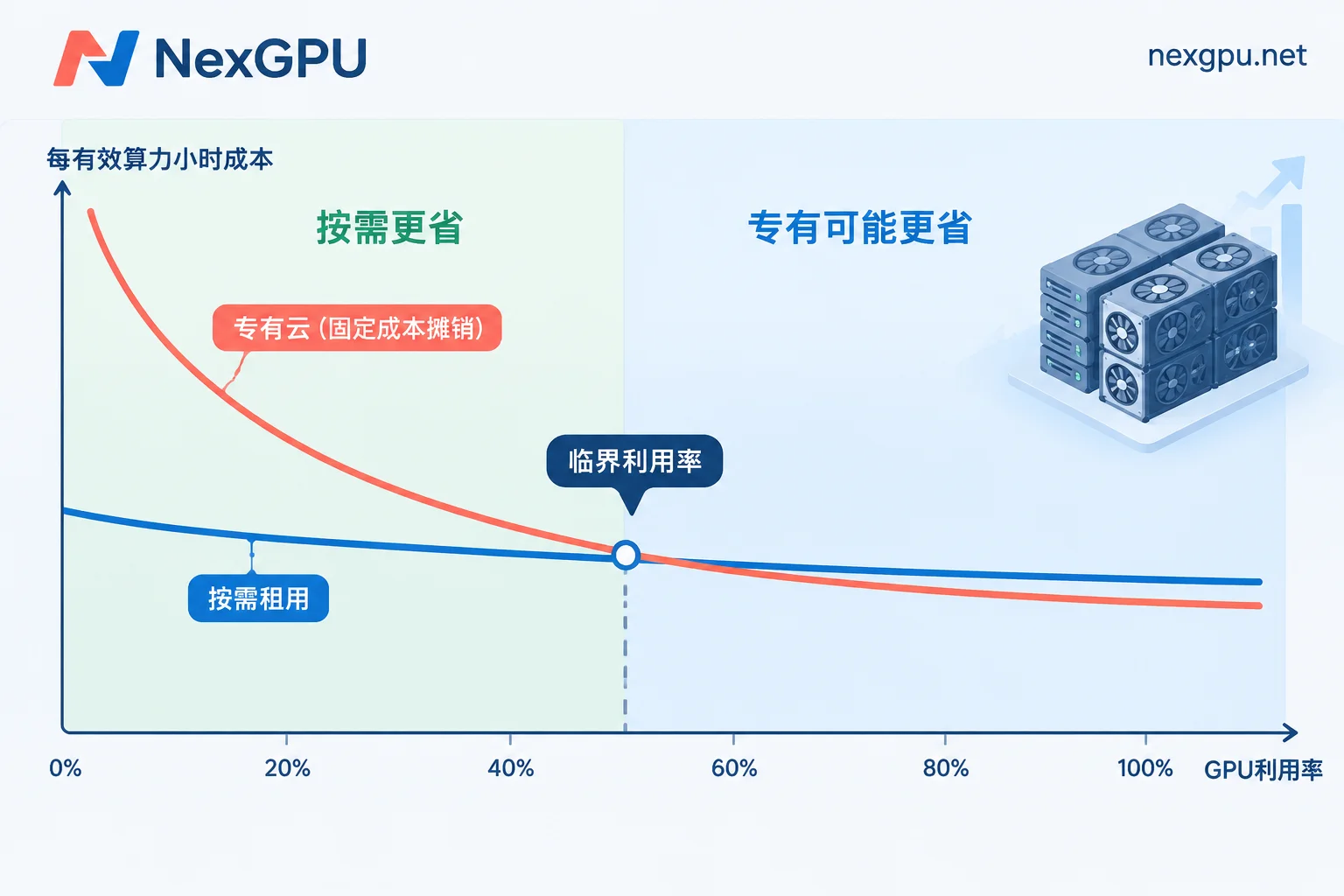
- If average utilization is below 45%–50%, or each GPU effectively runs less than 8–12 hours per day, on-demand rental usually has a significantly lower total cost. Compute fees don't accrue during downtime, which is a major factor in the overall bill.
- For production inference or continuous heavy training workloads that stay above 70%–80% utilization and will last more than a year, dedicated hardware's amortized hourly cost may be lower than standard on-demand pricing.
- If utilization falls between these ranges, the result depends more on specific parameters. Many teams adopt a hybrid approach, separating stable baseline workloads from fluctuating ones.
These ranges are empirical estimates, and the break-even point shifts depending on industry, data center, and procurement conditions. So let's first break down where the money goes on each side, then apply your own data.
Where the Money Goes on Each Side
Dedicated Cloud: Mostly Fixed Costs, Incurred Even When Idle
Explicit expenses include one-time GPU server purchases (or long-term fixed leases), plus supporting high-speed parallel storage and network switching equipment.
Hidden expenses are more easily underestimated:
- Data center colocation, electricity, and cooling energy
- Redundancy costs. For availability, N+1 configuration is typically required, and the extra unit also consumes resources when idle
- Dedicated hardware operations staff
- Depreciation. Equipment is generally calculated over 3 years
The common trait of these costs is that they are largely unrelated to how many tasks you run. When GPUs are idle, depreciation, colocation, and labor costs continue.
On-Demand Rental: Costs Vary with Usage, but Several Items Can't Be Ignored
Explicit expenses in the on-demand model mainly consist of three parts: compute fees during runtime, storage attachment fees, and public egress traffic fees. It requires no upfront fixed asset investment and carries no risk of hardware depreciation or technological obsolescence. Once tasks finish and instances are destroyed, costs stop.
Its hidden costs are concentrated in two areas:
- Shutting down does not mean billing stops. Take NexGPU as an example: after shutdown, compute fees stop, but storage fees continue; only destruction stops everything. Instances and data disks left running long-term without use will gradually inflate the total bill.
- When running at full load for extended periods, the accumulated hourly total can be very high, and large data egress brings additional traffic fees.
Put Both Sides on the Same Scale with One Formula
Simply comparing "how much it costs to buy a GPU" and "how much it costs to rent per hour" is meaningless. Instead, convert everything to cost per effective compute hour:
- Dedicated cloud: total expenses over one depreciation cycle (hardware amortization + colocation/electricity/cooling + redundancy + operations labor) ÷ actual hours spent running tasks during that period
- On-demand rental: compute unit price + (storage fees + traffic fees) ÷ actual hours spent running tasks
The numerator for dedicated cloud is essentially fixed, so if utilization halves, the cost per effective hour roughly doubles. For on-demand rental, the compute unit price doesn't change with utilization; only storage and traffic get diluted or amplified, making the curve much flatter. The intersection of the two curves is your break-even utilization.
Self-Assess These Four Data Points First
Before calculating, prepare the following data. Missing any one will skew your TCO conclusion.
- Average daily effective running hours. Count the time GPUs are actually running training, inference, or batch processing, not idle time while waiting for parameter tuning. You can check recent one to two months of billing or monitoring data.
- Peak-to-valley ratio. How much does inference service request volume differ between day and night? Do training tasks run continuously or concentrate in certain weeks? The larger the peak-to-valley difference, the higher the idle proportion of a dedicated cluster configured for peak demand.
- How long the load can remain stable. Only stable workloads that will last over a year justify discussing 3-year depreciation. If the business direction isn't settled, long-term hardware investment isn't suitable.
- VRAM and interconnect needs for the next one to two years. Large language models and multimodal models have rapidly changing requirements for VRAM capacity and interconnects like NVLink/InfiniBand. A configuration that's sufficient today may not fit a next-generation model, or communication may become a bottleneck. Dedicated hardware purchased in advance bears this risk, while on-demand rental allows switching GPU specs as models change.
How to Choose by Business Stage
Exploration and validation phase: Testing models, running demos, comparing options. Utilization is low and unstable, so on-demand compute billed hourly with no contract lock-in is usually most cost-effective. Choose GPUs based on the VRAM threshold of your current model; no need to pay in advance for specs you may never use.
Burst fine-tuning and batch processing: Concentrated runs over a week or a month, idle the rest of the time. Suitable for launching on-demand instances, moving results and weights out after completion, then destroying instances. Simply shutting down without destroying means storage fees continue. For specifics, refer to How to save data on rented GPU instances.
Early-to-mid-stage inference service: Traffic is growing, but peaks and valleys are pronounced, and scale is uncertain. Continue using on-demand instances, scaling by actual concurrency for more reliability. Once you have several months of real load curves, then determine whether long-term investment is worthwhile.
Stable production inference or continuous retraining: When load stays above 70%–80% and will last over a year, it's worth carefully evaluating a dedicated solution or long-term exclusive arrangement. Include all hidden costs listed earlier in your calculation; don't just compare hardware purchase prices.
Teams that already have dedicated hardware: Keep the baseline steady load around P50 on your own cluster, and put burst peaks and experimental tasks on on-demand instances. This way, your own cluster maintains higher utilization without needing to scale for peaks.
Next Steps After Calculating
If your calculation shows on-demand rental is more suitable, first check the NexGPU pricing page for available nodes and unit prices, and plug them into the formula above. NexGPU locks in unit prices at order time, valid until destruction; bills only include compute, storage, and traffic, making budgeting straightforward with this framework. If after running for a while you find the total bill is high, you can reconcile compute, storage, and traffic line by line.
If your load is approaching a stable high-utilization range, or you need scale like multi-GPU or clusters, we recommend organizing your GPU type, quantity, expected runtime, and peak-valley patterns, referencing the enterprise GPU cluster consultation requirements checklist, then contacting sales via the contact page to discuss specific solutions.




Comments(0)