 NexGPU-算力租赁,GPU服务器,GPU云算力,AI服务器租用-新闻博客
In 2026, the AI compute rental market is undergoing a clear structural shift. If the industry narrative of the past two years was dominated entirely by "ten-thousand-GPU clusters" and "hundred-billion-parameter foundation model pre-training," recent industry reports and earnings data point to a different reality: AI inference and agent applications have now officially surpassed 60% of compute consumption, becoming the largest engine of compute demand growth. At the same time, high-frequency applications such as large model fine-tuning, AIGC video generation, and 3D rendering are spreading compute demand from a handful of tech giants to thousands of small and mid-sized R&D teams and independent creators.
Yet supply and demand show a stark "dual-track divergence": on one hand, leading giants sign heavy-asset long-term contracts worth billions with lock-in periods of three to five years; on the other hand, developers, startups, and creators actually on the front lines of application deployment often face real pain points with traditional compute channels—queues for high-end GPUs, cumbersome quota approvals, time-consuming environment setup, and hidden billing charges.
As the industry enters a "moment of reckoning," how can small teams and individual developers build a lightweight, agile, and cost-controllable AI compute rental strategy?
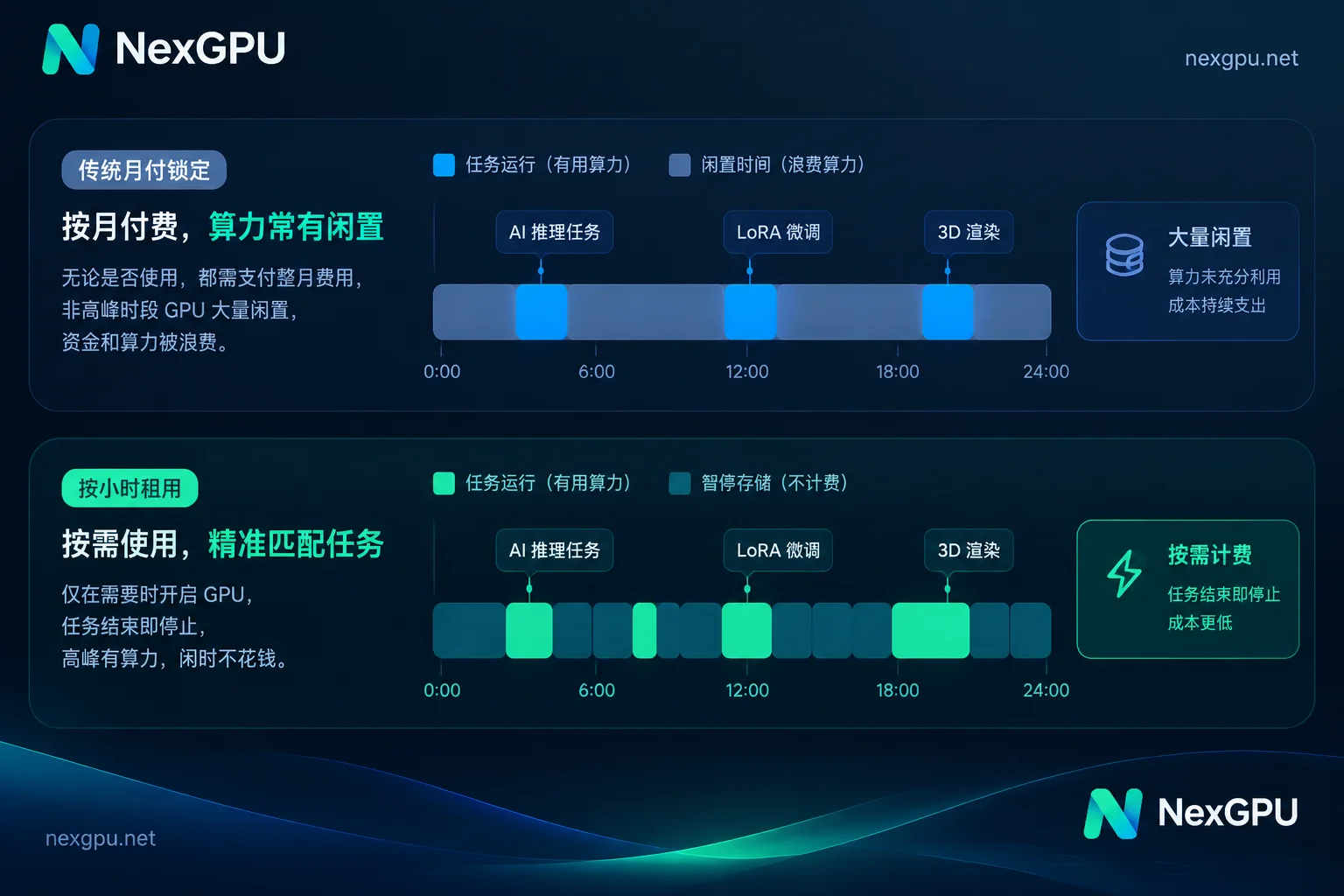
1. The New Normal of 2026 Compute Demand: Why "Commit to Monthly Billing" No Longer Pays
In real-world engineering, apart from a very small number of mature businesses running at full load 24/7, the compute loads of the vast majority of teams are strongly episodic and fluctuating:
- Agent and private inference validation: Early-stage traffic has obvious peaks and troughs, or the team is in a multi-model comparison testing phase; renting high-end GPUs monthly around the clock wastes money during large idle periods.
- Vertical-domain large model fine-tuning (LoRA / full fine-tuning): Data cleaning and hyperparameter tuning often follow a "pulsing" rhythm—run training for a dozen hours, stop for two days to analyze and evaluate results and adjust the dataset, then start the next round.
- AIGC visual creation and 3D cloud rendering: Whether running video generation workflows with ComfyUI or rendering animation sequences with Blender, these are essentially typical "short-burst" tasks that end once the output is produced.
For such non-continuous loads, if you are locked into long-term contracts or platforms with high minimum rental thresholds, idle costs often exceed actual compute costs. This is why compute marketplaces that aggregate distributed GPU supply worldwide and support flexible hourly billing are becoming the daily foundation for more and more technical teams.
2. The Three "Hidden Pitfalls" Developers Most Often Hit in AI Compute Rental
When surveying users who migrated from traditional clouds or small matchmaking platforms, we found that the core cause of compute budget overruns is usually not the GPU list price itself, but losses in the following three areas:
- Blind GPU selection and opaque hardware information: Looking only at GPU model names while ignoring whether VRAM capacity matches the quantized model weights, or not knowing the machine's actual network bandwidth and disk unit price. Only after booting do you discover that pulling hundreds of GB of model weights is painfully slow, or that VRAM immediately OOMs (runs out of memory).
- Environment setup eating up billable time: After renting a bare machine, spending two or three hours resolving driver conflicts, CUDA version compatibility, and compiling dependencies. The machine sits idle while compute fees continue to accrue.
- Complex billing structures and shutdown-billing traps: Some platforms advertise extremely low per-GPU-hour unit prices, but at settlement add activation fees, port mapping fees, image licensing fees, or minimum spend thresholds; or they continue charging full compute rates while an instance is stopped and saving data.
To avoid these pitfalls, the key is to standardize the three actions: "selecting GPUs, configuring environments, and managing lifecycles." For a side-by-side comparison of billing rules across platforms, see our earlier analysis, "How to Compare GPU Compute Prices Across Major Cloud Vendors: Beyond the Hourly Unit Price, You Also Need to Count Storage, Traffic, and Minimum Rental Thresholds."
3. Hardware Tiering by Scenario: From Consumer Flagships to Data-Center Multi-GPU
In the NexGPU compute marketplace, every row shows a real, rentable physical machine, with consumer GPUs and data-center GPUs priced separately, making it easy for teams to match precisely to task boundaries:
1. Consumer GPUs (RTX 3090 / 4090 / 5090, etc.): The Cost-Effective Workhorse for Creation and Lightweight Fine-Tuning
For creators renting a GPU for the first time to run image and video generation, developers doing QLoRA fine-tuning of 7B–14B models, and designers needing multiple instances to run Blender / V-Ray rendering in segmented parallel (see "How to Choose a Solution and GPU for Cloud Rendering" for rendering options), consumer flagship cards offer extremely high per-card value.
When filtering machines, you can directly filter by VRAM, price, region, reliability, bandwidth, and minimum GPU count. If you're unsure how much VRAM a given open-source model actually needs, consult the model-to-GPU selection guide first—whether for text large models like Qwen or various multimodal vision, speech synthesis, and video generation models, each page clearly lists the current version, VRAM threshold after quantization, and recommended GPU types. In addition, if you follow the "choose environment first, then filter machines" flow on NexGPU, machines with insufficient VRAM will be directly flagged with the reason, preventing you from renting the wrong GPU at the source.
2. Data-Center GPUs and Multi-GPU Nodes (A100 / H100 / H200 / B200, etc.): The Foundation for Large Model Inference and Distributed Training
When tasks move to full fine-tuning of large-parameter models (with DeepSpeed, FSDP, Megatron), high-concurrency long-context inference, or complex multi-agent collaborative deployment, VRAM capacity and inter-GPU interconnect bandwidth become decisive metrics. (For specific calculations on choosing GPUs for fine-tuning, see "How to Choose a GPU for Large Model Fine-Tuning: Determine the GPU in Three Steps Based on VRAM Budget, Fine-Tuning Method, and Open-Source Framework.")
In the NexGPU marketplace, multi-GPU nodes are rented as whole machines (order amount = per-GPU price × GPU count), with support for filtering by minimum GPU count and self-service ordering. If a R&D team or enterprise procurement needs to evaluate larger-scale training tasks, the enterprise solution also supports optional RDMA high-speed interconnect, data isolation, private networks, and dedicated compute clusters, plus reserved instances, monthly/annual subscriptions, contract signing, corporate payment and invoicing, and PO procurement services.
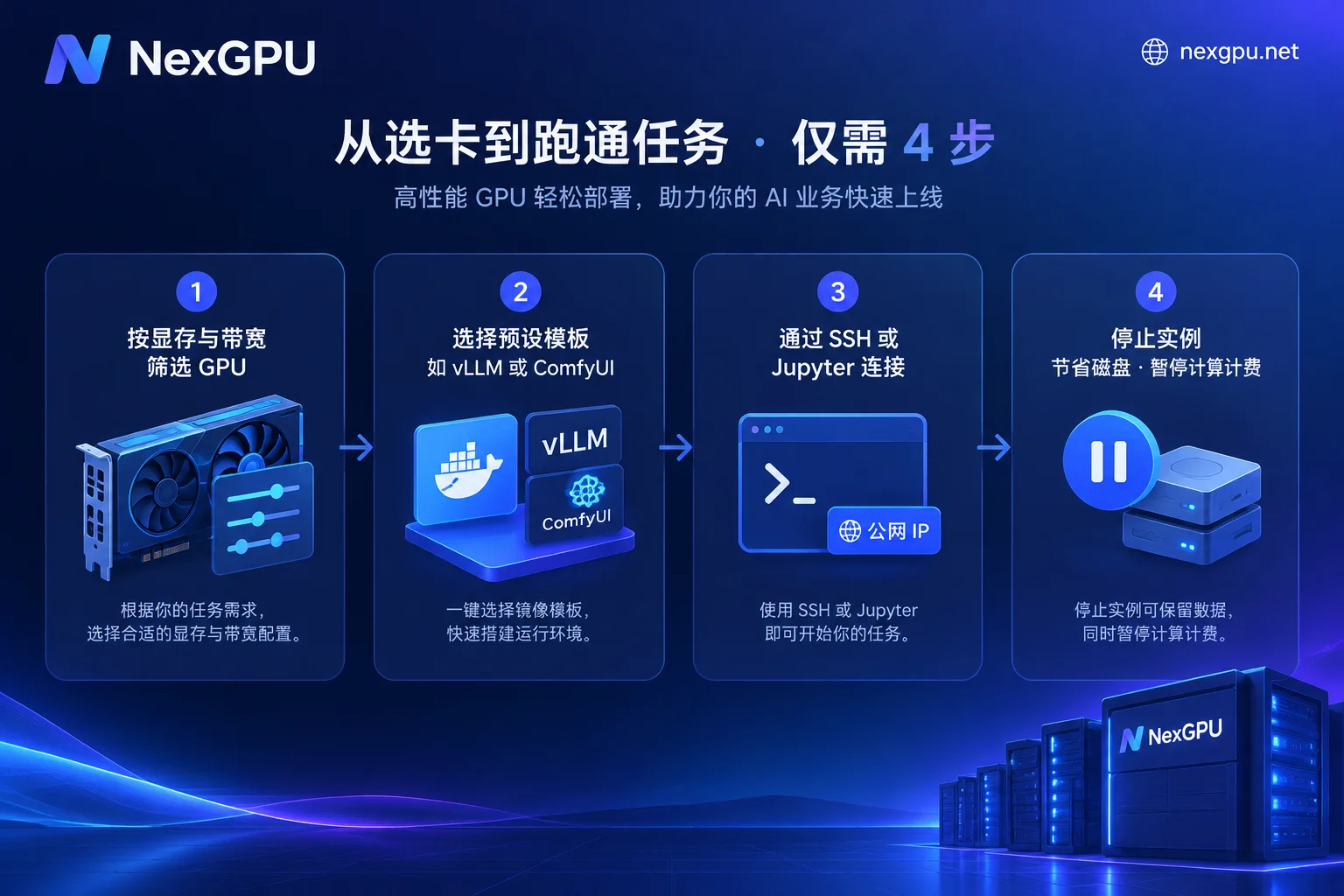
4. Shortening the Distance from "Boot to Output": Preset Images and Direct Development
The efficiency of compute rental largely depends on how long it takes from "clicking rent" to "running the first line of code or the first workflow."
To eliminate cumbersome low-level configuration, NexGPU offers preset image templates that are ready to use on boot regardless of tier, with low-level drivers, CUDA, core frameworks, and dependencies all pre-installed:
- Large model inference deployment: Covers vLLM, TGI, Ollama, and SGLang; once the service starts, it directly provides an OpenAI-compatible API for quick integration with business backends or agent frameworks.
- Training and fine-tuning: Pre-installed PyTorch, TensorFlow, JAX, and high-frequency fine-tuning toolchains such as LLaMA Factory, Axolotl, and Unsloth.
- AIGC image, video, and speech: Built-in ComfyUI, AUTOMATIC1111 (supporting SDXL, FLUX, and mainstream video diffusion models), plus speech processing environments such as Whisper, faster-whisper, and WhisperX.
- Custom Docker images: When a team's engineering code is strictly tied to a specific CUDA version or private dependencies, you can directly enter a public or private repository Docker image and customize startup commands and environment variables.
At the connectivity and daily operations level (for practical details, read "How to Set Up a Daily Development Environment on a GPU Cloud Server: A Practical Guide from Choosing Images and Direct SSH to Stopping While Retaining Disks"), each instance is a dedicated container with its own public IP, port mapping, and a set of spare ports reserved for custom services. Developers can use either the in-browser web root terminal, open Jupyter with one click without entering a token, or SSH directly via public IP and port (without a jump host, with support for setting a default public key). If you're not used to pure command-line operation, you can also install the aaPanel visual management dashboard with one click to intuitively manage files, processes, and scheduled tasks in the browser.
To quickly estimate the hardware and environment combination for an entire project cycle, you can also directly consult the scenario playbook page to see VRAM requirements, image choices, and approximate costs for 11 scenarios such as AI fine-tuning, private large model deployment, and batch data processing.
5. Account for Every Cent: How to Make Good Use of "Stop While Retaining Disk" and Transparent Billing
For cost control, clear billing granularity is the bottom line for preventing budget overruns.
In NexGPU's billing system, there is no minimum spend, activation fee, port fee, or image licensing fee, and no minimum rental duration; moreover, the unit price at order time is locked until the instance is destroyed, unaffected by subsequent market price fluctuations. The bill on the instance details page strictly lists only three items:
- Compute fee: Metered by the second, priced by the hour. Billing starts only when the instance enters the "Running" state; once a stop or destroy operation is performed, compute fees stop immediately.
- Storage fee: Billed per GB/month, starting from instance creation (including image pulling time).
- Traffic fee: Billed per GB actually used.
This breakdown provides an excellent money-saving mechanism for intermittent development—stop while retaining disk. When you finish a round of fine-tuning and need to go home and rest, or are waiting for the frontend team to integrate APIs, simply "stop" the instance. In the stopped state, the disk and its model weights and environment data are fully preserved, and you can start it again at any time, while no compute fees are incurred at all—only a very low storage fee prorated monthly. Until the project is completely finished, after entering the instance ID and confirming "destroy," the disk is released immediately and all billing terminates (note: the platform does not read or back up disk contents, so be sure to migrate important output data yourself before destruction).
In addition, to address the biggest fear in prepaid mode—"midnight insufficient balance leading to database deletion"—the system first sends a warning email when the balance is low; if the balance is exhausted, the instance is automatically stopped first (not destroyed). As long as you top up midway before the negative balance exceeds the configured duration, the task can resume seamlessly.
Conclusion: Let Compute Return to Its Tool-Like Nature of Being Available on Demand
Whether responding to the 2026 surge in agent inference or polishing your own fine-tuned models and visual works in a vertical track, compute should not become a burden that slows R&D. By eliminating real-name verification and quota applications (you only need an email to register and view real-time prices, with support for Alipay and USDT top-ups), NexGPU is committed to making every GPU activation, debugging session, and release simple and transparent.
If you're about to start a new model experiment or rendering task, why not first visit the GPU selection docs or the real-time compute marketplace and launch your first GPU instance on demand.



