 NexGPU-算力租赁,GPU服务器,GPU云算力,AI服务器租用-新闻博客
Direct answer: If you don't want to write Python scripts and just want Whisper as an out-of-the-box tool, running Speaches (formerly faster-whisper-server) with Docker will expose an OpenAI-compatible /v1/audio/transcriptions API in one click, ready to integrate with Open WebUI, Dify, or existing SDKs. If you only need to upload audio/video files and export SRT subtitles, the Gradio-based Whisper-WebUI is more convenient. As for 90% of first-time deployment errors, the root causes almost always boil down to four things: ctranslate2 and cuDNN 8/9 version conflicts, missing system FFmpeg, Hugging Face download timeouts, and incorrect container network loopback pointing.
Previously, in Whisper Deployment: How to Choose Solution and GPU, we compared the VRAM requirements and GPU selection logic of native Whisper, faster-whisper, and WhisperX. But many people only realize when they start that choosing the model and GPU is just the first step; what often blocks them is "how to provide a service without writing code" and "the tutorial runs halfway and then a screen full of red errors." Below, we'll help you get through it in one go, following the order: choose a ready-made solution → copy usable commands → fix errors one by one → run on cloud at low cost.
I. How to Choose a No-Code API: Speaches vs. Whisper-WebUI
Before pulling images, first distinguish between the two most effortless open-source wrapper solutions based on your usage:
| Solution | Underlying Core | Default Port | Core Output Capabilities | Best Use Case |
|---|---|---|---|---|
| Speaches (formerly faster-whisper-server) | faster-whisper + Piper/Kokoro | 8000 | Standard OpenAI /v1/audio/transcriptions and /v1/audio/translations APIs, SSE streaming, built-in Playground web UI | Integrate with Open WebUI, Dify, LibreChat, VideoLingo, or switch existing OpenAI SDK requests to self-hosted service |
| Whisper-WebUI | faster-whisper (default) / openai-whisper | 7860 | Browser upload of audio/video, built-in Silero VAD silence filtering, UVR vocal/background separation, one-click export to SRT/VTT/TXT | No code integration needed; manually batch upload long videos, podcasts, meeting recordings and download subtitles or transcripts directly |
One-sentence selection: If you need a backend API for other software or team systems, choose Speaches; if you want to open a browser, upload files, and get subtitles, choose Whisper-WebUI.
II. Solution A: One-Click Docker Deployment of OpenAI-Compatible API (Speaches)
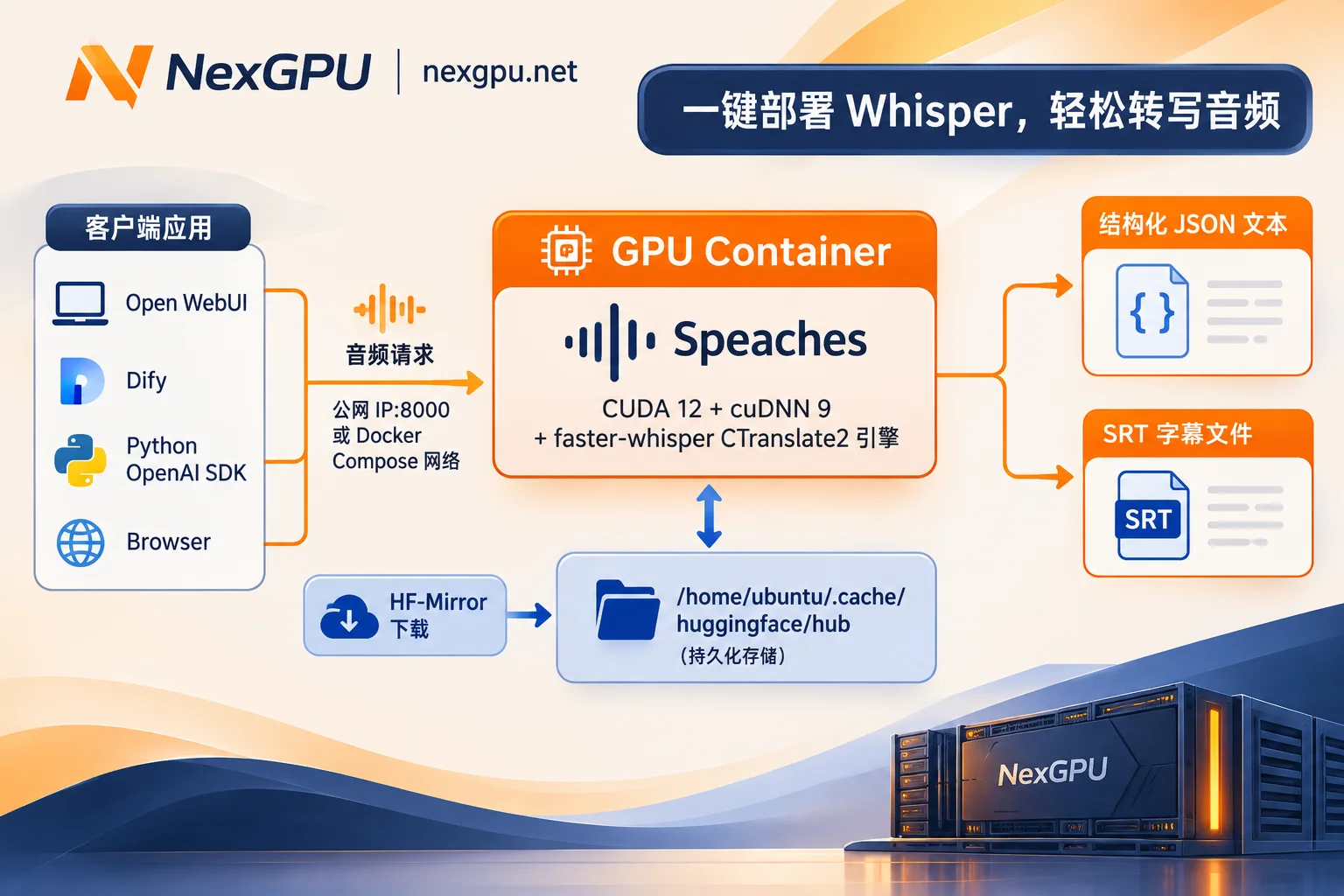
Speaches is called the "Ollama" of the speech domain—it automatically loads required models on demand, unloads them after idle time to free VRAM, and fully aligns API format with OpenAI Audio API.
1. Start GPU Container with One Command
On a host with NVIDIA drivers and NVIDIA Container Toolkit installed, run the following Docker command to launch the service:
docker run -d --name speaches --restart unless-stopped \
  --gpus all \
  -p 8000:8000 \
  -v hf-hub-cache:/home/ubuntu/.cache/huggingface/hub \
  -e HF_ENDPOINT=https://hf-mirror.com \
  -e WHISPER__COMPUTE_TYPE=int8_float16 \
  -e WHISPER__TTL=-1 \
  ghcr.io/speaches-ai/speaches:latest-cuda
Key parameter pitfalls (missing any one can cause issues):
-v hf-hub-cache:/home/ubuntu/.cache/huggingface/hub: Do not omit this volume mount. Otherwise, every restart or container update will re-download several GB of model weights.-e HF_ENDPOINT=https://hf-mirror.com: In mainland China network environments, direct connection to Hugging Face is prone to timeouts; adding the mirror environment variable can greatly improve first-time pull success rate.-e WHISPER__TTL=-1: By default, models are automatically unloaded after idle time to save VRAM; if you dedicate a GPU solely for Whisper, set-1to keep the model resident, avoiding cold start reload time.latest-cudaversion alignment: If the host driver is old and causeslatest-cudastartup issues, use a specific image tag (e.g.,ghcr.io/speaches-ai/speaches:latest-cuda-12.6.3). For machines without a discrete GPU, use:latest-cpuand remove--gpus all.
2. How to Confirm Successful Startup and Integrate with OpenAI SDK
After startup, visit http://<服务器IP>:8000 in a browser to see the built-in Playground interface. To integrate with code or third-party clients, simply change the original base_url to your service address:
from openai import OpenAI

client = OpenAI(
    api_key="none",  # 未开启鉴权时填任意非空字符串即可
    base_url="http://<你的服务器IP>:8000/v1"
)

with open("meeting.mp3", "rb") as f:
    res = client.audio.transcriptions.create(
        model="deepdml/faster-whisper-large-v3-turbo-ct2",  # 或 Systran/faster-whisper-large-v3
        file=f
    )
print(res.text)
Two high-frequency integration details:
- Model ID must be in CTranslate2 format: In Speaches, it is recommended to use model IDs that have been converted to CTranslate2 and are in the registry (e.g.,
Systran/faster-whisper-small,Systran/faster-whisper-large-v3, ordeepdml/faster-whisper-large-v3-turbo-ct2). You can verify the list of downloaded and ready models viacurl http://<IP>:8000/v1/models. - Don't use
localhostfor Docker same-host interconnection: If you run Open WebUI or Dify in Docker on the same machine, fillinghttp://localhost:8000/v1in the client will point to the client container itself, causing connection refused. The correct approach is to put both containers in the same Docker Compose network and fillhttp://speaches:8000/v1, or directly fill the host's public/LAN IP.
III. Solution B: Zero-Code Web UI for Subtitles (Whisper-WebUI)
If your core need is to drag videos and interview recordings into a web page, optionally perform background vocal separation (UVR), and export .srt subtitles with timestamps, jhj0517/Whisper-WebUI is more handy. When deploying from source, 90% of people cannot access the web page in cloud environments for one reason: Gradio listens only on local 127.0.0.1 by default.
When starting, be sure to explicitly open the listening address and port, and install FFmpeg on the system beforehand:
# 1. 确保系统级 FFmpeg 就位(处理视频抽音轨与分离任务必备)
sudo apt-get update && sudo apt-get install -y ffmpeg

# 2. 启动时绑定 0.0.0.0,外部浏览器才能访问
python app.py --server_name 0.0.0.0 --server_port 7860
If processing Chinese audio with long silent segments in the interface, remember to check Silero VAD preprocessing in the WebUI panel and turn off condition_on_previous_text in the parameters. This directly eliminates the "hallucination" problem of repeatedly outputting the same sentence during silent segments.
IV. The 4 Most Common Whisper Deployment Errors and Instant Fixes
Whether you use the above Docker solution or install faster-whisper / WhisperX with pip yourself, the following four types of errors are almost inevitable:
Error 1: Unable to load any of {libcudnn_ops.so.9...} or libcudnn_ops_infer.so.8: cannot open shared object file
- Why it happens: This is currently the most frequent pitfall. The underlying inference engine
ctranslate2thatfaster-whisperdepends on switched its CUDA 12 build target to cuDNN 9 starting from version4.5.0; many machines have CUDA 12 + cuDNN 8 pre-installed, ornvidia-cudnnis installed in a Python virtual environment and the system dynamic linker cannot find it. How to fix (choose one of three):
- Most reliable: Switch to a container image pre-installed with CUDA 12 + cuDNN 9 (e.g., the official Speaches CUDA image mentioned above, or a cloud platform's pre-built speech image).
Don't want to change system environment (downgrade lock): On machines with only cuDNN 8, lock the inference engine back to
4.4.0:pip install --force-reinstall ctranslate2==4.4.0Virtual environment path fix: If you installed
nvidia-cublas-cu12andnvidia-cudnn-cu12withpip, inject the library path intoLD_LIBRARY_PATHbefore starting:export LD_LIBRARY_PATH=$LD_LIBRARY_PATH:$(python3 -c 'import os, nvidia.cublas.lib, nvidia.cudnn.lib; print(os.path.dirname(nvidia.cublas.lib.__file__) + ":" + os.path.dirname(nvidia.cudnn.lib.__file__))')
Error 2: RuntimeError: Could not load libtorchcodec or FileNotFoundError: ffmpeg
- Why it happens: Many people see that
faster-whisperdocumentation says it has built-inPyAVdecoding and no need to install FFmpeg, so they skip installation; but once your pipeline mixes nativeopenai-whisper, VideoLingo video encoding, ortorchaudiopreprocessing, it will still directly trigger FFmpeg missing exceptions. - How to fix: On Linux, simply run
sudo apt-get install -y ffmpeg(orconda install -c conda-forge ffmpegin Conda environments) to permanently solve all audio/video container packaging and track extraction errors.
Error 3: Model download stuck at 0% or throws ConnectionError / ReadTimeout
- Why it happens: Whether it's Speaches,
faster-whisper, orWhisperXspeaker diarization weights (Pyannote), the first startup will pull several GB of files fromhuggingface.co. How to fix:
- Inject
export HF_ENDPOINT=https://hf-mirror.combefore running the command or in container environment variables; - Or use
huggingface-cli downloadwith a mirror to download weights to a local directory first, then load offline withWhisperModel("/本地/模型路径").
- Inject
Error 4: No error but transcription is slow as snail (silently falling back to CPU)
- Why it happens: If you see
This CTranslate2 package was not compiled with CUDA support, or PyTorch printstorch.cuda.is_available()asFalse, it means your task is not running on GPU at all; 1 hour of audio might take half an hour to compute. How to fix:
- Run
nvidia-smito confirm the container can see the GPU (Docker startup must include--gpus all); - Check if you accidentally installed CPU-only wheels; ensure PyTorch and
ctranslate2in the current Python environment match the host's CUDA major version.
- Run
V. Don't Want to Deal with Drivers and Environment Locally? Run and Control Costs on NexGPU
If your local computer doesn't have a large-VRAM NVIDIA GPU, or you don't want to repeatedly troubleshoot driver, CUDA, cuDNN 8/9 version dependencies, you can complete Whisper deployment directly on NexGPU.
Combining the Docker API and troubleshooting process above, here are several handy uses on NexGPU:
Use pre-built speech images directly, or fill in your own Docker image
- Under the Speech category of image templates, environments with
Whisper,faster-whisper, andWhisperXare pre-configured with drivers, CUDA, and framework dependencies all aligned, ready to run scripts right after boot, bypassinglibcudnn_opsversion conflicts. - If you want to deploy Speaches or your team's custom wrapper image mentioned above, simply fill in
ghcr.io/speaches-ai/speaches:latest-cudain the image field when creating an instance, and setHF_ENDPOINT,WHISPER__COMPUTE_TYPE, andWHISPER__TTL=-1in custom environment variables, and you'll have an OpenAI-compatible speech service upon boot.
- Under the Speech category of image templates, environments with
Choose cost-effective GPUs by VRAM, with transparent billing
- Before choosing a machine, you can check the VRAM requirements of
large-v3andlarge-v3-turboin the Model and GPU Selection Guide or Audio-to-Text Scenario Solutions; when selecting environment first and then filtering machines, the platform automatically flags nodes with insufficient VRAM and notes the reason. - In the GPU Computing Pricing marketplace, consumer GPUs like RTX 3090/4090/5090 and data center GPUs like A100/H100 are priced separately, with computing unit price and disk unit price clearly listed—computing is billed per second and priced per hour, with no minimum consumption, no setup fee, and no port fee. Register with email to view real-time quotes and spin up GPUs on demand; Alipay and USDT (TRC20) top-ups are supported.
- Before choosing a machine, you can check the VRAM requirements of
Direct public port access, and "stop to preserve disk" saves idle computing costs
- Each instance comes with a public IP, port mapping, and a set of backup ports (supporting web terminal, SSH direct connection, and built-in Jupyter; note that backup port mapping must be planned when creating the instance, and ports cannot be added or removed after creation. For temporary debugging, you can also use SSH tunnel forwarding; see Instance Connection Guide for details).
- After processing a batch of audio or meeting recordings, click Stop in the console: computing billing stops immediately, only a low disk storage fee per GB/month is retained, and downloaded model weights and container environment remain intact on disk, so no need to re-pull weights next time you start. If the project is completely over and you're ready to exit, enter the instance ID to confirm Destroy; the disk is immediately released and all billing cleared (the platform does not read or back up disk contents, so be sure to export transcribed subtitles and text locally before destruction; see Instance Management and Billing Explanation for details).
Once you have your single-machine API or WebUI running smoothly, if your business grows to the point of needing to process hundreds of hours of backlog audio or build a real-time streaming recognition queue, you can continue reading 2026 Whisper Production Deployment in Practice to implement concurrency scheduling and high-availability architecture.